
Opis
Pressure Scanner 🔍📊
1. Co robi Pressure Scanner
Pressure Scanner to narzędzie do analizy zmienności i kierunku, które:
- wykrywa, kiedy rynek znajduje się pod presją zmienności / kompresją ✅
- pokazuje, kiedy ta presja jest uwalniana w ekspansję 💥
- mierzy kierunek i siłę powstałego ruchu cenowego za pomocą wartości skanera przedstawionej w formie histogramu.
Łączy:
- pasmo cenowe w stylu Bollingera,
- kanał zmienności w stylu Keltnera,
- oraz linię skanera opartą na regresji liniowej,
aby wyświetlić zarówno stany presji (włączona / uwolniona / neutralna) oraz impuls kierunkowy (w górę lub w dół).
2. Jak to działa (logika)
- Źródło
Wskaźnik używa ceny zamknięcia jako głównego wejścia. - Zewnętrzne pasmo zmienności (styl BB)
-
- Podstawa = SMA(close,
BB Length) - Odchylenie =
KC MultFactor× odchylenie standardowe ceny zamknięcia - Górne pasmo = podstawa + odchylenie
- Dolne pasmo = podstawa − odchylenie
- Podstawa = SMA(close,
- Wewnętrzny kanał zmienności (styl KC)
-
- Środek = SMA(close,
KC Length) - Zakres = albo True Range albo High−Low (ustawione przez
Use TrueRange) - Średnia zakresu = SMA(range,
KC Length) - Górny kanał = środek + rangeAvg ×
KC MultFactor - Dolny kanał = środek − rangeAvg ×
KC MultFactor
- Środek = SMA(close,
- Stany presji
Porównując zewnętrzne pasmo i wewnętrzny kanał: -
- Presja WŁĄCZONA – czarne kropki na zero
-
- Dolne pasmo > dolny kanał i górne pasmo < górny kanał
- Pasmo jest całkowicie wewnątrz kanału → zmienność jest skompresowana, wysoka presja.
- Presja UWOLNIONA – szare kropki na zero
-
- Dolne pasmo < dolny kanał i górne pasmo > górny kanał
- Pasmo jest całkowicie poza kanałem → zmienność rośnie po okresie presji.
- Presja neutralna – niebieskie kropki na zero
-
- Każda inna konfiguracja.
- Wartość skanera (
val)
Histogram pokazuje wartość skanera obliczoną za pomocą regresji liniowej: -
- Na ostatnich
KC Lengthsłupkach wskaźnik znajduje: -
- najwyższy szczyt,
- najniższy dołek,
- SMA ceny zamknięcia.
- Buduje dynamiczną linię środkową:
-
- rangeMid = (highest + lowest) / 2
- combinedMid = average(rangeMid, SMA(close))
- Następnie definiuje:
scannerInput=close−combinedMid\text{scannerInput} = \text{close} - \text{combinedMid}scannerInput=close−combinedMid - Na tym
scannerInputprzeprowadza się regresję liniową naKC Lengthsłupkach, a wartość końcowa na ostatnim słupku to wartość skaneraval.
- Na ostatnich
Interpretacja:
val > 0→ cena naciska powyżej linii środkowej → presja bykówval < 0→ cena naciska poniżej linii środkowej → presja niedźwiedzi- zmiany w
valz słupka na słupek → wzrost lub spadek tej presji kierunkowej.
3. Jak czytać kolory
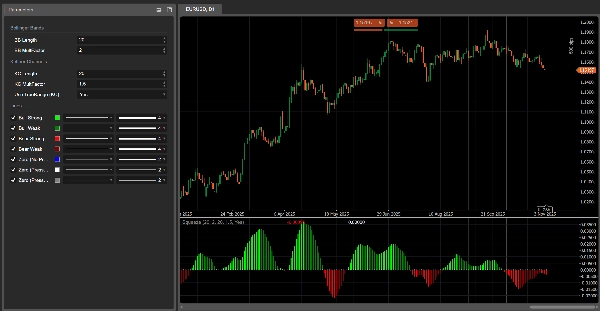
Histogram – presja kierunkowa (wartość skanera)
Każdy słupek histogramu odpowiada val i jest kolorowany następująco:
- Limonkowy –
val > 0i rośnie (val > previous val)
→ silna presja byków, wartość skanera wzmacnia się w górę. - Zielony –
val > 0ale spada (val ≤ previous val)
→ nadal byczo, ale presja słabnie. - Czerwony –
val < 0i spada dalej (val < previous val)
→ silna presja niedźwiedzi, intensyfikacja ruchu w dół. - Bordowy –
val < 0ale rośnie (val ≥ previous val)
→ nadal niedźwiedzi, ale presja traci na sile.
Zatem:
- Powyżej 0 → reżim presji byków
- Poniżej 0 → reżim presji niedźwiedzi
- Zmiana koloru po tej samej stronie 0 = presja przyspiesza lub zwalnia.
Linia zerowa – stany presji
Kropki na linii zerowej pokazują stan presji:
- Niebieski – presja neutralna (normalna zmienność)
- Czarny – Presja WŁĄCZONA (aktywna kompresja)
- Szary – Presja UWOLNIONA (ekspansja po kompresji)
4. Odniesienie parametrów (angielski)
BB Length
Okres dla SMA i odchylenia standardowego używanego w zewnętrznym paśmie zmienności.
- Krótszy → bardziej reaktywne pasmo, częstsze zmiany presji.
- Dłuższy → gładsze pasmo, mniej ale bardziej „makro” sygnałów.
BB MultFactor
Mnożnik odchylenia zewnętrznego pasma (utrzymany jako parametr użytkownika dla elastyczności).
W tym porcie zachowanie odchylenia jest powiązane z KC MultFactor jak w oryginalnej formule, ale można go dostosować, jeśli chcesz inny styl pasma.
KC Length
Okres dla:
- linii środkowej kanału zmienności,
- wygładzania zakresu,
- okna high/low oraz regresji skanera.
Określa, jak daleko wstecz Pressure Scanner patrzy, aby oszacować strukturę zmienności i presję kierunkową.
KC MultFactor
Kontroluje szerokość kanału zmienności i zewnętrznego pasma.
- Większa wartość → szerszy kanał, mniej stanów Presja WŁĄCZONA.
- Mniejsza wartość → węższy kanał, częstsze sygnały presji.
Use TrueRange (KC)
- true → zakres kanału używa True Range (uwzględnia luki i gwałtowne ruchy).
- false → zakres to po prostu High − Low.
Podsumowanie
Key features include:
- Visualization of pressure states via colored dots at zero: black for compression (pressure on), gray for expansion (pressure released), and blue for neutral.
- A histogram representing directional pressure through a scanner value calculated by linear regression over recent bars. Positive values indicate bullish pressure, negative values indicate bearish pressure, with color-coded bars showing strength and acceleration of pressure (lime and green for bullish, red and maroon for bearish).
- Adjustable parameters such as BB Length and KC Length control the sensitivity and lookback period for volatility and directional pressure estimation.
- Option to use True Range or High-Low for volatility range calculation.
The indicator combines Bollinger Bands, Keltner Channels, and linear regression to provide a comprehensive view of market volatility structure and directional momentum, aiding in the identification of breakout and trend continuation opportunities.
Opinie klientów
5 | 33 % | |
4 | 67 % | |
3 | 0 % | |
2 | 0 % | |
1 | 0 % |