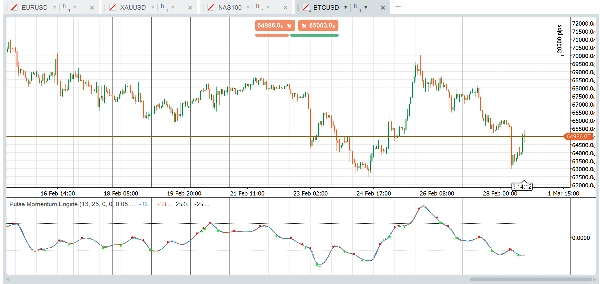
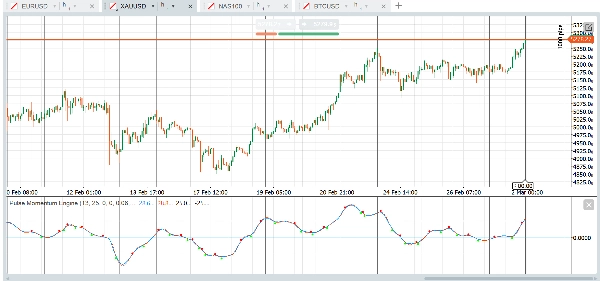
Opis
Silnik Pulse Momentum Engine (PME) to zaawansowany adaptacyjny oscylator momentum z wbudowaną korekcją opóźnień i filtrem konfluencji opartym na 5 warunkach. Przyspiesza w trendach, zwalnia w szumie i pokazuje tylko sygnały warte uwagi. Działa na Forex, indeksach, złocie, kryptowalutach i innych — od razu po uruchomieniu.
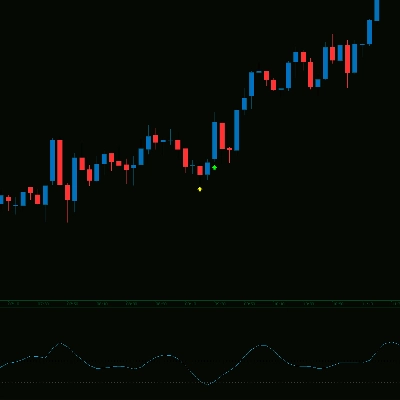
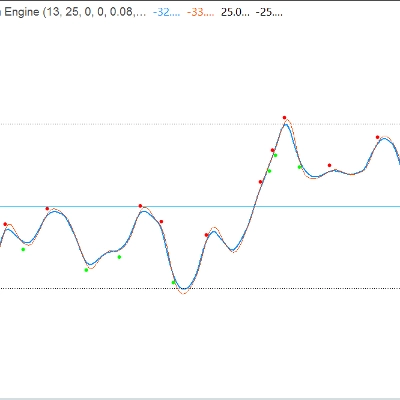
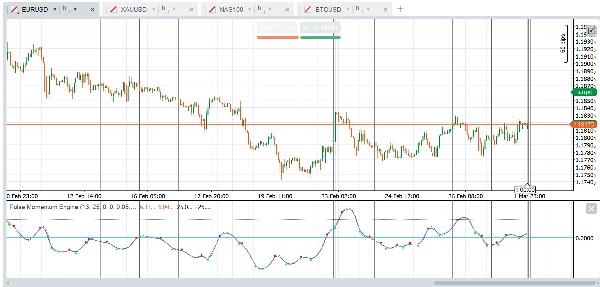
Wskaźnik wyświetla się jako oscylator w podoknie z główną Linią Pulsu, opcjonalną Linią Sygnału, stałymi poziomami wykupienia/wyprzedania oraz opcjonalnymi strzałkami przecięcia filtrowanymi przez system konfluencji wielowarunkowej.
Grupy parametrów:
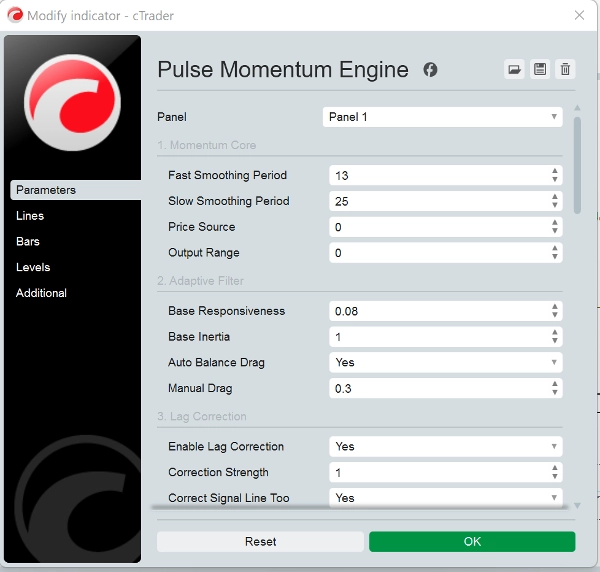
- Rdzeń momentum: Kontroluje podstawowe obliczenie momentum. Domyślny zakres wyjścia jest wyśrodkowany wokół 0. Przy użyciu zakresu wyjścia = 1 (przesunięty), odpowiednio dostosuj poziomy OB/OS (np. OB = 70, OS = 30)
- Filtr adaptacyjny: Kontroluje, jak filtr śledzi sygnał momentum. Podstawowa responsywność (0,08) określa, jak szybko filtr reaguje na zmiany momentum. Wyższa = szybsza, ale bardziej szumowa. Podstawowa inercja (1,0) określa odporność na nagłe zmiany. Wyższa = płynniejszy wynik, ale większe opóźnienie. Automatyczne wyważenie oporu (True) automatycznie oblicza optymalny opór, aby zapobiec drganiom/oscylacjom. Zaleca się pozostawienie włączonego. Ręczny opór (0,3) to współczynnik oporu ręcznego, gdy automatyczne wyważenie jest wyłączone. Wyższy = większe tłumienie.
- Korekcja opóźnień: Redukuje wrodzone opóźnienie filtra adaptacyjnego za pomocą dwukrotnego sprzężenia zwrotnego błędu.
- Dynamiczne śledzenie: Sprawia, że filtr dostosowuje swoje zachowanie w zależności od warunków rynkowych.
- Silnik adaptacji: Kontroluje ogólny mechanizm adaptacji.
- Linia sygnału: Wolniejsza linia odniesienia używana do sygnałów opartych na przecięciach.
- Strzałki przecięcia: Wizualne znaczniki w punktach przecięcia linii głównej i sygnału. Uwaga: Nieprzerysowujące: Gdy "Wymagaj potwierdzonego słupka" jest ustawione na True (domyślnie), sygnały przecięcia pojawiają się dopiero po zamknięciu słupka i nigdy nie znikają. Ustaw na False tylko jeśli potrzebujesz alertów w czasie rzeczywistym i rozumiesz, że sygnał może się zmienić przed zamknięciem słupka.
- Filtr konfluencji: Wymaga zgody wielu warunków przed pokazaniem strzałki przecięcia. Znacząco redukuje fałszywe sygnały.
- Stałe poziomy: Proste, stałe linie odniesienia wykupienia i wyprzedania. Konserwatywne (mniej sygnałów): OB = 40, OS = -40 (wyśrodkowane) lub OB = 70, OS = 30 (przesunięte). Agresywne (więcej sygnałów): OB = 15, OS = -15 (wyśrodkowane) lub OB = 60, OS = 40 (przesunięte).
- Wydajność: Maksymalna liczba słupków do obliczenia jest ustawiona na 0. 0 = oblicz całą dostępną historię. Ustaw na 5000-10000 na bardzo długich wykresach, aby zmniejszyć obciążenie CPU.
Podstawowe użycie
- Kierunek trendu: Gdy Linia Pulsu (niebieska) jest powyżej zera i rośnie, momentum jest bycze. Poniżej zera i spadająca wskazuje na momentum niedźwiedzie.
- Sygnały przecięcia: sygnał byczy pojawia się, gdy Linia Pulsu przecina się powyżej Linii Sygnału (zielona strzałka). sygnał niedźwiedzi pojawia się, gdy przecina się poniżej (czerwona strzałka).
- Strefy wykupienia/wyprzedania:
-
- Linia Pulsu powyżej poziomu OB → rynek może być nadmiernie wykupiony. Szukaj niedźwiedzich przecięć jako potencjalnych sygnałów odwrócenia.
- Linia Pulsu poniżej poziomu OS → rynek może być wyprzedany. Szukaj byczych przecięć jako potencjalnych sygnałów odwrócenia.
- Przecięcia, które występują w strefie neutralnej (pomiędzy OB a OS) są zazwyczaj sygnałami podążania za trendem.
Strategia filtra konfluencji
Domyślna konfiguracja wymaga potwierdzenia przecięcia przez 3 z 5 warunków. To znacznie redukuje fałszywe sygnały. Możesz:
- Zwiększyć minimalną liczbę warunków do 4-5 dla mniejszej liczby, ale wyższej jakości sygnałów
- Zmniejszyć minimalną liczbę warunków do 1-2 dla większej liczby sygnałów o niższej indywidualnej jakości
- Wyłączyć poszczególne filtry aby dostosować, które potwierdzenia są ważne dla twojej strategii
Zalecane aktywa i rynki
Główne pary Forex- EUR/USD, GBP/USD, USD/JPY, AUD/USD (Wysoka płynność zapewnia czyste wahania momentum. Filtr adaptacyjny skutecznie radzi sobie z różną zmiennością sesji)
Krosy Forex - EUR/GBP, GBP/JPY, AUD/NZD (Często wykazują silniejsze zachowania trendowe, które filtr konfluencji dobrze wykorzystuje)
Indeksy giełdowe - US30, NAS100, SPX500, GER40 (Trwałe fazy trendu dobrze współgrają z filtrem adaptacyjnym. Korekcja opóźnień wychwytuje wybicia wcześnie)
Złoto (XAU/USD) - Długie wahania momentum i wyraźne fazy trendu dobrze pasują do konstrukcji filtra.
Ropa naftowa - WTI, Brent (Silna trwałość momentum)
Akcje dużych spółek - AAPL, MSFT, AMZN, TSLA (Udział instytucjonalny generuje czyste sygnatury momentum)
Główne kryptowaluty - BTC/USD, ETH/USD (Silne tendencje trendowe. Zwiększ responsywność do 0.10 - 0.15 dla szybszych cykli kryptowalut).
Mniej odpowiednie dla instrumentów o niskiej płynności (losowe skoki wzmacniane jako fałszywe sygnały) oraz par o wąskim zakresie (wskaźnik dostarcza niewiele użytecznych informacji).
Jeśli chodzi o ramy czasowe, domyślne ustawienie jest przygotowane do pracy na wykresie godzinowym, ale inne ramy czasowe i typy wykresów, takie jak renko, zakres, ticki, również działają dobrze. Platforma i wskaźnik są do Twojej dyspozycji, aby eksperymentować i znaleźć odpowiednie ustawienia dla Twojej strategii. Oto przykłady szybkich presetów, które możesz wypróbować:
Szybkie presety startowe
Główne pary Forex — gotowe do użycia
Domyślne ustawienia są zoptymalizowane dla głównych par forex na ramie czasowej H1. Nie wymaga zmian. Po prostu zastosuj wskaźnik i ustaw poziom wykupienia na 25, a wyprzedania na -25.
Złoto i ropa — nieco bardziej responsywne
Dla złota (XAU/USD) i ropy naftowej zwiększ Podstawową responsywność do 0.10, aby lepiej uchwycić ich charakterystyczne wahania momentum. Nieco poszerz poziomy OB/OS do 30 i -30, aby uwzględnić ich szerszy zakres oscylacji. Wszystkie pozostałe ustawienia mogą pozostać domyślne.
Indeksy giełdowe — szybsze i bardziej precyzyjne
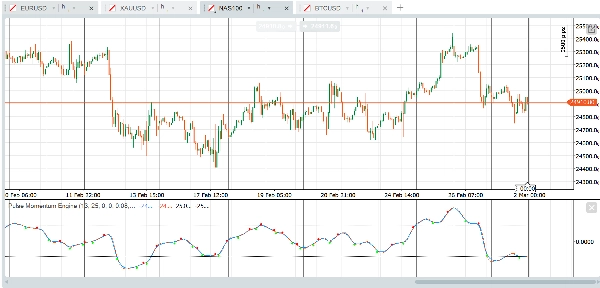
Indeksy takie jak US30, NAS100 i SPX500 korzystają z krótszych okresów wygładzania. Ustaw szybki okres na 11, a wolny na 21 dla szybszej reakcji na zmiany momentum w ciągu dnia. Zwiększ Podstawową responsywność do 0.10 i zmniejsz okres sygnału do 6 dla bardziej precyzyjnego czasu przecięcia. Utrzymaj OB na 25 i OS na -25. Minimalna konfluencja na 3 dobrze działa dla większości handlu indeksami.
Kryptowaluty — stworzone dla szybkości
Rynki kryptowalut poruszają się szybko i silnie trendują. Skróć szybki okres do 10, a wolny do 21. Podnieś Podstawową responsywność do 0.12 i zmniejsz Podstawową inercję do 0,8, aby filtr szybko reagował na zmienne wahania. Użyj okresu sygnału 5 dla szybszego wykrywania przecięć. Podnieś maksymalny sufit responsywności do 0,5, aby dać silnikowi adaptacji więcej przestrzeni. Obniż minimalną konfluencję do 2, ponieważ trendy kryptowalut mają tendencję do bycia bardziej kierunkowymi i mniej szumowymi po ustaleniu. Ustaw OB na 30 i OS na -30.
Obligacje i wolno poruszające się instrumenty — cierpliwe i selektywne
Obligacje skarbowe, bundy i inne wolno poruszające się instrumenty wymagają dłuższych okresów patrzenia wstecz i więcej cierpliwości. Zwiększ szybki okres do 18, a wolny do 34. Zmniejsz Podstawową responsywność do 0.05 i podnieś Podstawową inercję do 1,5, aby zapobiec reagowaniu filtra na drobne wahania. Wydłuż okres sygnału do 10 i okres patrzenia adaptacji do 15. Podnieś minimalną konfluencję do 4, aby zapewnić, że tylko najsilniejsze ustawienia wywołują sygnały. Użyj węższych poziomów OB/OS 20 i -20, ponieważ te instrumenty oscylują w węższym zakresie.
Ważne uwagi
- Nieprzerysowujące: Przy włączonym "Wymagaj potwierdzonego słupka" (domyślnie), wszystkie sygnały strzałek przecięcia opierają się na zamkniętych słupkach i nigdy nie zmieniają się ani nie znikają retrospektywnie.
- Wartości Linii Pulsu i Linii Sygnału na bieżącym (niezamkniętym) słupku będą aktualizowane w czasie rzeczywistym — to standardowe zachowanie każdego wskaźnika. Tylko sygnały strzałek są kontrolowane przez ustawienie potwierdzonego słupka.
- Stałe poziomy OB/OS są prostymi liniami odniesienia. W przeciwieństwie do poziomów dynamicznych, nie dostosowują się do zmieniających się warunków rynkowych. Dostosuj je w zależności od aktywa i ram czasowych, na których handlujesz.
- Przy przełączaniu zakresu wyjścia z wyśrodkowanego na przesunięty, pamiętaj o odpowiedniej aktualizacji poziomów OB/OS (patrz tabela wytycznych poziomów powyżej).
- Wydajność: Na bardzo długich wykresach (50 000+ słupków) rozważ ustawienie "Maksymalnej liczby słupków do obliczenia" na 5000-10000.
Zastrzeżenie
Ten wskaźnik jest narzędziem analizy technicznej i nie stanowi porady finansowej. Wyniki historyczne nie są wskaźnikiem przyszłych rezultatów. Zawsze stosuj odpowiednie zarządzanie ryzykiem i łącz z innymi formami analizy przed podejmowaniem decyzji handlowych.
Podsumowanie
Key functionalities include:
- Adaptive filtering that adjusts responsiveness and inertia based on market conditions.
- Lag correction via two-pass error feedback to improve signal timeliness.
- A confluence filter requiring multiple conditions to confirm crossover signals, enhancing signal quality.
- Fixed overbought and oversold reference levels to identify potential reversal zones.
- Customizable parameters for momentum calculation, filter behavior, lag correction, and signal generation.
PME is optimized for one-hour charts but supports other timeframes and chart types. It provides presets tailored for different markets such as Forex majors, gold, oil, stock indices, cryptocurrencies, and bonds, allowing users to adjust responsiveness and signal sensitivity accordingly. The indicator is non-repainting when used with confirmed bar settings and is intended as a technical analysis tool to assist in trend detection and trade timing.
Opinie klientów
5 | 25 % | |
4 | 75 % | |
3 | 0 % | |
2 | 0 % | |
1 | 0 % |