![Trading product for [CB] RR Management cBot Forex Indices, image 1](https://cdn.ctrader.com/image/webp/0390d544-4996-4346-974b-d41dd9e73c64_32505)
![Trading product for [CB] RR Management cBot Forex Indices, image 2](https://cdn.ctrader.com/image/webp/62a2f277-6531-4405-9387-d4eec2142b06_32506)
![Trading product for [CB] RR Management cBot Forex Indices, image 3](https://cdn.ctrader.com/image/webp/b9dad7e0-8fa2-4f29-8bf7-8b47116e97fa_32507)
![Trading product for [CB] RR Management cBot Forex Indices, image 4](https://cdn.ctrader.com/image/webp/772e2aa1-7349-43fa-ae70-fdc71ff9cf24_32508)
![Trading product for [CB] RR Management cBot Forex Indices, image 5](https://cdn.ctrader.com/image/webp/f2cdb27c-4b85-472a-a3c8-a2d607c06558_32509)
![Trading product for [CB] RR Management cBot Forex Indices, image 6](https://cdn.ctrader.com/image/webp/2d928340-8ae7-49f7-8942-4263af502b02_32510)
Description
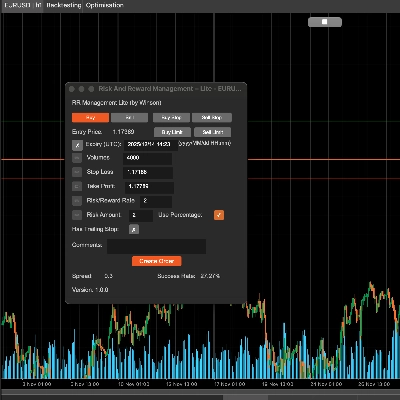
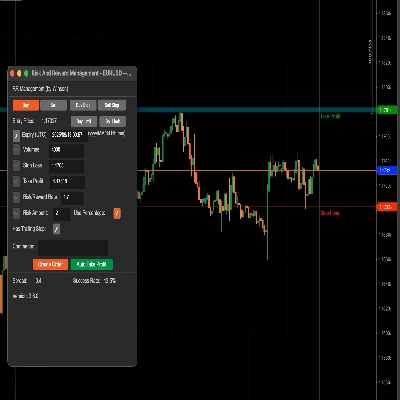
The cTrader Risk & Reward management tool can easily help you to set the risk vs reward values, you can just drag the take profit & stop loss lines to auto calculate the risk amount or volumes needed to be used. Also, included is an automatic take profit feature that will allow you to set four (4) different scenarios to lock in those profits.
Planning your trades is one of the most important parts of a day trader's life, if you fail to do this you will fail, this tool will allow you to easily set your take profit and stop-loss targets depending on your risk appetite.
Key Features
- Drag the TP/SL line to auto-calculate the risk/reward values
- Auto-take profit for pending orders.
- Based on the below value to set the risk/reward information
- Volumes: set the volumes will auto-calculate the risk amount
- Stop Loss: set the SL to calculate the TP/ RR rate and amount
- Take Profit: set the TP will auto calculate the SL/RR rate and amount
- Risk/Reward Rate: set the RR rate will auto-calculate the TP
- Risk Amount (with/without percentage): you can set the actual amount value or with the percentage
- Can use the trailing stop
- Add the comments to the order
- Support Buy, Sell, Buy Stop, Sell Stop order
- Set auto-take profit (but because this is a cBot so if use this function you can’t stop the tool)
- Support Windows and MacOS
Drag the stop loss line (default is green) and it will auto-calculate the risk & reward rate and amount of volume for the position size. You also can update the volume by manual input, when you change the below value, the left edit icon will be enabled so that you can update the values.
Support for Buy & Sell Limit Orders
The tool now supports both buy and sell limit orders with an expiry date/time.
Use Percentage
If you want to use the percentage based on your balance, just click the Use Percentage check box or it will use the actual amount value. Note: if your account balance is small the volume calculated will not go lower than the lowest position size allowed for the symbol.
Risk & Reward Rate
You can set the risk vs reward for your stop loss and take profit, so a Risk/Reward rate of 2 will be where your take profit is twice your risk, when you click on the sell button the stop loss and take profit will be automatically calculated using this ratio.
Success Rate
The success rate is based on all of your history orders, it will calculate the success orders for the rate, and the "Trailing Stop" is just a native option for cTrader to create an order to function, I just pass this when you create the order.
Auto Take Profit Button
There are 3 levels for set auto take profit, which means you can use 4 conditions for taking profit, for example:
- Take 50% partial take profit after getting above 60% of the profit target.
- Take 50% partial take profit when the price of the symbol reaches 60 or for Forex something like 1.72245
You can modify the above values in runtime, it will take effect immediately if you have started the take profit button. It will also reset all values after stopping the cBot. If profit 1 then will not be taken to profit again, that means only run once time for each profit condition unless stopping the auto profit and starting again, will reset all condition statuses.
Update: There is now support for pending orders to have automatic take profit applied when they become market orders.
Update: You can also set a take profit condition in pips, so you can choose a % of the total, the price and also the number of pips.
Using Volume for Taking Profit
Instead of using 50% or another percentage in the Take Profit box, you can use a value like 1000 (1K) which is the volume of the position.
But don’t forget must tick the green checkbox to enable this take-profit condition.
Set the order label for taking a profit, this is because maybe there are multiple orders at the same time, so you need to define which order do you want to use auto-take profit, and if you use this tool to create the order, it will auto set the order label here.
How to Manage Trades from Another cBot?
You can also use this tool to manage trades that are opened from another cBot simply by setting a label name when the order is submitted and using this same label name in the field above for the label of order to take a profit.
Set a Break-Even
This tool will also allow a break-even to be applied to your trades, again, you can use either a percentage of the total account balance or a fixed price.
To apply the settings and to return to the main screen you need to click on the Start Take Profit button.
Parameter Settings
When you attach the cBot to a chart you will be first shown the main settings window.
Style Settings
Set the SL/TP and current price line’s colour and thickness here.
Panel alignment
Set the panel position here, but you also can use Ctrl+Mouse to move the panel.
RR Management
- Set the default values for the risk/reward information.
- Auto Take Profit 1,2,3 - set the default values for the auto take profit function, there are 3 take profit levels.
- Auto Set Break-Even - set the default value for auto break-even when hitting it.
!["[CB] Pivot Points Pro" logo](https://cdn.ctrader.com/image/webp/43463c82-67b0-4f10-a4ba-901bba091d81_32594)