



Description
CashFlow v1.0.0 — DCA Trading Bot for cTrader
A DCA trading bot built on a simple idea: manage cash flow, don't predict the market. Two recovery modes let you choose between waiting for a new bar or triggering by fixed grid distance.
🔍 What This Bot Does (In Plain Terms)
CashFlow opens a first order, waits, and adds more orders when the price moves against it. When the combined profit becomes positive, it closes everything and starts a new cycle. That's the core loop — no indicator predictions, no trend guessing.
The choices you make are about when to add and how much to risk.
⚙️ Parameter Guide
1. CashFlow (Main)
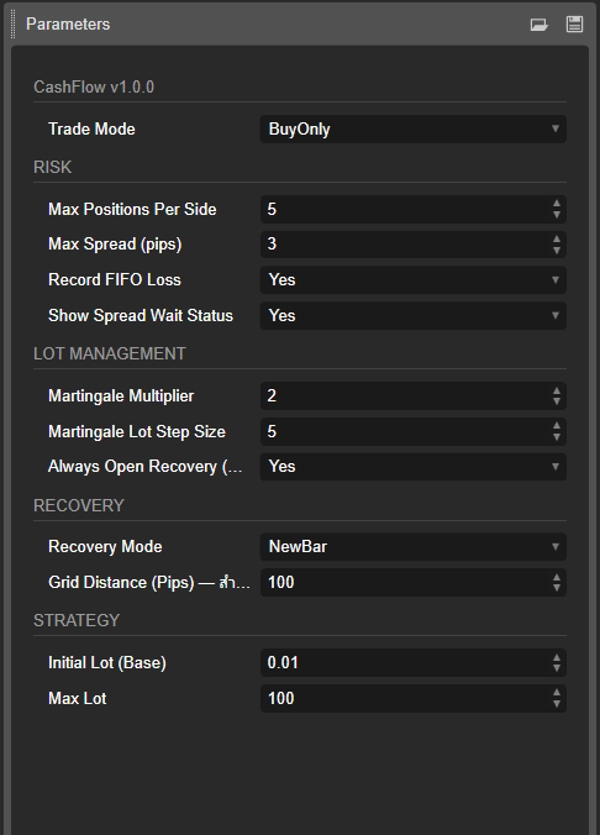
- Trade Mode — Choose the direction:
BuyOnly(buy-only DCA),SellOnly(sell-only), orBoth(runs both sides independently, each with its own memory).
2. RISK
- Max Positions Per Side — Maximum simultaneous orders per direction. When the limit is reached, the bot closes the oldest order to make room for a new one (rotation, keeps the bot running rather than freezing).
- Max Spread (pips) — If spread exceeds this value, the bot pauses orders. When spread drops back down, pending orders fire immediately (checked every tick, not every bar).
- Record FIFO Loss — When the oldest order is closed at a loss to rotate, the loss is remembered and added to the next cycle's profit target. This prevents "fake wins" that leave overall equity lower than it started.
- Show Spread Wait Status — Displays an on-chart status when orders are waiting for spread to normalize.
3. LOT MANAGEMENT
- Martingale Multiplier — Lot multiplier per tier (default 2.0). Setting this to 1.0 disables martingale entirely.
- Martingale Lot Step Size — Number of orders per tier. Example: with step size 10, orders 1–10 use the base lot, orders 11–20 use base × multiplier, orders 21–30 use base × multiplier², etc.
- Always Open Recovery (New Bar mode) — In NewBar mode, when enabled, the bot adds an order every new bar regardless of price direction. When disabled, it only adds when price moves against the last order.
4. RECOVERY (Add-Order Trigger)
This is the core choice that sets the bot's character.
- Recovery Mode
NewBar— Adds an order at the start of a new bar if the price has moved against the last order. Timeframe-dependent — a daily chart evaluates once a day.FixGrid— Adds an order as soon as price moves a fixed distance from the last order, regardless of bar. Timeframe-independent — reacts to price movement in real time.
- Grid Distance (Pips) — Only used in FixGrid mode. The distance the price must move against the last order before a new order is added.
5. STRATEGY
- Initial Lot (Base) — Base lot size for the first order of each cycle.
- Max Lot — Cap on lot size per order, no matter how high the martingale tier climbs. A safety ceiling.
🧠 The Two Recovery Modes — When to Use Which
NewBar Mode
- Adds orders at the open of a new bar when price is against the last order.
- Fits higher timeframes (H4, D1) where each bar carries meaningful information.
- Slower pace, fewer orders, better suited for capital preservation.
FixGrid Mode
- Adds orders at fixed pip distances, checked every tick.
- Timeframe-independent — the same behavior on M1 or D1.
- Better for volatile symbols (Gold, indices) where you want predictable order spacing.
- Faster pace, more orders per move, higher grid discipline.
Practical guidance: If you're new, start with NewBar on H4 or Daily. When comfortable with how the bot behaves, try FixGrid with a distance around 1× the symbol's daily ATR.
📊 How Positions Are Managed
Opening the first order — When there are no open orders on that side, the bot opens the base lot immediately (once spread is acceptable).
Adding orders — Depending on the mode, additional orders come at new bars (NewBar) or fixed distances (FixGrid). Lot size follows the tier formula.
Closing — When the combined net profit of all open orders (plus any recorded FIFO losses) turns positive at the start of a new bar, or when more than one position is open and combined profit is positive at any point, everything closes and the cycle resets.
Rotation — When Max Positions is reached and a new order is due, the oldest order is closed first to make space. If Record FIFO Loss is enabled, that loss becomes part of the next cycle's target.
🛡️ Built-In Safety
- Spread gate on every tick — Orders won't fire during wide-spread moments (news events, session opens). Once spread normalizes, pending orders execute.
- Fixed base lot — The default multiplier is 2.0, but setting it to 1.0 turns the bot into pure fixed-lot DCA. You control the level of aggression.
- Max Lot ceiling — A hard cap on lot size, regardless of how many tiers the martingale climbs.
- FIFO memory — Losses from rotation are tracked and paid off in the next cycle target, so you always know where you stand.
⚠️ What to Understand Before Using
- DCA carries drawdown risk. In strong one-directional trends, orders accumulate. Set Max Positions to a level your account can support during long trends.
- Martingale increases risk fast. With multiplier 2.0 and step size 10, order 30 uses 4× the base lot. Understand the math before using values above 1.0.
- Backtest first. Test on your target symbol and timeframe across trending and ranging periods before running live.
- Match lot size to account. A general starting point: base lot ≤ 0.01 per $500 of equity, adjusted for symbol volatility.
The bot follows rules without emotion — but the rules only work if the settings match your account size and risk tolerance.
🚀 Quick Start
- Attach to a chart of the symbol you want to trade.
- Set Trade Mode based on your bias (or
Bothfor two-way). - Choose Recovery Mode — start with NewBar if unsure.
- Set Initial Lot conservatively (0.01 is a reasonable starting point on most accounts).
- Set Max Positions Per Side based on how much drawdown you can accept.
- Backtest on at least 6 months of data before going live.
- Start on a demo account until you understand how the bot behaves in your market conditions.
CashFlow is a tool, not a guarantee. It follows rules consistently, but market behavior determines the outcome. Use appropriate risk management for your account.
Summary
Key features include two recovery modes:
- NewBar mode, which adds orders at the start of new bars if the price moves unfavorably, suited for higher timeframes (H4, Daily).
- FixGrid mode, which adds orders at fixed pip distances regardless of timeframe, suitable for volatile symbols.
Users can configure trade direction (buy-only, sell-only, or both), maximum positions per side with rotation of oldest orders, martingale multipliers for lot sizing, and spread filters to pause trading during high spread periods. The bot tracks losses from order rotation to adjust profit targets, ensuring accurate equity management.
CashFlow supports fixed and dynamic risk models, includes built-in safety features like spread gating, and requires backtesting before live use. It is designed for medium-frequency day trading using market orders on daily charts.
Discussion
Customer reviews
5 | 100 % | |
4 | 0 % | |
3 | 0 % | |
2 | 0 % | |
1 | 0 % |
FAQ
More from this author






















Price