present
Sign up and get $50 off your first purchase
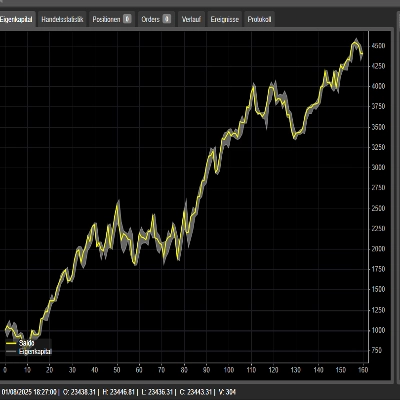
Trading product for Superior cTrader To Discord Notifier cBot Partial Close TP Manager, image 1
Superior cTrader To Discord Notifier
cBot
Version 1.0, Aug 2026
Windows, Mac, Web
Trading product for Superior cTrader To Discord Notifier cBot Partial Close TP Manager, image 2
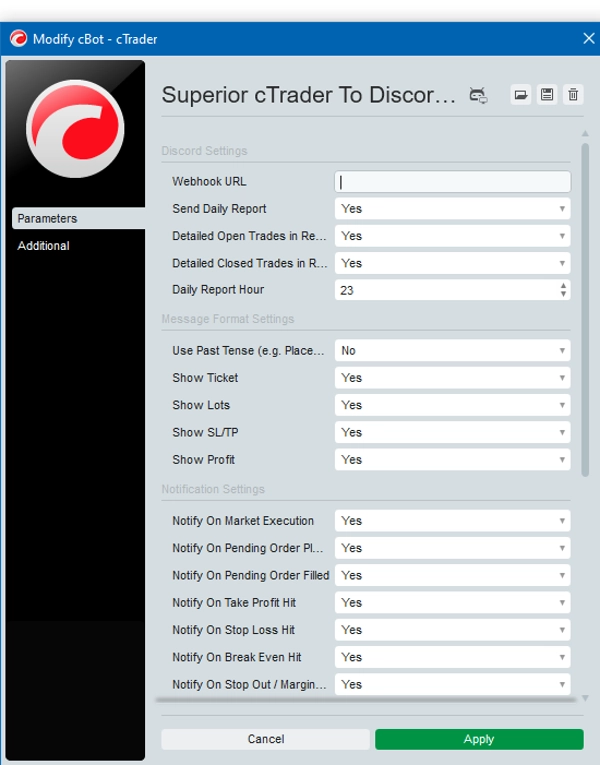
Trading product for Superior cTrader To Discord Notifier cBot Partial Close TP Manager, image 3
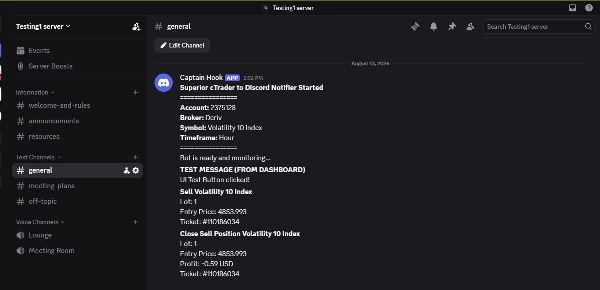
Trading product for Superior cTrader To Discord Notifier cBot Partial Close TP Manager, image 4

Description

Superior cTrader to Discord Notifier

Superior cTrader to Discord Notifier is a utility designed to connect the cTrader desktop terminal directly to the Discord application. It utilizes the cAlgo API to monitor trading activity and broadcast formatted text updates to Discord channels, servers, or groups using webhook integrations.

Core Use Cases

1. Signal Providers & Communities

This tool is built to assist Signal Providers who manage public or private Discord servers. The bot automatically publishes trade entries, modifications, and exits directly to Discord. Because the message formats are customizable (e.g., hiding lot sizes or ticket numbers), providers can broadcast clean, professional trade signals to their VIP channels or free community spaces without exposing private account details.


2. Personal Remote Monitoring

Retail traders can link the bot to their personal Discord server. This allows you to monitor your cTrader account's performance, open positions, floating profit, and risk levels from your mobile device while away from the trading desk.


Technical Features


Real-Time Trade Monitoring

Monitors the cTrader account for changes in positions and pending orders, triggering real-time notifications for:

- Market Executions: Position Opened, Position Closed, Position Partially Closed, and Position Modified (SL/TP adjusted).

- Pending Orders: Limit/Stop Order Placed, Order Modified, and Order Deleted.


Interactive On-Chart Dashboard

Includes a custom-built, draggable GUI dashboard rendered directly on the cTrader chart. The dashboard allows users to change settings on the fly without needing to restart the cBot or open the parameters menu.

- Tabs: Features categorized tabs (Trades, Orders, Format, Actions).

- Toggle Switches: Checkboxes to instantly enable/disable specific event notifications (e.g., turn off order modifications, or turn on partial close alerts).

- Manual Triggers: Buttons to trigger a Daily Report, or send a Test Connection message.

- UI Management: The dashboard can be minimized into a slim title bar to save chart space.


Customizable Message Formatting

Provides strict control over what data is included in the Discord broadcast. Users can toggle the visibility of the following variables to protect privacy or clean up signal formats:

- Show/Hide Ticket Numbers

- Show/Hide Lot Sizes (Volume)

- Show/Hide Stop Loss and Take Profit prices

- Show/Hide Net Profit on closed trades


Automated Reporting & Risk Alerts

- Advanced Daily Report: At a user-defined hour, the cBot generates a comprehensive summary of the day's performance. This includes total closed trades, net daily profit, current floating P/L, and a list of all active/closed trades.

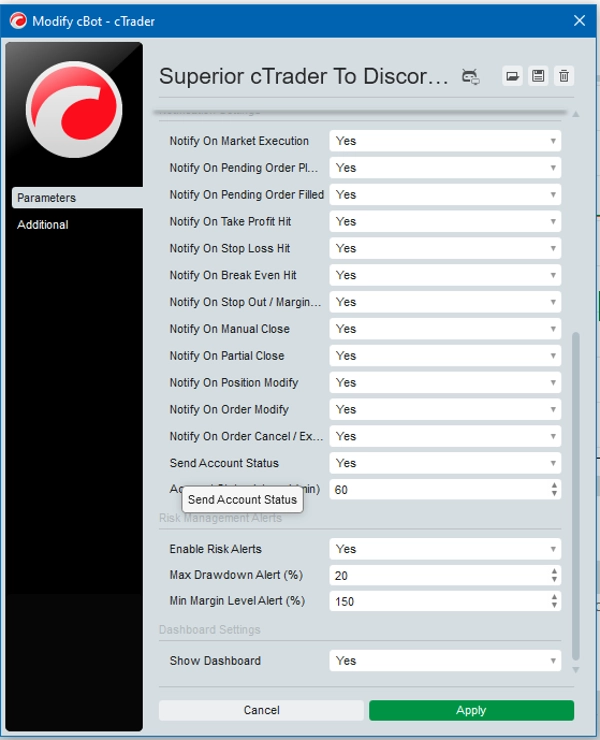
- Account Status Updates: Sends periodic updates containing the current Balance, Equity, and Free Margin at a set interval (e.g., every 60 minutes).

- Risk Management Alerts: Monitors account health and sends emergency warnings if Floating Drawdown exceeds a specified percentage, or if the Margin Level drops below a defined safety threshold.


Setup Requirements & Webhook Integration


To successfully connect your cTrader terminal to your server, you will need a dedicated Discord Webhook URL.


How to get the correct Webhook URL:

1. In Discord, go to the specific server channel you want messages posted to (e.g., #signals, #alerts, or a dedicated custom channel).

2. Click the gear icon next to the channel name to open Channel Settings → Select Integrations.

3. Click Webhooks and select New Webhook (or manage an existing one).

4. Customize your bot name if desired, then click Copy Webhook URL.

5. Open your cTrader platform, launch the cBot, and locate the parameters .

6. Paste the copied link directly into the Webhook URL parameter field in the cBot (make sure to replace any invite links or old text).

7. Click Apply, then hit Send Test Message via the on-chart dashboard to confirm your setup is active.


Summary

AI summary
Superior cTrader To Discord Notifier is a utility that connects the cTrader desktop terminal to Discord via webhook integration. It uses the cAlgo API to monitor trading activity in real time and sends formatted trade notifications to specified Discord channels or servers. Key features include automatic alerts for market executions (position opened, closed, partially closed, modified) and pending orders (placed, modified, deleted). The tool supports customizable message formats, allowing users to show or hide details such as ticket numbers, lot sizes, stop loss/take profit prices, and net profit to protect privacy or streamline signal presentation.

An interactive, draggable on-chart dashboard within cTrader enables users to adjust settings dynamically without restarting the bot. The dashboard includes categorized tabs, toggle switches for enabling/disabling specific notifications, manual triggers for daily reports and test messages, and can be minimized to save chart space.

Additional functionality includes automated daily performance reports, periodic account status updates (balance, equity, free margin), and risk management alerts based on floating drawdown and margin level thresholds. This notifier is suitable for signal providers managing Discord communities and retail traders seeking remote monitoring of their cTrader accounts. Setup requires a Discord webhook URL configured in the cBot parameters.

Trading profile

Customer reviews

0.0
Reviews: 0
Customer reviews
No reviews for this product yet. Already tried it? Be the first to tell others!

Discussion

FAQ

Partial Close
TP Manager
Stop Loss (SL) Manager
SL Manager
Channel
Limit Order Tool
Take Profit (TP) Manager
Products available through cTrader Store, including trading bots, indicators and plugins, are provided by third-party developers and made available for informational and technical access purposes only. cTrader Store is not a broker and does not provide investment advice, personal recommendations or any guarantee of future performance.

More from this author

cBot
Fixed Lot
VPS Recommended
+3
A high-performance cTrader local trade copier . Copy positions and pending orders between multiple terminals instantly.
Indicator
AI
BOS
+4
Golden Boom and Crash Spike Detector is a trading tool designed for Crash 300 and Boom 300 indices on M1 Timeframe.
cBot
Channel
SL Manager
+4
cTrader to Telegram trade notifier with custom message formats, risk alerts, and an on-chart dashboard.
cBot
Fixed Lot
Prop Firm Fit
+5
Instantly copy signals to cTrader with auto-execution, advanced risk management and stealth mode.
Indicator
BOS
Fibonacci
+4
Automatically draws major trading sessions, killzones, and SMC daily liquidity targets directly on your cTrader charts.
cBot
Fixed Lot
TP Manager
+5
Automatically copies trading signals from your channels or groups straight to your cTrader account.
cBot
Prop Firm Fit
Trailing Stop
+4
Copy trades remotely from different computers with risk management, prop firm compliance, and dynamic lot sizing.
cBot
Break Even
Equity Stop
+5
Manage your trades with auto lot sizing, breakeven, trailing stops, prop firm drawdown limits, and max spread guards.
cBot
Fixed Lot
Key Levels
+5
Copy signals to cTrader with auto execution, advanced risk management, and stealth mode.
cBot
Volume
Key Levels
+4
Automate open orders with smart grid lines, DCA scaling, Martingale multipliers, and safe zone recovery.

You may also like

cBot
Forex
Crypto
+5
cTrader to Telegram cBot is bot helps traders send signals instantly after open/close position on cTrader.
cBot
ATR
RSI
+23
🚀 N.B.: Results with an initial invested capital of 100 euros.🚀 📌 Tested on US2000 with Accurate Prices
cBot
Prop
Forex
+5
Quantum Queen Ctrader Cbot
cBot
AI
ATR
+8
ORB Smart Money Bot for XAUUSD is a sophisticated algorithmic trading system specifically optimized for Gold (XAUUSD).
cBot
SL Manager
Break Even
+4
FRACTAL STOP LOSS BOT AND RISK MANAGER
cBot
RSI
Fixed Lot
+2
Donchian breakout trend follower for XAUUSD H1, with RSI divergence entry filters and a 5% daily loss limit.
1.12
Profit factor
cBot
ATR
Prop
+5
Low-frequency XAUUSD trend cBot with adaptive risk, drawdown controls and restart recovery.
2.49
Profit factor
cBot
Supertrend
Super tendance
cBot
TP Manager
Fixed Risk %
+5
Professional risk and trade management assistant for precise position sizing, execution and automated trade management.
18.2%
ROI
35
Profit factor
cBot
Prop
Forex
+13
SUPPORT AND RESISTANCE STRATEGY. Master the Market’s Turning Points with Surgical Accuracy. SEE THE FULL BACKTEST. 📈
cBot
Forex
BTCUSD
+4
OneClick SL/TP Setter — Smart Trade Management Made Simple
cBot
Forex
EURUSD
+5
EasyPass ProFirm Wizard
cBot
RSI Scalping cBot—plug‑and‑play precision scalper for volatile indexes and symbols.
cBot
AI
ATR
+13
Multi-indicator scalping bot with concurrent trade management, and adaptive risk controls for professional forex trading
cBot
Fixed Lot
Prop Firm Fit
+5
Instantly copy signals to cTrader with auto-execution, advanced risk management and stealth mode.
cBot
AI
Forex
+4
A Trend Master AI, Suitable for more advance pro trader with fully customisation and risk control PLEASE ENJOY!!
10.9%
ROI
4
Profit factor
cBot
Advanced forex trade panel for risk, margin, swaps, and trade control with precision tools.
cBot
Prop
Forex
+4
cBot designed to assist traders in managing position risk effectively.

Price

44
Sales