
Description
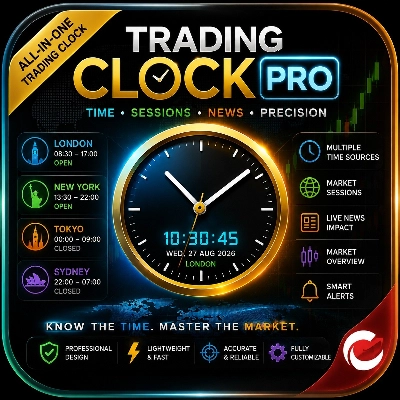
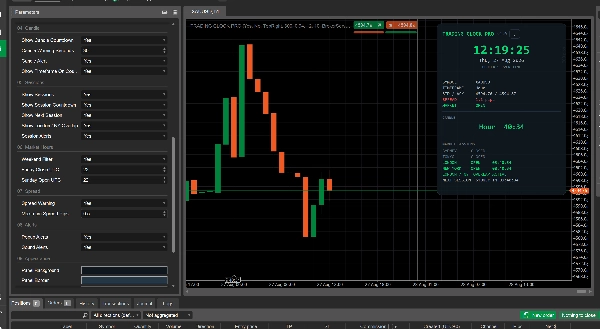
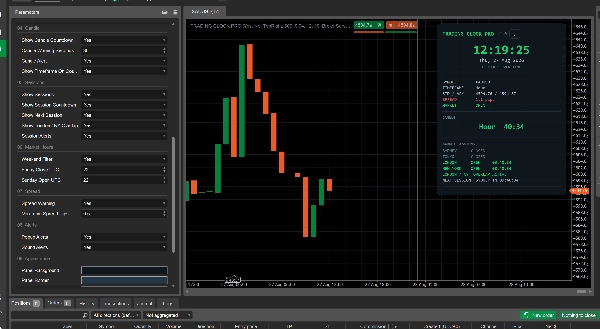
Trading Clock Pro is an all-in-one market timing dashboard designed to help traders understand when the market is most active and make better-timed decisions.
It shows:
- 🕐 Real-time clock with multiple time sources, including broker, UTC, London, New York, Tokyo and Sydney.
- 🌍 Forex trading sessions — Sydney, Tokyo, London and New York — with open/closed status and countdowns.
- 🔥 London/New York overlap, helping traders identify periods of potentially increased market activity.
- 📊 Market information including symbol, timeframe, bid/ask, spread and market-open status.
- ⏱️ Candle countdown, showing exactly how much time remains before the current candle closes.
- 🔔 Smart alerts for session openings, candle closing and unusually high spreads.
- 📅 Weekend/market-hour awareness so traders can quickly see whether the forex market is open.
Instead of relying on guesswork about market timing, traders can instantly see which major session is active, whether London and New York are overlapping, when the next session begins, and when a candle is about to close. This can help traders focus their analysis around periods they consider most relevant for their strategy.
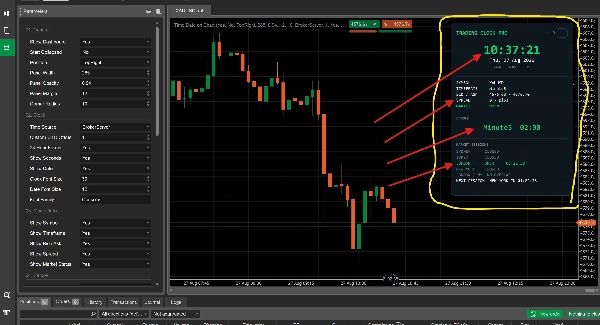
Trading Clock Pro is a professional market-timing and trading-information dashboard for cTrader. It is designed to give traders a clear view of market time, major forex sessions, candle timing, spread conditions, and basic market status directly on the chart.
Rather than generating buy/sell signals, the indicator helps traders understand when the market is active and what current trading conditions look like, allowing them to apply their own trading strategy with better timing.
What the Indicator Analyses
Trading Clock Pro monitors and displays several real-time market conditions:
- Current market time using the selected time source.
- Forex trading sessions: Sydney, Tokyo, London and New York.
- London/New York overlap status.
- Current candle duration and remaining time before the candle closes.
- Bid and Ask prices for the active symbol.
- Current spread in pips.
- Forex market open/closed status, including weekend conditions.
- Upcoming trading session and its countdown.
- Session openings, candle closing and high-spread conditions can also trigger alerts when enabled.
How to Interpret the Dashboard
The dashboard provides a quick visual overview without requiring traders to interpret complicated calculations.
Market Sessions
Each session is displayed as OPEN or CLOSED.
When a session is open, the dashboard can also show the remaining time. The London / NY OVERLAP indicator highlights when both London and New York are simultaneously active.
The NEXT SESSION display shows which session is coming next and provides a countdown.
Candle Countdown
The candle section displays the current timeframe and the amount of time remaining before the current candle closes.
For example:
M15 — 04:32
means approximately four minutes and thirty-two seconds remain on the current 15-minute candle.
As the candle approaches its close, the countdown can change to a warning state according to the configured warning period.
Market Information
The market-information section displays:
- Symbol
- Current timeframe
- Bid / Ask
- Spread
- Market status
The spread display can provide a warning when the current spread reaches or exceeds the configured maximum-spread threshold.
Alerts
When enabled, the indicator can notify the trader when:
- A major trading session opens.
- A candle is approaching its close.
- The spread reaches the configured warning level.
Popup and sound notifications can be enabled independently.
Key Settings and Parameters
Trading Clock Pro provides extensive customization through its cTrader parameters.
General
Controls the dashboard's:
- Visibility
- Starting collapsed/expanded state
- Chart position
- Width
- Opacity
- Margin
- Corner radius
Clock
Allows traders to select the time displayed by the dashboard:
- Broker Server
- UTC
- Local Computer
- Lagos
- London
- New York
- Tokyo
- Sydney
- Custom UTC offset
Additional options control 24-hour/12-hour format, seconds, date display and clock font size.
Market Information
Individual displays can be enabled or disabled for:
- Symbol
- Timeframe
- Bid / Ask
- Spread
- Market status
Candle
Controls:
- Candle countdown
- Warning threshold in seconds
- Candle alerts
- Timeframe display on the countdown
Sessions
Controls:
- Session display
- Session countdowns
- Next-session display
- London/New York overlap
- Session-opening alerts
Market Hours
Includes weekend filtering and configurable Friday close and Sunday open UTC times.
Spread
The trader can enable spread warnings and define the maximum acceptable spread threshold in pips.
Alerts
Popup and sound notifications can be switched on or off.
Appearance
The dashboard's background, border, primary, secondary, muted, open, closed, warning and danger colors can be customized.
Typical Use Cases
Session-Based Trading
Traders who build strategies around London, New York or other major sessions can use the dashboard to immediately see which session is active and how long it has remaining.
London/New York Overlap
Traders who prefer periods when major sessions overlap can use the dedicated overlap display to quickly identify when London and New York are simultaneously open.
Candle-Based Strategies
Traders waiting for a candle to close before confirming a setup can use the countdown to monitor the remaining candle time without manually calculating it.
Spread Monitoring
Before entering a trade, traders can check the current spread and optionally receive a warning when it reaches their configured threshold.
Multi-Time-Zone Trading
Traders working with different market centers can select their preferred time source instead of manually converting between time zones.
General Chart Monitoring
The dashboard can function as a compact trading information center, allowing traders to monitor essential timing and market information without adding several separate indicators to the chart.
Who Is It Best Suited For?
Trading Clock Pro is suitable for:
- Forex day traders
- Scalpers who pay close attention to session timing
- Intraday traders
- Session-based strategy traders
- Traders using candle-close confirmations
- Traders who monitor spreads before entering positions
- Traders trading across multiple time zones
- Beginners who want a simple overview of market timing
- Experienced traders who want a compact chart-side dashboard
It does not require advanced technical-analysis knowledge because it primarily presents timing and market-condition information rather than requiring the trader to interpret a complex mathematical indicator.
Important Limitations and Usage Notes
Trading Clock Pro is a market-information and timing tool, not an automated trading strategy or guaranteed signal generator.
It does not determine whether a trader should buy or sell, and the session or candle alerts should not be interpreted as guaranteed trading opportunities.
The indicator's usefulness depends on the trader's own strategy, market conditions and risk management.
Session times are calculated using the programmed time-zone and daylight-saving rules. Traders should ensure that their selected settings correspond with how they want to interpret each trading session.
The spread warning is based on the current Bid/Ask difference and should be treated as an informational condition rather than a prediction of future market behavior.
The candle countdown depends on the chart's timeframe and available bar data.
Trading Clock Pro is best used as a decision-support and market-awareness tool alongside a well-defined trading strategy, proper risk management and independent market analysis.
Summary
Key features include identification of the London/New York session overlap, candle countdown timers indicating time remaining before the current candle closes, and market information such as symbol, timeframe, bid/ask prices, spread, and market open status. The indicator supports smart alerts for session openings, candle closings, and high spreads, with customizable popup and sound notifications.
Traders can customize the dashboard’s appearance, position, and displayed elements. It also accounts for weekend market hours and allows configuration of spread warning thresholds. Trading Clock Pro is intended as a decision-support tool to enhance market awareness and timing, suitable for forex day traders, scalpers, intraday traders, and those using session-based or candle-close strategies. It does not provide buy/sell signals but helps users monitor market activity and conditions to apply their own trading strategies more effectively.