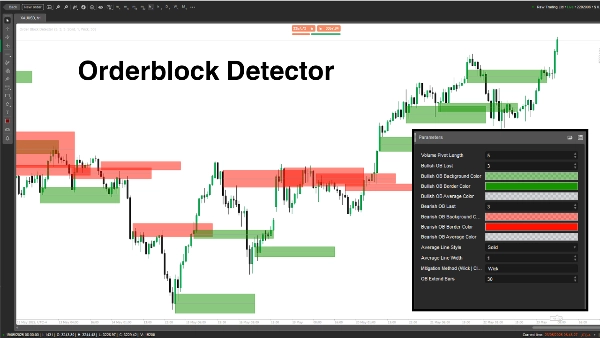
Descrição
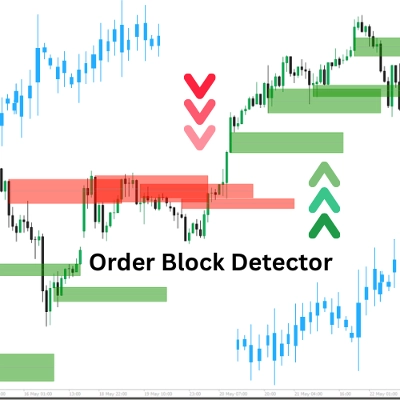
O indicador "Order Block Detector" foi criado para identificar e exibir Order Blocks (OBs) no gráfico de preços — zonas-chave onde grandes players (instituições) colocam ordens significativas de compra ou venda, frequentemente desencadeando fortes reações de preço. Ele ajuda os traders a identificar potenciais zonas de suporte/resistência para entradas de trade mais inteligentes, stop-losses ou take-profits.
Conceito
- Order Blocks: São zonas de preço onde o mercado reverte ou pausa devido ao intenso fluxo de ordens institucionais. O indicador detecta OBs analisando picos de volume pivot e o estado do mercado (altista/baixista).
- Como funciona:
-
- Determina o estado do mercado (altista/baixista) comparando máximas/mínimas com um período de retrocesso (Length).
- Identifica OBs em picos de volume ligados a níveis-chave de preço.
- Desenha retângulos e linhas médias para marcar OBs, enquanto verifica e remove OBs mitigados quando o preço rompe.
- Caso de uso: Traders podem usar OBs como zonas de alta probabilidade para configurações de trade, gerenciamento de risco ou metas de lucro.
Detalhamento dos Parâmetros
- Comprimento do Pivot de Volume (Length, Padrão: 5, Mín: 1)
-
- O que faz: Define o período de retrocesso (número de barras) para calcular máximas/mínimas e picos de volume pivot.
- Por que importa: Um comprimento maior aumenta a precisão, mas reduz a frequência de OBs; comprimento menor captura mais OBs, mas pode incluir ruído.
- Último OB Altista (BullExtLast, Padrão: 3, Mín: 1)
-
- O que faz: Limita o número de OBs altistas armazenados e monitorados.
- Por que importa: Limita o número de OBs altistas exibidos para manter o gráfico limpo e otimizar o desempenho.
- Cor de Fundo do OB Altista (BgBullCss, Padrão: #80169400)
-
- O que faz: Define a cor de fundo e transparência dos retângulos dos OBs altistas.
- Por que importa: Ajuda a distinguir visualmente os OBs altistas no gráfico.
- Cor da Borda do OB Altista (BullCss, Padrão: #169400)
-
- O que faz: Define a cor da borda dos retângulos dos OBs altistas.
- Por que importa: Melhora a visibilidade das zonas de OB altistas.
- Cor Média do OB Altista (BullAvgCss, Padrão: #609598A1)
-
- O que faz: Colore a linha média dentro dos OBs altistas.
- Por que importa: Marca o ponto médio do OB, servindo como nível de referência chave para os traders.
- Último OB Baixista (BearExtLast, Padrão: 3, Mín: 1)
-
- O que faz: Limita o número de OBs baixistas armazenados e monitorados.
- Por que importa: Assim como o BullExtLast, mantém o gráfico organizado limitando os OBs baixistas.
- Cor de Fundo do OB Baixista (BgBearCss, Padrão: #80FF1100)
-
- O que faz: Define a cor de fundo e transparência dos retângulos dos OBs baixistas.
- Por que importa: Diferencia os OBs baixistas dos altistas.
- Cor da Borda do OB Baixista (BearCss, Padrão: #FF1100)
-
- O que faz: Define a cor da borda dos retângulos dos OBs baixistas.
- Por que importa: Destaca os OBs baixistas para rápida identificação.
- Cor Média do OB Baixista (BearAvgCss, Padrão: #609598A1)
-
- O que faz: Colore a linha média dentro dos OBs baixistas.
- Por que importa: Destaca o nível central de preço dos OBs baixistas para planejamento de trades.
- Estilo da Linha Média (LineStyle, Padrão: Sólido)
-
- O que faz: Define o estilo da linha média do OB (Sólido, Tracejado, Pontilhado).
- Por que importa: Personaliza a aparência da linha média para adequar às preferências do trader.
- Largura da Linha Média (LineWidth, Padrão: 1, Mín: 1)
-
- O que faz: Ajusta a espessura da linha média do OB.
- Por que importa: Controla o quão proeminente a linha média aparece no gráfico.
- Método de Mitigação (Mitigation, Padrão: "Wick")
-
- O que faz: Define como os OBs são invalidados:
-
- Wick: Usa o preço mais baixo (OB altista) ou mais alto (OB baixista) para verificar a mitigação.
- Close: Usa o preço de fechamento para verificar a mitigação.
- Por que importa: Afeta a sensibilidade do indicador à quebra das zonas de OB, impactando quando os OBs são removidos.
O Order Block Detector é uma ferramenta poderosa para identificar zonas de ordens institucionais baseadas em picos de volume e ação de preço. Ele desenha retângulos claros de OB com linhas médias e remove dinamicamente os invalidados. Traders podem ajustar os parâmetros para aprimorar a detecção, exibição e gerenciamento dos OBs conforme seu estilo de negociação.
Resumo
The indicator works by analyzing volume pivot highs and determining market state (bullish or bearish) based on highs and lows over a configurable lookback period. It marks OBs with rectangles and average lines, dynamically removing those invalidated when price breaks through the zones. Users can customize parameters such as the lookback length, the number of bullish and bearish OBs tracked, colors and styles of OB rectangles and average lines, and the method used to detect OB mitigation (using wick or close prices).
This flexibility allows traders to tailor the detection and visualization of Order Blocks to their trading style, aiding in identifying high-probability zones for trade setups, risk management, and profit targeting.
Conversa
Avaliações de clientes
5 | 100 % | |
4 | 0 % | |
3 | 0 % | |
2 | 0 % | |
1 | 0 % |