คำอธิบาย
🎯 ดูว่าราคามาถึงระดับของคุณอย่างไร
ถ้าคุณได้ทำเครื่องหมายระดับแนวรับและแนวต้านของตัวเองแล้ว คุณจะรู้ว่าระดับนั้นเป็นเพียงครึ่งหนึ่งของเรื่อง วิธีที่ราคามาถึงระดับนั้นก็สำคัญเช่นกัน
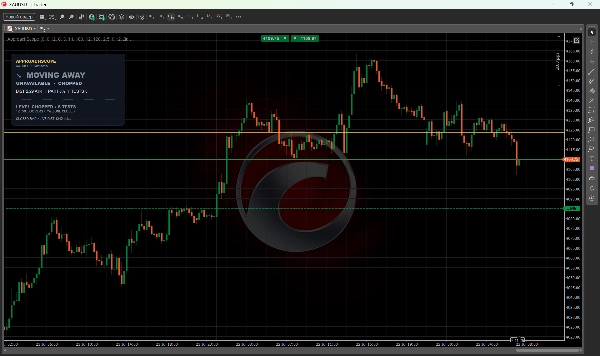
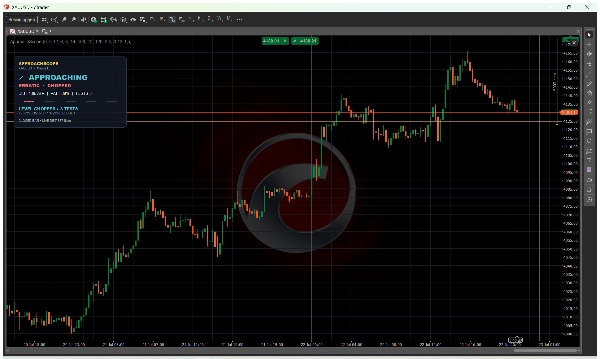
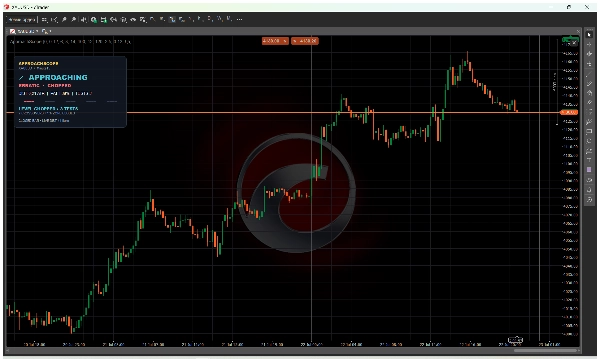
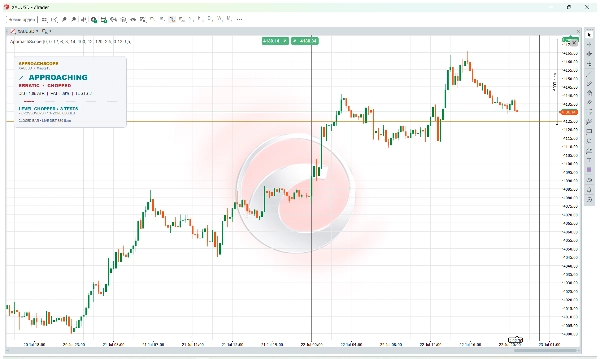
ApproachScope อ่านแท่งเทียนที่เสร็จสมบูรณ์รอบระดับที่คุณเลือกและเปลี่ยนการเคลื่อนไหวเหล่านั้นเป็นแผงควบคุมที่กะทัดรัด คุณจะได้รับบริบทที่เป็นประโยชน์สำหรับการตัดสินใจซื้อขายของคุณเอง ไม่ใช่แค่ลูกศรซื้อหรือขายที่ไม่มีคำอธิบาย
📊 สิ่งที่แผงควบคุมแสดง
• สถานะตลาด: รอ, กำลังเข้าใกล้, อยู่ที่ระดับ หรือ กำลังเคลื่อนออก
• รูปแบบการเข้าใกล้: เป็นระเบียบ, บีบอัด, กระตุ้น, สับสน หรือ ผสม
• สภาพระดับ: ใหม่, ผ่านการทดสอบ, สึกหรอ หรือ สับสน
• ระยะทางใน ATR, ประสิทธิภาพเส้นทาง, จำนวนการสัมผัส และ สเปรดปัจจุบัน
🛠️ วิธีใช้
1. เพิ่ม ApproachScope ลงในกราฟ
2. ลากเส้นสีเหลืองอำพันไปยังระดับแนวรับ, แนวต้าน, ช่วงเวลา, ช่วง หรือระดับกรอบเวลาที่สูงกว่า
3. อ่านแผงควบคุมเมื่อราคาขยับเข้าใกล้หรือออกห่างจากระดับนั้น
การคำนวณใช้แท่งเทียนที่เสร็จสมบูรณ์ ดังนั้นทุกสถานะจึงง่ายต่อการตรวจสอบกับกราฟ การจำแนกแต่ละประเภทยังมีคำอธิบายสั้น ๆ ไม่มีคะแนนความน่าจะเป็นที่ซ่อนอยู่
👍 สำหรับใคร
ApproachScope ถูกออกแบบมาสำหรับเทรดเดอร์รายวันที่เลือกระดับของตัวเองและต้องการมุมมองที่ชัดเจนขึ้นเกี่ยวกับการเข้าใกล้ มันทำงานกับสัญลักษณ์และกรอบเวลาที่ให้ข้อมูลราคาและสเกลที่ถูกต้อง รองรับคำนำหน้าและคำต่อท้ายของโบรกเกอร์สำหรับ XAUUSD
⚙️ การตั้งค่า
คุณสามารถปรับความกว้างโซน ATR, ขนาดโซนขั้นต่ำ, การแยกสัมผัส, ช่วงเวลา ATR และเส้นฐาน, การย้อนดูการเข้าใกล้และการสึกหรอ, การเตือนสเปรด, ธีม และสเกลแผงควบคุม
🔒 ความเป็นส่วนตัวและการควบคุม
อินดิเคเตอร์ทำงานในเครื่องใน cTrader โดยไม่มีสิทธิ์เข้าถึงขั้นสูง ไม่เชื่อมต่อกับเซิร์ฟเวอร์ภายนอก ไม่เก็บประวัติบัญชีหรือส่งข้อมูลเทเลเมทรี ไม่สามารถเปิด แก้ไข หรือปิดการเทรดได้
⚠️ โปรดทราบ
ApproachScope ไม่ได้เลือกระดับ, สร้างสัญญาณซื้อหรือขาย, ทำนายการเด้งหรือการเบรค, คำนวณความน่าจะเป็นชนะ, ตั้ง TP หรือ SL หรือโหลดข่าว
ORDERLY ไม่ได้หมายถึงการซื้อหรือขาย FRESH ไม่ได้รับประกันการเด้ง CHOPPED ไม่ได้รับประกันการเบรค ผลลัพธ์ขึ้นอยู่กับข้อมูลโบรกเกอร์, สเปรด, ประวัติ และการตั้งค่าสัญลักษณ์ ใช้การยืนยันและการจัดการความเสี่ยงของคุณเองเสมอ
สรุป
Key features of the panel include:
- Market state classification: WAITING, APPROACHING, AT LEVEL, or MOVING AWAY.
- Approach style identification: ORDERLY, COMPRESSED, IMPULSIVE, ERRATIC, or MIXED.
- Level condition status: FRESH, TESTED, WORN, or CHOPPED.
- Quantitative metrics such as distance in ATR (Average True Range), path efficiency, touch count, and current spread.
Users add ApproachScope to their chart and position an amber line on their chosen level (support, resistance, session, range, or higher timeframe). The indicator uses completed bars for calculations, ensuring transparency and easy verification against the chart. Each classification includes explanatory notes without relying on hidden probability scores.
Settings allow customization of ATR zone width, minimum zone size, touch separation, lookback periods, spread warnings, theme, and panel scale. The indicator operates locally within cTrader, does not connect to external servers, and does not execute trades. It supports symbols and timeframes with valid price and scale data, including broker prefixes and suffixes for XAUUSD.
การสนทนา
รีวิวจากลูกค้า
5 | 100 % | |
4 | 0 % | |
3 | 0 % | |
2 | 0 % | |
1 | 0 % |