
AbsorptionRatio_AutoRiskPanel
อินดิเคเตอร์
เวอร์ชัน 1.0, Dec 2025
Windows, Mac
4.7
รีวิว: 4

42.11M
ปริมาณการเทรด
6.13M
Pips ที่ได้กำไร
279
การขาย
11K
ติดตั้งฟรี
คำอธิบาย
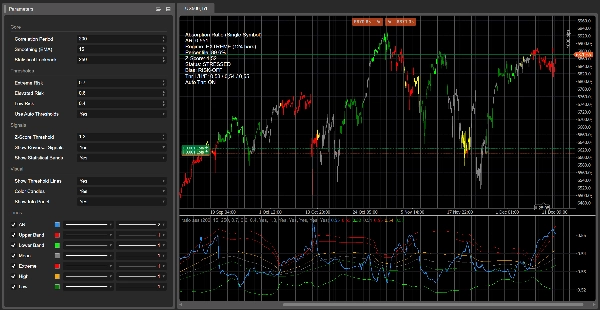
AbsorptionRatio_AutoRiskPanel แปลงสัญลักษณ์ cTrader ใด ๆ ให้เป็น แดชบอร์ดโหมดความเสี่ยงแบบสด 🛰️.
แทนที่จะพึ่งพา ETF หลายตัวเหมือนกับ Absorption Ratio หลายสินทรัพย์ต้นฉบับ ตัวชี้วัดนี้จะสร้าง ตัวแทน AR สัญลักษณ์เดียว โดยตรงจากการเคลื่อนไหวราคาของเครื่องมือที่คุณกำลังเทรด:
- 📉 มันคำนวณ ผลตอบแทนลอการิทึม ของสัญลักษณ์ปัจจุบัน.
- 🔗 มันวัด การวัดความสัมพันธ์อัตโนมัติของผลตอบแทน ในหลายช่วงเวลา (1…7 แท่ง ขึ้นอยู่กับช่วงเวลาความสัมพันธ์).
- 📊 มันรวบรวม ค่าเฉลี่ยสัมบูรณ์ของการวัดความสัมพันธ์อัตโนมัติ และแมปเป็น อัตราการดูดซับที่ปรับมาตรฐานระหว่าง 0.5 ถึง 1.0 — ค่าที่สูงกว่าหมายถึงการรวมตัวกันมากขึ้นและพฤติกรรมที่เข้มงวดขึ้น.
- 🧬 มันทำให้สัญญาณดิบเรียบด้วย EMA ผลิตเส้นโค้ง AR ที่เสถียร.
- 🧪 ในช่วง สถิติย้อนหลังแบบเลื่อน มันคำนวณ:
-
- ค่า เฉลี่ย และ ส่วนเบี่ยงเบนมาตรฐาน ของ AR
- ค่า Z-Score ปัจจุบัน (จำนวน σ เหนือ/ต่ำกว่าค่าเฉลี่ย)
- อันดับ เปอร์เซ็นไทล์ ของ AR วันนี้เทียบกับประวัติศาสตร์
- 🤖 ด้วย เกณฑ์อัตโนมัติ เปิดใช้งาน ตัวชี้วัดจะ ปรับระดับความเสี่ยงด้วยตนเองอย่างต่อเนื่อง:
-
- ความเสี่ยงต่ำ ≈
mean − 0.5σ - ความเสี่ยงสูง ≈
mean + 0.5σ - ความเสี่ยงสุดขีด ≈
mean + 1.5σ
ค่าจะถูกจำกัดไว้ที่[0…1]และอัปเดตทีละแท่ง ดังนั้นโหมดจะปรับให้เข้ากับแต่ละสัญลักษณ์และกรอบเวลา.
- ความเสี่ยงต่ำ ≈
- 🧱 จากเกณฑ์เหล่านี้, AbsorptionRatio_AutoRiskPanel กำหนดสี่โหมดไดนามิก:
-
- ต่ำ → กระจายตัว, สภาพแวดล้อมที่ผ่อนคลาย / ความเสี่ยงเปิด
- ปกติ → สภาพสมดุล / เป็นกลาง
- สูง → การรวมกลุ่มสูงขึ้น, แนวโน้มความเสี่ยงปิด
- สุดขีด → สภาพแวดล้อมเครียด, ความเสี่ยงระบบอาจเพิ่มขึ้น 🛑
- 🕯️ บนแผนภูมิหลัก, แท่งเทียนสามารถ ระบายสีตามความเสี่ยง:
สิ่งนี้ให้ ตัวกรองภาพทันที: ตัวอย่างเช่น เทรดเฉพาะการเข้าเทรนด์เมื่อแท่งเทียนไม่เป็นสีแดง/ส้ม หรือปรับขนาดลดลงในช่วงโหมดเครียด. -
- 🔴 แดง → AR เครียดทางสถิติ (Z-Score ≥ เกณฑ์)
- 🟢 มะนาว → AR สงบทางสถิติ (Z-Score ≤ −เกณฑ์)
- 🟧 / 🟡 ส้ม/เหลือง → เหนือระดับสูง / ใกล้สุดขีด
- ⚪ เทา → โซนเป็นกลาง
- 💚 เขียว → AR ต่ำ, พฤติกรรมกระจายตัวมากขึ้น / ความเสี่ยงเปิด
- 🎯 สัญญาณ mean-reversion ทางเลือกในแผง AR:
-
- 🟢 ลูกศรซื้อ เมื่อ AR สงบทางสถิติและเริ่มขึ้น
- 🔴 ลูกศรขาย เมื่อ AR เครียดทางสถิติและเริ่มลดลง
- 📋 แผงข้อมูล ขนาดกะทัดรัด ที่มุมบนซ้ายแสดง:
-
- ค่า AR ปัจจุบัน
- โหมด ที่ใช้งาน + ระยะเวลา (จำนวนแท่งที่อยู่ในโหมดนี้)
- เปอร์เซ็นไทล์, Z-Score และ สถานะ เชิงคุณภาพ (เครียด / สงบ / ปกติ)
- อคติ ความเสี่ยง (เปิดความเสี่ยง / ปิดความเสี่ยง / เป็นกลาง)
- เกณฑ์ ต่ำ / สูง / สุดขีด ที่ใช้จริงและสถานะของ เกณฑ์อัตโนมัติ ว่าเปิดหรือปิด
ใช้ AbsorptionRatio_AutoRiskPanel เพื่อ:
- หลีกเลี่ยงการเทรดในช่วง โหมดเครียดทางสถิติและปิดความเสี่ยง
- ระบุ สภาพแวดล้อมที่สงบ ที่การเบรกเอาต์หรือการตามเทรนด์อาจทำงานได้ดีกว่า
- วางบริบทกลยุทธ์ใด ๆ ภายใน กรอบโหมดความเสี่ยงไดนามิก แทนการใช้ตัวกรองความผันผวนแบบคงที่.
⚙️ พารามิเตอร์ (เอกสารจัดเก็บ)
แกนหลัก ⚙️
- ช่วงเวลาความสัมพันธ์ – ความยาวของหน้าต่างการวัดความสัมพันธ์อัตโนมัติ ควบคุมว่าประวัติศาสตร์มากน้อยแค่ไหนที่ใช้ในการประมาณอัตราการดูดซับ ค่าใหญ่ = โหมดที่เรียบและ “แมโคร” มากขึ้น; ค่าเล็ก = เร็วแต่มีเสียงรบกวนมากขึ้น.
- การทำให้เรียบ (EMA) – ช่วงเวลา EMA ที่ใช้กับสัญญาณ AR ดิบ ค่าที่สูงกว่าจะทำให้การเปลี่ยนแปลงโหมดเรียบขึ้น ค่าที่ต่ำกว่าจะทำให้ตัวชี้วัดตอบสนองเร็วขึ้น.
- สถิติย้อนหลัง – ช่วงเวลาย้อนหลังสำหรับค่าเฉลี่ย AR, ส่วนเบี่ยงเบนมาตรฐาน, Z-Score และเปอร์เซ็นไทล์ ควบคุมความเร็วที่ฐานสถิติปรับตัว.
เกณฑ์ 🚦
- ความเสี่ยงสุดขีด / ความเสี่ยงสูง / ความเสี่ยงต่ำ – เกณฑ์ด้วยมือสำหรับโหมด AR (ต่ำ / ปกติ / สูง / สุดขีด) ใช้เมื่อเกณฑ์อัตโนมัติปิด เมื่อเปิดเกณฑ์อัตโนมัติจะถูกละเลยสำหรับตรรกะและแสดงเป็นค่าเริ่มต้นเท่านั้น.
- ใช้เกณฑ์อัตโนมัติ – เมื่อเปิดใช้งาน เกณฑ์จะได้มาจากสถิติ AR แบบเลื่อน:
-
- ความเสี่ยงต่ำ = ค่าเฉลี่ย − 0.5σ
- ความเสี่ยงสูง = ค่าเฉลี่ย + 0.5σ
- ความเสี่ยงสุดขีด = ค่าเฉลี่ย + 1.5σ
สัญญาณ 🎯
- เกณฑ์ Z-Score – ค่าขั้นต่ำของค่า Z-Score สัมบูรณ์เพื่อจัดประเภท AR ว่าเป็นสุดขีดทางสถิติ ขับเคลื่อนป้าย STRESSED/CALM, การแทนที่แท่งเทียน และลูกศร mean-reversion.
- แสดงสัญญาณกลับตัว – เปิด/ปิดลูกศรซื้อ/ขายในหน้าต่างย่อย AR.
- แสดงแถบสถิติ – สลับแถบ ±2σ และเส้นค่าเฉลี่ยรอบ AR.
ภาพ 🎨
- แสดงเส้นเกณฑ์ – แสดงระดับต่ำ / สูง / สุดขีด ที่ใช้โดยเครื่องยนต์โหมด (ด้วยมือหรืออัตโนมัติ).
- ระบายสีแท่งเทียน – ระบายสีแท่งเทียนราคาตามค่า Z-Score และระดับโหมดเพื่อการแสดงความเสี่ยงทันที.
- แสดงแผงข้อมูล – แสดงแผงข้อความที่มุมบนซ้ายพร้อม AR, โหมด, สถิติ และอคติ.
สรุป
สรุปโดย AI
AbsorptionRatio_AutoRiskPanel is a cTrader indicator that converts any single trading symbol into a live risk-regime dashboard by calculating a single-symbol Absorption Ratio (AR) proxy based on the instrument’s price action. It computes log returns and measures autocorrelation of returns over multiple lags, aggregating these into a normalized AR value between 0.5 and 1.0, where higher values indicate more concentrated and tighter price behavior. The raw AR signal is smoothed using an exponential moving average (EMA) to produce a stable curve.
Over a rolling statistical lookback period, the indicator calculates the mean, standard deviation, Z-Score, and percentile rank of the AR, enabling dynamic risk thresholds that self-calibrate to the symbol and timeframe. These thresholds define four risk regimes: LOW (dispersed, risk-on), NORMAL (balanced), HIGH (elevated clustering, risk-off), and EXTREME (stressed, potential systemic risk). Price candles can be color-coded by risk level for immediate visual filtering.
An info panel displays current AR values, active regime and duration, percentile, Z-Score, qualitative status, risk bias, and threshold settings. Optional mean-reversion signals provide buy/sell arrows based on AR turning points. Parameters allow customization of correlation period, smoothing, lookback, thresholds, and visual options. This tool supports various markets including forex, indices, commodities, stocks, and crypto.
Over a rolling statistical lookback period, the indicator calculates the mean, standard deviation, Z-Score, and percentile rank of the AR, enabling dynamic risk thresholds that self-calibrate to the symbol and timeframe. These thresholds define four risk regimes: LOW (dispersed, risk-on), NORMAL (balanced), HIGH (elevated clustering, risk-off), and EXTREME (stressed, potential systemic risk). Price candles can be color-coded by risk level for immediate visual filtering.
An info panel displays current AR values, active regime and duration, percentile, Z-Score, qualitative status, risk bias, and threshold settings. Optional mean-reversion signals provide buy/sell arrows based on AR turning points. Parameters allow customization of correlation period, smoothing, lookback, thresholds, and visual options. This tool supports various markets including forex, indices, commodities, stocks, and crypto.
โปรไฟล์อินดิเคเตอร์
การสนทนา
รีวิวจากลูกค้า
4.7
รีวิว: 4
5 | 75 % | |
4 | 25 % | |
3 | 0 % | |
2 | 0 % | |
1 | 0 % |
รีวิวจากลูกค้า
December 25, 2025
Spread and slippage need a line in the notes, and the setup needs a better reason to exist.
December 20, 2025
the cleanest use is it makes weak ideas easier to leave alone, and It should stay in the support stack.
December 17, 2025
The setup feels less confusing, but ugly trades need to be in the sample too.
December 16, 2025
Spread and slippage need a line in the notes. It adds a check without taking over.
คำถามที่พบบ่อย
Signal
Indices
Commodities
GBPUSD
RSI
Bollinger
Fibonacci
Scalping
AI
XAUUSD
NAS100
MACD
BTCUSD
Forex
Breakout
EURUSD
NZDUSD
Martingale
Prop
ZigZag
Supertrend
Fair Value Gap
SMC
Crypto
Grid
Stocks
ATR
USDJPY
VWAP
ผลิตภัณฑ์ที่มีให้บริการผ่าน cTrader Store รวมถึงบอทการเทรด อินดิเคเตอร์ และปลั๊กอิน มีให้บริการโดยนักพัฒนาบุคคลที่สามและมีไว้เพื่อวัตถุประสงค์ในการเข้าถึงข้อมูลและทางเทคนิคเท่านั้น cTrader Store ไม่ใช่โบรกเกอร์และไม่ได้ให้คำแนะนำการลงทุน คำแนะนำส่วนบุคคล หรือการรับประกันผลการดำเนินงานในอนาคต



















ราคา
42.11M
ปริมาณการเทรด
6.13M
Pips ที่ได้กำไร
279
การขาย
11K
ติดตั้งฟรี