
Descrizione
🤖 LiveSignalTrinityAuto V28
━━━━━━━━━━━━━━━━━━
LiveSignalTrinityAuto V28 è un avanzato cBot per cTrader progettato per automatizzare le decisioni di trading combinando molteplici elementi strategici: COT bias, gamma walls, market regime, auto-generated dynamic trendlines, technical filters e advanced risk management.
Questo sistema è costruito per trader che desiderano un approccio più strutturato e professionale, perché non apre semplicemente operazioni basate su un singolo segnale. Invece, cerca una vera confluenza operativa tra dati esterni e la struttura tecnica del grafico. 📊
━━━━━━━━━━━━━━━━━━
🧠 Come funziona il bot
━━━━━━━━━━━━━━━━━━
Il cBot scarica dati esterni da API dedicate per ottenere:
- Walls / Gamma levels
- Market bias
- Market regime
- COT signal
Da queste informazioni costruisce una lettura operativa del mercato, che viene poi filtrata secondo la logica selezionata dall'utente.
In pratica, il bot:
✅ analizza il bias direzionale
✅ valuta il regime di mercato
✅ verifica la presenza di trendline tecniche
✅ applica filtri opzionali RSI / EMA / spread
✅ verifica i limiti di rischio giornalieri e complessivi
✅ gestisce automaticamente break-even, trailing stop e pyramiding
━━━━━━━━━━━━━━━━━━
🎯 Logica di trading principale
━━━━━━━━━━━━━━━━━━
Il cuore del sistema è la combinazione di:
- COT Bias → utile per una visione direzionale più ampia
- Wall Bias / Gamma Wall → utile per identificare livelli di prezzo sensibili
- Automatic trendlines → utile per ingressi tecnici
- Action Mode → determina se il contesto è aggressivo, cauto o neutro
Il bot può operare in due modalità strategiche:
🔹 Standard Smart Money
Entra quando il prezzo conferma un incrocio tecnico della trendline in linea con il bias operativo.
🔹 Intraday Breakout
Funziona con una logica di breakout veloce: prima identifica un setup vicino alla trendline, poi attende la conferma entro un numero massimo di candele.
━━━━━━━━━━━━━━━━━━
📈 Trendline automatiche
━━━━━━━━━━━━━━━━━━
Le trendline sono generate automaticamente utilizzando:
- pivot highs / pivot lows
- ATR
- moltiplicatore della pendenza
- distanza massima consentita dal prezzo corrente
Questo permette al cBot di adattarsi meglio alla reale struttura del mercato, invece di affidarsi a livelli statici fissi. 📉📈
━━━━━━━━━━━━━━━━━━
🛡️ Gestione del rischio
━━━━━━━━━━━━━━━━━━
Uno degli aspetti più forti di questo cBot è la gestione del rischio, che include:
- dimensionamento fisso o basato su percentuale
- calcolo del volume basato su equity o balance
- stop loss e take profit
- limite massimo di operazioni giornaliere
- blocco del trading quando si raggiungono limiti in stile prop firm
- break-even automatico
- trailing stop dinamico
- pyramiding con regole personalizzabili
Questo lo rende particolarmente interessante per trader che vogliono rispettare regole in stile prop firm. 💼
━━━━━━━━━━━━━━━━━━
⚙️ Filtri di trading
━━━━━━━━━━━━━━━━━━
Per migliorare la qualità degli ingressi, il bot può utilizzare filtri opzionali come:
- Filtro RSI
- Filtro EMA
- Filtro Spread
- Filtro Sessione
- Filtro Prossimità Wall
Questo ti permette di scegliere tra una logica di trading più permissiva o più selettiva.
━━━━━━━━━━━━━━━━━━
📊 Dashboard integrato
━━━━━━━━━━━━━━━━━━
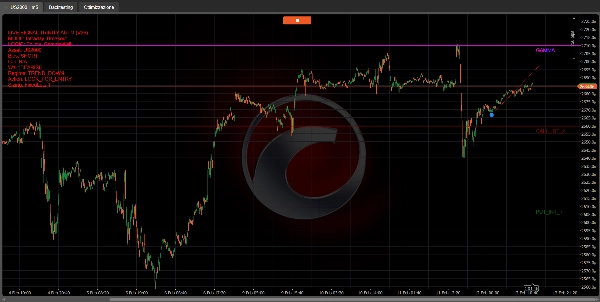
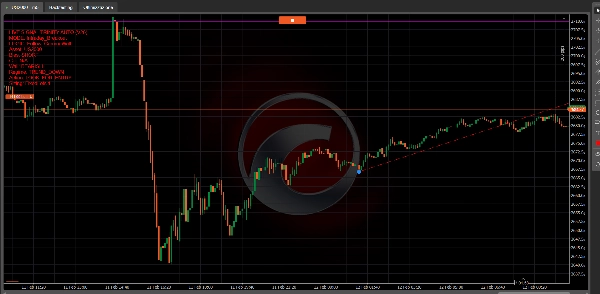
Il cBot include anche un dashboard sul grafico che mostra:
- bias corrente
- regime di mercato
- azione corrente
- equity
- profitto/perdita giornaliero
- numero di operazioni per il giorno
- stato della sessione
- stato della protezione prop
- numero di trendline rilevate
Questo ti offre una panoramica costante in tempo reale di come si comporta il bot. 👀
━━━━━━━━━━━━━━━━━━
✅ Punti di forza principali
━━━━━━━━━━━━━━━━━━
✨ Integrazione di analisi esterna e tecnica
✨ Trendline automatiche
✨ Gestione professionale del rischio
✨ Modalità intraday e smart money
✨ Filtri configurabili
✨ Supporto a break-even, trailing stop e pyramiding
✨ Dashboard chiaro e completo
✨ Capacità di operare anche senza obbligatoria prossimità al wall
━━━━━━━━━━━━━━━━━━
⚠️ Nota tecnica importante
━━━━━━━━━━━━━━━━━━
Questa versione include anche funzioni dedicate alla Modalità Basket, ma nel codice mostrato alcune opzioni basket sembrano essere solo preparate o parzialmente utilizzate, piuttosto che completamente implementate per una logica autonoma completa multi-simbolo.
Quindi è corretto presentarlo come un cBot con struttura avanzata e basi pronte per il basket, ma non ancora come un trader basket completamente completo.
📘 Guida parametro per parametro
━━━━━━━━━━━━━━━━━━
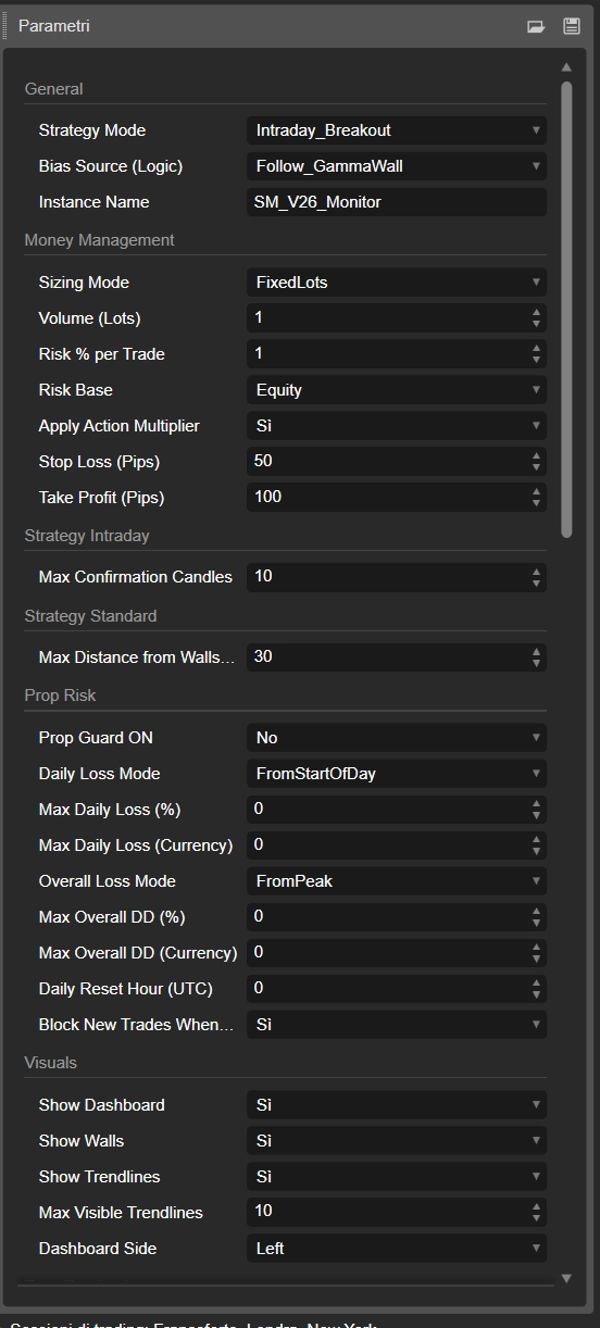
🧩 GENERALE
━━━━━━━━━━━━━━━━━━
Modalità Strategia
Seleziona la modalità principale di trading.
- Standard_SmartMoney → entra alla conferma tecnica della trendline
- Intraday_Breakout → cerca setup di breakout con conferma entro un certo numero di candele
Fonte Bias (Logica)
Definisce come viene costruito il bias operativo finale.
- Strict_Confluence → opera solo quando COT e Walls sono concordi
- Follow_COT_Ignore_Wall → segue solo il segnale COT
- Follow_Wall_Ignore_COT → segue solo il bias del wall
- Follow_GammaWall → dà priorità a gamma/regime, supportato dai walls
- Follow_GammaWall_Plus_COT → combina gamma e COT con logica più avanzata
Nome Istanza
Etichetta identificativa del bot.
Viene usata per riconoscere e gestire solo le posizioni aperte da questa specifica istanza.
━━━━━━━━━━━━━━━━━━
💰 GESTIONE DEL DENARO
━━━━━━━━━━━━━━━━━━
Modalità Dimensionamento
Modalità di calcolo del volume.
- FixedLots → usa la dimensione lotto fissa
- RiskPercent → calcola il volume basato sulla percentuale di rischio
Volume (Lotti)
Dimensione lotto fissa usata quando è selezionata la modalità FixedLots.
Rischio % per Operazione
Percentuale di rischio per operazione, usata nella modalità RiskPercent.
Base Rischio
Base usata per il calcolo della percentuale di rischio.
- Equity → usa l'equity corrente
- Balance → usa il saldo del conto
Applica Moltiplicatore Azione
Se abilitato, il bot regola la dimensione della posizione in base alla qualità del segnale:
- segnali aggressivi / trend-follow → dimensione aumentata
- segnali cauti / leggeri → dimensione ridotta
- segnali ad alta volatilità → dimensione ridotta
Stop Loss (Pips)
Stop loss fisso in pips.
Take Profit (Pips)
Take profit fisso in pips.
Se l'API fornisce un take profit esterno valido, il bot può usarlo al posto di questo valore.
━━━━━━━━━━━━━━━━━━
🎯 STRATEGIA
━━━━━━━━━━━━━━━━━━
Max Candele Conferma
Numero massimo di candele consentite per la conferma del breakout in modalità Intraday_Breakout.
Richiedi Prossimità Wall
Se abilitato, il prezzo deve essere vicino a un wall compatibile prima di aprire un'operazione.
- per operazioni di acquisto → vicino a un put wall
- per operazioni di vendita → vicino a un call wall
Se disabilitato, il bot può operare usando solo trendline e bias.
Distanza Max Wall (Pips)
Distanza massima del prezzo consentita per considerare un wall valido.
Max Operazioni Per Giorno
Numero massimo di operazioni per giorno.
Se impostato a 0, non c'è limite giornaliero.
━━━━━━━━━━━━━━━━━━
🕒 SESSIONE
━━━━━━━━━━━━━━━━━━
Filtro Sessione ON
Abilita o disabilita il filtro della sessione di trading.
Ora Inizio Sessione (UTC)
Ora di inizio della sessione di trading in UTC.
Ora Fine Sessione (UTC)
Ora di fine della sessione di trading in UTC.
Il bot apre nuove operazioni solo all'interno di questa finestra temporale.
━━━━━━━━━━━━━━━━━━
🌐 DATI
━━━━━━━━━━━━━━━━━━
Aggiorna Dati Ogni N Barre
Con quale frequenza il bot ricarica i dati dalle API esterne.
Se impostato a 0, l'aggiornamento automatico periodico è disabilitato.
━━━━━━━━━━━━━━━━━━
🛡️ RISCHIO PROP
━━━━━━━━━━━━━━━━━━
Prop Guard ON
Abilita la protezione del rischio in stile prop firm.
Modalità Perdita Giornaliera
Determina come viene calcolata la perdita giornaliera.
- FromStartOfDay → dal valore di equity all'inizio della giornata
- FromIntradayPeak → dal picco intraday dell'equity
Perdita Giornaliera Max (%)
Perdita giornaliera massima espressa in percentuale.
Perdita Giornaliera Max (Valuta)
Perdita giornaliera massima espressa in valuta.
Modalità Perdita Complessiva
Determina come viene calcolato il drawdown totale.
- FromStart → dall'equity iniziale
- FromPeak → dal massimo equity raggiunto
Drawdown Complessivo Max (%)
Drawdown complessivo massimo in percentuale.
Drawdown Complessivo Max (Valuta)
Drawdown complessivo massimo in valuta.
Ora Reset Giornaliero (UTC)
Ora UTC in cui il bot considera l'inizio di un nuovo giorno di controllo.
Blocca Nuove Operazioni al Raggiungimento
Se abilitato, una volta raggiunto un limite di rischio prop, il bot blocca nuove entrate.
━━━━━━━━━━━━━━━━━━
👁️ ASPETTI VISIVI
━━━━━━━━━━━━━━━━━━
Mostra Dashboard
Mostra o nasconde il dashboard sul grafico.
Mostra Walls
Mostra le linee orizzontali dei wall.
Mostra Trendline
Mostra le trendline automatiche sul grafico.
Numero Max Trendline Visibili
Numero massimo di trendline visibili per lato.
Lato Dashboard
Posizione del dashboard:
- Destra
- Sinistra
━━━━━━━━━━━━━━━━━━
📐 LOGICA DELLA TRENDLINE
━━━━━━━━━━━━━━━━━━
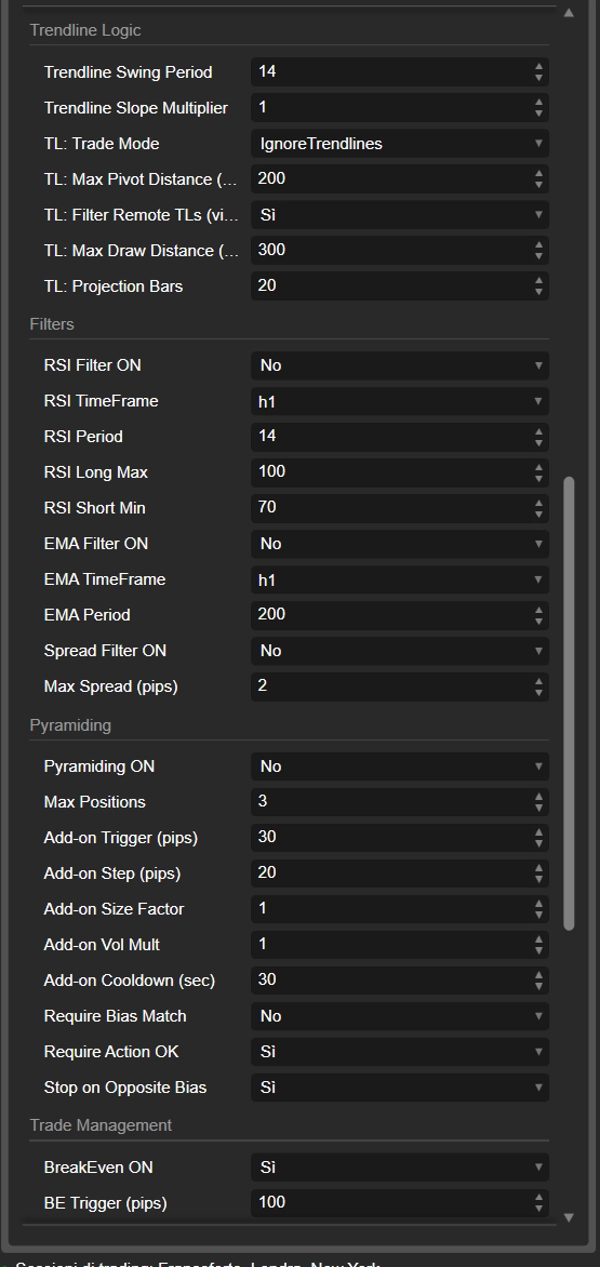
Periodo Swing Trendline
Periodo usato per identificare i pivot e calcolare l'ATR collegato alle trendline.
Moltiplicatore Pendenza Trendline
Moltiplicatore applicato alla pendenza della trendline.
Valori più alti creano trendline più ripide.
TL: Modalità Trading
Definisce se la strategia deve usare o ignorare le trendline.
- UseTrendlines
- IgnoreTrendlines
TL: Distanza Max Pivot (pips)
Distanza massima consentita tra prezzo corrente e pivot per considerare valida una trendline.
TL: Filtra TL Remote
Se abilitato, nasconde le trendline troppo lontane dal prezzo corrente.
TL: Distanza Max Disegno (pips)
Distanza massima del prezzo consentita per continuare a disegnare una trendline remota.
TL: Barre Proiezione
Numero di barre future usate per estendere visivamente le trendline.
━━━━━━━━━━━━━━━━━━
🔎 FILTRI
━━━━━━━━━━━━━━━━━━
Filtro RSI ON
Abilita il filtro RSI.
TimeFrame RSI
Timeframe usato per calcolare l'RSI.
Periodo RSI
Periodo RSI.
RSI Long Max
Per operazioni di acquisto: se l'RSI è sopra questo valore, l'acquisto è bloccato.
Utile per evitare ingressi long in condizioni di iperestensione.
RSI Short Min
Per operazioni di vendita: se l'RSI è sotto questo valore, la vendita è bloccata.
Utile per evitare ingressi short in condizioni già esaurite.
Filtro EMA ON
Abilita il filtro EMA.
TimeFrame EMA
Timeframe usato per l'EMA.
Periodo EMA
Periodo EMA.
Filtro Spread ON
Abilita il filtro spread.
Spread Max (pips)
Il bot evita nuove entrate se lo spread è superiore a questo valore.
━━━━━━━━━━━━━━━━━━
📈 PYRAMIDING
━━━━━━━━━━━━━━━━━━
Pyramiding ON
Abilita aggiunte progressive a posizioni profittevoli.
Max Posizioni
Numero massimo totale di posizioni aperte in pyramiding per simbolo/istanza.
Trigger Add-on (pips)
Profitto minimo in pips richiesto prima di permettere una posizione aggiuntiva.
Step Add-on (pips)
Passo di profitto aggiuntivo richiesto tra un add-on e il successivo.
Fattore Dimensione Add-on
Moltiplicatore base applicato alla dimensione delle posizioni aggiuntive.
Moltiplicatore Volume Add-on
Moltiplicatore progressivo per il volume sugli add-on successivi.
Cooldown Add-on (sec)
Tempo minimo richiesto tra un'operazione add-on e la successiva.
Richiedi Corrispondenza Bias
Se abilitato, il bias corrente deve rimanere allineato con la direzione delle posizioni esistenti.
Richiedi Azione OK
Se abilitato, l'azione corrente deve anche rimanere compatibile con la direzione del pyramiding.
Stop su Bias Opposto
Se abilitato, il pyramiding si ferma quando appare un bias opposto.
━━━━━━━━━━━━━━━━━━
🔧 GESTIONE DELLE OPERAZIONI
━━━━━━━━━━━━━━━━━━
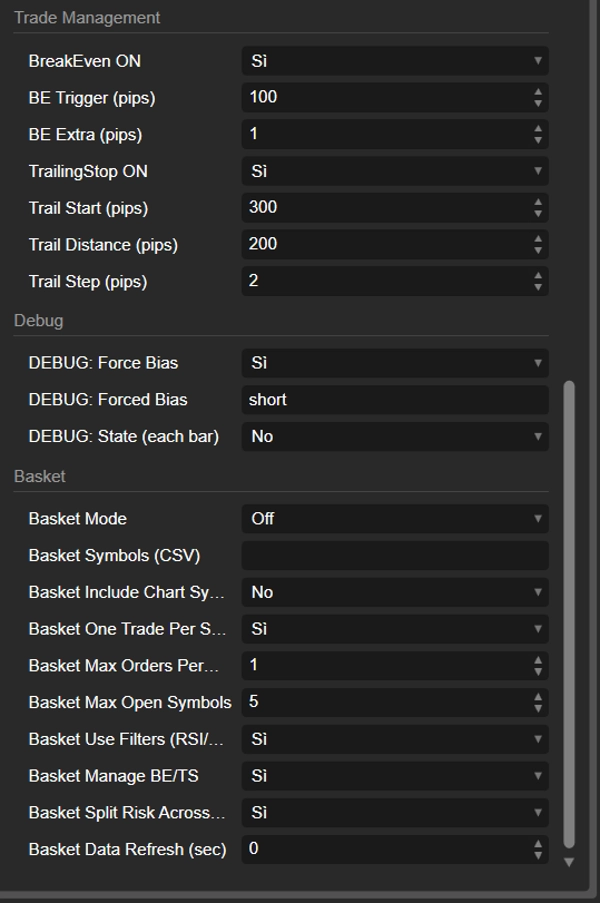
BreakEven ON
Abilita il break-even automatico.
Trigger BE (pips)
Profitto minimo in pips necessario per attivare il break-even.
Extra BE (pips)
Margine extra aggiunto oltre il prezzo di entrata quando si applica il break-even.
TrailingStop ON
Abilita il trailing stop.
Inizio Trail (pips)
Profitto minimo necessario per iniziare il trailing.
Distanza Trail (pips)
Distanza tra prezzo e stop durante il trailing.
Step Trail (pips)
Passo minimo richiesto prima di aggiornare nuovamente il trailing stop.
━━━━━━━━━━━━━━━━━━
🧪 DEBUG
━━━━━━━━━━━━━━━━━━
Forza Bias
Se abilitato, il bot ignora il bias calcolato e usa quello forzato manualmente.
Bias Forzato
Bias forzato manualmente, come LONG, SHORT o NEUTRO.
Log Verbose
Se abilitato, stampa più dettagli nel log.
━━━━━━━━━━━━━━━━━━
🧺 BASKET
━━━━━━━━━━━━━━━━━━
Modalità Basket
Modalità basket.
- Off
- WallsOnly
⚠️ Nel codice mostrato, questa sezione sembra essere parzialmente implementata.
Simboli Basket (CSV)
Elenco di simboli separati da virgole.
Includi Simbolo Grafico nel Basket
Se abilitato, il simbolo del grafico è incluso anche nella lista del basket.
Un Basket per Simbolo
Parametro preparato.
Nel codice mostrato, non sembra essere usato direttamente nella logica di ingresso.
Max Ordini/Barra Basket
Parametro preparato.
Nel codice mostrato, non sembra essere usato direttamente.
Max Simboli Basket
Parametro preparato.
Nel codice mostrato, non sembra essere usato direttamente.
Usa Filtri Basket
Parametro preparato.
Nel codice mostrato, non sembra essere usato direttamente.
Gestisci BE/TS Basket
Se abilitato, break-even e trailing stop possono gestire anche posizioni basket già aperte.
Rischio Diviso Basket
Parametro preparato.
Nel codice mostrato, non sembra essere usato direttamente nel dimensionamento degli ordini.
Aggiorna Basket (sec)
Intervallo di aggiornamento del basket in secondi.
Se maggiore di 0, il bot aggiorna periodicamente i dati del basket.
📝 Nota finale importante
Questo cBot, così com'è scritto, non è solo un semplice robot di ingresso/uscita, ma piuttosto un sistema ibrido che combina:
- analisi esterna
- struttura tecnica
- controllo del contesto
- gestione avanzata del rischio
- strumenti di protezione operativa
Quindi è ben adatto a essere presentato come un cBot professionale multi-logica con forti capacità di controllo del rischio e filtraggio contestuale. 🔥
Riepilogo
The bot supports two main trading modes: Standard Smart Money, which enters trades upon technical trendline confirmation aligned with market bias, and Intraday Breakout, which targets fast breakout setups confirmed within a set number of candles. It downloads external data via APIs to assess walls/gamma levels, market bias, regime, and COT signals, then applies user-configurable filters such as RSI, EMA, spread, session, and wall proximity to refine entries.
Automatic trendlines are generated using pivot highs/lows, ATR, and slope multipliers, adapting to market structure dynamically. Risk management features include fixed or percentage-based position sizing, stop loss/take profit settings, daily trade limits, prop firm-style risk controls, automatic break-even, trailing stops, and pyramiding with customizable rules.
An on-chart dashboard provides real-time information on bias, market regime, current action, equity, daily P/L, trade count, session status, and prop guard status. The bot is suitable for trading forex, indices, commodities, and cryptocurrencies, and is designed with professional multi-logic and strong risk control capabilities.
Discussioni
Recensioni dei clienti
5 | 67 % | |
4 | 33 % | |
3 | 0 % | |
2 | 0 % | |
1 | 0 % |