

cPanel 1.1
cBot
2 satın almalar
Sürüm 1.0, Dec 2024
Windows, Mac, Mobile, Web
4.5
Değerlendirmeler: 2
2
Satışlar
Açıklama
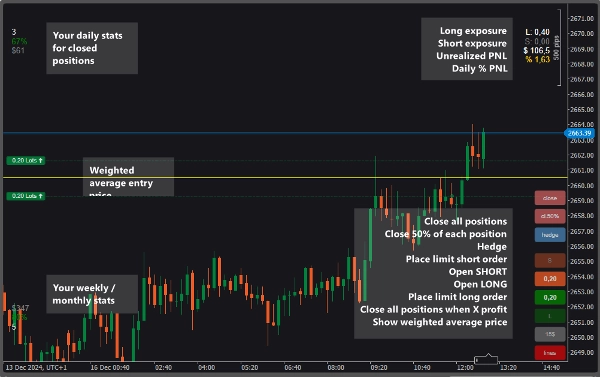
Ekran İstatistikleri ile Basit ve Etkili Ticaret Paneli
Ana Özellikler:
- Önceden Tanımlı Büyüklükte Piyasa ve Limit Emirleri
-
- Tercih ettiğiniz lot büyüklüğünü ayarlayın veya hesap marjınızın önceden tanımlı bir yüzdesini kullanın.
- Tek Tıkla Pozisyon Yönetimi
-
- Tüm pozisyonlar için önceden belirlenmiş kar hedefinize ($) ulaşıldığında tüm pozisyonları otomatik olarak kapatın.
- Açık pozisyonlarınızın %50'sini tek tıklamayla kapatın.
- Tüm pozisyonları zahmetsizce kapatın.
- Hedging Seçenekleri
-
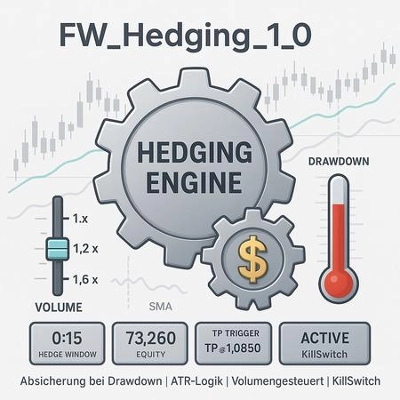
- Tüm pozisyonları kolayca hedge edin — mevcut pozisyonlarınızın lot büyüklüklerine uygun zıt işlemleri otomatik olarak açın.
- Stop-Loss ve Take-Profit Yönetimi
-
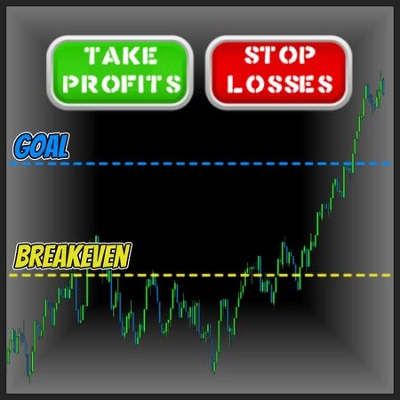
- Stop-loss seviyeleri tanımlanmış tüm pozisyonlar için stop-loss'u zarar etmeme noktasına taşıyın.
- ATR'ye dayalı otomatik SL ve TP değerleri ayarlayın
- Tüm Pozisyonlarınızın ve İşlemlerinizin Gerçek Zamanlı İzlenmesi
-
- Günlük PNL, kazanma oranı ve işlem sayısını takip edin.
- Haftalık, aylık veya özel dönemler için PNL ve kazanma oranını izleyin.
- Uzun ve kısa işlemler için toplam pozisyon büyüklüklerini görüntüleyin.
- Tüm pozisyonlar için gerçekleşmemiş PNL'yi gösterin.
- Günlük yüzde karı hesaplayın.
- Ağırlıklı Ortalama Giriş Fiyatı:
-
- Tüm uzun/kısa pozisyonlar için ağırlıklı ortalama giriş fiyatını grafikte görün ve zarar etmeme seviyelerinizi belirleyin.
Özet
AI summary
cPanel 1.1 is a trading panel designed to provide simple and effective trade management with on-screen statistics. It supports market and limit orders with predefined sizes, allowing users to set fixed lot sizes or use a percentage of their account margin. The panel offers one-click position management features, including automatic closure of all positions upon reaching a predefined profit target, partial closure of 50% of open positions, and full position closure.
Hedging is facilitated by automatically opening opposite trades matching current position sizes. Stop-loss and take-profit management includes moving stop-loss levels to break-even and setting automatic SL and TP values based on the Average True Range (ATR) indicator.
Real-time monitoring displays key metrics such as daily profit and loss (PNL), win rate, number of trades, unrealized PNL, total position sizes for long and short trades, and daily percentage profit, with options to track these over custom periods. The panel also visualizes the weighted average entry price for all long and short positions directly on the chart to help identify break-even levels.
Overall, cPanel 1.1 integrates order execution, risk management, and performance tracking into a unified interface for enhanced trading oversight.
Hedging is facilitated by automatically opening opposite trades matching current position sizes. Stop-loss and take-profit management includes moving stop-loss levels to break-even and setting automatic SL and TP values based on the Average True Range (ATR) indicator.
Real-time monitoring displays key metrics such as daily profit and loss (PNL), win rate, number of trades, unrealized PNL, total position sizes for long and short trades, and daily percentage profit, with options to track these over custom periods. The panel also visualizes the weighted average entry price for all long and short positions directly on the chart to help identify break-even levels.
Overall, cPanel 1.1 integrates order execution, risk management, and performance tracking into a unified interface for enhanced trading oversight.
İşlem profili
Müşteri değerlendirmeleri
4.5
Değerlendirmeler: 2
5 | 50 % | |
4 | 50 % | |
3 | 0 % | |
2 | 0 % | |
1 | 0 % |
Tartışma
SSS
ATR
cTrader Store üzerinden erişilebilen işlem botları, göstergeler ve eklentiler gibi ürünler, üçüncü taraf sağlayıcılar tarafından sağlanır ve yalnızca bilgilendirme ve teknik erişim amaçlarıyla sunulur. cTrader Store bir broker değildir ve yatırım tavsiyesi, kişisel öneriler vermez veya gelecekteki performansı garanti etmez.













Fiyat
2
Satışlar