Açıklama
Hile Sayfası. Aşağıda yüksek olasılıklı Yön ile 3 yıllık Veri özetlenmiştir.
Gün içi işlem
- Asya: B120 (Oturum Eğilimi + Heikin 2H uyumlu) | alternatif: Sadece Oturum Eğilimi
- Londra: Heikin 1H
- New York: Heikin 2H
- Batı (Londra ve NY): Heikin 2H
- Zamanlama: Batı + Heikin 2H dönüşü → en iyi 30 dakikalık takip
Swing (2–3 gün)
- Yön (3 gün / 72s): Küresel Oturum Eğilimi (Asya+Londra+New York birleşik)
- Giriş filtresi: Küresel Oturum Eğilimi + Heikin 4H uyumlu (uyum yoksa → atla)
- Varsayılanı önleyin: 2 gün / 48s
HeikinSessionBiasOnlyBot, takdir edilebilir tüccarlar için bir eğilim panosu ve piyasa yapısı “pusulası”dır. İşlem yapmaz. Bunun yerine, size iki bağımsız motor kullanarak trend/eğilim hakkında temiz, her zaman güncellenen bir görünüm sunar:
- Heikin Eğilimi (daha yüksek zaman dilimi yön eğilimi)
- Oturum Eğilimi (Asya/Londra/New York aralığı + hacim profili eğilimi)
Ne yapar (basit İngilizce ile)
1) Heikin Eğilimi (trend eğilimi motoru)
Bu motor, seçtiğiniz Eğilim Zaman Diliminde (dakika) (varsayılan 360 dk / 6S) çalışır:
- O zaman diliminde Heikin Ashi mumları oluşturur.
- HA “rengi” değiştiğinde dönüm noktası bölgelerini tespit eder (yeşil ↔ kırmızı).
- Eğilim, kapanış en son dönüm noktası bölgesini kırdığında değişir:
-
- Kapanış direnç bölgesinin üzerinde → Boğa
- Kapanış destek bölgesinin altında → Ayı
- Dönüm noktası ihlali dönüşü olmazsa, yine de Inside Engine v2 kullanarak dönüş yapabilir:
-
- Fitil aralığına dayalı inside-bar bobinlerini (sıkışma) izler.
- MinInsideBarsForReversal inside bar sayısından sonra “hazır” olur.
- Fitil aralığının üzerinde kapanış boğa dönüşü; altında ayı dönüşü yapar.
Sonuç: otomatik güncellenen temiz bir daha yüksek zaman dilimi yön eğilimi elde edersiniz.
2) Oturum Eğilimi (Asya / Londra / New York eğilim motoru)
Bu motor, sert kodlanmış 5 dakikalık analiz zaman diliminde çalışır ve her oturum sonunda kendini yeniden oluşturur.
Her oturum (Asya, Londra, NY) için:
- O oturumun yüksek/düşük aralığını oluşturur
- Basit bir hacim profili (kutu) oluşturur ve POC (Kontrol Noktası) bulur
- Bir yarı-aralık hacim bölümü kullanır:
-
- Oturum aralığının orta noktasını alır: orta = (Düşük + Yüksek) / 2
- Alt yarı ile üst yarıdaki işlem hacmini karşılaştırır
- Üç sütundan oluşan oturum başına bir yön puanı üretir:
-
- HYB (kapanış konumu aralık + POC karşılaştırması)
- V (yarı-bölümden etkili hacim eğilimi)
- BB (gövde-kırılma momentumu: önceki mum gövdesine karşı sadece kırılma mantığı)
Sonra hesaplar:
- DirScore = ortalama(HYB, V, BB)
- DirScore’dan bir oturum Eğilimi (DirBand kullanarak)
- Şundan bir oturum Güveni hesaplar:
-
- AGR (HYB/V/BB arasındaki uyum)
- CLR (girdilerin ne kadar güçlü/açık olduğu)
- PRG (hareketin oturum boyunca ne kadar “ilerici” olduğu)
Son olarak, üç oturumu birleştirir ve genel SetScore ve genel Oturum Eğilimi etiketini oluşturur.
3) Nihai “Birleştirilmiş Eğilim” (en üst düzey cevabınız)
İki motoru nasıl birleştireceğinizi seçersiniz:
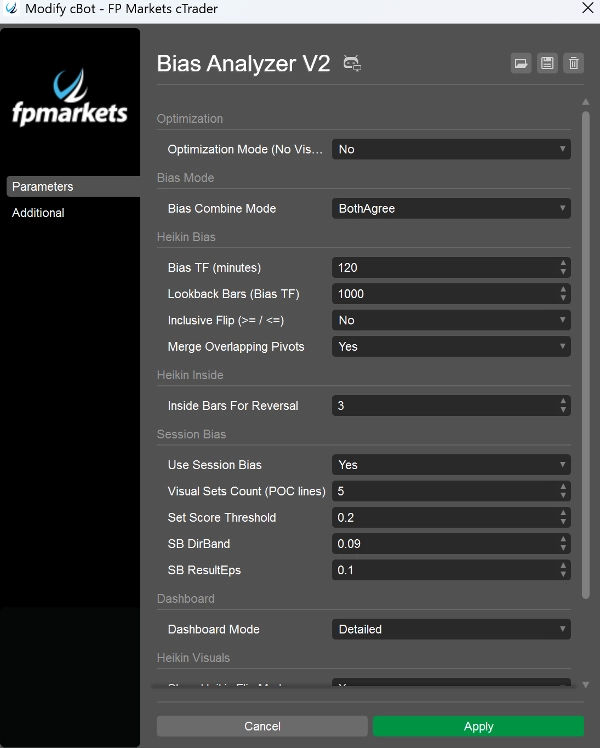
- BothAgree (varsayılan): sadece her iki motor aynı fikirdeyse Boğa/Ayı gösterir; aksi takdirde Dengeli (veya tamamlanmamışsa Beklemede).
- HeikinOnly: sadece daha yüksek zaman dilimi Heikin eğilimi.
- SessionOnly: sadece oturum motoru sonucu.
Bu pratik bir filtredir: daha az işlem ama daha temiz uyum istiyorsanız BothAgree kullanın.
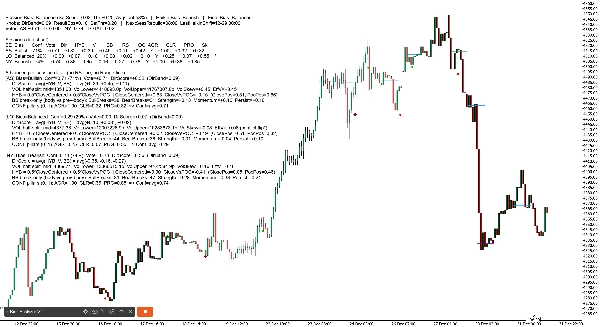
1) Gösterge Paneli Başlığı (üst satır)
Şöyle bir şey görürsünüz:
Oturum Eğilimi: Boğa (SetScore +0.85, Eşik ±0.20, Ortalama Güven 72%) | Heikin Eğilimi: Boğa | Nihai Eğilim: Boğa
Her terimin anlamı
- Oturum Eğilimi: Asya/Londra/NY birleşik yönü
- SetScore: üç oturumun birleşik “oy toplamı”
-
- Her oturum bir Oy = yön işareti × güven katkısı yapar
- Boğa ekler, ayı çıkarır
- Eşik (SetThr): Oturum Eğilimini boğa/ayı olarak adlandırmak için gereken minimum SetScore
-
- SetScore ±Eşik içindeyse → Oturum Eğilimi Dengeli olur
- Ortalama Güven: üç oturumun ortalama güveni (0–100%)
- Heikin Eğilimi: daha yüksek zaman dilimi eğilimi (Boğa/Ayı/Beklemede)
- Nihai Eğilim: birleştirme modunuzdan sonra nihai çıktı (BothAgree / HeikinOnly / SessionOnly)
2) Gösterge Paneli “Düğmeleri” satırı (ayarlar anlık görüntüsü)
Örnek:
Düğmeler: DirBand=0.09 ResultEps=0.10 SetThr=0.20 | NextSessRebuild=17:00 LastHeikinShift=12-30 06:00
Anlamı
- DirBand: bir oturumun boğa veya ayı olarak etiketlenmesi için DirScore’un ne kadar güçlü olması gerektiği
-
- Küçük DirBand = daha fazla sinyal, daha “hassas”
- Büyük DirBand = daha az sinyal, daha muhafazakar
- ResultEps: sonuçların net olup olmadığını belirlerken kullanılan “ölü bölge”
-
- Küçük farkları anlamlı olarak değerlendirmemeye yardımcı olur
- SetThr: birleşik oturum seviyesinde kullanılan eşik (SetScore)
- NextSessRebuild: bir sonraki oturumun yeniden oluşturulacağı zaman (UTC)
- LastHeikinShift: Heikin eğiliminin son değişim zamanı
3) “Oylar” satırı (hızlı toplam)
Örnek:
Oylar: AS +0.40 LO +0.20 NY -0.10 TOPLAM +0.50
Anlamı
- AS / LO / NY oyu = işaret(yön) × güven
- TOPLAM sadece toplamdır
- Bu temelde sizin “oturum skor tablonuzdur.”
4) Ayrıntılı Mod Tablosu (oturum başına döküm)
Ayrıntılı modda, şöyle kompakt bir tablo alırsınız:
SE | Eğilim | Güven | Oy | Dir | HYB | V | BB | RS | OC | AGR | CLR | PRG | Sk
Sütun sütun açıklama (basit)
- SE: oturum etiketi (AS, LO, NY)
- Eğilim: o oturum için Boğa / Ayı / Dengeli
- Güven: o oturum için güven yüzdesi
- Oy: yön oyu (eğilim işareti × güven)
- Dir: DirScore = ortalama(HYB, V, BB)
- HYB: hibrit kapanış konumu puanı
-
- “Aralık içinde kapanış” + “POC’ye karşı kapanış” birleşimi
- V: etkili hacim eğilimi
-
- Üst yarı ile alt yarı oturum hacmine dayanır
- “Sonuç” ile çelişirse dönüş yapabilir (aşağıdaki Sk’ye bakınız)
- BB: gövde-kırılma puanı
-
- Önceki mum gövdesi sınırına karşı sadece kırılma momentumunu ölçer
- RS: Sonuç Puanı (net hareket + HYB karışımı)
-
- “Sonuç netliği” kontrolleri için kullanılır
- OC: sonuç net mi? (E/H)
-
- RS yeterince büyükse (ResultEps’in ötesinde), “net” kabul edilir
- AGR: uyum sütunu (0..1)
-
- HYB/V/BB aynı yöne mi işaret ediyor?
- CLR: açıklık sütunu (0..1)
-
- HYB/V/BB güçlü mü zayıf mı?
- PRG: ilerleme sütunu (0..1)
-
- Oturum istikrarlı mı ilerledi (daha az dalgalanma / daha iyi takip)?
- Sk: eğilim çelişki işareti
-
*hacim eğilimi sonuç yönüyle çelişti ve yanıltıcı eğilimi önlemek için dahili olarak döndürüldü
2) Oturum POC Geçmiş Çizgileri (grafikte)
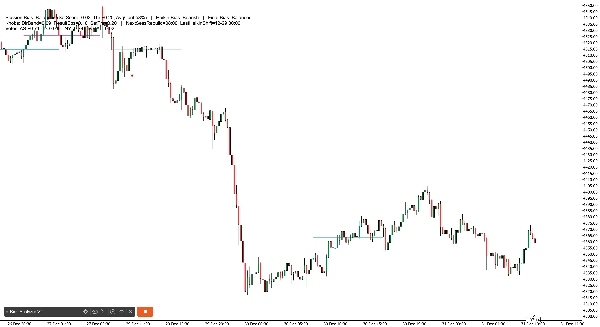
Robot, yakın oturumlar için POC (Kontrol Noktası) gösteren yatay çizgiler çizer:
- AS, LO, NY için ayrı çizgiler
- Birden fazla “geçmiş seti” çizer (varsayılan 6), eskileri soluklaştırır
3) Heikin Dönüş İşaretçileri (grafikte)
Heikin eğilimi döndüğünde, bot işaretçiler basar:
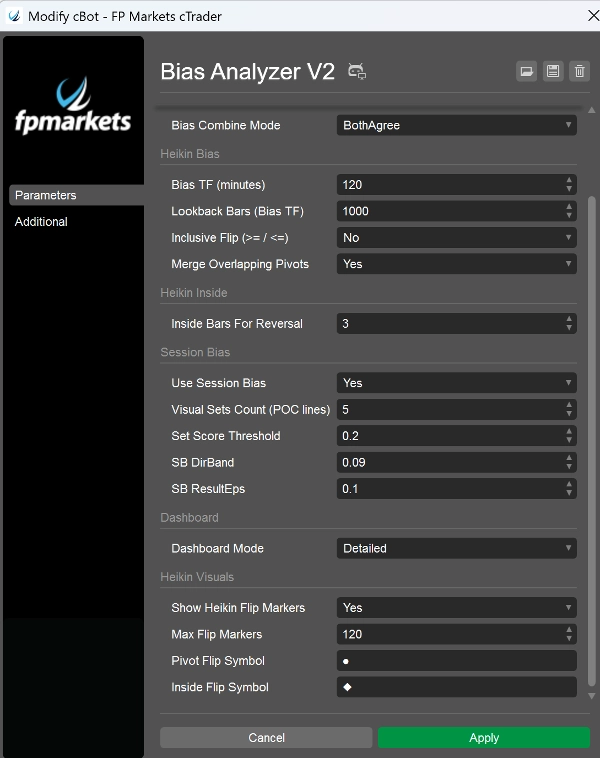
- Dönüm noktası ihlali dönüşü sizin Dönüm Noktası Dönüş Sembolünüzü kullanır (varsayılan ●)
- Inside Engine dönüşü sizin Inside Dönüş Sembolünüzü kullanır (varsayılan ◆)
- Renkler yön ve dönüş türüne göre farklıdır (neden değiştiğini anlayabilmeniz için)
En önemli parametreler (sunumunuzda vurgulanacaklar)
- Eğilim Zaman Dilimi (dakika): Heikin eğilimi için “çapa zaman dilimini” ayarlar (örneğin, 240, 360, 720)
- MinInsideBarsForReversal: inside motorun dönüş yapabilmesi için bobinin ne kadar sıkı olması gerektiğini kontrol eder
- Oturum Eğilimini Kullan: oturum motorunu etkinleştir/devre dışı bırak
- Görsel Set Sayısı: kaç POC geçmiş çizgisinin tutulacağı
- DirBand / ResultEps / SetScoreThreshold: oturum motorunun ne kadar katı olduğunu kontrol eder
- Eğilim Birleştirme Modu: nihai eğilimin ne kadar muhafazakar olduğunu tanımlar
- Gösterge Paneli Modu: BaseOnly vs Ayrıntılı
- Optimizasyon Modu: performans testi için görselleri/kayıt gürültüsünü devre dışı bırakır