
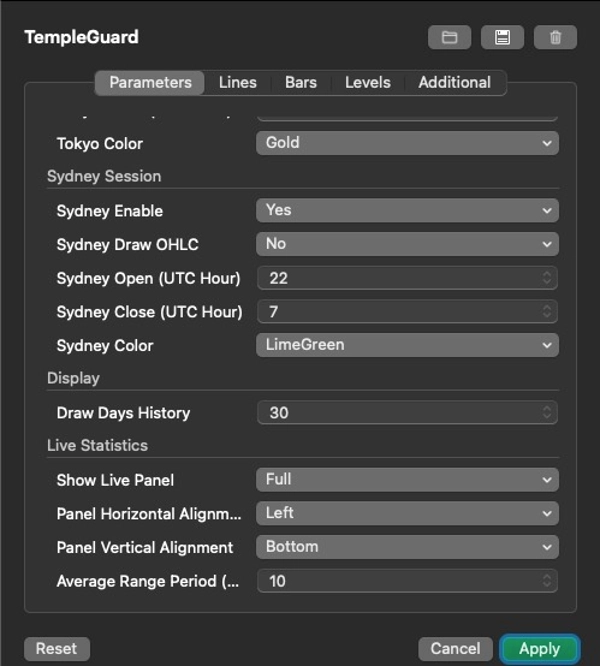

Mô tả
v1.0.2
Introduction
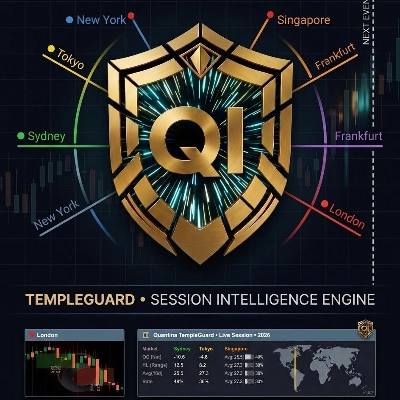
Unlike simple session indicators, Quantina TempleGuard also computes adaptive statistics such as the session Completion Rate and Average Candle Size, and includes a Next Event Marker to help avoid trades during institutional handover periods. These features allow both discretionary traders and cBot developers to calibrate their strategies to real‑time market dynamics rather than generic time blocks.
Modern financial markets are global. Every trading day begins when the first institutional desks in Sydney open, gathers pace through Tokyo and Singapore, accelerates as Frankfurt and London come online, and reaches peak liquidity when New York joins. These regional sessions exhibit distinctive volatility patterns, spreads and order‑flow characteristics. Identifying and quantifying these patterns has traditionally required a combination of experience, manual chart marking and statistical analysis.
Quantina TempleGuard transforms the invisible institutional transitions of the trading day into structured, measurable market intelligence. It draws time‑boxed areas on your chart to show when major sessions are active, calculates descriptive statistics about each session, tracks how much of its typical range has been consumed, and provides a unified panel for at‑a‑glance context. For algorithmic developers, TempleGuard exposes a high‑level interface for filtering trades by session and by exhaustion conditions without exposing proprietary internals.
Cross‑midnight handling
Some sessions start before midnight and end after (Sydney: 22:00–07:00 UTC). Rather than splitting the session into two boxes across the midnight divider, TempleGuard creates a unified structure that carries over into the next calendar day. The live statistics panel aggregates data across the entire session, avoiding artificial discontinuities at midnight. If you use cBots, you can rely on consistent session identifiers irrespective of date boundaries.
Visual hierarchy
In markets with overlapping sessions, it is essential to avoid visual clutter. TempleGuard layers sessions on top of each other using a render level hierarchy. Lower‑level sessions (e.g. Sydney) are drawn first; higher‑level sessions (e.g. London, New York) are drawn on top. You can adjust the render levels in the settings if you prefer a different stacking order.
Session interplay and overlaps
While each session has a nominal start and end time, the real market does not reset at fixed boundaries. Activity often bleeds across sessions, creating periods of overlap where liquidity and volatility can increase dramatically. The most important overlap is between London and New York, roughly 13:00–17:00 UTC, where both major financial centres are active simultaneously. This window typically produces the day’s largest moves and requires robust risk management.
Other overlaps can also generate opportunities or noise. The tail end of the Asian sessions (Tokyo/Singapore) meets the European open, sometimes causing false spikes as liquidity transitions from east to west. TempleGuard’s layered session boxes make these overlaps obvious so you can adapt your strategy – for example, waiting for a breakout during the London open or reducing exposure when the Asian session is winding down.
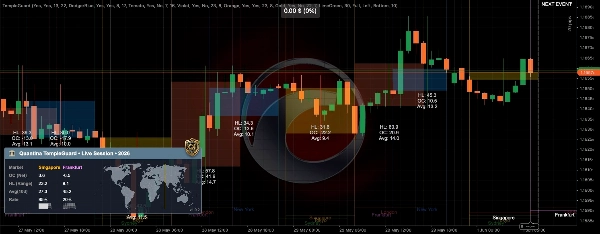
TempleGuard provides two formats for viewing session statistics: Full and Compact. Both panels update in real time, and you can drag them anywhere on your chart or minimise them when not needed.
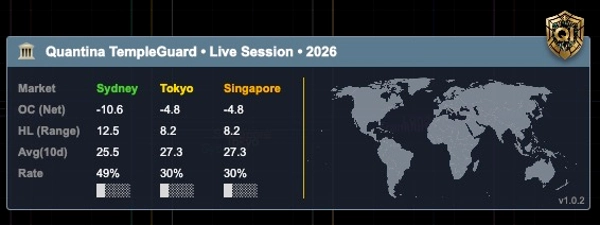
The full panel displays the following metrics for each active or recently closed session:
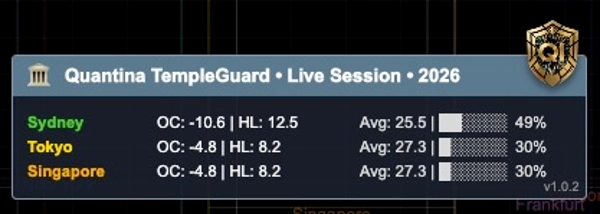
- Net Change (OC) – the directional displacement of the session from its opening price to its current price. Positive values suggest a bullish bias, negative values bearish. The calculation uses the symbol’s pip size; you see the result in pips rather than raw price.
- High–Low Range (HL) – the total vertical range between the highest high and the lowest low within the session. This measures volatility rather than direction.
- Average Candle Size (Avg) – the average trading range of the 1‑hour bars within the session so far. This metric gives you an indication of the session’s ‘stride’ or micro‑volatility.
- Completion Rate (Rate %) – the ratio of the current session range to its historical average over the past N days, expressed as a percentage. A value near 100 % suggests that the session has already covered most of its statistically expected range. A rate above 100 % signals potential exhaustion.
In addition to the numeric values, the panel shows a colour‑coded progress bar representing the completion rate. The bar gradually fills from left to right; it turns red when the rate exceeds 100 %, warning you of an overextended session.
Compact panel
If you prefer a more minimalist view, enable the Compact Panel. It displays only the most essential metrics (Net Change, HL Range and Completion Rate) in a single row per session, saving screen space. Use the compact mode when you run multiple indicators or when screen space is limited.
Multi‑session overview
For a quick snapshot of several sessions at once, TempleGuard’s panel can display multiple rows summarising the most recently closed sessions. The example below shows statistics for Sydney, Tokyo and Singapore. Notice how the Net Change, HL Range, Average and Completion Rate provide an at‑a‑glance comparison of the sessions’ behaviour:
Summary panel
Session Rendering and OHLC Boxes
Session boxes and trend lines
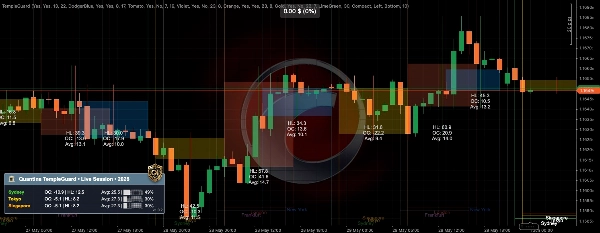
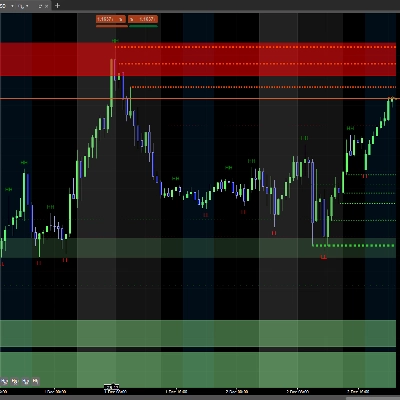
TempleGuard draws semi‑transparent boxes on your chart that correspond to each session’s active period. The boxes are colour‑coded according to the session and include thin trend lines at the top and bottom to mark the session’s high and low levels. The opacity of the boxes can be adjusted or disabled altogether in the settings.
OHLC breakout boxes
For selected sessions (typically Tokyo and Singapore), you can enable OHLC breakout boxes. After a session closes, TempleGuard draws a rectangular box that spans the session’s high and low. This box is often referred to as an accumulation zone, reflecting the tendency for the Asian sessions to trade in a relatively tight range. Traders often monitor subsequent sessions to see if price breaks out of this zone.
The box includes a centre line representing the midpoint between the high and low. This line can serve as a stop‑loss anchor when trading breakouts. A typical breakout approach is to enter a trade when price closes above the high or below the low of the box during the first part of the London session. The box’s average candle size can be used to project potential take‑profit targets (see Trading Methodology).
Quantina TempleGuard
Professional Market Session Intelligence Framework
Version 1.0.2 — June 2026
Developed by Quantina Ltd., Quantina Intelligence Research Lab.
About this document
This manual describes the operation, features, best‑practices and legal terms of the Quantina TempleGuard indicator. The TempleGuard is a professional market session visualiser and statistics engine designed for the cTrader platform. It transforms the invisible institutional transition points of the trading day into clearly defined boundaries, statistical panels and actionable context for manual traders and algorithmic strategies.
The information in this manual is intended for educational purposes only. It does not constitute investment advice, and it does not guarantee profitability. Use at your own risk. See the Risk Disclosure and Legal Notice sections for further details.
Legal Notice and Compliance
Copyright and Intellectual Property
© 2013–2026 Quantina Ltd. All rights reserved.
“TempleGuard,” “Quantina” and “Quantina Intelligence Research Lab.” are trademarks and intellectual property of Quantina Ltd. No part of this publication may be reproduced, distributed or modified without the prior written permission of the copyright holder.
All source code, algorithms, designs, icons, images and the documentation itself are protected under international copyright law. Unauthorised use, reproduction or dissemination is strictly prohibited.
Licensing model
Quantina TempleGuard is provided strictly on a licence basis. When you obtain a copy of this indicator you are notpurchasing the software itself or any intellectual property in it. Instead, you are granted a limited, non‑exclusive, non‑transferable right to use the software for a specified period of time in accordance with the terms of the End‑User Licence Agreement (EULA).
The software remains the sole property of Quantina Ltd., and no rights are granted to copy, modify, reverse‑engineer, rent, sell, sub‑licence or otherwise distribute it. This rental‑style model has been consistently applied across all Quantina products: users pay for access and support; they do not acquire ownership of the underlying code or intellectual property【421048547653464†L82-L100】. Maintaining control over distribution allows Quantina to protect its proprietary algorithms and to provide timely updates and support.
FCA and UK regulatory context
TempleGuard is a market analysis tool that provides visualisation and statistics; it does not execute trades on behalf of the user, does not manage funds, and does not constitute a regulated investment service. As such, it does not require authorisation by the UK Financial Conduct Authority (FCA). It is the user’s responsibility to ensure that their use of TempleGuard complies with local regulations and with the policies of their broker or prop firm. Nothing in this manual should be construed as legal or financial advice.
Risk disclosure
Trading leveraged financial products such as forex, CFDs or futures involves substantial risk. Past performance is not indicative of future results. The statistical outputs and session analysis provided by TempleGuard are descriptive, not predictive【421048547653464†L82-L100】. Markets can move beyond historical averages and break technical structures without warning. Users are solely responsible for their trading decisions, including but not limited to position sizing, stop losses and capital allocation. Only trade with capital you can afford to lose.
No financial advice
TempleGuard is neither an investment advisor nor a broker. The software, its outputs and this manual are provided for informational and educational purposes only. Quantina Ltd. does not provide personalised financial advice. Always consult a qualified professional before making trading decisions.
Tóm tắt
Thảo luận
Đánh giá của khách hàng
Câu hỏi thường gặp





Giá