
说明
注意:仅在cTrader Windows上测试。
成交量轮廓
在价格图表中绘制的垂直轮廓,用于显示在哪个价格有更多/更少的成交量(交易兴趣)。
灵活的成交量轮廓指标
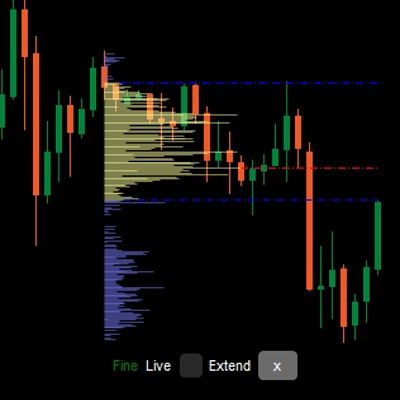
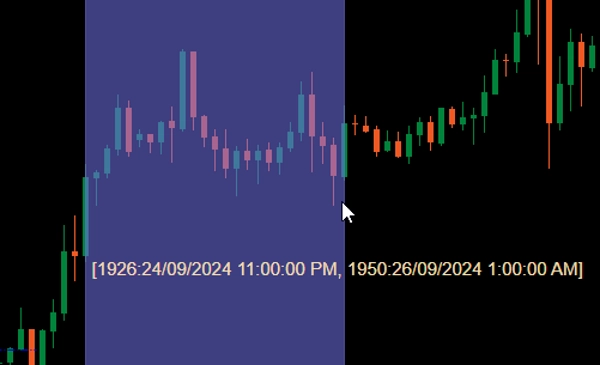
添加到图表后,按住Ctrl并用鼠标左键拖动价格图表中的某个区域,即可为该区域绘制轮廓。
为了性能考虑,轮廓将以两种状态绘制:
- 粗略轮廓:指标将使用由CoarseTF定义的时间框架(默认m5)加载成交量信息,通常速度较快。当显示粗略轮廓时,精细轮廓将在后台加载。
- 精细轮廓:更精确的轮廓,使用由FineTF定义的时间框架(默认m1),但您可以将其设置为最细(t1 - 单个tick)。然而,如果您查看的是日线或更长时间框架的图表,设置为tick时间框架将增加加载时间。
参数
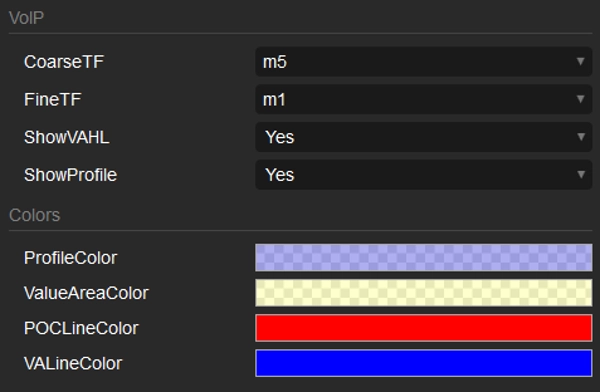
- CoarseTF:粗略数据的时间框架(默认m5)。
- FineTF:精细数据的时间框架(默认m1)。
- ShowVAHL:显示VAH(价值区高点)和VAL(价值区低点)。
- ShowProfile:如果为是,则显示完整轮廓,否则仅显示VAH、VAL和POC(控制点)。
- Colors:颜色自定义。
使用方法
将指标添加到价格图表后,按住Ctrl并用鼠标左键拖动选择您想要绘制轮廓的图表区域,就完成了。
轮廓渲染完成后,您将在轮廓底部看到一些信息/操作:
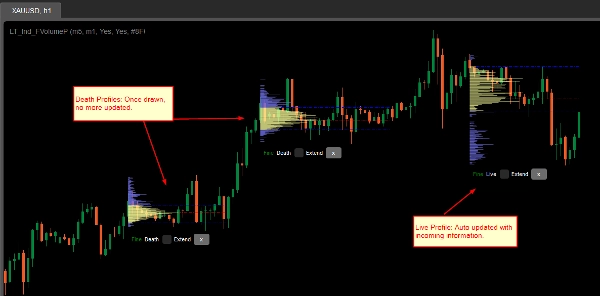
- 粗略/精细:轮廓的状态。
- 死亡/实时:如果您的轮廓覆盖了最新的柱(蜡烛),则为实时轮廓,并会自动更新最新信息。
- 扩展复选框:勾选以使VAH、VAL和POC线延伸到最新的柱(蜡烛)。
- x按钮:点击以从图表中移除轮廓。
摘要
AI 摘要
LT Flexible Volume Profile is a volume profile indicator designed for use on price charts, primarily tested on cTrader Windows. It visually represents trading volume distribution across price levels within a selected chart area, highlighting where trading interest is higher or lower.
Users activate the profile by holding Ctrl and dragging the mouse over a desired chart region. The indicator operates in two modes for performance optimization: a Coarse profile using a configurable timeframe (default 5 minutes) for faster loading, and a Fine profile using a finer timeframe (default 1 minute, with an option down to single ticks) for more precise volume data.
Key parameters include:
- CoarseTF and FineTF: timeframes for coarse and fine volume data aggregation.
- ShowVAHL: toggles display of Value Area High (VAH) and Value Area Low (VAL).
- ShowProfile: controls whether the full profile or only key levels (VAH, VAL, Point of Control) are shown.
- Colors: customizable color settings.
After rendering, the profile provides status indicators (Coarse/Fine, Live/Dead), options to extend VAH, VAL, and POC lines to the latest bar, and the ability to remove the profile. This tool supports detailed volume analysis to assist traders in identifying significant price levels based on traded volume.
Users activate the profile by holding Ctrl and dragging the mouse over a desired chart region. The indicator operates in two modes for performance optimization: a Coarse profile using a configurable timeframe (default 5 minutes) for faster loading, and a Fine profile using a finer timeframe (default 1 minute, with an option down to single ticks) for more precise volume data.
Key parameters include:
- CoarseTF and FineTF: timeframes for coarse and fine volume data aggregation.
- ShowVAHL: toggles display of Value Area High (VAH) and Value Area Low (VAL).
- ShowProfile: controls whether the full profile or only key levels (VAH, VAL, Point of Control) are shown.
- Colors: customizable color settings.
After rendering, the profile provides status indicators (Coarse/Fine, Live/Dead), options to extend VAH, VAL, and POC lines to the latest bar, and the ability to remove the profile. This tool supports detailed volume analysis to assist traders in identifying significant price levels based on traded volume.
指标配置
讨论
客户评价
5.0
评价:3
5 | 100 % | |
4 | 0 % | |
3 | 0 % | |
2 | 0 % | |
1 | 0 % |
客户评价
October 1, 2024
Sensible product to test around volume based context. The useful part is checking participation, value areas and pressure, with the numbers checked before scaling. I would review 20 reactions near POC or VWAP before trusting the read. The data helps most when price action confirms the same zone.
September 30, 2024
September 30, 2024
Good tool for patience if the trader wants it adds useful information behind the price move. It works best as support, not a final decision maker. Volume context is stronger when POC, VWAP and value area agree across 2 sessions. volume alone can be noisy without price action.
常见问答
Forex
cTrader Store 提供的所有产品,包括交易机器人、指标和插件,均由第三方开发者提供,仅供信息参考和技术访问之用。cTrader Store 并非经纪商,不提供投资建议、个人推荐或任何未来业绩保证。









价格

注册日期 25/09/2024
38
销售