00
Days
:
00
Hours
:
00
Minutes
:
00
Seconds
Multi-Timeframe Market Levels
指标
10 购买
版本 1.0, Dec 2024
Windows 版、Mac 版
5.0
评价:1
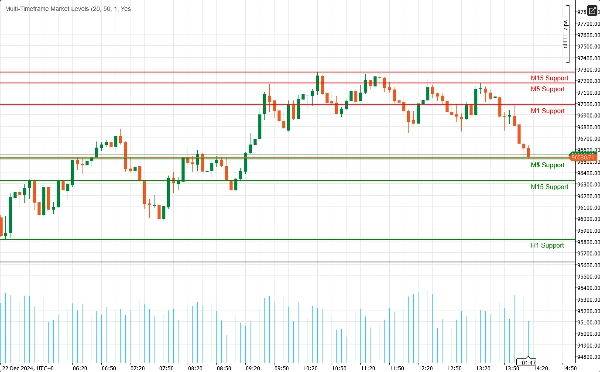
"Multi-Timeframe Market Levels" 已上传图片"Multi-Timeframe Market Levels" 已上传图片"Multi-Timeframe Market Levels" 已上传图片"Multi-Timeframe Market Levels" 已上传图片"Multi-Timeframe Market Levels" 已上传图片
注册日期 22/11/2024
104
销售
2.34K
免费安装

Enhanced Support Resistance Indicator

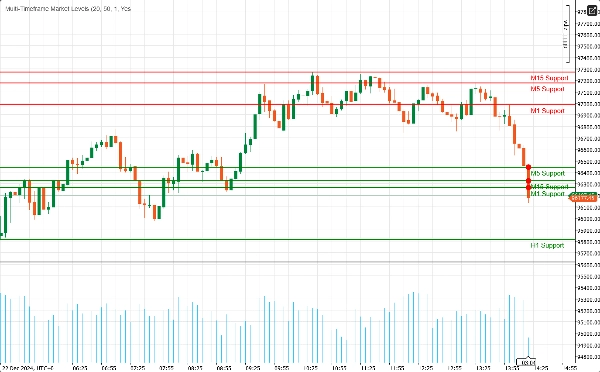
Unlock the power of technical analysis with our Enhanced Support Resistance Indicator for cAlgo. This advanced tool is designed to help traders identify and visualize critical support and resistance levels on their trading charts, enhancing decision-making and trading strategies.

Key Features:

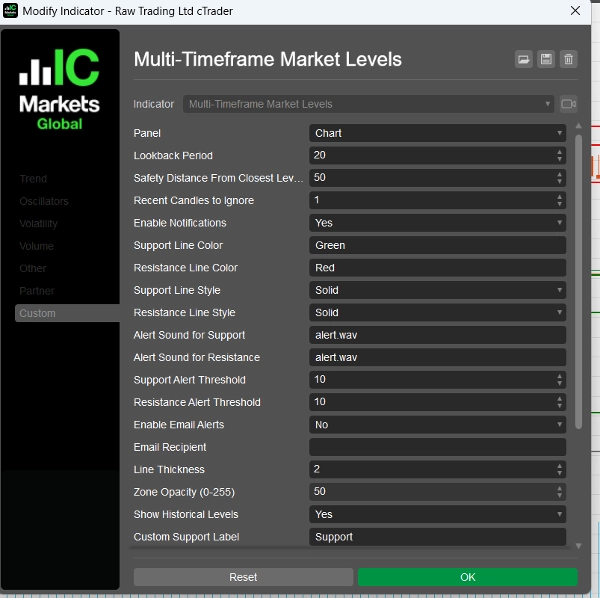
  • Customizable Parameters: Tailor the indicator to your trading style with adjustable settings, including lookback periods, safety distances, alert sounds, and more.
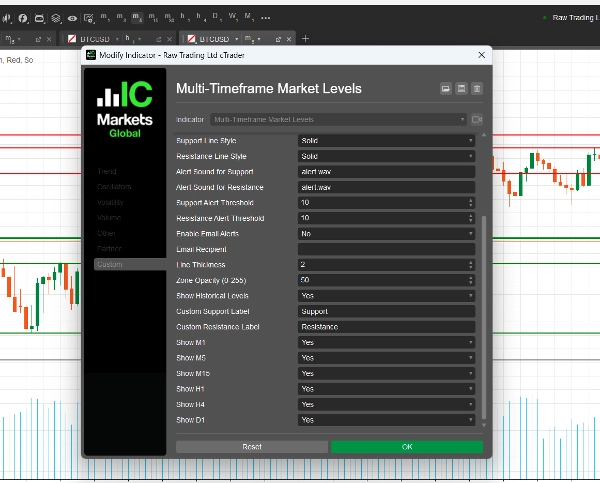
  • Multi-Timeframe Support: Analyze multiple timeframes simultaneously (M1, M5, M15, H1, H4, D1) to gain a comprehensive view of market dynamics and identify key levels across different trading horizons.
  • Real-Time Alerts: Stay informed with instant notifications! The indicator can send audio alerts and email notifications when the price approaches critical support or resistance levels, ensuring you never miss a trading opportunity.
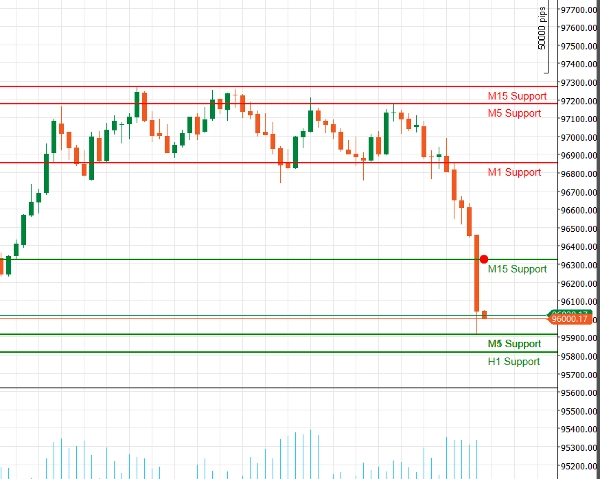
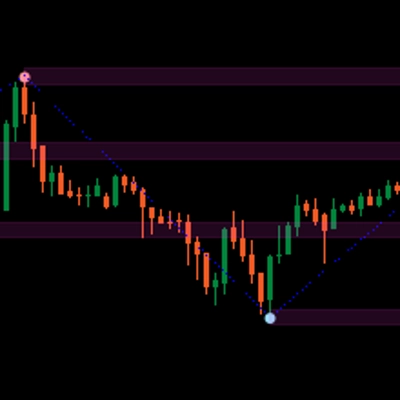
  • Visual Clarity: Enjoy clear visual representations of support and resistance levels, complete with customizable colors and line styles. Highlighted zones provide additional context, making it easier to spot potential reversal points.
  • Fibonacci Integration: Enhance your analysis with built-in Fibonacci level drawing, allowing you to identify potential retracement and extension levels in conjunction with support and resistance.
  • User-Friendly Interface: Designed for both novice and experienced traders, the indicator is easy to set up and integrates seamlessly into your existing cAlgo environment.

How to Use the Enhanced Support Resistance Indicator

  1. Installation:
    • Download the indicator and import it into your cAlgo platform.
    • Attach the indicator to your desired chart.
  2. Configure Parameters:
    • Adjust the settings to fit your trading style. Set the lookback period, safety distance, and choose your preferred colors and line styles for support and resistance levels.
    • Enable notifications if you wish to receive alerts when the price approaches these levels.
  3. Select Timeframes:
    • Choose which timeframes you want to display. You can opt to show or hide levels from M1, M5, M15, H1, H4, and D1, depending on your trading strategy.
  4. Analyze the Chart:
    • Observe the support and resistance levels drawn on your chart. These levels indicate where the price is likely to reverse or consolidate.

How to Trade with the Enhanced Support Resistance Indicator

  1. Identifying Entry Points:
    • Long Trades: Look for buying opportunities when the price approaches a support level, especially if it shows signs of bouncing back (e.g., bullish candlestick patterns).
    • Short Trades: Consider selling when the price nears a resistance level, particularly if there are bearish signals (e.g., bearish candlestick patterns).
  2. Using Alerts:
    • Utilize the real-time alerts to notify you when the price approaches key support or resistance levels. This allows you to act quickly and capitalize on potential trading opportunities.
  3. Combining with Other Indicators:
    • Enhance your strategy by combining the Enhanced Support Resistance Indicator with other technical indicators (e.g., Moving Averages, RSI, MACD) to confirm signals and improve the accuracy of your trades.
  4. Setting Stop-Loss and Take-Profit Levels:
    • Place stop-loss orders just below support levels for long trades and just above resistance levels for short trades to manage risk.
    • Set take-profit targets at the next significant support or resistance level to maximize potential gains.

Why Choose Enhanced Support Resistance?

Navigating the complexities of the financial markets can be challenging. The Enhanced Support Resistance Indicator equips you with the tools you need to identify key price levels and make informed trading decisions. Whether you’re a day trader or a long-term investor, this indicator is an essential addition to your trading toolkit.

5.0
评价:1
5
100 %
4
0 %
3
0 %
2
0 %
1
0 %
客户评价
August 18, 2025
Displays support/resistance levels from multiple timeframes in one chart. Clear visual hierarchy and flexible settings. Cons: No alerts or tooltips. Can't save presets or filter levels dynamically.
RSI
MACD

该作者的其他作品

指标
Indices
RSI
Stocks
+3
Advanced RSI Indicator with multi-MA smoothing, Bollinger Bands, divergence detection, and fill zones for cTrader.
指标
NAS100
NZDUSD
Martingale
+26
The Support & Resistance Pro helps traders identify key support and resistance levels for informed trading decisions.
FiboSmart cBot automates Fibonacci-based trading with trend, RSI, and MACD filters, plus built-in money management, trai
指标
ATR
Stocks
Commodities
+2
LevelMaster S/R: Pinpoint key support & resistance zones with precision. Perfect for traders of all levels Trade smarter
指标
NAS100
NZDUSD
Martingale
+26
Complete ICT Killzones: 5 sessions, easy colors, transparency controls & session info. Professional timing for cTrader.
SmartFibonacci — automatic Fibonacci retracements & extensions with swing detection, alerts and clean labels for cTrader
指标
RSI
Breakout
XAUUSD
+1
Automatic ZigZag swings with dynamic support & resistance levels, labeling highs/lows for clear trend signals.
指标
Indices
Stocks
Forex
+4
🚀 MACD Pro Trader – Advanced MACD with buy/sell signals, custom MAs & color-coded histograms for smarter trading! 📈🔥
指标
VWAP
Indices
RSI
+4
Advanced Anchored VWAP for cTrader: volatility bands, real‑time alerts & customizable session resets.
指标
RSI
EURUSD
MACD
Precision Supply & Demand zones indicator—automatically plots key buy/sell areas on your chart for smarter entries.
指标
Signal
MACD
Enhance your trading strategy with our customizable TradingViewMACD indicator. Optimize and elevate your market analysis
指标
Breakout
FlexSR auto‑detects pivot highs/lows to plot dynamic support & resistance lines Features customizable styling and option

猜您喜欢

指标
Grid
NAS100
NZDUSD
+15
The FZ indicator draws Fibonacci channel zones based on the highest and lowest prices over a user-defined period.
指标
NAS100
RSI
NZDUSD
+17
Institutional liquidity map for XAUUSD. Spot stop hunts, find the next target, and get a full trade setup automatically.
指标
Indices
Prop
FVG
+6
SMC indicator for cTrader detecting order blocks, fair value gaps, liquidity sweeps and market structure with buy/sell
指标
Grid
NAS100
NZDUSD
+13
PhantomGrid draws clear grid levels to help spot entries, exits, and key price zones with ease.
指标
Indices
Prop
Stocks
+3
Visualize the four major trading sessions with color-coded rectangles showing session high/low ranges.
指标
NAS100
RSI
NZDUSD
+14
Scalping & Swing signals in one. Smart S/R, Auto SL/TP, HTF panel. No repainting. Built for serious traders.
指标
NAS100
NZDUSD
XAUUSD
+10
Sero is a stochastic-based momentum oscillator that gives clear, color-coded visual signals for market momentum shifts.
指标
NAS100
Breakout
XAUUSD
+6
GUPPY TREND MASTER V3.. Visualize Market Sentiment with the 38-EMA Rainbow The Guppy Trend Master 4X4 Indicator
指标
Grid
NAS100
NZDUSD
+19
Session Volume Profile
指标
NAS100
RSI
NZDUSD
+13
🚀 HAI QUANTUM v4.0 | The Ultimate Quantum Terminal for cTrader (Smart Money & Algorithmic Trading)
指标
Indices
Signal
AI
🔥 THIS BURNS JP225 INDICATOR – Professional Trading Signals
指标
Grid
Indices
XAUUSD
+6
Follow The Trend cBot - INDICATOR - displays two Moving Average Bands for cBot or for your own use
注册日期 22/11/2024
104
销售
2.34K
免费安装