الوصف
ملف سيولة وامتصاص الحيتان
تتبع الأموال المؤسسية، حلل تدفق الأوامر، واكتشف مناطق الانعكاس بدقة حجمية
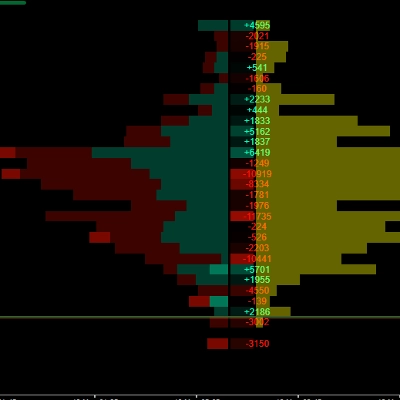
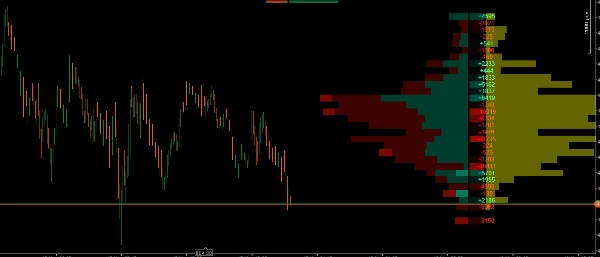
الملف سيولة وامتصاص الحيتان ليس ملف الحجم التقليدي الخاص بك. إنه مجموعة أدوات تحليل بنية السوق الدقيقة التي تفصل كل معاملة لتظهر لك ليس فقط أين تم تداول الحجم، بل من قام بالتداول (مؤسسي مقابل تجزئة) و كيف تفاعل السعر عند تلك المستويات (العدوانية مقابل الامتصاص).
يتميز بمحرك عرض محسن يعرض جميع البيانات إلى يمين السعر الحالي، مما يحافظ على نظافة الرسم البياني وخلوه من التأخير.
الميزات الرئيسية
- مرشح القوة (للحيتان فقط): يستخدم خوارزمية النسبة المئوية (مثلاً، أعلى 97٪) لفصل حجم المؤسسات ("القوي") عن حجم التجزئة ("الضعيف"). يمكنك تفعيل وضع "القوي فقط" لتتبع بصمة الأموال الذكية حصريًا.
- ملف حجم مكدس: يعرض بصريًا توزيع حجم الشراء والبيع لكل مستوى سعري، مما يسهل تحديد نقطة السيطرة (POC) وعقد الحجم العالي/المنخفض (HVN/LVN).
- كشف منطقة القيمة التلقائي: يبرز مستويات السعر حيث تم تداول أعلى نسبة من الحجم (الافتراضي 70٪)، مع تعتيم المناطق الخارجية لقراءة سياق السوق بسهولة بنظرة سريعة.
- ملف دلتا (خريطة حرارية): يحسب الفرق الدقيق بين عمليات الشراء والبيع في السوق عند كل مستوى سعري. يشمل القيم الرقمية وخريطة حرارية بصرية لتحديد من يسيطر بعدوانية بسرعة.
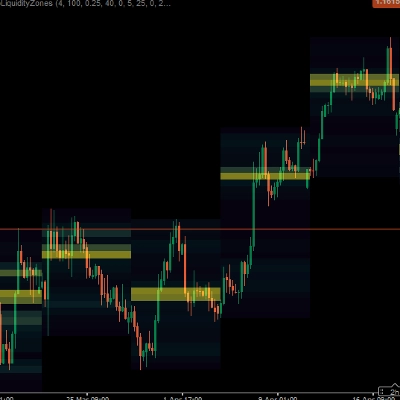
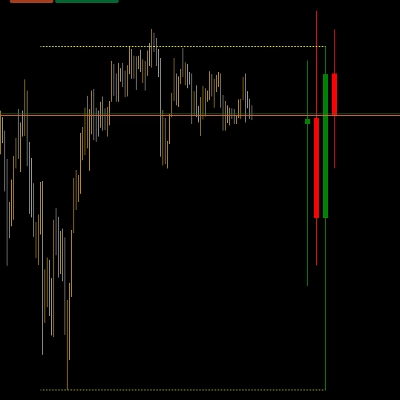
- ملف الامتصاص (المناطق الصفراء): يقيس الحجم المحبوس تحديدًا داخل شعيرات الشمعة. هذا يسمح لك برؤية مكان امتصاص الأموال الذكية للسيولة بشكل سلبي من المتداولين المحاصرين في التجزئة.
- أداء محسن: تتم معالجة الحسابات الحجمية الثقيلة فقط على الشمعة الأخيرة، مما يضمن تشغيل منصة cTrader بسلاسة وكفاءة، حتى على الأطر الزمنية الأقل.
كيف تستخدم هذا المؤشر في تداولك؟
يوفر هذا المؤشر 3 طبقات من التأكيد لصفقاتك. إليك كيفية دمجها بفعالية:
1. حدد السياق باستخدام ملف الحجم ومنطقة القيمة
- استخدم ملف الحجم لتحديد مكان قبول السعر الأعلى (منطقة القيمة ونقطة السيطرة).
- الاستراتيجية: ابحث عن فرص شراء في أسفل منطقة القيمة (الدعم) وفرص بيع في أعلى منطقة القيمة (المقاومة).
2. قيّم العدوانية باستخدام ملف الدلتا
- عندما يصل السعر إلى مستواك الرئيسي (مثلاً، منطقة دعم)، انظر إلى عمود الدلتا.
- الاستراتيجية: إذا كنت تبحث عن شراء عند الدعم، تريد رؤية دلتا إيجابية قوية (خضراء) عند ذلك المستوى، مما يشير إلى أن المشترين يتدخلون بعدوانية. إذا ظلت الدلتا سلبية بشدة، فإن البائعين ما زالوا يسيطرون.
3. ابحث عن الزناد المثالي باستخدام ملف الامتصاص (جوهر المؤشر)
- هنا يبرز الأداة حقًا. غالبًا ما يبدو السوق وكأنه يهبط بقوة (دلتا سلبية قوية)، ومع ذلك يتوقف السعر عن الانخفاض. لماذا؟ لأن "الحيتان" تستخدم أوامر الحد لتمتص كل ضغط البيع هذا.
- الاستراتيجية (صفقة انعكاس): إذا رأيت السعر ينخفض إلى مستوى حرج وكانت الدلتا سلبية (بائعون تجزئة محاصرون)، لكن فجأة يظهر شريط أصفر كبير في ملف الامتصاص، فهذا يعني أن المؤسسات قد امتصت للتو كل السيولة في تلك الشعرة. هذا هو الزناد الأمثل للدخول في الاتجاه المعاكس!
4. استخدم "مرشح القوة" لتصفية الضوضاء
- إذا كان السوق يتماسك والاتجاه غير واضح، فعّل خيار "القوي فقط". سيخفي هذا كل ضوضاء التجزئة غير ذات الصلة ويظهر لك بالضبط أين تقوم الصناديق الكبيرة بتجميع أو توزيع مراكزها.
الملخص
A Delta Profile heatmap calculates the net difference between market buys and sells at each price level, showing buyer or seller aggression. The Absorption Profile identifies volume trapped in candlestick wicks, revealing where institutional traders absorb liquidity from retail participants. The indicator’s optimized engine processes heavy volumetric calculations only on the latest candle, ensuring smooth performance on the cTrader platform.
Traders can use this tool to define market context, evaluate buying or selling aggression, and pinpoint reversal triggers based on absorption patterns. The "Strong Only" mode filters out retail noise during consolidation phases, focusing on institutional accumulation or distribution zones. This indicator supports volume and DOM data visualization to enhance decision-making around key support and resistance levels.
تقييمات العملاء
5 | 100 % | |
4 | 0 % | |
3 | 0 % | |
2 | 0 % | |
1 | 0 % |