
Beschreibung
✅ UATKit wird als kostenlose Geste an die cTrader-Community bereitgestellt, erstellt von einem professionellen Trader, der die täglichen Herausforderungen der Chartanalyse und Ausführung versteht.
⚠️Bitte überprüfen Sie die Produktseite regelmäßig auf Updates, da cTrader die Nutzer nicht benachrichtigt, wenn neue Versionen von Indikatoren veröffentlicht werden.
⭐️ Ich freue mich auch über Ihre Kommentare und Ihr Feedback in den Kundenbewertungen und Diskussionsbereichen.
1. Was dieses Produkt ist
Ein umfassendes Workflow-Verbesserungs-Toolkit, das das Charting auf cTrader reibungsloser, klarer und effizienter macht.
Universal Assistant Toolkit (UATKit) ist ein multifunktionaler Chart-Begleiter für cTrader.
Es vereint mehrere praktische Werkzeuge – jedes entwickelt, um ein spezifisches Workflow-Bedürfnis zu lösen – in einem einheitlichen, leichten Indikator.
Jede Funktion in UATKit ist vollständig anpassbar und arbeitet unabhängig, sodass Trader die volle Kontrolle haben, Verhalten, Darstellung und Hotkeys anzupassen und nur die Werkzeuge zu aktivieren, die sie für eine saubere, reaktionsschnelle Chart-Erfahrung benötigen.
UATKit wird als kostenlose Geste an die cTrader-Community bereitgestellt, erstellt von einem professionellen Trader, der die täglichen Herausforderungen der Chartanalyse und Ausführung versteht.
2. Für wen dieses Toolkit gedacht ist
UATKit ist für Trader entwickelt, die:
- viel Zeit mit der Analyse von Charts verbringen
- saubere, informative und anpassbare Chart-Layouts bevorzugen
- schnelleren Zugriff auf häufige Aktionen über Hotkeys wünschen
- visuelle Klarheit während schnelllebiger Märkte benötigen
- Werkzeuge schätzen, die den Workflow verbessern, ohne Lärm hinzuzufügen
Egal ob Sie scalpen, swingtraden oder einfach eine organisiertere Chart-Umgebung wünschen, UATKit passt sich Ihrem Stil an.
3. Überblick über die Funktionsgruppen
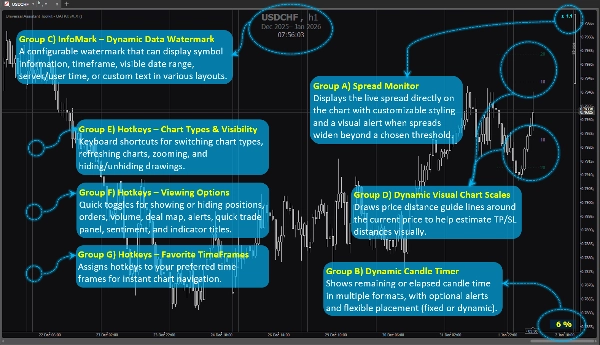
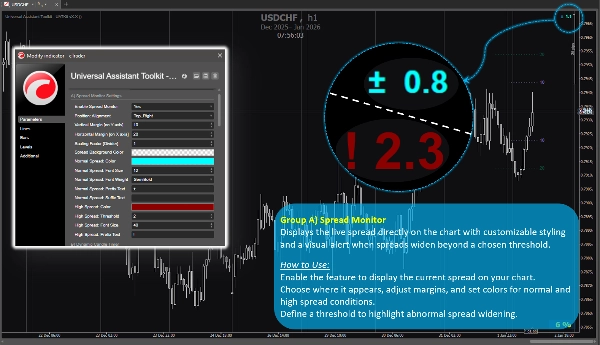
Funktionsgruppe A) 🔸 Spread Monitor
Zeigt den Live-Spread direkt im Chart mit anpassbarem Stil und einer visuellen Warnung, wenn sich der Spread über einen gewählten Schwellenwert hinaus ausweitet.
Anwendung:
Aktivieren Sie die Funktion, um den aktuellen Spread in Ihrem Chart anzuzeigen.
Wählen Sie den Anzeigebereich, passen Sie Abstände an und legen Sie Farben für normale und hohe Spread-Bedingungen fest.
Definieren Sie einen Schwellenwert, um eine abnormale Spread-Ausweitung hervorzuheben.
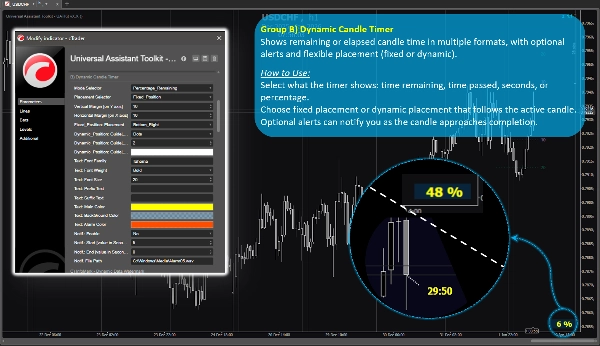
Funktionsgruppe B) 🔸 Dynamischer Kerzen-Timer
Zeigt verbleibende oder vergangene Kerzenzeit in mehreren Formaten, mit optionalen Warnungen und flexibler Platzierung (fest oder dynamisch).
Anwendung:
Wählen Sie, was der Timer anzeigt: verbleibende Zeit, vergangene Zeit, Sekunden oder Prozentsatz.
Wählen Sie feste Platzierung oder dynamische Platzierung, die der aktiven Kerze folgt.
Optionale Warnungen können Sie benachrichtigen, wenn sich die Kerze dem Ende nähert.
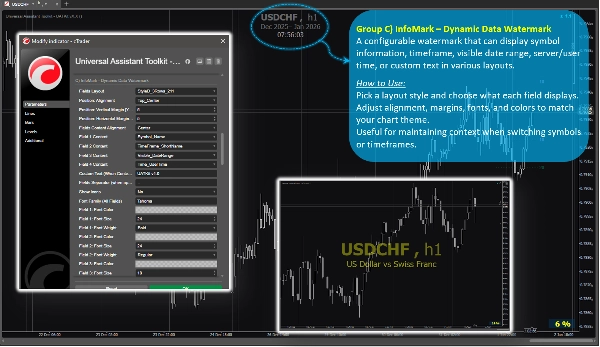
Funktionsgruppe C) 🔸 InfoMark – Dynamisches Daten-Wasserzeichen
Ein konfigurierbares Wasserzeichen, das Symbolinformationen, Zeitrahmen, sichtbaren Datumsbereich, Server-/Benutzerzeit oder benutzerdefinierten Text in verschiedenen Layouts anzeigen kann.
Anwendung:
Wählen Sie einen Layoutstil und bestimmen Sie, was jedes Feld anzeigt.
Passen Sie Ausrichtung, Abstände, Schriftarten und Farben an, um Ihr Chart-Thema zu ergänzen.
Nützlich, um den Kontext beim Wechseln von Symbolen oder Zeitrahmen beizubehalten.
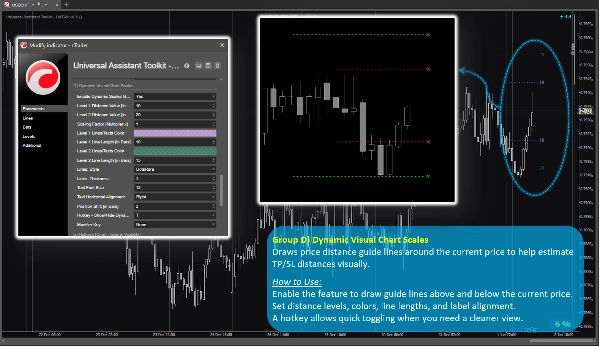
Funktionsgruppe D) 🔸 Dynamische visuelle Chart-Skalen
Zeichnet Preis-Abstand-Hilfslinien um den aktuellen Preis, um TP/SL-Abstände visuell einzuschätzen.
Anwendung:
Aktivieren Sie die Funktion, um Hilfslinien ober- und unterhalb des aktuellen Preises zu zeichnen.
Legen Sie Distanzstufen, Farben, Linienlängen und Beschriftungsausrichtung fest.
Ein Hotkey ermöglicht schnelles Umschalten, wenn Sie eine klarere Ansicht benötigen.
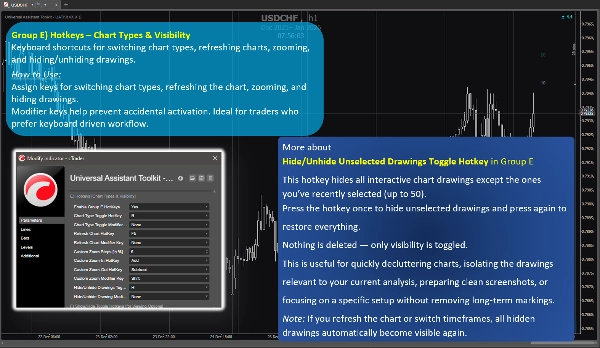
Funktionsgruppe E) 🔸 Hotkeys – Charttypen & Sichtbarkeit
Tastenkombinationen zum Wechseln der Charttypen, Aktualisieren der Charts, Zoomen und Ein-/Ausblenden von Zeichnungen.
Anwendung:
Weisen Sie Tasten zum Wechseln der Charttypen, Aktualisieren des Charts, Zoomen und Ausblenden von Zeichnungen zu.
Modifikatortasten helfen, versehentliche Aktivierungen zu vermeiden. Ideal für Trader, die einen tastaturgesteuerten Workflow bevorzugen.
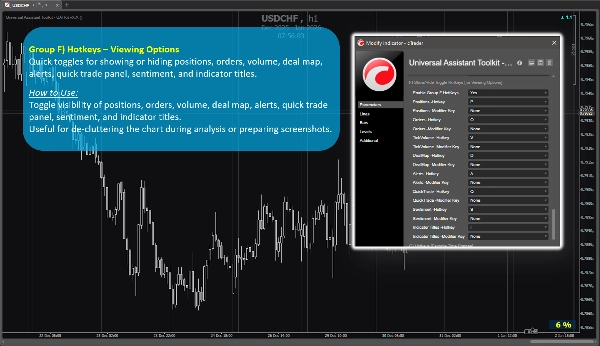
Funktionsgruppe F) 🔸 Hotkeys – Anzeigeoptionen
Schnelle Umschalter zum Ein- oder Ausblenden von Positionen, Orders, Volumen, Deal Map, Alerts, Quick Trade Panel, Sentiment und Indikatortiteln.
Anwendung:
Schalten Sie die Sichtbarkeit von Positionen, Orders, Volumen, Deal Map, Alerts, Quick Trade Panel, Sentiment und Indikatortiteln um.
Nützlich, um das Chart während der Analyse zu entrümpeln oder Screenshots vorzubereiten.
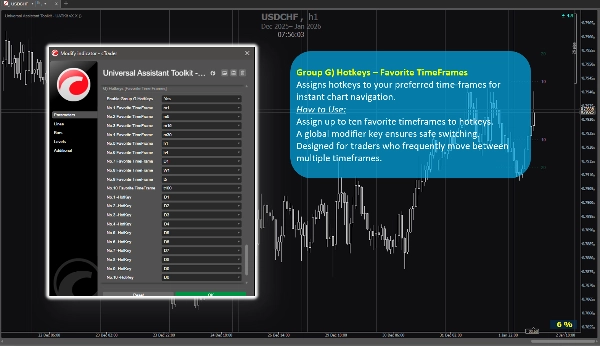
Funktionsgruppe G) 🔸 Hotkeys – Favorisierte Zeitrahmen
Weist Hotkeys Ihren bevorzugten Zeitrahmen für eine sofortige Chart-Navigation zu.
Anwendung:
Weisen Sie bis zu zehn Lieblings-Zeitrahmen Hotkeys zu.
Eine globale Modifikatortaste sorgt für sicheres Umschalten.
Entwickelt für Trader, die häufig zwischen mehreren Zeitrahmen wechseln.
4. Zusätzliche Hinweise für Nutzer
- Alle Funktionen sind optional und können einzeln aktiviert oder deaktiviert werden.
- Das Toolkit ist auf Leistung optimiert und so konzipiert, dass es andere Indikatoren nicht beeinträchtigt.
- Die meisten Parameter enthalten integrierte Tooltips. Fahren Sie einfach mit der Maus über eine Einstellung, um zusätzliche Hinweise und Nutzungshinweise zu sehen.
- Es werden keine externen Datenquellen verwendet; alle Informationen stammen vom Chart und der Plattform.
- Dieses Toolkit wird kostenlos bereitgestellt, um die cTrader-Community zu unterstützen und den täglichen Chart-Workflow zu verbessern.
- Die Standardeinstellungen sind sinnvoll, sodass Nutzer, die keine speziellen Konfigurationen benötigen, sich auf die voreingestellten Parameter verlassen können, ohne zusätzliche Zeit für die Einrichtung aufzuwenden.
- ⭐️ Feedback und Vorschläge sind willkommen, um zukünftige Versionen zu verbessern (nutzen Sie den Diskussionsbereich auf dieser Seite).
- ⚠️Bitte überprüfen Sie die Produktseite regelmäßig auf Updates, da cTrader die Nutzer nicht benachrichtigt, wenn neue Versionen von Indikatoren veröffentlicht werden.
Zusammenfassung
Key features include:
- **Spread Monitor:** Displays live spread on the chart with customizable visuals and alerts for spread widening.
- **Dynamic Candle Timer:** Shows remaining or elapsed candle time in various formats, with optional alerts and flexible positioning.
- **InfoMark Watermark:** Configurable watermark displaying symbol info, timeframe, date range, server/user time, or custom text.
- **Dynamic Visual Chart Scales:** Price-distance guide lines around current price to estimate take-profit/stop-loss distances visually.
- **Hotkeys for Chart Types & Visibility:** Keyboard shortcuts for switching chart types, refreshing, zooming, and toggling drawing visibility.
- **Hotkeys for Viewing Options:** Quick toggles for positions, orders, volume, deal map, alerts, quick trade panel, sentiment, and indicator titles.
- **Hotkeys for Favorite TimeFrames:** Assign up to ten favorite timeframes to hotkeys for instant navigation.
All features are optional and configurable, optimized for performance without interfering with other indicators. UATKit supports various markets including Forex, indices, commodities, crypto, and stocks. It is intended for traders who seek a clean, customizable, and efficient charting environment with enhanced workflow controls.
Kundenbewertungen
5 | 100 % | |
4 | 0 % | |
3 | 0 % | |
2 | 0 % | |
1 | 0 % |