present
Daftar dan dapatkan diskon $50 untuk pembelian pertama Anda
Trading product for Backtest-OHLC-Exporter cBot Key Levels Volume, image 1
Backtest-OHLC-Exporter
cBot
Versi 1.0, Jun 2026
Windows, Mac, Web
Trading product for Backtest-OHLC-Exporter cBot Key Levels Volume, image 2
Trading product for Backtest-OHLC-Exporter cBot Key Levels Volume, image 3
Trading product for Backtest-OHLC-Exporter cBot Key Levels Volume, image 4
Trading product for Backtest-OHLC-Exporter cBot Key Levels Volume, image 5
Trading product for Backtest-OHLC-Exporter cBot Key Levels Volume, image 6
Trading product for Backtest-OHLC-Exporter cBot Key Levels Volume, image 7
Trading product for Backtest-OHLC-Exporter cBot Key Levels Volume, image 8
Trading product for Backtest-OHLC-Exporter cBot Key Levels Volume, image 9
Trading product for Backtest-OHLC-Exporter cBot Key Levels Volume, image 10
6
Penjualan
79
Instal gratis

Deskripsi

# Backtest OHLC Exporter


**Ekspor data OHLC dari backtest apa pun ke CSV.** Analisis hasil backtest Anda secara eksternal dengan Excel, Python, R, atau alat analisis lainnya.


## 🔹 APA YANG DILAKUKANNYA


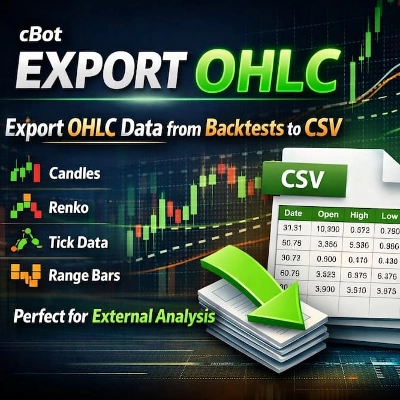
cBot ini mengekspor data Open, High, Low, Close (OHLC) dan Volume dari backtest Anda langsung ke file CSV. Tidak perlu lagi menyalin secara manual atau ekspor data yang terbatas.


## 🔹 FITUR UTAMA


✔ **Ekspor Data OHLC** – Timestamp, Open, High, Low, Close, Volume

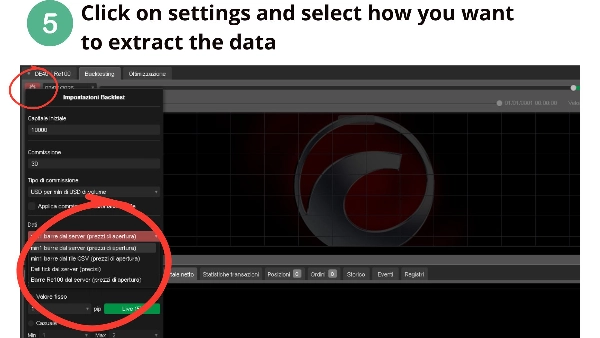
✔ **Bekerja pada jenis grafik APA PUN** – Candles (M1 hingga Bulanan), Renko (ukuran batu apa pun), Tick, Range, Volume, Point & Figure, Kagi

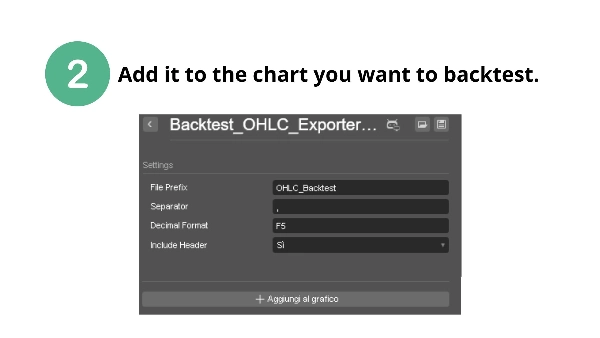
✔ **Pengaturan yang dapat dikonfigurasi** – Awalan file, pemisah (koma atau titik koma), format desimal

✔ **Penamaan file otomatis** – Nama file unik dengan simbol dan timestamp

✔ **Simpan berkala** – Menyimpan setiap 1000 bar (mencegah kehilangan data)

✔ **Format CSV bersih** – Siap untuk analisis eksternal

✔ **Tidak memerlukan izin khusus** – Aman digunakan, tanpa akses sistem


## 🔹 MENGAPA ANDA MEMBUTUHKANNYA


• cTrader tidak mengekspor data OHLC secara native – ini solusinya

• Analisis data backtest di Excel, Python, R, atau MATLAB

• Lakukan analisis statistik khusus pada strategi Anda

• Simpan catatan permanen data backtest Anda

• Validasi strategi Anda dengan alat eksternal


## 🔹 CARA MENGGUNAKAN


1. Tambahkan cBot ini ke grafik apa pun

2. Konfigurasikan awalan file dan pemisah (opsional)

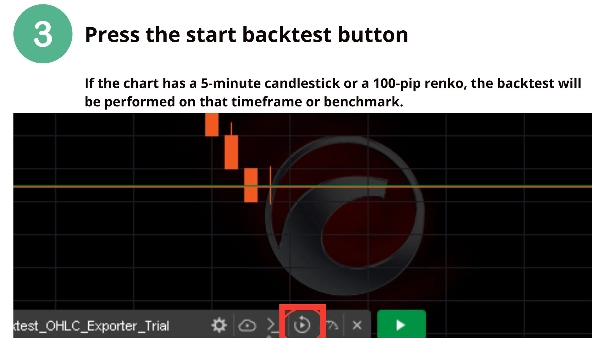
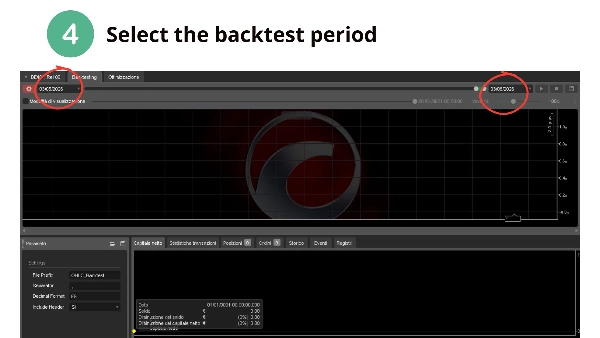
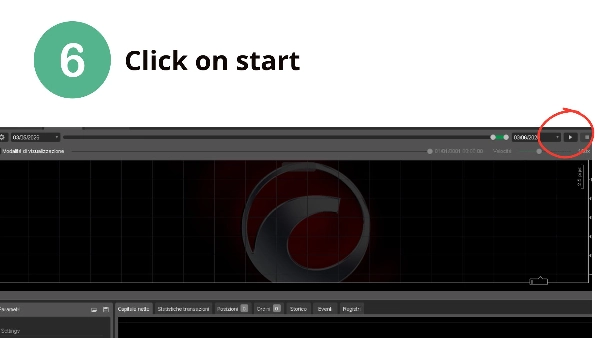
3. Jalankan backtest Anda seperti biasa

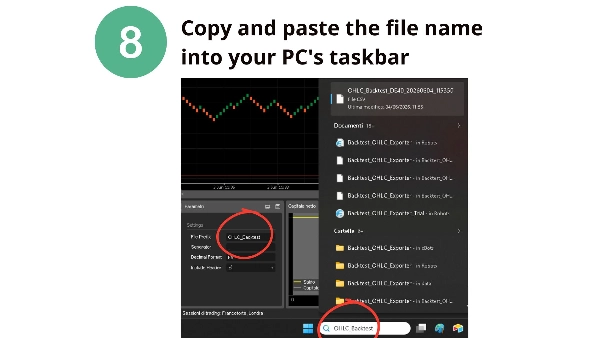
4. Temukan file CSV Anda di folder data cBot:

`Documents\cAlgo\Data\cBots\BacktestOHLCExporter\`


## 🔹 FORMAT OUTPUT


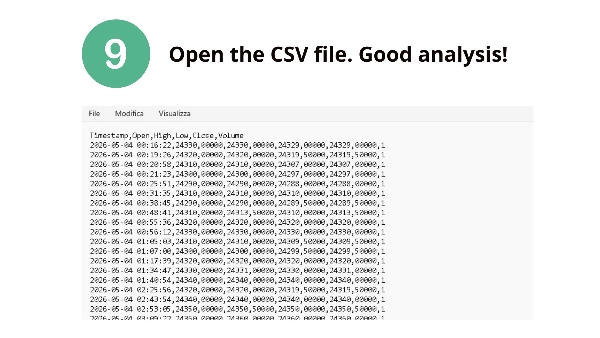
```csv

Timestamp,Open,High,Low,Close,Volume

2025-06-01 00:00:00,1.08950,1.08960,1.08940,1.08955,1245

...


## 🔹 PENGATURAN


| Parameter | Default | Deskripsi |

|-----------|---------|-------------|

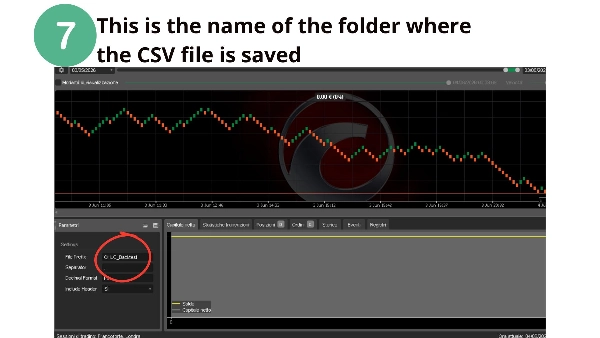
| File Prefix | OHLC_Backtest | Awalan untuk nama file |

| Separator | , | Pemisah CSV (koma atau titik koma) |

| Decimal Format | F5 | Jumlah tempat desimal |

| Include Header | True | Sertakan header kolom |


⚠️ **PENOLAKAN**: Perdagangan melibatkan risiko kerugian. Alat ini mengekspor data untuk analisis eksternal. Kinerja masa lalu tidak menjamin hasil di masa depan.


📌 **Pertanyaan atau permintaan fitur?** Hubungi saya melalui cTrader Store.


**Selamat melakukan backtesting! – CapitalMente**

Ringkasan

Ringkasan AI
Backtest-OHLC-Exporter is a cBot designed to export Open, High, Low, Close (OHLC) and Volume data from any backtest into a CSV file for external analysis. It supports all chart types including Candles (from 1 minute to Monthly), Renko (any brick size), Tick, Range, Volume, Point & Figure, and Kagi charts. The exported CSV includes timestamped OHLC and volume data, formatted cleanly for use in tools like Excel, Python, R, or MATLAB.

Key features include configurable file prefix, CSV separator (comma or semicolon), decimal formatting, and automatic unique file naming with symbol and timestamp. The bot saves data periodically every 1000 bars to prevent data loss. It operates without requiring special system permissions, ensuring safe usage.

To use, add the cBot to any chart, optionally configure settings, run the backtest, and retrieve the CSV file from the designated cBot data folder. This tool addresses the lack of native OHLC export in cTrader, enabling users to keep permanent backtest records and perform custom statistical or validation analyses externally.

Profil trading

Ulasan pelanggan

0.0
Ulasan: 0
Ulasan pelanggan
Belum ada ulasan untuk produk ini. Sudah mencobanya? Jadilah pemberi ulasan pertama!

Diskusi

Pertanyaan umum

Key Levels
Volume
Produk-produk yang tersedia melalui cTrader Store, termasuk bot trading, indikator, dan plugin, disediakan oleh pengembang pihak ketiga serta hanya ditujukan untuk akses teknis dan informasi. cTrader Store bukan broker dan tidak menyediakan saran investasi, rekomendasi pribadi, atau jaminan apa pun tentang kinerja di masa mendatang.

Produk lain dari penulis ini

Indikator
Key Levels
Support & Resistance
Renko Multi-Level Grid Overlay draws configurable horizontal grid lines on any chart type, for multi-timeframe analysis.
Indikator
ADX
ATR
+5
Signal Quality Score - 0-100 filter combining RSI, Volume, ATR, Trend Strength & Alignment. Works on ANY chart type.
Indikator
Volume
Key Levels
+4
Session & Kill Zone Highlighter - Visual tool for London, NY, Tokyo, Sydney sessions plus ICT Kill Zones.
Indikator
ADX
ATR
+5
Identifies TRENDING, RANGING and VOLATILE markets with pullback detection. Anti-noise filter. Works on ANY chart.
Indikator
Market Structure
Support & Resistance
Auto-centers price when it moves beyond threshold. Adjustable zoom. Works on any chart type. Never lose price again.

Anda mungkin juga suka

cBot
Forex
BTCUSD
+13
Automatically manages Stop Loss and Take Profit using Support & Resistance levels, with intelligent trailing stop protec
cBot
AI
NAS100
+3
DeMark Volume Pro Multi-Style Suite
19.24
Faktor laba
cBot
Indices
DAX BOT FOR INTRADAY TRADING
cBot
Forex
Crypto
+5
Smart position sizing, visual SL/TP lines, risk-based lot calculation, RR display, margin & lot limits, and hotkey trade
cBot
Position Sizer
Verwendet RSI und EMA Perioden . Fixe Minimalste Position.
30.55
Faktor laba
cBot
SL Manager
TP Manager
+4
Fast manual execution + automatic TP/SL management in one powerful cTrader trading panel.
cBot
Prop
Forex
+6
PropFirm Forex trader
cBot
AI
RSI
+8
Auto increase lot on how many percent profits you made, please try default setting before making any changes
cBot
Perfectly optimized to trade EURUSD achieving high risk reward. Win rate of over 85%
cBot
Prop
Forex
+11
Manage trades visually! Secure profits with Auto Partials & Trailing Shield. Works on all cTrader markets.
35.2%
ROI
4
Faktor laba
cBot
RSI Scalping cBot—plug‑and‑play precision scalper for volatile indexes and symbols.
cBot
SL Manager
Break Even
+4
FRACTAL STOP LOSS BOT AND RISK MANAGER
cBot
ADX
ATR
+5
Automated XAUUSD structure-break and pullback strategy that waits for confirmed breakouts and retests
53.3%
ROI
1.65
Faktor laba
cBot
SL Manager
TP Manager
+2
cBot de Risk Control para cTrader que calcula el lotaje según el riesgo y coloca automáticamente Stop Loss y Take Profit
cBot
EMA
Balanced
+5
Sniper Entry Bot – Advanced EMA Crossover Trading Robot for cTrader
677%
ROI
2.5
Faktor laba
cBot
ATR
Prop
+4
🚀 HTF Power 3 (PO3) – Automated ICT AMD Strategy
70.2%
ROI
1.31
Faktor laba
cBot
AI Trading
AI Integration
Export cTrader market data to CSV or JSON for Python, AI, backtesting and quantitative research.
cBot
Forex
EURUSD
+5
EasyPass ProFirm Wizard

Harga

6
Penjualan
79
Instal gratis