

Breakout channel
Indicatore
612 download
Versione 1.0, Nov 2025
Windows, Mac

42.11M
Volume negoziato
6.13M
Profitto in pip
278
Vendite
10.82K
Installazioni gratuite
Descrizione
Canali di Breakout
Cosa fa
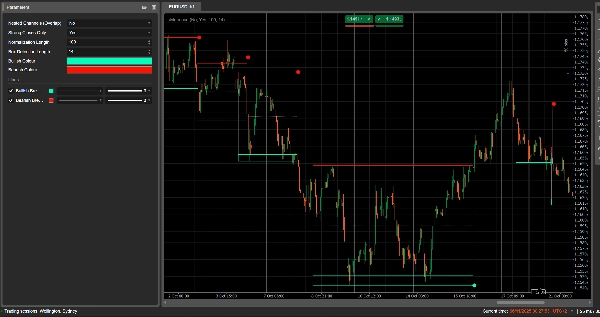
Canali di Breakout rileva automaticamente gli intervalli di consolidamento (”box” di prezzo) e segna punti di breakout quando il prezzo esce da questi intervalli.
Disegna:
- Una scatola canale grigia intorno alla zona di consolidamento
- Una banda superiore rossa (potenziale resistenza)
- Una banda inferiore verde (potenziale supporto)
- Una linea mediana tratteggiata bianca (punto medio del canale)
- Punti colorati quando si verifica un breakout:
-
- Punto verde/ciano sotto la scatola → breakout rialzista
- Punto rosso sopra la scatola → breakout ribassista
L’idea è evidenziare visivamente le aree dove il prezzo si sta avvolgendo e dove è probabile che inizino movimenti forti quando l’intervallo si rompe.
Come calcola
- Normalizzazione del prezzo
-
- Negli ultimi Normalization Length barre trova il massimo più alto e il minimo più basso.
- Normalizza la chiusura in un intervallo 0–1:
normalizedPrice=Close−LowestLowHighestHigh−LowestLow\text{normalizedPrice} = \frac{\text{Close} - \text{LowestLow}}{\text{HighestHigh} - \text{LowestLow}}normalizedPrice=HighestHigh−LowestLowClose−LowestLow
- Misura della volatilità
-
- Calcola la deviazione standard del prezzo normalizzato su 14 barre.
- Questo fornisce una serie di volatilità usata per rilevare i punti di svolta nella struttura del mercato.
- Linee di volatilità superiore / inferiore
-
- Negli ultimi (Box Detection Length + 1) barre, trova:
-
- la barra dove la volatilità era massima
- la barra dove la volatilità era minima
- Da quante barre fa si sono verificati questi estremi, costruisce due linee sintetiche: Superiore e Inferiore.
- Gli incroci tra queste linee segnalano potenziale inizio/fine di una fase di canale.
- Inizio e durata del canale
-
- Quando Inferiore incrocia verso l’alto la Superiore, l’indicatore segna un potenziale inizio del canale.
- Da quella barra traccia la durata e il massimo più alto / minimo più basso nel periodo.
- Creazione del canale
-
- Quando successivamente Superiore incrocia di nuovo sopra Inferiore, e la durata è maggiore di 10 barre:
-
- Definisce il Top del canale come il massimo più alto in quel periodo.
- Definisce il Bottom del canale come il minimo più basso.
- Misura l’attuale ATR/2 per separare una zona sottile in alto e in basso:
-
- Banda rossa in alto (banda ribassista)
- Banda verde in basso (banda rialzista)
- Disegna:
-
- Rettangolo di contorno grigio (canale completo)
- Contorno superiore rosso
- Contorno inferiore verde
- Una linea mediana tratteggiata bianca attraverso il centro
- I canali rimangono sul grafico come struttura storica (non vengono cancellati dopo il breakout).
- Rilevamento del breakout
-
- Per ogni canale attivo, ad ogni nuova barra calcola un prezzo di riferimento:
-
- Se Strong Closes Only = true → usa il punto medio del corpo della candela:
refPrice=(Open+Close)/2\text{refPrice} = (\text{Open} + \text{Close})/2refPrice=(Open+Close)/2
Questo richiede che più della metà del corpo sia fuori dalla scatola. - Se Strong Closes Only = false → usa la semplice chiusura.
- Se Strong Closes Only = true → usa il punto medio del corpo della candela:
- Regole di breakout:
-
- Se
refPrice > Top→ breakout rialzista -
- Disegna un punto verde al Bottom del canale.
- Disattiva questo canale (smette di estenderlo), ma la scatola rimane visibile.
- Se
refPrice < Bottom→ breakout ribassista -
- Disegna un punto rosso al Top del canale.
- Disattiva il canale.
- Altrimenti, il canale è ancora attivo e il suo bordo destro viene esteso alla barra corrente.
- Se
- Opzione Canali Annidati
-
- Se Nested Channels = true, più canali possono sovrapporsi nel tempo e nel prezzo.
- Se false, l’indicatore blocca la creazione di un nuovo canale che si sovrapporrebbe a uno esistente.
Come leggerlo e usarlo
- Scatola grigia (canale)
-
- Rappresenta una zona di consolidamento / equilibrio dove il prezzo ha negoziato per un po’ di tempo.
- Più la scatola è lunga e alta, più significativo è l’intervallo.
- Banda superiore rossa (zona di resistenza)
-
- La parte superiore del canale, evidenziata visivamente come potenziale area di resistenza.
- Ripetuti rifiuti vicino a questa banda suggeriscono pressione di vendita all’interno dell’intervallo.
- Banda inferiore verde (zona di supporto)
-
- La parte inferiore del canale, evidenziata come potenziale supporto.
- Ripetuti rimbalzi suggeriscono acquirenti che difendono il bordo inferiore dell’intervallo.
- Linea mediana tratteggiata bianca
-
- Il punto medio del canale – una sorta di “valore equo” locale.
- Il prezzo che oscilla intorno a questa linea indica equilibrio; forti movimenti lontano spesso precedono un test della banda opposta.
- Punti di breakout
-
- Punto verde sotto la scatola:
-
- Il prezzo ha chiuso fortemente sopra la parte superiore del canale (o semplicemente chiuso sopra, a seconda di Strong Closes Only).
- Suggerisce un breakout rialzista – potenziale inizio di un movimento al rialzo da una compressione di volatilità.
- Punto rosso sopra la scatola:
-
- Il prezzo ha chiuso fortemente sotto la parte inferiore del canale.
- Suggerisce un breakout ribassista – potenziale inizio di un movimento al ribasso.
- Modi tipici di usarlo (a livello di idea)
-
- Breakout seguendo il trend
-
- Operare nella direzione del breakout (comprare dopo il punto verde, vendere dopo il punto rosso), idealmente in congiunzione con il trend di timeframe superiore o altri indicatori.
- Filtro e conferma
-
- Usa il canale e il suo breakout solo come filtro per la tua strategia esistente (es. prendi solo setup long se l’ultimo segnale è stato un breakout rialzista).
- Posizionamento del rischio
-
- Per i breakout rialzisti, molti trader posizionano stop all’interno o appena sotto il precedente canale; per i ribassisti, all’interno o sopra la scatola.
Riepilogo
AI summary
Breakout Channels is a technical indicator designed to identify consolidation zones and signal potential price breakouts. It automatically detects price ranges where the market is coiling, marking these with a grey channel box that highlights the consolidation area. The indicator draws a red upper band indicating potential resistance, a green lower band indicating potential support, and a white dotted midline representing the channel midpoint or local fair value.
Breakout points are signaled by colored dots: a green or cyan dot below the box indicates a bullish breakout, while a red dot above signals a bearish breakout. The indicator calculates these zones by normalizing price data, measuring volatility through the standard deviation of normalized prices, and identifying volatility extremes to define channel start and duration.
Channels remain visible on the chart as historical structures even after breakouts. Users can enable nested channels to allow overlapping consolidation zones. Breakout detection uses either candle body midpoints or close prices, depending on settings, to confirm strong closes outside the channel.
Typical uses include trading in the breakout direction, filtering existing strategies, and placing risk stops near channel boundaries. The indicator supports various markets including forex, indices, commodities, stocks, and cryptocurrencies.
Breakout points are signaled by colored dots: a green or cyan dot below the box indicates a bullish breakout, while a red dot above signals a bearish breakout. The indicator calculates these zones by normalizing price data, measuring volatility through the standard deviation of normalized prices, and identifying volatility extremes to define channel start and duration.
Channels remain visible on the chart as historical structures even after breakouts. Users can enable nested channels to allow overlapping consolidation zones. Breakout detection uses either candle body midpoints or close prices, depending on settings, to confirm strong closes outside the channel.
Typical uses include trading in the breakout direction, filtering existing strategies, and placing risk stops near channel boundaries. The indicator supports various markets including forex, indices, commodities, stocks, and cryptocurrencies.
Profilo indicatore
Recensioni dei clienti
0.0
Recensioni: 0
Recensioni dei clienti
Questo prodotto non ha ancora ricevuto recensioni. L'hai già provato? Fallo sapere agli altri per primo!
Discussioni
Domande frequenti
Signal
Indices
Commodities
GBPUSD
RSI
Bollinger
Fibonacci
Scalping
AI
XAUUSD
NAS100
MACD
BTCUSD
Forex
Breakout
EURUSD
NZDUSD
Martingale
Prop
ZigZag
Supertrend
Fair Value Gap
SMC
Crypto
Grid
Stocks
ATR
USDJPY
VWAP
I prodotti disponibili tramite cTrader Store, inclusi bot di trading, indicatori e plugin, sono forniti da sviluppatori terzi e resi disponibili esclusivamente a scopo informativo e di accesso tecnico. cTrader Store non è un broker e non fornisce consulenze in materia di investimento, raccomandazioni individualizzate o garanzie di risultati futuri.




















Prezzo
42.11M
Volume negoziato
6.13M
Profitto in pip
278
Vendite
10.82K
Installazioni gratuite