
Dem
Gösterge
2 satın almalar
Sürüm 2.0, Apr 2026
Windows, Mac
4.2
Değerlendirmeler: 4


Başlangıç 14/03/2025
25
Satışlar
Açıklama
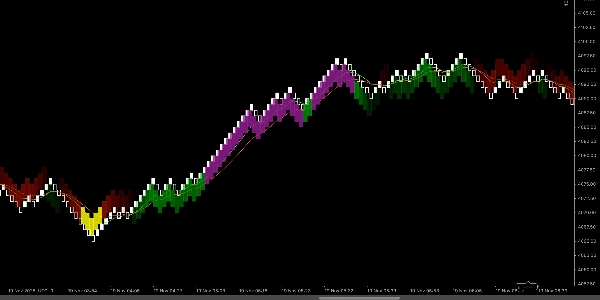
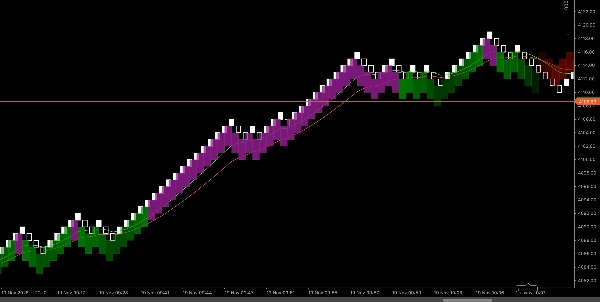
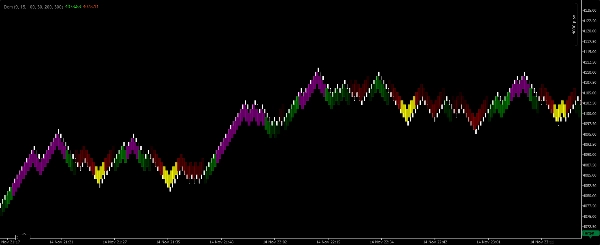
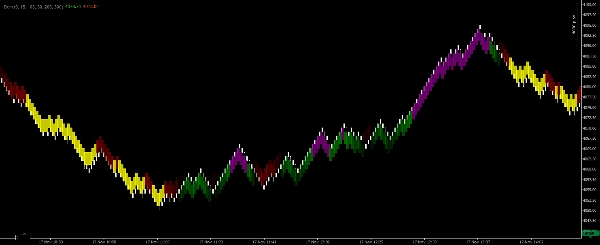
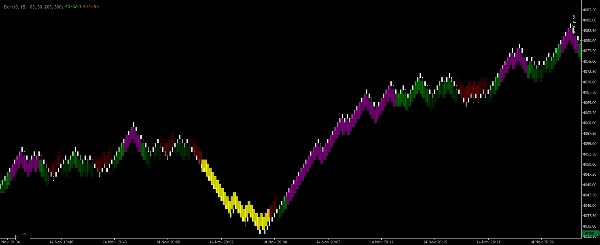
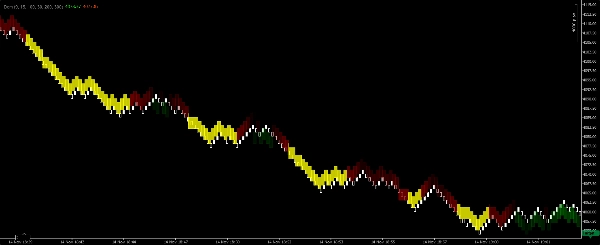
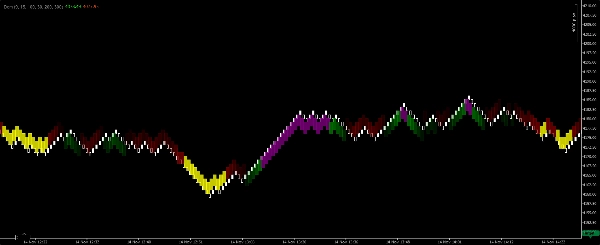
Renko EMA-Scalper Bölgeleri, yalnızca cTrader platformundaki Renko 100-pip grafikler için özel olarak oluşturulmuş hafif, görsel bir scalper göstergesidir. Kısa vadeli trend yönünü belirlemek ve temiz, işlem yapılabilir bölgeleri vurgulamak için iki Üssel Hareketli Ortalama (EMA) kullanır. Gösterge, scalperların piyasa eğilimini hemen okuyabilmesi ve manuel sayı hesaplamaya gerek kalmadan daha yüksek olasılıklı girişleri tespit edebilmesi için grafikte dört renkte dolu dikdörtgenler çizer.
Her rengin anlamı
- Yeşil dikdörtgen — Boğa trendi onaylandı. Hızlı EMA, Yavaş EMA'nın üzerinde ve EMA'lar yukarı yönlü. Kısa vadeli, trendi takip eden uzun pozisyonlar için kullanın.
- Mor dikdörtgen — Boğa bağlamı içinde alım giriş bölgesi. Aktif bir boğa trendi içinde kısa vadeli bir geri çekilme veya konsolidasyonu gösterir ve scalping için bir giriş fırsatı sunabilir.
- Kırmızı dikdörtgen — Ayı trendi onaylandı. Hızlı EMA, Yavaş EMA'nın altında ve EMA'lar aşağı yönlü. Kısa vadeli, trendi takip eden kısa pozisyonlar için kullanın.
- Sarı dikdörtgen — Ayı bağlamı içinde satış giriş bölgesi. Aktif bir ayı trendi içinde kısa vadeli bir geri çekilme veya konsolidasyonu gösterir ve scalping için bir giriş fırsatı sunabilir.
Nasıl çalışır (mantık özeti)
- Gösterge, Renko 100-pip grafikte iki EMA (Hızlı ve Yavaş) hesaplar ve trend yönünü belirlemek için bunların göreceli hizalanmasını ve eğimini değerlendirir.
- EMA'lar net bir boğa hizalanması ve momentumu gösterdiğinde, gösterge trend bölgesini kapsayan Yeşil bir dikdörtgen çizer. O boğa bölgesi içinde kısa bir konsolidasyon veya geri çekilme ortaya çıkarsa, gösterge alım giriş fırsatını işaretlemek için Mor bir dikdörtgen çizer.
- Aynı mantık ayı koşulları için tersine uygulanır ve Kırmızı (trend) ve Sarı (giriş) dikdörtgenleri oluşturur.
- Dikdörtgenler tek bar değil, bölgeler olarak çizilir, böylece scalperlar hızlı giriş ve çıkış zamanlamasını görsel olarak değerlendirebilir.
Önerilen ayarlar (scalper varsayılanları)
- Grafik türü: Renko
- Renko tuğla boyutu: 100 pip (gösterge bu tuğla boyutu için tasarlanmıştır).
- Duyarlılık / tespit — ayarlanabilir bir parametre, göstergenin EMA hizalamasını ne kadar sıkı gerektirdiğini kontrol eder; daha düşük = daha fazla sinyal; daha yüksek = daha az, daha güçlü sinyal.
- Dikdörtgen opaklığı — fiyat barlarının üzerinde görsel netlik için ayarlayın.
- Oturum filtresi — scalping için yüksek likidite saatleriyle sınırlamak önerilir.
- Maksimum bölge genişliği (barlar) — aşırı geniş bölgeleri önlemek için isteğe bağlı sınır.
Kullanım rehberi ve scalper kuralları
- Yeşil/Kırmızı dikdörtgenleri trend onayı olarak değerlendirin. Renkli trend bölgesinin yönünde işlem yapmayı tercih edin ve bir trend dikdörtgeni baskın olduğunda agresif karşı trend scalplarından kaçının.
- Onaylanmış trend içinde Mor/Sarı dikdörtgenleri scalping giriş pencereleri olarak kullanın — giriş yapmadan önce hızlı bir mikro yapı tetikleyicisi (örneğin, momentum barı, küçük bir konsolidasyonun kırılması) arayın.
- Hedefler scalping için sıkı ve gerçekçi olmalıdır (stopunuzun küçük katları). Risk profilinize bağlı olarak sabit pip hedefleri veya minimum bar onayları kullanın.
- Stopları son mikro yapı düşük/yüksek seviyesinin ötesine veya giriş bölgesinin dışına yerleştirin; scalping disiplinli, küçük kayıplar gerektirir.
- Hacim/fiyat hareketi onayı (varsa) ile birleştirin ve yalnızca aktif oturumlarda işlem yapın.
- Enstrümanlarınızda görsel olarak geriye dönük test yapın — Renko 100-pip, volatil çiftler ve 100-pip tuğlaların scalping için faydalı fiyat yapısı ürettiği enstrümanları tercih eder.
Özet
YZ özeti
Renko EMA-Scalper Zones is a scalping indicator designed for use on Renko charts with 100-pip brick size within the cTrader platform. It employs two Exponential Moving Averages (EMAs)—a fast and a slow EMA—to determine short-term trend direction and identify tradeable zones. The indicator visually represents market conditions by drawing colored rectangles on the chart: green for confirmed bullish trends, purple for buy-entry zones during bullish pullbacks, red for confirmed bearish trends, and yellow for sell-entry zones during bearish pullbacks. These rectangles span zones rather than single bars, allowing traders to quickly assess trend bias and potential entry points. Users can adjust sensitivity to control signal frequency, rectangle opacity for clarity, and apply session filters to focus on high-liquidity trading hours. The indicator is intended to support scalping strategies by highlighting trend confirmations and entry windows, recommending tight targets and disciplined stop placements based on recent price structure. It is suitable for volatile instruments such as Forex pairs (e.g., BTCUSD), commodities (e.g., XAUUSD), and cryptocurrencies. The tool facilitates visual, momentum-based scalping decisions without manual calculation, emphasizing trend-following entries within clearly defined zones.
Gösterge profili
Tartışma
Müşteri değerlendirmeleri
4.2
Değerlendirmeler: 4
5 | 50 % | |
4 | 25 % | |
3 | 25 % | |
2 | 0 % | |
1 | 0 % |
Müşteri değerlendirmeleri
November 25, 2025
A decent setup here should survive 50 quick trades without looking messy. A few sessions of data make the result easier to trust. The useful comparison is hit rate versus average R.
November 18, 2025
The product feels more useful when the plan is already written down. A 13 setup run on daily close keeps the review grounded.
November 18, 2025
This feels useful when you already has a plan. The main value is short term execution, not chasing every signal that appears. Early sizing should stay modest until the journal looks stable.
November 18, 2025
Useful tool, but not for lazy entries. It supports short term execution and feels more useful if the trader stays selective.
SSS
BTCUSD
Forex
Signal
Scalping
Commodities
Crypto
XAUUSD
cTrader Store üzerinden erişilebilen işlem botları, göstergeler ve eklentiler gibi ürünler, üçüncü taraf sağlayıcılar tarafından sağlanır ve yalnızca bilgilendirme ve teknik erişim amaçlarıyla sunulur. cTrader Store bir broker değildir ve yatırım tavsiyesi, kişisel öneriler vermez veya gelecekteki performansı garanti etmez.
Bu oluşturanın diğer ürünleri










Fiyat
Başlangıç 14/03/2025
25
Satışlar