「Market Sessions With Stats」ロゴ
インジケーター
バージョン 1.0、Dec 2025
Windows、Mac
「Market Sessions With Stats」アップロード画像
9
販売
301
無料インストール

MarketSessions – Your Trading Edge, Visualized


Turn Market Time Into Trading Power

MarketSessions is a professional-grade cTrader indicator that brings global market sessions to life — so you can trade where momentum is real and timing becomes your edge.

🚀 Why Traders Trust MarketSessions

See the Market Rhythm
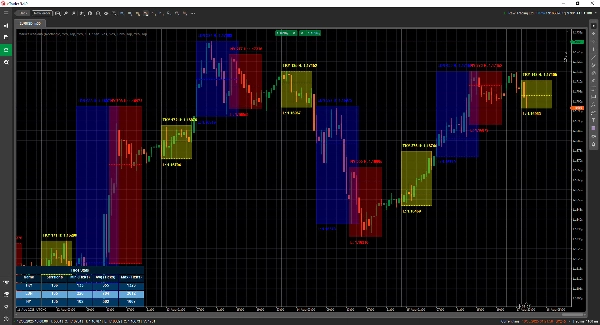
Instantly visualize London, New York, Tokyo, Sydney – and any other session you want – with clean, elegant overlays that adapt to your chart.

Trade Smarter, Not Later
Get real-time notifications when sessions open, close or reach key levels – delivered through Telegram or Discord (your choice).

Attack High-Probability Zones
Leverage built-in tools such as the Opening Range Breakout, Point of Control (POC) and precision session lines so you never miss a breakout or rejection.

🎯 Key Features

  • Session Visualization & Management – fully customizable times, colors and labels, even for overlapping markets
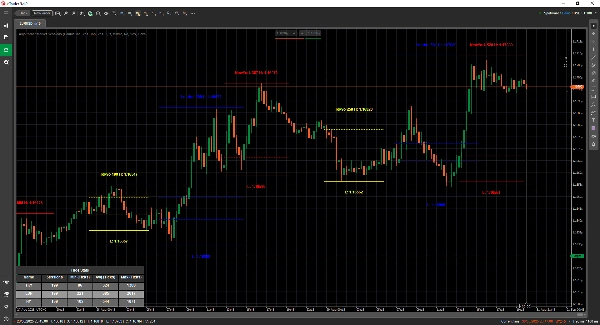
  • Advanced Drawing Tools – includes Double ❘❘ and Middle line drawers, breakout rectangles, text markers and a Double Line Mode for minimalistic traders
  • Statistics Panel – view Total Sessions, Min, Avg and Max ranges for each session (in Ticks, Pips or %)
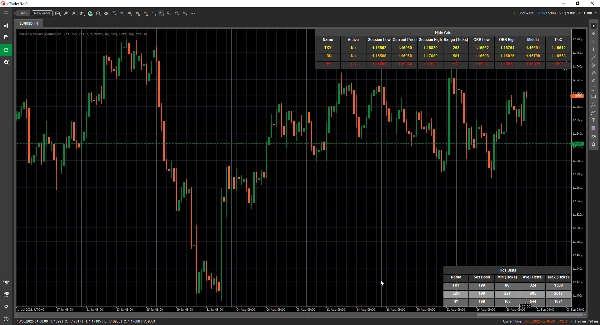
  • Grid Mode - allows you to view the current active sessions in a table, so you can see the sessions in a higher timeframe.
  • Flexible Configuration – customize text placement, range modes, drawing preferences and themes
  • Alerts & Integrations – Telegram/Discord integration with sound and visual alerts

📦 What You Get

  • MarketSessions.algo (ready to use)
  • Lifetime Updates (no recurring fees)
  • Friendly Support (direct access if you need help)

💻 Requirements

  • cTrader platform
  • .NET 6.0 runtime

✅ Install in minutes
✅ Trade with absolute confidence

📘 Parameter Reference (Friendly Version)

List of Sessions Available

  • New York
  • London
  • Frankfurt
  • Tokyo
  • Hong Kong
  • Shanghai
  • Singapore
  • Wellington
  • Sydney
  • Toronto

General Settings

  • Drawing Mode – Choose how session lines are drawn on the chart (Rectangle / Double Line / Middle Line)
  • Show Session Name – Display the name of each session directly on your chart
  • Session Name Location – Decide where the session name text appears (top, center, bottom)
  • Text Bold – Makes the session name bold so it’s easier to read
  • Top Text Offset – Adds extra spacing from the top (so text doesn’t overlap candles)
  • Bottom Text Offset – Adds extra spacing from the bottom of the session area
  • Text Time Location – Show the session time along with the session name
  • Use Short Session Name – Switches to shorter names (e.g. NY instead of New York)
  • Show Session Range – Highlight the full price range covered by the session
  • Session Range Mode – Choose how the price range is calculated (high/low or open/close)
  • Session Range Location – Place the range marker either at the top or bottom of the range
  • Show High – Display the session’s highest price
  • Show High Location – Choose where the High label appears
  • Show Low – Display the session’s lowest price
  • Show Low Location – Choose where the Low label appears
  • Extend High/Low Lines (Minutes) - Allows extending these lines for x minutes forward
  • Show Opening Range Breakout – Draw a breakout box at the session open
  • Extend ORB Lines (Minutes) - Allows extending these lines for x minutes forward
  • Show Middle Lines – Add midlines to help identify fair value
  • Extend Middle Lines (Minutes) - Allows extending this line for x minutes forward
  • Show PoC – Display the Point of Control (most traded price of the session)
  • Extend Middle Lines (Minutes) - Allows extending this line for x minutes forward
  • Filled Transparency – Control how transparent the background fill of the session is

Statistics

  • Draw Statistics – Show/hide the statistics panel on your chart
  • Stats Horizontal Alignment – Align the panel (Left / Center / Right)
  • Stats Vertical Alignment – Choose whether the panel appears on top or bottom
  • Title Color – Text color for the “Statistics” title
  • Even Row Color – Background color for even-numbered rows in the panel
  • Odd Row Color – Background color for odd-numbered rows in the panel
  • Foreground Color – Text color used inside the panel

Telegram

  • Use – Enable or disable Telegram alerts
  • Token – Your Telegram Bot token
  • ChatId – The chat ID where alerts will be sent

Discord

  • Use – Enable or disable Discord alerts
  • WebhookUrl – Discord webhook URL for sending session alerts

Sound Alerts

  • New Session Sound Alert – Play a sound when a new session begins
  • Session Completed Sound Alert – Play a sound when a session ends

Grid

  • Force Grid - Forces rendering the grid irrespective of the TimeFrame used
  • Grid Visible for Above TimeFrame - Let's you select at which Timeframe and beyond this Grid is visible
  • Message Box Notification - Notifies why the normal rendering mode is not possible and switches to the Grid Mode
  • Grid Horizontal Alignment
  • Grid Vertical Alignment

Session Example (New York)

⚠️ Same parameters apply to each session (London, Tokyo, Sydney, etc.)

  • Active – Enable or disable this specific session
  • Color – Session color used on the chart
  • Fill Region – Fill the background of the session area
  • Line Style – Choose line style (solid, dashed, etc.)
  • Line Thickness – Control the thickness of the session borders

Make the market’s clock your ally
Get MarketSessions today and never miss a profitable session again.

インジケーターのプロフィール
0.0
レビュー: 0
カスタマーレビュー
この商品にはまだレビューがありません。お使いになったことがある方は、ぜひレビューをお願いします。
Forex
EURUSD
GBPUSD
NZDUSD
USDJPY
cTrader Storeで入手可能な取引ボット、インジケーター、プラグインなどの商品は、第三者の開発者が提供するものであり、情報と技術の取得のみを目的としてご利用いただけます。cTrader Storeはブローカーではなく、投資助言や個人的な推奨を行うことも、将来のパフォーマンスを保証することもありません。

この作成者の他の商品

インジケーター
Forex
Signal
+1
Draw as many Moving Averages as you need from a simple indicator.
cBot
Grid
Forex
+9
This tool will help you spread your trades very quickly with a few clicks
インジケーター
Forex
BTCUSD
+3
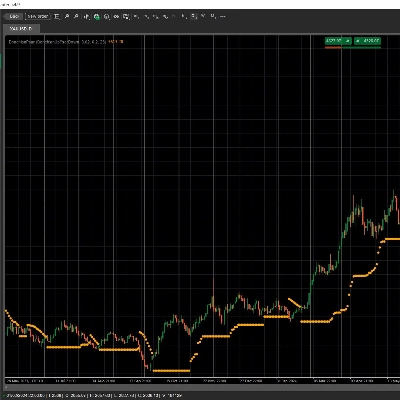
Visualize market asymmetry like never before — steady climbs meet sudden drops with the Donchian PSAR
インジケーター
Signal
Supertrend
Supertrend Scanner – Track trends across assets & timeframes in real-time with alerts. Stay ahead, and trade smarter!
インジケーター
Forex
EURUSD
+1
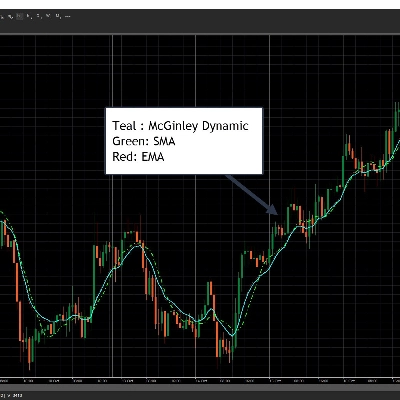
Designed to follow price more naturally, adjusting automatically to market speed, to reduce lag and false signals.
インジケーター
Forex
EURUSD
+4
Check the correlations between dozens of assets in one elegant display.
インジケーター
RSI
NAS100
+1
A long-term indicator created by E.S.C. Coppock
デスクトッププラグイン
Prop
Forex
+5
Place professional OCO & OSO orders in cTrader — visually, instantly, and without execution mistakes.
インジケーター
ATR
RSI
+7
Track the Movement of Market Assets with an Oscillator Scanner in Real-Time!
インジケーター
ATR
RSI
+1
Pinpoint, highlight and lock market data easily
cBot
Custom trading dashboard for fast one-click orders. Set Stop Loss, Take Profit, and customize layout & symbols easily.

これも好きかも

インジケーター
Forex
Indices
+1
The Floating Risk Indicator is an essential tool for traders who prioritize risk management.
インジケーター
AI
ATR
+27
Smart Money Gaps: MTF FVG auto-detection, extension, and mitigation marker. Trade institutional imbalances.
インジケーター
Forex
Signal
+3
Basic & FREE. Plots New York Initial Balance (NY local time) and projects IB High, IB Low, and midline.
「VWAP Pro」ロゴ
トップ評価
5.0
(4)
無料
インジケーター
VWAP
Forex
Advanced VWAP with up to 30 anchored levels, multiple timeframes, memory mode, standard deviation bands & simple GUI
インジケーター
ATR
SMC
+9
The Wyckoff Schematic Indicator is a professional-grade market structure tool designed to automatically detect
インジケーター
Breakout
Break Out Probability Experimental indicator. Credits for this indicator goes to Zeiierman !!!
インジケーター
Prop
Forex
+4
This indicator consists of 3 moving averages that can be configured to your liking, from the type of moving average....
インジケーター
Forex
Crypto
+4
Statistical boundaries that adapt to real-time volatility for a better risk management.
インジケーター
Prop
Forex
+4
Advanced Market Sessions with ICT killzones
インジケーター
Forex
Crypto
+3
Detect powerful 2-candle reversal patterns at key highs/lows. Boost entries with real-time alerts and visual signals.
インジケーター
Support & Resistance
A full‑featured pivot point system with multi‑mode calculations, zone coloring, CPR levels, and left/right labels for pr
インジケーター
AI
ATR
+20
Algorithmic trend precision for cTrader.
インジケーター
Universal Moving Average indicator with extended features
インジケーター
Prop
VWAP
+5
Multi-anchor VWAP indicator for cTrader. Plots two VWAP lines (red and blue) with selectable anchors.
インジケーター
Market Sessions is very important for traders.
インジケーター
AI
RSI
+7
EMA MTF TREND PRO - Multi-timeframe trend analysis overlay indicator, 6 timeframes - in one table with ADX
インジケーター
Forex
Enhance your trading strategy with automated detection and alerts for key chart patterns.
インジケーター
ZigZag Pro – Multi-Swing Indicator for cTrader Description: ZigZag Pro is a powerful and fully customizable swing indica
9
販売
301
無料インストール