

Institutional Flow Radar
Indikator
3 pembelian
Versi 1.0, Nov 2025
Windows, Mac
4.5
Ulasan: 4

42.11M
Volum yang didagangkan
6.13M
Pip dimenangi
274
Jualan
10.71K
Pemasangan percuma
Penerangan
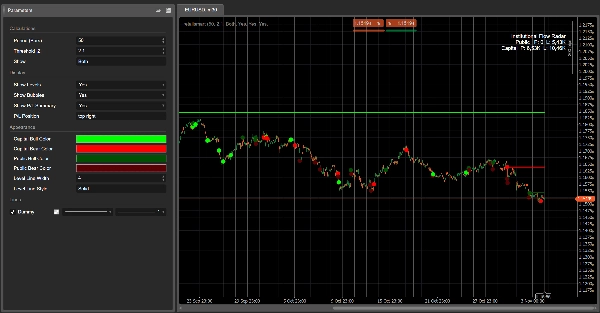
Radar Aliran Institusi – Penerangan
Konsep:
Radar Aliran Institusi mengimbas carta untuk peristiwa volum luar biasa dan mengklasifikasikannya kepada dua kumpulan:
- Modal → aktiviti yang dikaitkan dengan peserta yang lebih kuat / lebih berpengetahuan
- Awam → aktiviti yang dikaitkan dengan orang ramai yang lebih luas
Kemudian ia:
- melukis tahap mendatar pada peristiwa tersebut,
- menandakan peristiwa yang paling relevan dengan gelembung berwarna,
- dan menunjukkan ringkasan P/L yang membandingkan berapa banyak volum Modal berbanding Awam yang kini dalam keuntungan atau kerugian.
Dalam satu pandangan, anda melihat di mana volum besar melanda pita, siapa yang menang, dan harga mana yang masih bertahan.
Bagaimana ia berfungsi (versi ringkas)
- Untuk setiap bar, algoritma mengira skor Z volum ke atas N bar terakhir (Tempoh).
- Jika skor Z mutlak melebihi Ambang |Z| anda, bar itu ditandakan sebagai peristiwa volum.
- Struktur lilin (badan berbanding julat keseluruhan) digunakan untuk mengklasifikasikan peristiwa:
-
- badan lebih kecil, sumbu panjang → Modal (penyerapan / tingkah laku lebih kompleks)
- badan lebih besar, pergerakan arah → Awam (pecahan gaya orang ramai / mengejar)
- Satu tahap mendatar dilukis pada harga peristiwa dan dikekalkan sehingga harga berdagang dengan bersih melalui tahap itu (mitigasi).
- Untuk setiap tahap aktif, Radar memeriksa sama ada harga semasa adalah:
-
- dalam keuntungan untuk pihak itu (harga telah bergerak ke arah peristiwa), atau
- dalam kerugian (harga telah bergerak bertentangan).
- Kotak ringkasan P/L mengumpulkan volum semua tahap aktif:
-
- Keuntungan Modal vs Kerugian Modal
- Keuntungan Awam vs Kerugian Awam
Elemen visual
- Tahap Modal:
-
- Peristiwa naik → tahap Modal bullish (contoh: hijau terang / aqua)
- Peristiwa turun → tahap Modal bearish (contoh: merah terang)
- Tahap Awam:
-
- Peristiwa naik → tahap Awam bullish (nada kelabu)
- Peristiwa turun → tahap Awam bearish (kelabu lebih gelap / arang)
- Gelembung:
-
- Bulatan pada peristiwa paling signifikan, berwarna mengikut:
-
- arah (bullish/bearish)
- kelas (Modal / Awam)
- Kotak Ringkasan P/L:
-
- Baris: Awam, Modal
- Lajur: Keuntungan, Kerugian
- Kecerahan latar sel meningkat mengikut volum yang sepadan.
Label parameter yang dicadangkan (Bahasa Inggeris)
- Tempoh (Bar): bilangan bar yang digunakan untuk mengira skor Z volum.
- Ambang |Z|: skor Z mutlak minimum untuk menandakan peristiwa.
- Tunjukkan:
Modal,Awam, atauKedua-duanya– kelas mana yang hendak dipaparkan. - Tunjukkan Tahap / Tunjukkan Gelembung / Tunjukkan Ringkasan P/L
- Warna Bull Modal / Warna Bear Modal
- Warna Bull Awam / Warna Bear Awam
- Lebar Garis Purata / Gaya Garis Purata
Ringkasan
AI summary
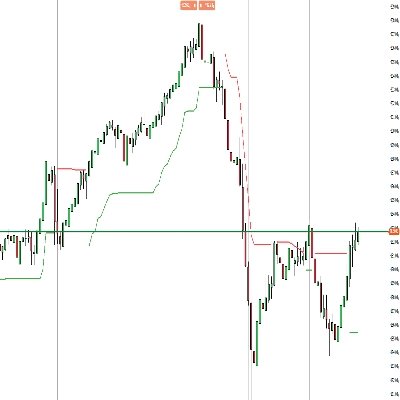
Institutional Flow Radar is a trading indicator that identifies and classifies abnormal volume events on price charts into two categories: Capital (activity from stronger or more informed participants) and Public (activity from the broader crowd). It calculates a volume Z-score for each bar over a specified period and flags bars exceeding a set threshold as volume events. These events are further classified based on candle structure—smaller bodies with long wicks indicate Capital activity, while larger bodies with directional moves indicate Public activity.
The indicator visually marks these events by drawing horizontal levels at event prices, which remain until price moves decisively through them. Significant events are highlighted with colored bubbles indicating direction (bullish or bearish) and classification (Capital or Public). A P/L summary box aggregates volume at active levels, showing Capital and Public volumes currently in profit or loss.
Users can customize parameters such as the period for Z-score calculation, threshold for event detection, and visual settings including colors for bullish and bearish levels for both Capital and Public groups. This tool provides a consolidated view of where large volume occurred, which participant group is prevailing, and which price levels are holding, aiding in volume-based breakout analysis.
The indicator visually marks these events by drawing horizontal levels at event prices, which remain until price moves decisively through them. Significant events are highlighted with colored bubbles indicating direction (bullish or bearish) and classification (Capital or Public). A P/L summary box aggregates volume at active levels, showing Capital and Public volumes currently in profit or loss.
Users can customize parameters such as the period for Z-score calculation, threshold for event detection, and visual settings including colors for bullish and bearish levels for both Capital and Public groups. This tool provides a consolidated view of where large volume occurred, which participant group is prevailing, and which price levels are holding, aiding in volume-based breakout analysis.
Profil indikator
Ulasan pelanggan
4.5
Ulasan: 4
5 | 50 % | |
4 | 50 % | |
3 | 0 % | |
2 | 0 % | |
1 | 0 % |
Ulasan pelanggan
November 18, 2025
The only reason it stays interesting is the trading notes stop feeling so random, and two sessions say more than one clean chart.
November 15, 2025
bad setups become easier to pass on, but bad trades still need to be rejected.
November 9, 2025
Perbincangan
Soalan Lazim
Breakout
Produk yang tersedia melalui cTrader Store, termasuk bot dagangan, indikator dan plugin, disediakan oleh pembangun pihak ketiga dan diberikan akses untuk tujuan maklumat dan teknikal sahaja. cTrader Store bukan broker dan tidak memberikan nasihat pelaburan, syor peribadi atau sebarang jaminan prestasi masa hadapan.






















Harga
42.11M
Volum yang didagangkan
6.13M
Pip dimenangi
274
Jualan
10.71K
Pemasangan percuma