
Description
What is PROP Account Guardian?
The paid version is available here: https://ctrader.com/it/products/2093?u=Labot
Account Guardian Pro is a powerful and flexible management tool for your trading account. It's not a bot that opens trades on its own, but rather an automated co-pilot 🧑✈️ for your manual trading. Its sole purpose is to strictly enforce your risk and profit rules by closing all open positions when certain thresholds are met.
Think of this bot as your personal risk manager working 24/7, allowing you to focus on your trading strategy with the peace of mind that a safety net 🥅 is always active.
Note on the Trial Version : This version of the bot is a limited trial and will only work on Demo accounts for a period of 7 days from its first launch. All parameters described below are active and fully testable.
For the backtesting and live proving of these cBots, I am utilizing IC Markets And ICTrading: Visit IC Markets Visit IC Trading
How to Activate and Use the Bot (Quick Guide) 🚀
Follow these simple steps to get the guardian up and running:
- Activation (The Most Important Step) ✅
- You only need to run one single instance of the bot to protect your entire account.
- Choose any chart you like 📉 (many traders use a chart they don't actively trade, like AUD/CAD M1, just to "host" the bot).
- Add the
Account Guardian ProcBot instance to that single chart. - You do not need to open an instance for every asset you trade! ❌
- Configuration ⚙️
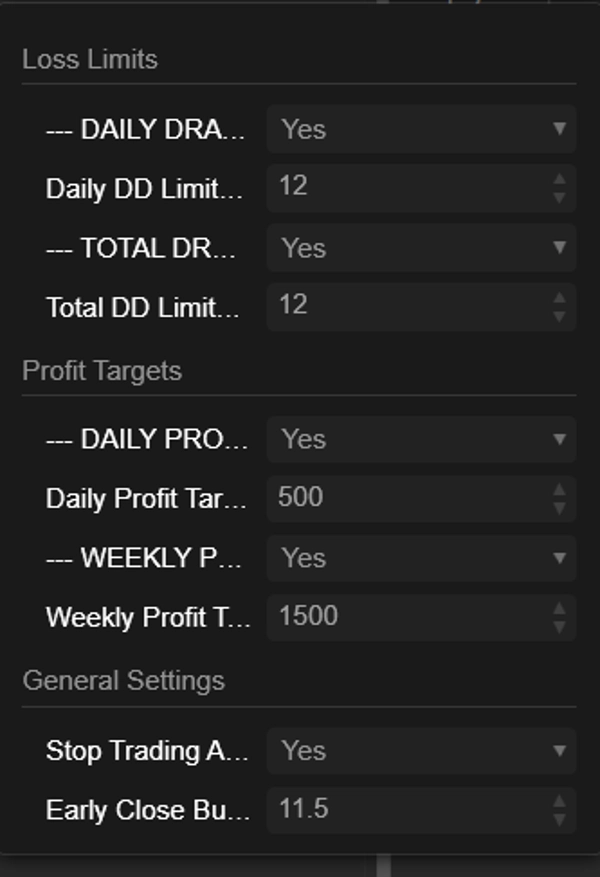
- Before you press "Play," set up the bot's parameters according to your trading plan. Decide which loss limits and profit targets you want to enable and with what values.
- Launch & Monitor ▶️
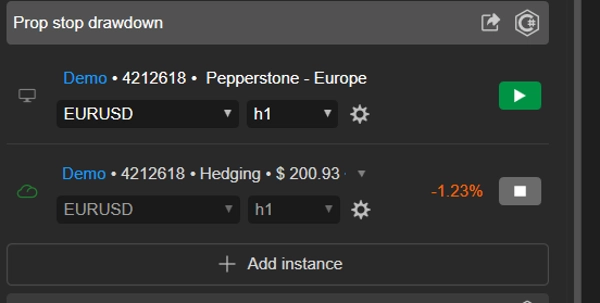
- Once the parameters are set, press the "Play" button on the cBot instance.
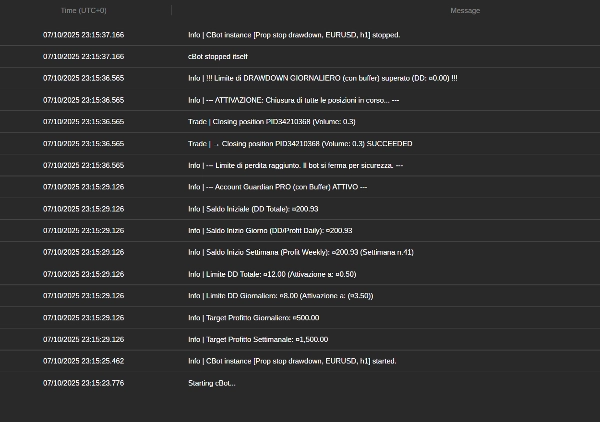
- You will see messages appear in the bot's "Log" tab 📜, confirming that it's active and showing the limits you've set.
- That's it! You can now focus on your manual trading. The bot will run quietly in the background and will only take action when one of your rules is met.
Parameter Details Breakdown 📋
Here is an explanation of every parameter you will find in the bot's interface.
Group: Loss Limits 🛑
- EnableDailyDrawdownLimit (
Yes/No) - Explanation: Enables (
Yes) or disables (No) the daily maximum drawdown check. - How it works: If enabled, the bot will calculate the maximum loss from the account balance at the start of the day.
- Explanation: Enables (
- Daily DD Limit ($) (e.g.,
400.0) - Explanation: Sets the maximum loss amount (in your account's currency) that you are willing to accept in a single day. This should be a positive number.
- EnableTotalDrawdownLimit (
Yes/No) - Explanation: Enables (
Yes) or disables (No) the total maximum drawdown check. - How it works: If enabled, the bot will calculate the maximum loss from the balance you had when you first started the bot.
- Explanation: Enables (
- Total DD Limit ($) (e.g.,
800.0) - Explanation: Sets the maximum total loss amount you are willing to accept.
Group: Profit Targets 🎯
- EnableDailyProfitTarget (
Yes/No) - Explanation: Enables (
Yes) or disables (No) the daily profit target.
- Explanation: Enables (
- Daily Profit Target ($) (e.g.,
500.0) - Explanation: Sets the daily profit amount at which the bot will close all open positions.
- EnableWeeklyProfitTarget (
Yes/No) - Explanation: Enables (
Yes) or disables (No) the weekly profit target.
- Explanation: Enables (
- Weekly Profit Target ($) (e.g.,
1500.0) - Explanation: Sets the weekly profit amount (calculated from Monday) at which the bot will close all positions.
Group: General Settings 🔧
- Stop Trading After Profit Target? (
Yes/No) - Explanation: This crucial parameter decides what happens after a profit target is reached.
- If
Yes: The bot closes all positions and stops monitoring until the next day (or week). This is the safest option to lock in your profits. 🔒 - If
No: The bot closes the positions but continues to monitor. If you open new trades and they go into loss, the drawdown limits are still active and could be triggered. 👀
- Early Close Buffer ($) (e.g.,
10.0) - Explanation: This is your safety margin 🛡️. The amount entered here is subtracted from your drawdown limits to create an earlier trigger point.
- Example: If your
Daily DD Limitis $400 and yourBufferis $10, the bot will intervene and close everything as soon as the drawdown reaches $390, ensuring you never hit your absolute maximum limit.