คำอธิบาย
QX PivotZones คืออินดิเคเตอร์ Pivot Points ที่สร้างขึ้นสำหรับ การตัดสินใจซื้อขายจริง ไม่ใช่แค่เส้นนิ่งที่ราคามองข้าม"
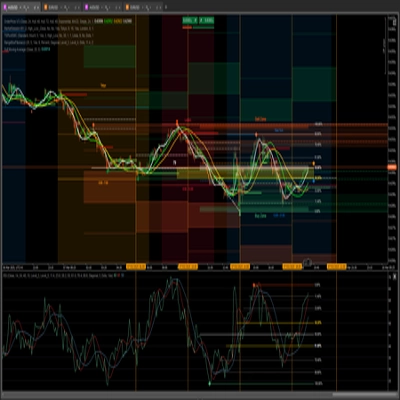
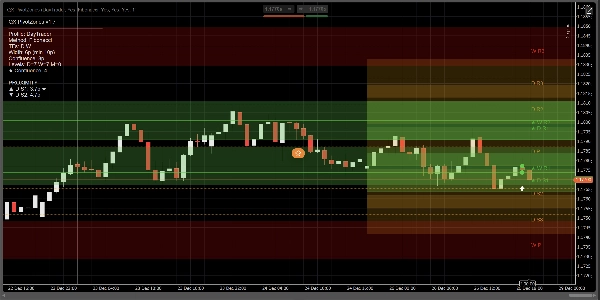
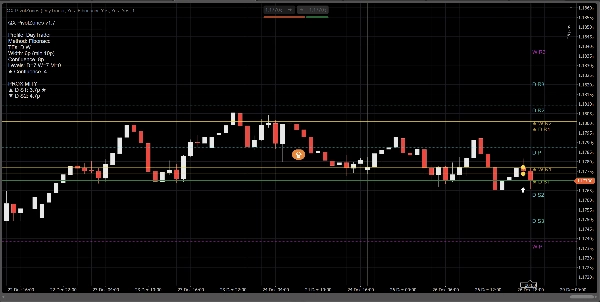
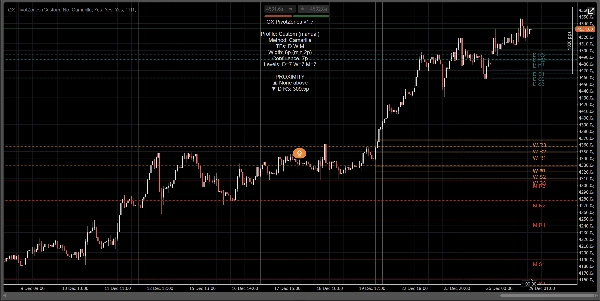
มันคำนวณ จุดหมุนรายวัน รายสัปดาห์ และรายเดือน โดยใช้ Classic, Fibonacci, Camarilla, หรือ Woodie และแสดงผลเป็น โซนราคาจริง (แถบ) ที่มีความกว้างปรับได้ (Pips หรือ ATR-based) จุดเด่นหลักคือความเรียบง่าย: มันเน้นอัตโนมัติที่ ความสอดคล้องหลายกรอบเวลา และเปลี่ยนจุดหมุนให้เป็น พื้นที่ที่สามารถนำไปใช้ได้จริง ไม่ใช่ “จินตนาการเส้นสมบูรณ์แบบ”
ทำไมมันถึงแตกต่างจากเครื่องมือ Fibonacci Pivot / FiboPoints ทั่วไป:
อินดิเคเตอร์ “FiboPoints” ส่วนใหญ่หยุดที่เส้นจุดหมุนพื้นฐาน QX PivotZones เพิ่มสิ่งที่เทรดเดอร์ต้องการจริงๆ:
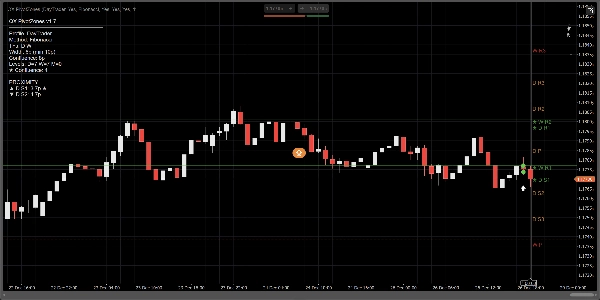
- การตรวจจับความสอดคล้อง D/W/M อัตโนมัติ: เมื่อจุดหมุนจากกรอบเวลาต่างๆ รวมตัวกัน ระดับนั้นจะถูกเน้น (★) และทาสีด้วยสีความสอดคล้อง
- โซน (แถบ) แทนเส้นบาง: กำหนดความกว้างเป็นพิปส์หรือ ATR เพื่อลดเสียงรบกวนจากปฏิกิริยา “เกือบแตะ”
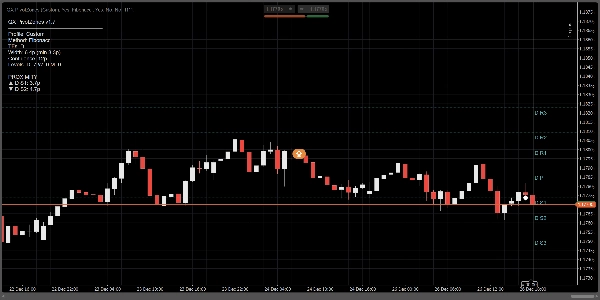
- ตัวกรองระดับใกล้เคียง (ไม่บังคับ): แสดงเฉพาะโซนที่เกี่ยวข้องมากที่สุดเหนือและใต้ราคาปัจจุบัน
- การแจ้งเตือนที่มีประโยชน์: ทริกเกอร์เมื่อ เข้าสู่โซน, แตะเส้น หรือ ทั้งสองอย่าง พร้อมระยะเวลาคูลดาวน์และตัวกรอง “เฉพาะความสอดคล้อง” ที่เลือกได้
- แผงข้อมูล + ระยะใกล้: ดูกรอบเวลาที่เปิดใช้งาน วิธีการ ความกว้างโซน จำนวนความสอดคล้อง และระยะทางไปยังโซนที่ใกล้ที่สุดด้านบน/ล่าง
วิธีใช้:
1) เลือกโปรไฟล์
- Scalper: ภายในวัน มีระดับน้อยกว่า โซนปรับตัวแคบกว่า
- DayTrader: รายวัน + รายสัปดาห์ (ค่าเริ่มต้น)
- Swing: รายวัน + รายสัปดาห์ + รายเดือน
- กำหนดเอง: ควบคุมทุกอย่างด้วยตนเอง
เคล็ดลับ: หากคุณต้องการ “DayTrader + รายเดือน” ปิดการใช้งานการแทนที่โปรไฟล์ (หรือใช้กำหนดเอง) และเปิดใช้งาน แสดงรายเดือน ด้วยตนเอง
2) กำหนดค่าโซน (จุดประสงค์หลัก)
ภายใต้ โหมดความกว้างโซน:
- Pips สำหรับแถบที่คงที่และสม่ำเสมอ
- ATR สำหรับแถบที่ปรับตามความผันผวน
พารามิเตอร์สำคัญ:
- ความกว้างโซน (pips) หรือ ATR k
- ความกว้างโซนขั้นต่ำ (pips) เพื่อป้องกันไม่ให้แถบบางเกินไป
- เติมโซน เพื่อทาสีโซน
- ขยายโซนไปทางขวา เพื่อฉายแถบไปยังด้านขวาที่มองเห็นได้
3) เปิดใช้งานความสอดคล้อง (จุดที่แตกต่างหลัก)
- เน้นความสอดคล้อง: เปิด
- โหมดความสอดคล้อง:
-
- Pips สำหรับความทนทานคงที่
- ATR สำหรับความทนทานปรับตัว
- ระยะความสอดคล้อง หรือ Confluence ATR k
ระดับที่สอดคล้องกันจะได้รับ:
- สีความสอดคล้อง
- เครื่องหมาย ★ บนป้าย
- จำนวนที่แสดงในแผง
4) การแจ้งเตือน (เทรดโดยไม่ต้องจ้องหน้าจอ)
- การแจ้งเตือน: EnterZone, TouchLine, หรือ ทั้งสองอย่าง
- การแจ้งเตือน: เฉพาะความสอดคล้อง: ลดเสียงรบกวน
- ระยะเวลาคูลดาวน์การแจ้งเตือน (แท่ง): ป้องกันการแจ้งเตือนซ้ำซ้อน
- แสดงไอคอนแจ้งเตือน: ทำเครื่องหมายเหตุการณ์บนชาร์ต
การตั้งค่าล่วงหน้าอย่างรวดเร็ว (แนะนำ)
การสแคปปิ้ง (M5–M15)
- โหมดความกว้างโซน: ATR
- ATR k: 0.15–0.25
- โหมดความสอดคล้อง: Pips
- ระยะความสอดคล้อง: 4–8 pips
- แสดงเฉพาะโซนที่ใกล้ที่สุด: เปิด (3 ด้านบน / 3 ด้านล่าง)
การเทรดรายวัน (M15–H1)
- โหมดความกว้างโซน: Pips
- ความกว้าง: 6–10 pips
- ความสอดคล้อง: 8–12 pips
- เปิดใช้งาน รายวัน + รายสัปดาห์
สวิง (H4–D1)
- โหมดความกว้างโซน: ATR
- ATR k: 0.25–0.45
- เปิดใช้งาน รายวัน + รายสัปดาห์ + รายเดือน
สิ่งที่มันทำ (และไม่ทำ)
- นี่ไม่ใช่ เครื่องสร้างสัญญาณซื้อ/ขาย.
- มันคือ แผนที่โครงสร้างตลาด / โซน S&R พร้อม การแจ้งเตือนเหตุการณ์ (เข้า/แตะ) และ การเน้นความสอดคล้อง.
- กรณีการใช้งานที่ดีที่สุด: ปฏิกิริยาที่จุดหมุน การปฏิเสธ/ยอมรับ การดึงกลับ เป้าหมาย การทยอยออก และการป้องกันการเทรด
สรุป
Key features include automatic detection and highlighting of multi-timeframe confluence (daily/weekly/monthly), which marks clustered pivot zones with distinct colors and symbols. Users can filter to show only the nearest relevant zones around the current price. The indicator offers configurable alerts for entering or touching zones, with options to limit alerts to confluence zones and apply cooldown periods to reduce noise.
An information panel provides details on active timeframes, pivot methods, zone widths, confluence counts, and proximity to zones. Predefined profiles support different trading styles such as scalping, day trading, and swing trading, with customizable settings for zone width and confluence parameters.
QX PivotZones functions as a market structure and support/resistance zone tool with event alerts, intended for use in analyzing reactions at pivots, pullbacks, targets, and trade management across various markets including forex, indices, commodities, and cryptocurrencies.
รีวิวจากลูกค้า
5 | 33 % | |
4 | 67 % | |
3 | 0 % | |
2 | 0 % | |
1 | 0 % |