Description
Alertes de ligne de tendance
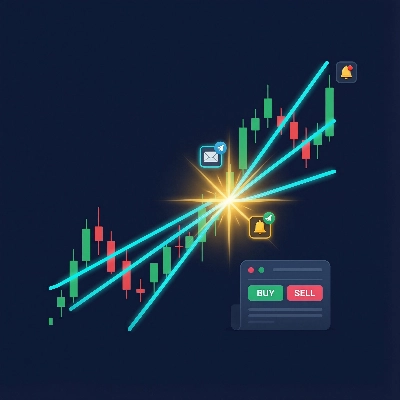
Un indicateur qui surveille les lignes de tendance dessinées à la main sur les graphiques de prix et déclenche des alertes multi-canaux — et place éventuellement des trades — lorsque le prix franchit une ligne de tendance.
Ce que cela fait
Vous dessinez des lignes de tendance sur votre graphique. L'indicateur les surveille. Lorsque le prix franchit une ligne, il :
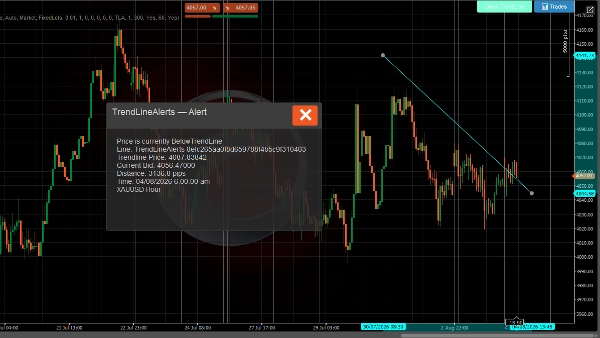
- Affiche une fenêtre contextuelle sur le graphique avec les détails du franchissement
- Joue un son de notification
- Envoie un e-mail (optionnel)
- Envoie un message Telegram via un bot (optionnel)
- Place un trade (optionnel — ordre au marché, limite, stop, ou stop-limite)
Système d'alerte
- Détection de franchissement de ligne de tendance — se déclenche à chaque tick lorsque le prix franchit une ligne de tendance suivie vers le haut ou vers le bas
- Messages riches — inclut le prix de la ligne de tendance, le cours acheteur actuel, la distance en pips, l'instrument et l'intervalle de temps
- Limitation du taux — temps de refroidissement configurable par ligne de tendance pour éviter les alertes en double
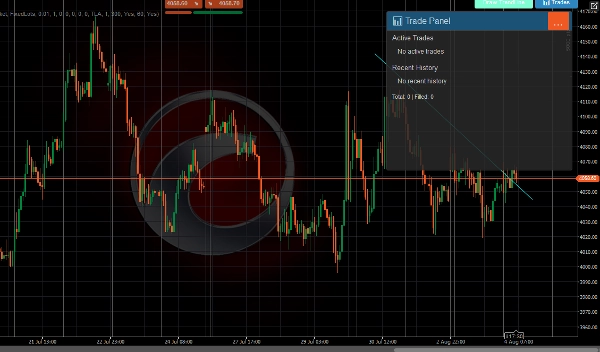
- Historique des alertes — les 500 dernières alertes sont stockées et consultables dans le panneau de trading
- Diffusion multi-canaux — popup, son, e-mail et Telegram simultanément
Système de trading
Lorsque le trading est activé, un événement de franchissement peut également placer un trade :
- Tous les types d'ordres C-Trader — marché, limite achat/vente, stop achat/vente, stop-limite achat/vente
- Direction automatique — le prix franchit vers le bas → vendre, franchit vers le haut → acheter (ou défini manuellement par ligne)
- Stop loss et take profit — spécifiés en pips, convertis automatiquement en niveaux de prix
- Deux modes de volume — lots fixes ou basés sur le risque (% du solde du compte)
- Remplacements par ligne de tendance — chaque ligne de tendance peut avoir ses propres paramètres de trading (direction, volume, SL / TP, type d'ordre)
- Gestion des trades — nombre maximum de trades par ligne, temps de refroidissement entre trades, annulation automatique des ordres en attente lorsqu'une ligne de tendance est supprimée
- Suivi du cycle de vie des trades — suit les exécutions, les hits SL/TP, les rejets et les annulations avec notifications pour chaque événement
Interface utilisateur
Une barre d'outils apparaît sur le graphique (position configurable) avec :
- Dessiner une ligne de tendance — place une nouvelle ligne de tendance interactive sur le graphique
- 📊 Trades — ouvre un panneau affichant les trades actifs, l'historique récent et les statistiques
Notifications
Canal Description
Popup Dialogue dans le graphique avec en-tête codé par couleur (vert = TP atteint, rouge = SL/rejet, bleu = ordre placé)
Son Son d'annonce cTrader
E-mail Envoyé via le système d'e-mail intégré de cTrader
Telegram Envoyé via l'API Bot Telegram aux canaux configurés
Tous les canaux reçoivent le même format de message riche incluant l'instrument, l'intervalle de temps, le prix actuel, les détails de la ligne de tendance, et les informations de trade le cas échéant.
UTILISATION
Dessiner des lignes de tendance
Utilisation du bouton de la barre d'outils
- Cliquez Dessiner une ligne de tendance sur la barre d'outils
- Une ligne de tendance horizontale cyan apparaît sur le graphique
- Faites glisser les points d'extrémité pour la positionner au niveau de prix souhaité
- L'indicateur commence automatiquement à la surveiller pour les franchissements
Dessin manuel
- Dessinez n'importe quelle ligne de tendance en utilisant les outils de dessin de cTrader
- Nommez-la avec le préfixe
TrendLineAlertssuivi d'un espace (par exemple,TrendLineAlerts support1) - L'indicateur la détecte et commence à la suivre
Configurer les alertes
Placement du bouton
- Placement des boutons groupe → choisissez dans quel coin la barre d'outils apparaît (HautGauche, HautDroite, BasGauche, BasDroite)
Notifications Telegram
- Réglez Utiliser les notifications Telegram sur
true - Saisissez votre Clé du bot Telegram (depuis @BotFather)
- Saisissez le Nom du canal ou ID de chat (laissez vide pour découvrir automatiquement via les interactions du bot)
Notifications par e-mail
- Réglez Utiliser les notifications par e-mail sur
true(par défaut) - Saisissez votre Adresse e-mail
- Les e-mails sont envoyés via le système de notification intégré de cTrader
Temps de refroidissement des alertes
- Temps de refroidissement des alertes (secondes) — temps minimum entre les alertes en double pour la même ligne de tendance (par défaut : 60s)
- Activer l'historique des alertes — stocke les 500 dernières alertes (par défaut : true)
Configurer le trading
Activer le trading
- Réglez Activer le trading sur
true(par défaut : false) - Configurez les paramètres globaux ci-dessous
Type d'ordre
- Type d'ordre par défaut — type d'ordre à placer lors d'un franchissement :
-
Market— s'exécute immédiatement au prix actuelLimit— place un ordre limite en attente au prix de la ligne de tendance ± décalageStop— place un ordre stop en attente au prix de la ligne de tendance ± décalageStopLimit— place un ordre stop-limite en attente
Direction
- Direction par défaut :
-
Auto— le prix franchit la ligne de tendance vers le bas → Vendre, franchit vers le haut → AcheterBuy— toujours acheter lors d'un franchissementSell— toujours vendre lors d'un franchissement
Volume
- Mode de volume :
-
FixedLots— utilise directement la valeur Volume (lots) (par exemple, 0.01)RiskPercent— calcule la taille du lot à partir du solde du compte, du pourcentage de risque et de la distance du stop loss
- Volume (lots) — taille de lot fixe en mode FixedLots
- Pourcentage de risque — pourcentage du solde du compte à risquer par trade (par exemple, 1.0 = 1%)
Stop Loss / Take Profit
- Stop Loss (pips) — distance depuis l'entrée en pips (0 = pas de SL)
- Take Profit (pips) — distance depuis l'entrée en pips (0 = pas de TP)
Paramètres des ordres en attente
Pertinent uniquement pour les types d'ordres Limit, Stop, et StopLimit :
- Décalage du prix limite (pips) — distance par rapport au prix de la ligne de tendance pour les ordres limite
- Décalage du prix stop (pips) — distance par rapport au prix de la ligne de tendance pour les ordres stop
- Expiration (minutes) — moment où l'ordre en attente expire (0 = valable jusqu'à annulation)
Gestion des trades
- Étiquette d'ordre — préfixe pour les étiquettes de position (par défaut :
TLA) - Nombre maximum de trades par ligne — nombre maximum de trades simultanés par ligne de tendance (par défaut : 1)
- Temps de refroidissement (secondes) — temps minimum entre les trades sur la même ligne de tendance (par défaut : 300)
Notifications de résultat de trade
- Notifier les résultats de trade — envoie des alertes lorsque les trades sont exécutés, hits SL/TP, ou rejetés (par défaut : true)
Remplacements par ligne de tendance
Par défaut, toutes les lignes de tendance utilisent les paramètres globaux de trading ci-dessus.
Visualiser les trades
Cliquez sur le bouton 📊 Trades dans la barre d'outils pour ouvrir le panneau de trading :
- Trades actifs — affiche toutes les positions ouvertes et les ordres en attente liés aux lignes de tendance
- Historique récent — 5 derniers trades fermés/annulés/rejetés avec icônes de statut :
-
- 🛑 Stop Loss atteint
- 🎯 Take Profit atteint
- ❌ Rejeté
- ⚠️ Annulé
- Statistiques — total des trades et nombre d'exécutions
Cycle de vie de la ligne de tendance
Événement Ce qui se passe
Ligne dessinée/mise à jour L'indicateur calcule l'état du prix, réinitialise l'alerte à En attente
Le prix franchit la ligne L'alerte se déclenche (popup + son + e-mail + Telegram), trade placé si activé
Ligne supprimée Les données de suivi sont effacées, tous les ordres en attente pour cette ligne sont annulés
Guide des couleurs des popups
Couleur Signification
Gris foncé Alerte de franchissement de prix
Bleu Ordre placé
Vert (sarcelle) Trade exécuté
Vert Take profit atteint
Rouge Stop loss atteint ou trade rejeté
Jaune Ordre annulé
Le trading comporte des risques. Les performances passées ne garantissent pas les résultats futurs.
Résumé
Key features include:
- Real-time detection of price crossing above or below tracked trend lines on every tick.
- Rich alert messages containing trend line price, current bid, distance in pips, instrument, and timeframe.
- Configurable alert cooldowns to prevent duplicate notifications.
- Storage and display of the last 500 alerts in a Trade Panel.
- Multi-channel alert delivery: popup, sound, email, and Telegram simultaneously.
When trading is enabled, the indicator supports all cTrader order types (market, limit, stop, stop-limit) with automatic direction setting based on price crossing (buy above, sell below) or manual configuration per trend line. It includes stop loss and take profit settings, two volume modes (fixed lots or risk-based), and per-trend line trade overrides. Trade management features include limits on concurrent trades per line, cooldowns between trades, and automatic cancellation of pending orders when a trend line is deleted. Trade lifecycle events such as fills, SL/TP hits, rejections, and cancellations generate notifications.
The user interface provides a configurable toolbar for drawing trend lines and accessing a Trade Panel that displays active trades, recent history, and statistics. Alerts use color-coded popups to indicate event types (e.g., order placed, trade filled, stop loss hit).

![Logo de "[Hamster-Coder] Bollinger Bands"](https://cdn.ctrader.com/image/webp/21d8e5d6-fb11-4bac-b9ee-cd05c2b76804_30327)