present
Kaydolun ve ilk alışverişinizde $50 indirim kazanın
Trading product for SmartOrderPro Masaüstü eklentisi Position Sizer Stop Loss (SL) Manager, image 1
SmartOrderPro
Masaüstü eklentisi
Sürüm 1.4, Oct 2026
Windows, Mac
Trading product for SmartOrderPro Masaüstü eklentisi Position Sizer Stop Loss (SL) Manager, image 2
Başlangıç 09/03/2026
49
Ücretsiz yüklemeler

Açıklama

SmartOrderPro : Drag your risk. Lock your profit.

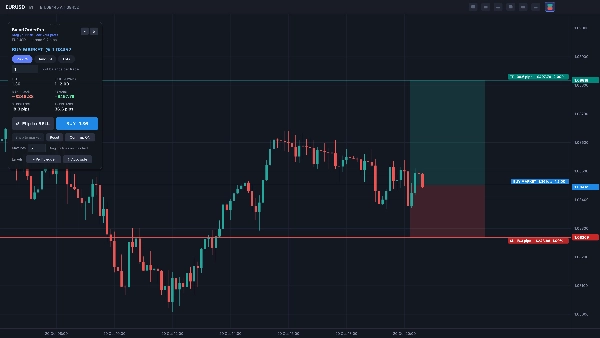
Plan and place trades visually, right on your cTrader chart. Instead of typing prices and calculating lot sizes, you drag three lines – Entry, Stop Loss and Take Profit – and SmartOrderPro shows your risk, reward, R:R, pips and position size live. When the trade looks right, place it with one click.

VISUAL ORDER PLANNING
• Entry (grey), Stop Loss (red) and Take Profit (green) lines you can drag anywhere
• Shaded risk and reward zones on the live candle, like a position tool
• Labels on every line show pips, money at risk or reward, % of balance and R multiple
• Drag the entry and the whole setup moves with it, keeping your R:R
• Drag the SL or TP across the entry to flip between Buy and Sell instantly

SMART ORDER TYPES
• Entry at current price = Market order
• Drag the entry away from price and SmartOrderPro picks Limit or Stop automatically
• "Snap to market" brings a pending setup back to a market order in one click
• For market orders, SL and TP are set to the exact prices you dragged

POSITION SIZING
• Risk %: risk a percentage of your balance per trade
• Amount: risk a fixed amount of money per trade
• Lots: trade a fixed lot size
• Lot size is rounded down to your broker's lot step, so you never risk more than planned
• Max-lots safety cap
• If even the minimum lot would risk more than your setting, the order is blocked and the panel tells you why

ORDER PANEL
• Floating panel you can drag anywhere on the chart, or collapse
• Big Buy and Sell buttons with the lot size shown
• Optional confirm step: click once to arm, click CONFIRM to send – or switch it off for one-click trading
• Clear warnings for invalid setups: SL or TP on the wrong side, SL inside the spread, size above broker or your own limits
• Reset button for a fresh default setup

LIVE TRADE LABELS
For positions and pending orders placed with SmartOrderPro:
• Entry label: live P/L, pips and R
• SL and TP labels: money and R at stake if the level is hit
• When your SL is moved into profit, its label shows the profit it locks in
• Labels update when you modify SL or TP

CUSTOMIZATION
• Label position: right edge of the chart, next to the live candle, or left edge
• Label side: automatic, always above the line, or always below
• All settings are saved and restored the next time you use it

BUILT FOR REAL USE
• Keeps your setup when you switch timeframes
• Stays open when you click outside cTrader or on another chart – closes only when you choose
• Toolbar button on a different chart moves the preview there
• Detailed log (filter by "[SOP]") for quick support

HOW TO INSTALL

  1. Get SmartOrderPro from the cTrader Store – it is added to your cTrader automatically.
  2. Open cTrader Desktop and go to Algo › Plugins. Make sure SmartOrderPro is enabled.
  3. Open any chart. A SmartOrderPro button appears in the chart toolbar.

HOW TO USE

  1. Click the SmartOrderPro button in the chart toolbar to open the order preview.
  2. Choose your sizing mode (Risk %, Amount or Lots) and enter your value.
  3. Drag the SL and TP lines to your levels. Drag the entry line for a Limit or Stop order.
  4. Check risk, reward and R:R in the panel and on the chart.
  5. Click Buy or Sell (then CONFIRM, if the confirm step is on). If cTrader asks for trading permission, allow it.
  6. Close the preview with the × on the panel or the toolbar button.

REQUIREMENTS
• cTrader Desktop 5.2 or newer
• Works with any symbol your broker offers

PLEASE NOTE
• Risk figures are based on your SL distance and do not include commission or swap.
• Your broker's minimum stop distance still applies; if a stop is too tight, the broker rejects the order and SmartOrderPro shows the reason.
• Trading involves risk. Always test on a demo account first.

Özet

AI summary
SmartOrderPro is a trading plugin for cTrader Desktop (version 5.2 or newer) that enables visual trade planning and one-click order placement directly on the chart. Users drag three adjustable lines—Entry, Stop Loss (SL), and Take Profit (TP)—to set trade parameters visually. The plugin dynamically calculates and displays key metrics including risk, reward, risk-to-reward ratio (R:R), pips, and position size based on the user’s chosen sizing mode: risk percentage, fixed amount, or fixed lots. Lot sizes are automatically adjusted to comply with broker lot steps and user-defined maximums.

SmartOrderPro supports market, limit, and stop orders, automatically selecting the order type based on the entry line position relative to the current price. The interface includes a floating, draggable order panel with large Buy and Sell buttons, optional confirmation steps, and clear warnings for invalid setups such as improper SL/TP placement or exceeding size limits.

Live trade labels update in real time to show profit/loss, pips, and risk multiples for open positions and pending orders. Customization options allow label positioning and display preferences, with all settings saved between sessions. The plugin maintains setups across timeframes and chart changes, enhancing trade management efficiency for any symbol offered by the broker.

Eklenti profili
Eklenti kategorisi
Risk yönetimi
Veri erişimi
Grafik
Desteklenen emir türleri
Piyasa
Limit
Stop
Stop limiti
Risk modeli
Sabit risk yüzdesi
Sabit lot
Dinamik
Desteklenen risk denetimleri
Zarar durdur
Kâr al

Müşteri değerlendirmeleri

0.0
Değerlendirmeler: 0
Müşteri değerlendirmeleri
Bu ürün için henüz bir değerlendirme yok. Ürünü denediniz mi? O zaman ona dair görüşlerini paylaşan ilk kişi olun!

Tartışma

SSS

Position Sizer
Stop Loss (SL) Manager
One-click Trading
SL Manager
Risk/Reward
Risk Calculator
Take Profit (TP) Manager
cTrader Store üzerinden erişilebilen işlem botları, göstergeler ve eklentiler gibi ürünler, üçüncü taraf sağlayıcılar tarafından sağlanır ve yalnızca bilgilendirme ve teknik erişim amaçlarıyla sunulur. cTrader Store bir broker değildir ve yatırım tavsiyesi, kişisel öneriler vermez veya gelecekteki performansı garanti etmez.

Bu oluşturanın diğer ürünleri

Gösterge
Key Levels
Every major liquidity level drawn for you: PDH/PDL, PWH/PWL, PMH/PML and more. Same price on every timeframe. Free.
Masaüstü eklentisi
Chart UI Tools
Replay your broker’s charts candle by candle. Rewind any time, switch timeframes and practise trades with full stats.
Gösterge
Fair Value Gap
Auto-draws every Fair Value Gap on any timeframe and removes it once filled. Clean, fast, free. Built for cTrader.
Masaüstü eklentisi
Prop Firm Fit
Trade Journal
+1
Paper trade your broker’s live prices in cTrader: demo accounts, prop challenges, a stats dashboard and trading journal
Gösterge
Key Levels
Support & Resistance
Day and week separators plus previous day high, low and close lines for every day on H1 and lower charts
Masaüstü eklentisi
Trade Journal
Trade Statistics
Track. Analyze. Improve. A journal and statistics for your real cTrader trades, with a prop challenge guard.
Gösterge
EMA
Outlines the first candle of the real session open for indices, forex & crypto. Auto DST, HTF candle panel & EMA.
Gösterge
BOS
CHOCH
+5
SMC structure indicator for cTrader: BOS/CHoCH, order blocks, FVGs, liquidity sweeps, key levels and alerts.
Gösterge
EMA
Flag
+2
Liquidity levels, trend lines, filtered chart patterns and a composite bias HUD in one cTrader overlay.

Şunları da beğenebilirsiniz

"TradeGuard" logosu
Popüler
4.6
(3)
$25
Masaüstü eklentisi
ATR
Prop
+5
cTrader risk management plugin with daily & total drawdown limits, CBot control, and risk-based order execution.
Masaüstü eklentisi
Signal
Breakout
The Risk-Reward plugin is a tool to visualize a trading idea based on other analysis tools,
Masaüstü eklentisi
Prop
Forex
+5
Place professional OCO & OSO orders in cTrader — visually, instantly, and without execution mistakes.
Masaüstü eklentisi
Prop Firm Fit
Trade Journal
+1
Paper trade your broker’s live prices in cTrader: demo accounts, prop challenges, a stats dashboard and trading journal
Masaüstü eklentisi
Risk Alerts
Prop Firm Fit
+5
Read-only risk cockpit for prop-firm traders: live drawdown gauges, FTMO-style permitted loss, alerts and reports.
Masaüstü eklentisi
Chart UI Tools
Replay your broker’s charts candle by candle. Rewind any time, switch timeframes and practise trades with full stats.
Masaüstü eklentisi
ATR
RSI
+24
One-click toggle for Positions / Pending Orders on cTrader charts with fixed on-chart warnings and an ASP control panel
Masaüstü eklentisi
External Data
Trade Journal
+2
Real Quant Audit, Live equity, open-position risk and 24 quant tests on your full account. IS THE EDGE REAL?
Masaüstü eklentisi
Trade Journal
Trade Statistics
Track. Analyze. Improve. A journal and statistics for your real cTrader trades, with a prop challenge guard.
Masaüstü eklentisi
Forex
Commodities
Close all non crypto trades at 19:55 utc Friday

Fiyat

Başlangıç 09/03/2026
49
Ücretsiz yüklemeler