
![Trading product for [Stellar Strategies] BOS Trend 1.0 Chỉ báo, image 1](https://cdn.ctrader.com/image/webp/6cdec0f1-0e97-4a82-a8a4-2b67aed54d38_25695)
[Stellar Strategies] BOS Trend 1.0
Chỉ báo
493 lượt tải
Phiên bản 1.0, Nov 2024
Windows, Mac
5.0
Đánh giá: 1
![Trading product for [Stellar Strategies] BOS Trend 1.0 Chỉ báo, image 2](https://cdn.ctrader.com/image/webp/2738d263-76dc-4e6f-a818-7e66349e6883_25696)
![Trading product for [Stellar Strategies] BOS Trend 1.0 Chỉ báo, image 3](https://cdn.ctrader.com/image/webp/5338cc95-bf3e-4db4-b575-3e935cff8e90_25697)
![Trading product for [Stellar Strategies] BOS Trend 1.0 Chỉ báo, image 4](https://cdn.ctrader.com/image/webp/59502053-3cfb-4232-b1da-c27ad8852e60_25698)
![Trading product for [Stellar Strategies] BOS Trend 1.0 Chỉ báo, image 5](https://cdn.ctrader.com/image/webp/e32ea74f-662d-4c30-8571-3b8062b6be90_25699)
![Trading product for [Stellar Strategies] BOS Trend 1.0 Chỉ báo, image 6](https://cdn.ctrader.com/image/webp/fe0c3dd9-19fe-4833-bd0e-640ccec47e31_25700)
![Trading product for [Stellar Strategies] BOS Trend 1.0 Chỉ báo, image 7](https://cdn.ctrader.com/image/webp/0fa38032-d41c-4684-a0ec-c9512db0d567_25701)
![Trading product for [Stellar Strategies] BOS Trend 1.0 Chỉ báo, image 8](https://cdn.ctrader.com/image/webp/10e865d7-9813-4932-ac9b-3b76516518c9_25702)

20.46M
Khối lượng đã giao dịch
8.02K
Pip đạt được
27
Lượt bán
4.92K
Cài đặt miễn phí
Mô tả
The [Stellar Strategies] BOS Trend là một chỉ báo Break of Structure (BOS) đa khung thời gian cao cấp được thiết kế cho cAlgo. Nó cung cấp cho các nhà giao dịch những hiểu biết quan trọng về xu hướng thị trường bằng cách phát hiện BOS xu hướng tăng và xu hướng giảm trên nhiều khung thời gian.
Tính năng:
- Phân tích đa khung thời gian: Phân tích biến động giá trên nhiều khung thời gian khác nhau (1 phút đến hàng ngày).
- Khung thời gian tùy chỉnh: Bật hoặc tắt các khung thời gian cụ thể để tùy chỉnh phân tích của bạn.
- Cảnh báo thời gian thực: Hiển thị thông báo trên biểu đồ khi phát hiện BOS.
- Giao diện thân thiện với người dùng: Màu chữ có thể tùy chỉnh để dễ nhìn hơn trên các nền biểu đồ khác nhau.
Tham số:
- Khoảng thời gian nhìn lại (Mặc định: 20): Số thanh để nhìn lại khi phát hiện BOS.
- Tham số khung thời gian:
-
Sử dụng khung thời gian 1 phútSử dụng khung thời gian 5 phútSử dụng khung thời gian 15 phútSử dụng khung thời gian 30 phútSử dụng khung thời gian 1 giờSử dụng khung thời gian 4 giờSử dụng khung thời gian hàng ngày
- Màu chữ (Mặc định: "Vàng"): Đặt màu cho các thông báo BOS.
Cách sử dụng chỉ báo:
- Thêm chỉ báo:
-
- Mở nền tảng cAlgo của bạn.
- Đi đến phần chỉ báo và thêm [Stellar Strategies] BOS Trend vào biểu đồ của bạn.
- Cài đặt tham số:
-
- Khoảng thời gian nhìn lại: Điều chỉnh khoảng thời gian nhìn lại theo chiến lược giao dịch của bạn (mặc định là 20 thanh).
- Bật/Tắt các khung thời gian: Chọn các khung thời gian bạn muốn phân tích bằng cách đánh dấu hoặc bỏ đánh dấu các tùy chọn tương ứng.
- Màu chữ: Chọn màu chữ tương phản tốt với nền biểu đồ của bạn để dễ nhìn.
- Đọc tín hiệu BOS:
-
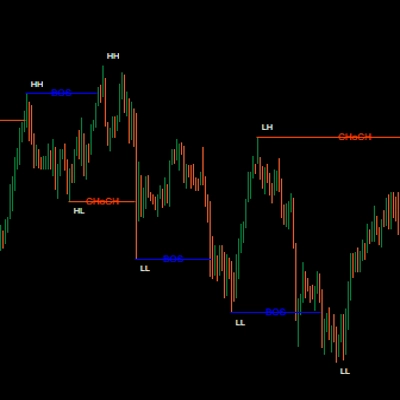
- BOS xu hướng tăng: Các đường màu xanh lá biểu thị sự phá vỡ cấu trúc xu hướng tăng.
- BOS xu hướng giảm: Các đường màu đỏ biểu thị sự phá vỡ cấu trúc xu hướng giảm.
- Thông báo BOS: Các thông báo như "Current TF: Uptrend BOS detected" sẽ xuất hiện trên biểu đồ, cùng với các thông báo khác từ các khung thời gian bạn đã bật.
- Diễn giải dữ liệu:
-
- Sử dụng tín hiệu BOS để xác định khả năng đảo chiều hoặc tiếp tục xu hướng.
- Chú ý đến phân tích đa khung thời gian để có xác nhận xu hướng mạnh hơn.
- Tùy chỉnh hiển thị:
-
- Bạn có thể điều chỉnh màu chữ và vị trí của các thông báo BOS để dễ đọc hơn.
Ví dụ:
Dưới đây là ví dụ từng bước về cách sử dụng chỉ báo [Stellar Strategies] BOS Trend:
- Thêm chỉ báo:
-
- Mở một biểu đồ trên nền tảng cAlgo của bạn.
- Đi đến
Indicatorsvà chọn [Stellar Strategies] BOS Trend.
- Cài đặt tham số:
-
- Đặt
Khoảng thời gian nhìn lạithành 20. - Bật
Sử dụng khung thời gian 1 phút,Sử dụng khung thời gian 5 phút, và các khung thời gian khác khi cần. - Đặt
Màu chữthành "Vàng" để dễ nhìn hơn.
- Đặt
- Theo dõi biểu đồ:
-
- Quan sát các đường BOS màu xanh (xu hướng tăng) và đỏ (xu hướng giảm) trên biểu đồ của bạn.
- Tìm các thông báo chỉ ra việc phát hiện BOS trên các khung thời gian khác nhau.
- Hành động:
-
- Sử dụng các tín hiệu BOS để đưa ra quyết định giao dịch thông minh dựa trên sự đảo chiều hoặc tiếp tục xu hướng.
Bằng cách làm theo các bước này, bạn có thể sử dụng hiệu quả chỉ báo [Stellar Strategies] BOS Trend để nâng cao chiến lược giao dịch của mình với phân tích BOS đa khung thời gian.
Hãy cho tôi biết nếu bạn cần thêm trợ giúp hoặc thông tin! 📈📉
Tóm tắt
Tóm tắt AI
The [Stellar Strategies] BOS Trend is a multi-timeframe Break of Structure (BOS) indicator designed for the cAlgo platform. It identifies key market trend shifts by detecting uptrend and downtrend BOS signals across multiple timeframes ranging from 1 minute to daily charts. Users can customize which timeframes to analyze and adjust the lookback period for BOS detection, with a default of 20 bars. The indicator provides real-time alerts directly on the chart, displaying messages such as "Current TF: Uptrend BOS detected" to inform traders of structural breaks. Visual cues include green lines for uptrend BOS and red lines for downtrend BOS. The interface allows customization of text color to enhance visibility against different chart backgrounds. Traders can use the BOS signals to identify potential trend reversals or continuations, leveraging multi-timeframe analysis for stronger confirmation. The indicator supports flexible configuration to fit various trading strategies and preferences.
Hồ sơ chỉ báo
Thảo luận
Đánh giá của khách hàng
5.0
Đánh giá: 1
5 | 100 % | |
4 | 0 % | |
3 | 0 % | |
2 | 0 % | |
1 | 0 % |
Đánh giá của khách hàng
August 18, 2025
Pros: Automatically detects and marks Break Of Structure points indicating trend shifts. Clean visual arrows and straightforward setup. Cons: No alerts, tooltips, or template saving. May produce noise without volume or market context filters.
Câu hỏi thường gặp
Các sản phẩm có sẵn trên cTrader Store, bao gồm bot giao dịch, chỉ báo và plugin, được cung cấp bởi các nhà phát triển bên thứ ba và chỉ nhằm mục đích cung cấp thông tin và tiếp cận kỹ thuật. cTrader Store không phải là nhà môi giới và không cung cấp lời khuyên đầu tư, khuyến nghị cá nhân hay bất kỳ đảm bảo nào về hiệu suất trong tương lai.
![Logo "[Stellar Strategies] Market Structure Breakout"](https://cdn.ctrader.com/image/webp/bceec265-3247-4b11-915f-6295a29c106d_28465)
![Logo "[Stellar Strategies] Market Session Ultimate"](https://cdn.ctrader.com/image/webp/61ffd537-0125-4246-9e72-42eca1791d64_28232)
![Logo "[Stellar Strategies] Wave Trend Pro"](https://cdn.ctrader.com/image/webp/5f226fbb-245a-41cd-9cdd-b018257d5e6d_28617)
![Logo "[Stellar Strategies] Inside Bar with Signals"](https://cdn.ctrader.com/image/webp/1d9e8bfa-3b2c-4440-bb37-5856902008a7_30683)
![Logo "[StellarStrategies] Scheduled Trade Executor"](https://cdn.ctrader.com/image/webp/daefc6af-7eca-453e-878d-1b981be2c401_25646)
![Logo "[Stellar Strategies] Smart ADX"](https://cdn.ctrader.com/image/webp/af13b084-b6f6-41db-b7bc-c7e688b57b05_36929)
![Logo "[Stellar Strategies] Linear Regression Candles 1.1"](https://cdn.ctrader.com/image/webp/8b9cff9f-2431-46d2-b0ec-c7f55f4a4a6d_27918)
![Logo "[Stellar Strategies] VBO"](https://cdn.ctrader.com/image/webp/f034c012-94d4-445a-a01b-febd1cdedaef_36944)
![Logo "[Stellar Strategies] SP500 Gap Closure cBot 1.0"](https://cdn.ctrader.com/image/webp/92c23fdc-4ad1-4e61-bdb5-c77f6ec8c539_27686)
![Logo "[Stellar Strategies] Candlestick Patterns Dashboard"](https://cdn.ctrader.com/image/webp/ae8691a5-4884-4553-9bcc-64e16ac82a30_38344)
![Logo "[Stellar Strategies] QQE"](https://cdn.ctrader.com/image/webp/e702104a-874c-4b39-97dd-fb34518d1015_27712)
![Logo "[Stellar Strategies] Visual Trend Momentum"](https://cdn.ctrader.com/image/webp/48aee0a5-f10e-4bc8-9671-78e156fcc5df_27548)











Giá
20.46M
Khối lượng đã giao dịch
8.02K
Pip đạt được
27
Lượt bán
4.92K
Cài đặt miễn phí