
คำอธิบาย
🔥 คำอธิบายตัวชี้วัด
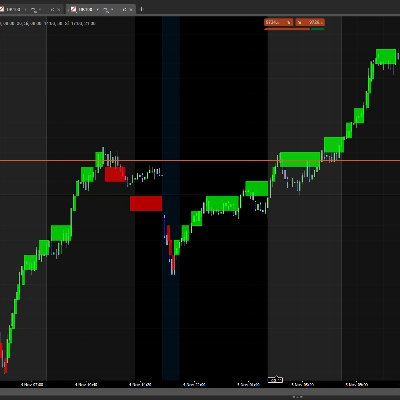
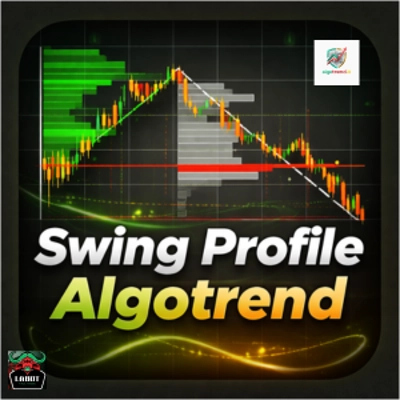
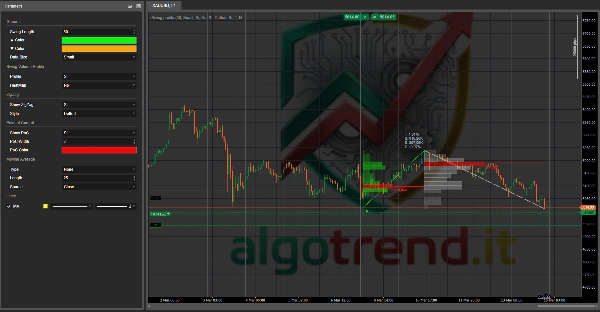
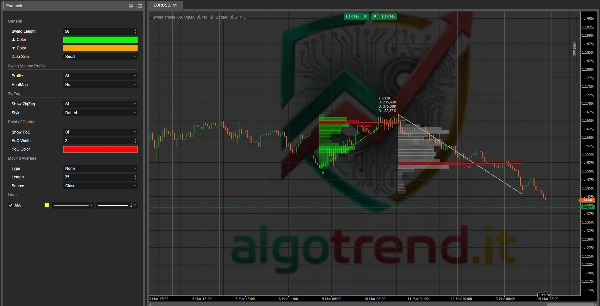
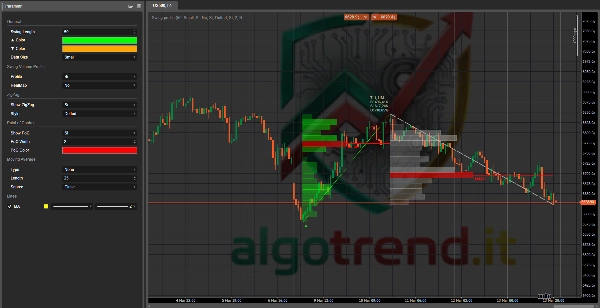
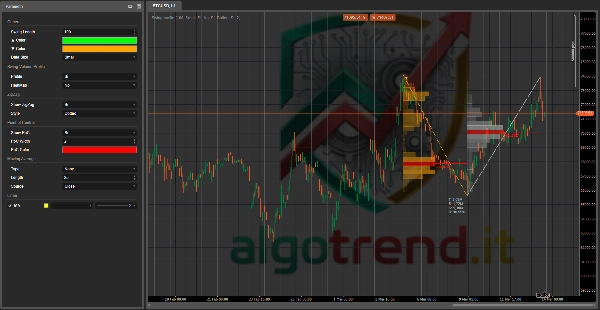
Swing Profile cTrader เป็นตัวชี้วัดเชิงภาพขั้นสูงที่รวมเครื่องมือหลายอย่างไว้ในตัวเดียว:
- การตรวจจับสวิง
- โครงสร้าง ZigZag
- โปรไฟล์ปริมาณสวิงเดี่ยว
- PoC (จุดควบคุม)
- เดลตาปริมาณที่ประมาณการ
- ค่าเฉลี่ยเคลื่อนที่ที่เลือกได้
แนวคิดง่ายแต่ทรงพลังมาก:
แทนที่จะดูแค่ราคา ตัวชี้วัดจะแสดง ว่าปริมาณถูกกระจุกตัวอยู่ที่ใดภายในแต่ละขาสวิง.
ในทางปฏิบัติ มันไม่ได้บอกแค่:
“ราคาขยับขึ้นหรือลง”
แต่มันยังบอกคุณด้วยว่า:
“พื้นที่ใดภายในสวิงนั้นที่เป็นสนามรบจริงระหว่างผู้ซื้อและผู้ขาย”
นั่นคือข้อได้เปรียบที่แท้จริงของมัน 🚀
Swing Profile cTrader เป็นตัวชี้วัดขั้นสูงที่วิเคราะห์โครงสร้างราคาโดยผ่านสวิงแบบไดนามิก, ตรรกะ ZigZag และโปรไฟล์ปริมาณสำหรับแต่ละขาตลาดแต่ละขา
สำหรับทุกสวิง มันเน้นการกระจายปริมาณ, ระบุจุดควบคุม และประมาณสมดุลระหว่างผู้ซื้อและผู้ขายผ่านเดลตาปริมาณ ซึ่งช่วยให้นักเทรดระบุโซนสมดุล, ระดับแนวรับ/แนวต้านที่ซ่อนอยู่, พื้นที่ต่อเนื่อง และความเป็นไปได้ของการหมดแรงของแนวโน้มได้อย่างแม่นยำยิ่งขึ้น
การรวมค่าเฉลี่ยเคลื่อนที่ที่เลือกได้ทำให้ตัวชี้วัดเหมาะสำหรับทั้งการอ่านแผนภูมิแบบเลือกสรรและการกรองทิศทางที่มีโครงสร้างมากขึ้น
🧠 สิ่งที่แสดงบนแผนภูมิ
1) ZigZag
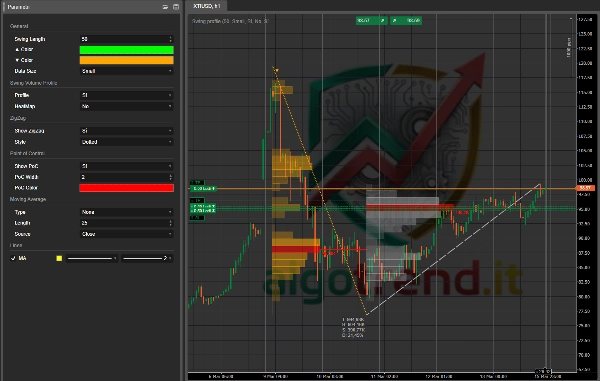
เส้น ZigZag เชื่อมต่อจุดสูงสุดและต่ำสุดหลักของสวิง
มันช่วยให้คุณ:
- เห็นโครงสร้างตลาด
- แยกขาแรงกระตุ้นออกจากขาแก้ไข
- เข้าใจว่าตลาดกำลังสร้าง:
-
- สูงสุดสูงขึ้น / ต่ำสุดสูงขึ้น
- หรือ สูงสุดต่ำลง / ต่ำสุดต่ำลง
วิธีอ่าน
- ZigZag ที่มีสวิงเพิ่มขึ้น = โครงสร้างขาขึ้น
- ZigZag ที่มีสวิงลดลง = โครงสร้างขาลง
- ZigZag สั้นและสับสน = ตลาดข้างเคียง / ไม่มีทิศทาง
2) โปรไฟล์ปริมาณสวิง
นี่คือหัวใจของตัวชี้วัด 💥
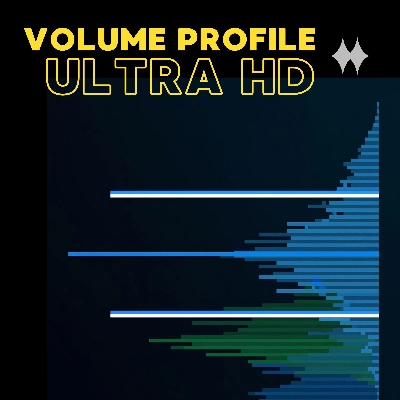
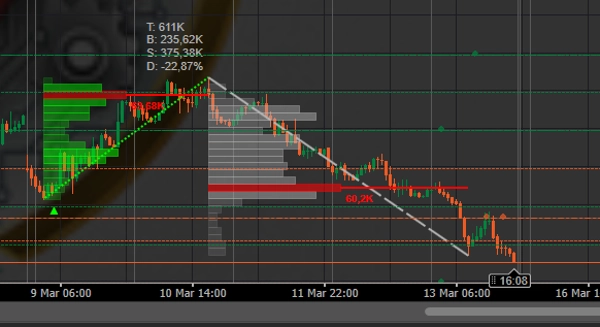
สำหรับแต่ละสวิงที่เสร็จสมบูรณ์ ตัวชี้วัดจะสร้าง โปรไฟล์ปริมาณแนวตั้ง ที่กระจายอยู่ตามโซนราคา
แต่ละบล็อกแนวนอนแทน:
- ช่วงราคา
- ที่มีปริมาณการซื้อขายมากหรือน้อยภายในช่วงนั้น
วิธีอ่าน
- บล็อกยาวกว่า = ปริมาณมากในพื้นที่นั้น
- บล็อกสั้นกว่า = ปริมาณน้อยในพื้นที่นั้น
ดังนั้นคุณจึงเข้าใจได้ทันทีว่า:
- ตลาดยอมรับราคาอยู่ที่ใด
- ตลาดปฏิเสธราคาอยู่ที่ใด
- ที่ใดอาจมีแนวรับ/แนวต้านที่ซ่อนอยู่
3) PoC – จุดควบคุม
PoC คือโซนราคาที่มีปริมาณสูงสุดภายในสวิง
เป็นพื้นที่ที่มีกิจกรรมเข้มข้นสูงสุดเกิดขึ้น
ความหมายทางการเทรด
PoC มักจะเป็น:
- แม่เหล็กราคาดึงดูด
- โซนของ สมดุลชั่วคราว
- พื้นที่แนวรับ/แนวต้านในอนาคต
กฎปฏิบัติ
- เหนือ PoC = ตลาดมักรักษาความแข็งแกร่งไว้
- ต่ำกว่า PoC = ตลาดมักสูญเสียความแข็งแกร่ง
- กลับไปที่ PoC = พื้นที่สำคัญที่ต้องจับตาดูการตอบสนองหรือการเบรกเอาท์
4) เดลตาปริมาณ
ในแผงข้อความคุณจะพบ:
- T = ปริมาณรวม
- B = ปริมาณซื้อ
- S = ปริมาณขาย
- D = เปอร์เซ็นต์เดลตาปริมาณ
ในโค้ดของคุณ เดลตาจะประมาณการแบบนี้:
- แท่งขาขึ้น → ปริมาณนับเป็นซื้อ
- แท่งขาลง → ปริมาณนับเป็นขาย
ดังนั้นมันไม่ใช่เดลตาออเดอร์โฟลว์มืออาชีพแท้จริง แต่ก็ยังมีประโยชน์มากในฐานะเครื่องมืออ่านแรงกดดัน
วิธีอ่าน
- เดลตาเป็นบวก = แรงกดดันขาขึ้นมีอำนาจเหนือกว่า
- เดลตาเป็นลบ = แรงกดดันขาลงมีอำนาจเหนือกว่า
- เดลตาใกล้ศูนย์ = สมดุล / ไม่แน่ใจ
5) ค่าเฉลี่ยเคลื่อนที่ที่เลือกได้
ค่าเฉลี่ยเคลื่อนที่ทำหน้าที่เป็นตัวกรองทิศทาง
คุณสามารถใช้มันเพื่อหลีกเลี่ยงการเทรดสวนทางกับแนวโน้มหลัก
การใช้งานง่าย
- ราคาสูงกว่า MA = ชอบซื้อ
- ราคาต่ำกว่า MA = ชอบขาย
📖 วิธีอ่านอย่างถูกต้อง
A. อ่านโครงสร้างก่อน
คำถามแรกไม่ใช่ “ฉันควรเข้าเทรดไหม?”
คำถามแรกคือ:
ตลาดกำลังสร้างโครงสร้างขาขึ้น ขาลง หรือข้างเคียง?
ดูที่ ZigZag:
- สูงสุดสูงขึ้น + ต่ำสุดสูงขึ้น = ขาขึ้น
- สูงสุดต่ำลง + ต่ำสุดต่ำลง = ขาลง
- สวิงสับสนและบีบอัด = ช่วงข้างเคียง
ถ้าคุณไม่เข้าใจโครงสร้าง อย่าใช้สัญญาณ
B. จากนั้นอ่านว่าปริมาณกระจุกตัวที่ไหน
ดูโปรไฟล์ของสวิงที่เพิ่งเสร็จสมบูรณ์ล่าสุด
ถามตัวเองว่า:
- ปริมาณกระจุกตัวที่ด้านบนหรือไม่?
- ตรงกลางหรือไม่?
- ด้านล่างหรือไม่?
การตีความ
- ปริมาณกระจุกตัวที่ส่วนบนของสวิงขาขึ้น
= ผู้ซื้อยังคงเคลื่อนไหวอยู่ สวิงที่แข็งแรง - ปริมาณกระจุกตัวที่ส่วนล่างของสวิงขาขึ้น
= แรงผลักดันอ่อนลง อาจมีการฟื้นตัวช้าแต่คุณภาพต่ำกว่า - ปริมาณกระจุกตัวที่ส่วนบนของสวิงขาลง
= การกระจายและแรงกดดันขายเริ่มต้นจากราคาสูงกว่า - ปริมาณกระจุกตัวที่ส่วนล่างของสวิงขาลง
= แนวโน้มขยายตัวแล้ว มีความเสี่ยงของการหมดแรง
C. สุดท้าย ดูที่ PoC
PoC มักเป็นกุญแจสำคัญของการเทรดจริงๆ
ถ้าราคากลับไปที่ PoC:
หนึ่งในสามสิ่งนี้อาจเกิดขึ้น:
- มันเด้งกลับ
- มันรวมตัว
- มันเบรกและเร่งความเร็ว
นั่นหมายความว่า PoC ควรถูกปฏิบัติเหมือน:
- แนวรับ/แนวต้านแบบไดนามิก
- พื้นที่ทดสอบซ้ำ
- ระดับตัดสินใจ
🎯 สัญญาณหลักที่ควรใช้ประโยชน์
1) การทดสอบซ้ำ PoC ในแนวโน้ม
นี่คือหนึ่งในสัญญาณที่ดีที่สุด ✅
สถานการณ์ซื้อ
- โครงสร้างขาขึ้น
- สวิงขาขึ้นที่มีเดลตาดี
- ราคาย่อตัว
- ราคากลับมาใกล้ PoC ของสวิงก่อนหน้า
- PoC ยืนหยัดได้
สัญญาณ: อาจต่อเนื่องไปทางยาว
สถานการณ์ขาย
- โครงสร้างขาลง
- สวิงขาลงที่มีเดลตาลบ
- ราคาดีดตัว
- ราคากลับไปที่ PoC ของสวิงก่อนหน้า
- PoC ปฏิเสธราคา
สัญญาณ: อาจต่อเนื่องไปทางสั้น
👉 นี่คือหนึ่งในวิธีที่ชาญฉลาดที่สุดในการใช้ตัวชี้วัดนี้
2) การเบรก PoC
ถ้าราคาเบรก PoC อย่างเด็ดขาด มักหมายความว่าสมดุลของสวิงก่อนหน้ามีการเปลี่ยนแปลง
วิธีอ่าน
- เบรก PoC ชัดเจน + ปิดเหนือมัน = อาจมีการเปลี่ยนแปลงแรงกดดัน
- เบรกปลอม + กลับเข้ามาทันที = เบรกเอาท์ปลอม
เคล็ดลับที่มีประโยชน์
อย่าดูแค่การเบรกเท่านั้น
ดู พฤติกรรมราคาตอนกลับมาที่ PoC.
การทดสอบซ้ำหลังเบรกเอาท์มักมีค่ามากกว่าการเบรกเอาท์เอง
3) ปฏิกิริยาในพื้นที่ปริมาณต่ำ
โซนที่โปรไฟล์แคบเป็นพื้นที่ที่มีความสนใจต่ำ
เมื่อราคาขยับผ่านโซนเหล่านี้:
- มักเร่งความเร็ว
- มักผ่านอย่างรวดเร็ว
การใช้งานในทางปฏิบัติ
ถ้าราคาเข้าสู่พื้นที่ปริมาณต่ำ:
- อย่าคาดหวังความมั่นคงมากนัก
- คาดหวังการเคลื่อนไหวที่ง่ายขึ้น
นี่คือพื้นที่ที่ยอดเยี่ยมสำหรับ:
- เป้าหมาย
- การเร่งความเร็ว
- การเบรกแบบแรง
4) ความแตกต่างของเดลตา
ตอนนี้เราจะเข้าสู่เคล็ดลับจริง 😏
กรณีขาลงคลาสสิก
- ราคาทำสวิงขาขึ้น
- แต่เดลตาไม่ดีขึ้น
- หรือแย่ลง
- หรือแรงผลักดันสุดท้ายเกิดบนปริมาณต่ำ
นี่อาจเป็นสัญญาณ:
- การหมดแรง
- การเคลื่อนไหวขึ้นที่เปราะบาง
- อาจเกิดการกลับตัวหรือแก้ไข
กรณีขาขึ้น
- ราคาลดลง
- แต่เดลตาขาลงไม่เพิ่มขึ้นจริงๆ
- โปรไฟล์บีบอัด
- PoC เลื่อนไปสูงขึ้นหรือยืนหยัดได้
นี่อาจเป็นสัญญาณ:
- การขายที่เหนื่อยล้า
- อาจเกิดการกลับตัว
5) สวิงแข็งแรงกับสวิงอ่อนแอ
ไม่ใช่สวิงทุกตัวที่เท่ากัน
สวิงแข็งแรง
- โปรไฟล์ชัดเจน
- PoC ชัดเจน
- ปริมาณสอดคล้อง
- เดลตาสอดคล้องกับทิศทาง
- ZigZag สะอาด
สวิงอ่อนแอ
- ปริมาณกระจัดกระจาย
- โปรไฟล์สับสน
- เดลตาไม่น่าเชื่อถือ
- โครงสร้างไม่เป็นระเบียบ
👉 สัญญาณที่ดีที่สุดมาจากสวิงแข็งแรง ไม่ใช่สวิงที่ดูไม่ดี
🧩 เคล็ดลับจริงๆ เพื่อใช้มันให้ดียิ่งขึ้น
เคล็ดลับ 1: อย่าใช้ PoC เพียงอย่างเดียว
PoC เพียงอย่างเดียวไม่เพียงพอ
PoC ทำงานได้ดีที่สุดเมื่อสอดคล้องกับ:
- แนวรับ/แนวต้านแนวนอน
- จุดสูง/ต่ำของสวิง
- MA
- เส้นแนวโน้ม
- ระดับจิตวิทยา
ยิ่งมีจุดร่วมมากเท่าไหร่ สัญญาณก็ยิ่งแข็งแกร่งขึ้นเท่านั้น
เคล็ดลับ 2: ดูที่จุดเริ่มต้นของการสร้างสวิง
อย่าหยุดแค่ปริมาณรวม
ดูที่ ตำแหน่งภายในสวิงที่ปริมาณกระจุกตัว.
ตัวอย่าง
สวิงขาขึ้นที่ PoC ต่ำมาก:
- อาจหมายถึงการสะสมในช่วงต้นตามด้วยการขยายตัว
- มักดี แต่ระวังการย่อลึก
สวิงขาขึ้นที่ PoC สูงมาก:
- อาจหมายถึงตลาดยอมรับราคาสูงขึ้น
- ขาขึ้นมากถ้าราคายังคงอยู่เหนือมันหลังจากนั้น
เคล็ดลับ 3: การเทรดที่ดีที่สุดมักเกิดขึ้นตอนกลับมา ไม่ใช่ตอนเริ่ม
หลายคนเข้าเทรดเมื่อเห็นแท่งเทียนแรง
ซึ่งมักจะสายไปแล้ว
กับตัวชี้วัดนี้ คุณสามารถรอ:
- สวิงแรง
- การระบุ PoC
- ราคากลับมา
- การยืนยันการยืนหยัดหรือตอบสนอง
นี่ช่วยให้คุณเข้าเทรดได้สะอาดขึ้นและวางจุดหยุดได้ดีกว่า
เคล็ดลับ 4: ใช้ขาสดอย่างระมัดระวัง
ขาสดมีประโยชน์ แต่ก็เป็นส่วนที่ไม่เสถียรที่สุดด้วย
นั่นคือเหตุผลที่ในโค้ดเราทำให้เป็นตัวเลือก
กฎ
- สวิงที่เสร็จสมบูรณ์ = น่าเชื่อถือกว่า
- สวิงสด = ตอบสนองเร็วกว่าแต่มีเสียงรบกวนมากกว่า
ถ้าคุณต้องการความแม่นยำ ให้ให้น้ำหนักกับสวิงที่เสร็จสมบูรณ์มากกว่า
เคล็ดลับ 5: อย่าสับสนระหว่างปริมาณสูงกับสัญญาณแรง
ปริมาณสูงไม่ได้หมายความโดยอัตโนมัติว่ามีการกลับตัวหรือการต่อเนื่อง
ปริมาณสูงหมายความว่า:
ตลาดให้ความสนใจมากที่นั่น
จากนั้นคุณต้องเข้าใจว่าโซนนั้นคือ:
- การสะสม
- การกระจาย
- การดูดซับ
- สมดุล
เคล็ดลับ 6: ใช้เดลตาเป็นการยืนยัน ไม่ใช่เป็นเจ้านาย
เดลตาที่นี่เป็นการประมาณ ไม่ใช่ฟุตพริ้นท์แท้จริง
ดังนั้นควรใช้แบบนี้:
- ไม่ใช้เพียงลำพัง
- ใช้เป็นการยืนยัน
- ใช้เปรียบเทียบสวิงหนึ่งกับสวิงก่อนหน้า
✅ วิธีใช้ในทางปฏิบัติ
การตั้งค่าซื้อที่เหมาะสม
- โครงสร้างขาขึ้น
- ราคาสูงกว่า MA
- สวิงขาขึ้นที่มีปริมาณดี
- เดลตาเป็นบวกหรือดีขึ้น
- ราคาย่อตัวไปที่ PoC หรือพื้นที่ปริมาณสูง
- ปฏิกิริยาขาขึ้นที่ระดับนั้น
เข้าเทรด:
- เมื่อยืนยันการตอบสนอง
หยุด:
- ต่ำกว่าสวิงหรือต่ำกว่า PoC ขึ้นอยู่กับความก้าวร้าว
เป้าหมาย:
- จุดสูงสุดก่อนหน้า
- โซนปริมาณต่ำ
- การขยายสวิง
การตั้งค่าขายที่เหมาะสม
- โครงสร้างขาลง
- ราคาต่ำกว่า MA
- สวิงขาลงที่มีปริมาณดี
- เดลตาเป็นลบหรือแย่ลง
- ดีดตัวไปที่ PoC
- ปฏิเสธขาลงจากพื้นที่
เข้าเทรด:
- เมื่อยืนยันการปฏิเสธ
หยุด:
- เหนือสวิงหรือเหนือ PoC
เป้าหมาย:
- จุดต่ำสุดก่อนหน้า
- โซนปริมาณต่ำ
- การขยายตัวใหม่
⚠️ เมื่อไม่ควรใช้
หลีกเลี่ยงหรือลดน้ำหนักสัญญาณเมื่อ:
- ตลาดนิ่งและเคลื่อนไหวข้างเคียง
- สวิงเล็กเกินไป
- สัญลักษณ์มีปริมาณเท็จที่ไม่น่าเชื่อถือ
- กรอบเวลาต่ำและมีเสียงรบกวนมาก
- ข่าวใหญ่กำลังจะมา
🛠️ การตั้งค่าที่แนะนำ
สำหรับการเทรดรายวัน
- ความยาวสวิง: 20–40
- จำนวนแท่งย้อนหลัง: 300–500
- จำนวนบ็อกซ์สูงสุด: 30–50
- แสดงขาสด: false
- HeatMap: false
สำหรับการเทรดสวิง
- ความยาวสวิง: 50–80
- จำนวนแท่งย้อนหลัง: 500–800
- จำนวนบ็อกซ์สูงสุด: 40–60
สำหรับแผนภูมิที่สะอาด
- โปรไฟล์: true
- HeatMap: false
- แสดง ZigZag: true
- แสดง PoC: true
📌 สรุปที่ใช้งานได้จริงมาก
อ่านเสมอในลำดับนี้:
1. โครงสร้าง
แนวโน้มหรือช่วงข้างเคียง?
2. สวิง
สวิงสำคัญล่าสุดคืออะไร?
3. โปรไฟล์
ปริมาณกระจุกตัวที่ไหน?
4. PoC
สมดุลจริงของสวิงอยู่ที่ไหน?
5. เดลตา
แรงกดดันยืนยันหรือไม่?
6. บริบท
ระดับนั้นสอดคล้องกับจุดร่วมอื่นๆ หรือไม่?
สรุป
Key features include the Point of Control (PoC), representing the price zone with the highest volume within a swing, which acts as a dynamic support/resistance and equilibrium level. The indicator estimates delta volume by categorizing volume on bullish bars as buy volume and on bearish bars as sell volume, providing insights into buying or selling pressure. An optional moving average serves as a directional filter to align trades with broader trends.
Users can interpret volume concentration within swings to assess market strength, potential reversals, or trend exhaustion. The indicator supports various markets including Forex, indices, commodities, stocks, and cryptocurrencies such as BTCUSD and EURUSD. It is suitable for intraday and swing trading with configurable parameters for swing length, lookback bars, and volume bins. The tool aids in identifying key trade signals like PoC retests, breakouts, low-volume area reactions, and delta divergences for more informed trading decisions.