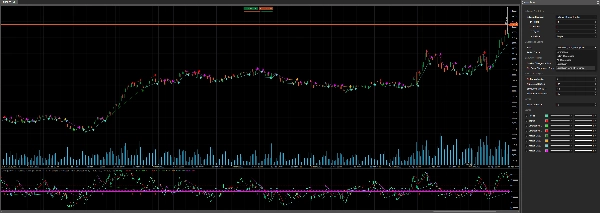
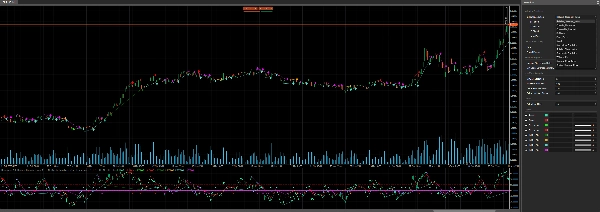
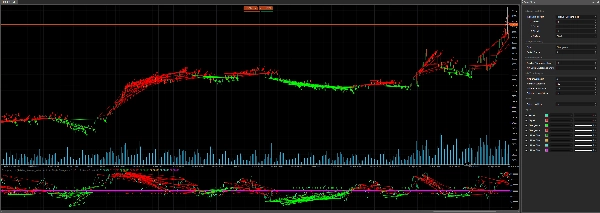
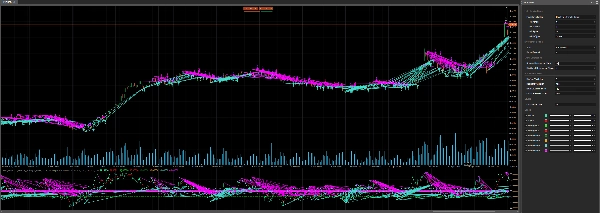
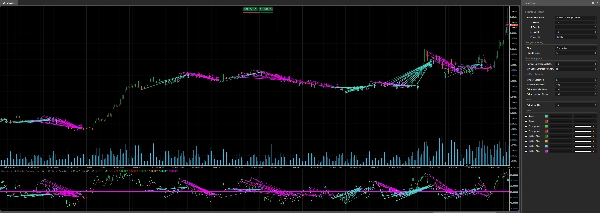
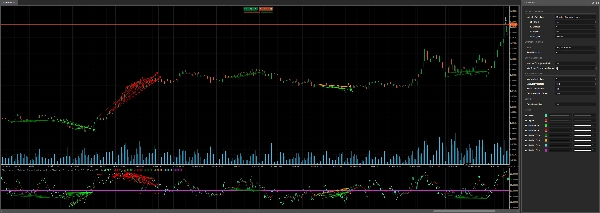
Açıklama
📈 cTrader için Divergency v1.1 Göstergesi: Kapsamlı Bir Rehber 🚀
The Divergency v1.1 göstergesi, fiyat hareketleri ile çeşitli osilatörler arasındaki uyumsuzlukları ve korelasyonları tespit etmek için cTrader platformu için tasarlanmış güçlü bir araçtır. Bu rehber, kodun detaylı açıklamasını, işlevselliğini ve etkili kullanım için adım adım talimatları sunar. İster yeni başlayan ister deneyimli bir trader olun, bu gösterge özelleştirilebilir ayarları ve görsel ipuçları ile teknik analizlerinizi geliştirebilir. Hadi başlayalım! 🌟
🎯 Divergency11 Göstergesinin Genel Bakışı
The Divergency v1.1 göstergesi, fiyat hareketlerini ve osilatör davranışını analiz ederek şunları tespit eder:
- Düzenli Uyumsuzluklar: Fiyat ve gösterge zıt yönlerde hareket ettiğinde potansiyel dönüş sinyalleri verir.
- Gizli Uyumsuzluklar: Fiyat ve gösterge farklı şekilde hizalandığında trend devamını gösterir.
- Korelasyonlar: Fiyat ve gösterge senkronize hareket ettiğinde trend gücünü vurgular.
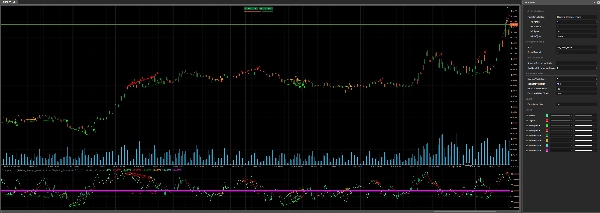
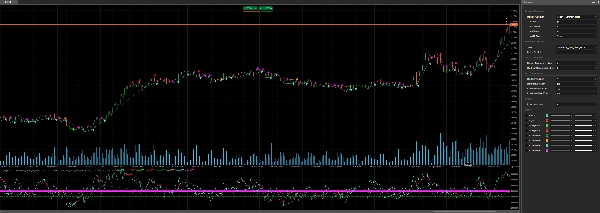
12 farklı osilatörü (örneğin, RSI, MACD, Stokastik) destekler ve uyumsuzluk tespit parametrelerinin özelleştirilmesine izin verir, böylece çeşitli ticaret stratejileri için çok yönlüdür. Gösterge, sinyalleri doğrudan grafik ve gösterge alanında renkli çizgiler, simgeler ve metin kullanarak net bir şekilde görselleştirir. 📊
🔍 Kod Analizi
1. Gösterge Kurulumu 🛠️
- Namespace ve Sınıf:
cAlgonamespace içindeDivergency v1.1olarak tanımlanmış,Indicatorsınıfından türetilmiştir. - Öznitelikler:
-
IsOverlay = false: Ayrı bir gösterge penceresinde görüntülenir.TimeZone = TimeZones.UTC: Tutarlılık için UTC kullanır.AccessRights = AccessRights.None: Özel izin gerektirmez.
2. Parametreler ⚙️
Gösterge, parametreler aracılığıyla kapsamlı özelleştirme sunar ve bunlar açıklık için gruplandırılmıştır:
- Osilatör Seçimi:
-
IndicatorSelection: 12 osilatörden seçim yapın (örneğin, RSI, MACD, Stokastik). (Orta olarak 50'ye normalize edilmiş ve optimizasyon süreci için daha yüksek sonuçlar)Value1,Value2,Value3: Periyot, yumuşatma ve sinyal çizgisi ayarlarını yapın.MaType: Hareketli ortalama türünü seçin (örneğin, Basit, Üssel).
- Uyumsuzluk Ayarları:
-
Strat: Tespit modunu seçin (Uyumsuzluk, Gizli Uyumsuzluk, Korelasyon veya kombinasyonlar).PeriodFractal: Zirve/çukur tespiti için fraktal periyodu ayarlayın (tek sayı olmalı).LookBack: Analiz edilecek geçmiş uyumsuzluk sayısı.MinCountDivergenceShow: Sinyalleri göstermek için gereken minimum uyumsuzluk sayısı.
- Bölge Analizi:
-
MinBarsValidation,MaxBarsValidation: Uyumsuzluk tespiti için geçerli bar aralığını tanımlar.ExtraLevelMin,ExtraLevelMax: Osilatörün aşırı alım/aşırı satım eşiklerini ayarlar.
- Seviyeler:
-
ExtraLevelLine: 50 seviyesi çevresinde aşırı satım/aşırı alım çizgilerini ayarlar.
3. Çıktılar 📈
Result: Ana osilatör değeri (yeşil çizgi).Signal: Yumuşatılmış sinyal çizgisi (kırmızı çizgi).- Uyumsuzluk sinyalleri (noktalar olarak çizilir):
-
ResDivergenceUp(Lime),ResDivergenceDown(Kırmızı): Düzenli uyumsuzluklar.ResDivergenceUpHidden(Yeşil),ResDivergenceDownHidden(Turuncu): Gizli uyumsuzluklar.ResCorrelationUp(Turkuaz),ResCorrelationDown(Macenta): Korelasyonlar.
4. Ana Fonksiyonlar 🧠
- Initialize(): Göstergeleri kurar, parametreleri doğrular ve statik çizgiler (aşırı satım, aşırı alım, sıfır) çizer.
- Calculate(): Osilatör değerlerini hesaplar, bunları 50 çevresinde normalize eder ve uyumsuzluk analizleri için fraktalları tespit eder.
- GetFractal(): Osilatördeki zirve (fractalUp) ve çukur (fractalDown) noktalarını belirler.
- GetDivergence(): Fraktal noktalarını analiz ederek uyumsuzlukları veya korelasyonları tespit eder.
- CreateLine(): Tespit edilen sinyaller için trend çizgileri ve simgeler çizer.
- DawDivergence(): Grafik ve gösterge alanında çizgiler ve oklarla uyumsuzlukları görselleştirir.
5. Yardımcı Sınıflar 📋
SRPrice: Fraktal verilerini (indeks, fiyat, gösterge değeri) saklar.DivergenceFind: Uyumsuzluk detaylarını (başlık, zaman, fiyatlar, renk) takip eder.
6. Hata Yönetimi 🚨
Gösterge, geçersiz parametreleri (örneğin, MinBarsValidation > MaxBarsValidation, hatta PeriodFractal) kontrol eder ve uyarıları gösterge alanında DrawStaticText kullanarak gösterir.
🛠️ Divergency11 Göstergesinin Kullanımı
Adım 1: Kurulum 📥
- Kodu İndirin: Sağlanan C# kodunu kopyalayın.
- cTrader’a Ekleyin:
-
- cTrader’ı açın ve cAlgo > Indicators bölümüne gidin.
- Yeni New butonuna tıklayın ve kodu editöre yapıştırın.
- Göstergede derleme hatası olmadığından emin olarak derleyin.
- Grafiğe Uygulayın:
-
- cTrader’da bir grafik açın.
- Gösterge listesinden Divergency11 göstergesini ekleyin.
Adım 2: Parametreleri Yapılandırın ⚙️
Ayarları ticaret tarzınıza göre özelleştirin:
- Bir Osilatör Seçin:
-
- Bir osilatör seçin (örneğin, RSI için
Relative_Strenght_Index)IndicatorSelectionaracılığıyla. - Gerekirse
Value1(periyot),Value2(yumuşatma) veValue3(sinyal periyodu) ayarlarını yapın.
- Bir osilatör seçin (örneğin, RSI için
- Uyumsuzluk Türünü Belirleyin:
-
- Odaklanmak için
Stratkullanın:Divergence,Hiden_Divergence,CorrelationveyaAll_Divergence.
- Odaklanmak için
- Fraktal ve Geriye Dönük:
-
- Simetri için
PeriodFractaldeğerini tek sayı olarak ayarlayın (örneğin, 5). - Kaç geçmiş uyumsuzluğun analiz edileceğini kontrol etmek için
LookBackayarını yapın.
- Simetri için
- Bölge ve Seviyeler:
-
- Aşırı alım/aşırı satım bölgeleri için
ExtraLevelMinveExtraLevelMaxayarlarını yapılandırın. - Görsel eşikleri ayarlamak için
ExtraLevelLinedeğerini belirleyin.
- Aşırı alım/aşırı satım bölgeleri için
Adım 3: Sinyalleri Yorumlayın 📊
- Düzenli Uyumsuzluk:
-
- Yukarı (Lime): Ayı sinyali (fiyat daha yüksek zirveler yapar, osilatör daha düşük zirveler yapar).
- Aşağı (Kırmızı): Boğa sinyali (fiyat daha düşük dipler yapar, osilatör daha yüksek dipler yapar).
- Gizli Uyumsuzluk:
-
- Yukarı (Yeşil): Boğa devamı (fiyat daha düşük zirveler yapar, osilatör daha yüksek zirveler yapar).
- Aşağı (Turuncu): Ayı devamı (fiyat daha yüksek dipler yapar, osilatör daha düşük dipler yapar).
- Korelasyon:
-
- Yukarı (Turkuaz): Güçlü boğa trendi (fiyat ve osilatör birlikte yükselir).
- Aşağı (Macenta): Güçlü ayı trendi (fiyat ve osilatör birlikte düşer).
- Görsel İpuçları:
-
- Trend çizgileri, grafik ve göstergede uyumsuzluk noktalarını bağlar.
- Oklar sinyal yönünü gösterir (yukarı/aşağı).
- Metin, tespit edilen uyumsuzluk sayısını gösterir (eğer
LookBack > 1ise).
Adım 4: Ticaret Stratejileri 💡
- Dönüş Ticareti:
-
- Potansiyel dönüşleri tespit etmek için düzenli uyumsuzlukları (Lime/Kırmızı) kullanın.
- Diğer göstergelerle (örneğin, destek/direnç, mum formasyonları) teyit edin.
- Trend Devamı:
-
- Trend devamını göstermek için gizli uyumsuzlukları (Yeşil/Turuncu) kullanın.
- Geri çekilme sonrası trend yönünde işlemlere girin.
- Trend Gücü:
-
- Güçlü trendleri teyit etmek için korelasyonları (Turkuaz/Macenta) kullanın.
- Karşı trend işlemlerinden kaçınmak için filtre olarak kullanın.
- Zaman Dilimi:
-
- Herhangi bir zaman diliminde çalışır, ancak daha yüksek zaman dilimleri (H1, H4) gürültüyü azaltır.
- Risk Yönetimi:
-
- Stop-loss’ları son salınım diplerinin altına (uzun pozisyonlar için) veya salınım zirvelerinin üstüne (kısa pozisyonlar için) ayarlayın.
- Pozisyon büyüklüğünü belirlemek için ATR’yi (koda dahil) kullanın.
Adım 5: Optimizasyon 🔧
- Geri Test: Göstergeyi geçmiş veriler üzerinde test etmek için cTrader’ın geri test özelliğini kullanın.
- Parametreleri Ayarlayın: Yanlış sinyalleri azaltmak için
PeriodFractal,LookBackveMinCountDivergenceShowile deneyler yapın. - Göstergeleri Birleştirin: Trend göstergeleri (örneğin, Hareketli Ortalamalar) veya volatilite araçları (örneğin, Bollinger Bantları) ile eşleştirin.
🌟 Başarı İçin İpuçları
- Basit Başlayın: Varsayılan ayarlarla ve RSI gibi tanıdık bir osilatörle başlayın.
- Demo Üzerinde Pratik Yapın: Sinyalleri anlamak için göstergede demo hesabında test yapın.
- Uyarıları Takip Edin: Oklar ve trend çizgilerini izleyerek sinyallere hızlıca tepki verin.
- Aşırı İşlemden Kaçının: Uyumsuzlukları tek başına değil, daha geniş bir stratejinin parçası olarak kullanın.
- Güncel Kalın: Kod güncellemeleri veya topluluk geri bildirimleri için cTrader forumlarını kontrol edin.
⚠️ Yaygın Sorunlar ve Çözümleri
- Sinyal Görünmüyor:
-
-
MinCountDivergenceShowileLookBackdeğerlerini kontrol edin (ilk değer ikinciden küçük veya eşit olmalı). -
PeriodFractaldeğerinin tek sayı olduğundan emin olun.
-
- Çok Fazla Sinyal:
-
-
MinCountDivergenceShowdeğerini artırın veyaLookBackdeğerini azaltın. -
MinBarsValidationveMaxBarsValidationdeğerlerini sıkılaştırın.
-
- Hata Mesajları:
-
- Gösterge alanındaki parametre uyarılarını gözden geçirin (örneğin,
MinBarsValidation > MaxBarsValidation). - Geçersiz ayarları düzeltin ve göstergeleri yeniden uygulayın.
- Gösterge alanındaki parametre uyarılarını gözden geçirin (örneğin,
🎉 Sonuç
The Divergency v1.1 göstergesi, cTrader kullanıcıları için fiyat-osilatör ilişkilerine derinlemesine bakış sunan çok yönlü ve sağlam bir araçtır. Özelleştirilebilir ayarları ve net görsel çıktıları ile traderların dönüşleri, devamları ve trend gücünü güvenle tespit etmelerini sağlar. Deneyin, parametreleri ayarlayın ve analizlerinizi yükseltmek için ticaret planınıza entegre edin! 🚀
İyi işlemler dileriz, grafikleriniz her zaman yeşil olsun! 📈💚
Özet
- Regular divergences signaling potential reversals when price and oscillator move oppositely.
- Hidden divergences indicating trend continuation with differing price and oscillator alignments.
- Correlations highlighting synchronized movements suggesting trend strength.
Signals are displayed on the chart and indicator window using colored lines, icons, and text for clarity. Visual cues include trend lines connecting divergence points and arrows indicating signal direction. Key functions handle initialization, calculation of normalized oscillator values, fractal detection, divergence analysis, and drawing of signals.
Users can configure overbought/oversold zones and adjust lookback periods to tailor signal sensitivity. The indicator works on any timeframe, with higher timeframes recommended to reduce noise. It includes error handling for invalid parameters and provides guidance for installation, parameter setup, signal interpretation, and trading strategies such as reversal and trend continuation. Backtesting and parameter optimization are supported within cTrader to refine performance.
Müşteri değerlendirmeleri
5 | 100 % | |
4 | 0 % | |
3 | 0 % | |
2 | 0 % | |
1 | 0 % |
!["Smart Money Concepts (SMC) [Iridio Capital]" logosu](https://cdn.ctrader.com/image/webp/b4b5414d-a5ca-44b7-a947-e28eca44a218_61548)