


Descripción
Ema Up&Down 2025: Tu aliado estratégico en los mercados
¿Estás listo para elevar tu trading algorítmico a un nuevo nivel? Ema Up&Down 2025 para cTrader no es solo un cBot; es una verdadera potencia estratégica diseñada para ofrecerte flexibilidad, control y una gestión de riesgos sofisticada. Olvídate de las horas frente a los gráficos: deja que Ema Up&Down 2025 trabaje para ti con precisión quirúrgica.
Por qué Ema Up&Down 2025 destaca:
- Múltiples estrategias, control único: ¡No te limites a un solo enfoque! Ema Up&Down 2025 te pone al mando con tres estrategias de entrada personalizables y combinables:
-
- Cruce de medias móviles: Aprovecha el poder de los cruces de medias móviles (EMA, SMA, etc.), un clásico atemporal para identificar tendencias.
- Ruptura: Captura movimientos explosivos del mercado entrando con precisión oportuna tras la ruptura de niveles clave.
- Desviación de precio: Aprovecha las desviaciones del precio respecto a una media móvil, ideal para estrategias de reversión a la media o continuaciones tras retrocesos. Elige tu modo de ejecución preferido –
OnBarClosepara confirmaciones sólidas oOnEveryTickpara una respuesta inmediata.
- Gestión de riesgos de nivel profesional:
-
- Stop Loss y Take Profit dinámicos: Adapta tu protección y objetivos con SL/TP fijos en pips o basados en la volatilidad real del mercado gracias al ATR, con multiplicadores distintos para operaciones Long y Short.
- Trailing Stop inteligente: Una vez que una operación está en ganancia (por
TrailingStartPips), el bot activa un Trailing Stop que sigue dinámicamente el precio a una distancia que defines (TrailingDistancePips), protegiendo ganancias y maximizando el potencial de cada operación. - Break-Even automático: Al alcanzar cierta ganancia (
BreakEvenTriggerPips), el bot mueve automáticamente el Stop Loss a break-even (más un pequeño extraBreakEvenExtraPips), haciendo tu operación libre de riesgo.
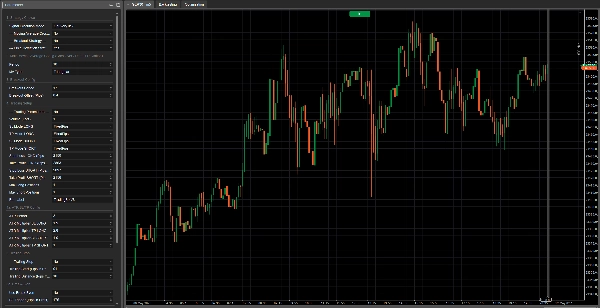
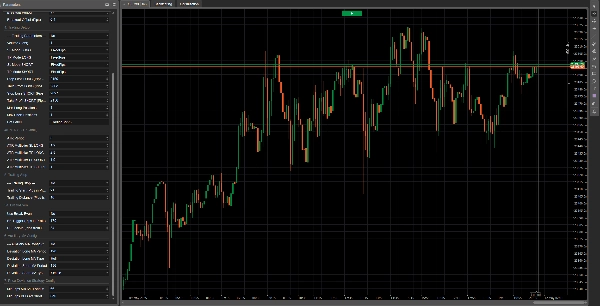
- Configuración profunda e intuitiva: Cada aspecto del bot está bajo tu control gracias a un panel de parámetros completo y bien organizado. Define volúmenes, períodos de indicadores, tipos de medias móviles (incluyendo MAs auxiliares para la estrategia de desviación) y cada detalle de la gestión de tus operaciones.
- Diseñado para la eficiencia:
-
- Lógica de inicialización optimizada: Los indicadores se cargan solo si es estrictamente necesario, asegurando un rendimiento óptimo.
- Código limpio y comentado: Para quienes aman entender qué sucede "bajo el capó", el código está claramente y lógicamente estructurado.
- Retroalimentación detallada: Cada acción del bot, desde la apertura de órdenes hasta la gestión de SL/TP y Trailing Stop, se registra con mensajes claros en el log, permitiéndote monitorear cada movimiento.
Nota importante sobre la optimización:
Ten en cuenta que esta versión de Ema Up&Down 2025 es una herramienta poderosa y flexible proporcionada sin preoptimización para ningún activo o condición de mercado específica. Esto te da la libertad completa para probarla y adaptarla a tus instrumentos preferidos. ¡Noticias emocionantes! Próximamente estarán disponibles versiones optimizadas para varios activos. Si buscas optimizaciones personalizadas y ad-hoc adaptadas a tu estrategia única o activos específicos, no dudes en contactarnos!
Ema Up&Down 2025 es ideal para:
- Traders que buscan un bot versátil capaz de adaptarse a diferentes condiciones de mercado y que estén dispuestos a realizar su propia optimización.
- Desarrolladores que desean una base sólida y bien estructurada sobre la cual construir personalizaciones adicionales.
- Cualquiera que quiera automatizar sus estrategias con un alto grado de control sobre la gestión de riesgos y el proceso de optimización.
Con Ema Up&Down 2025, no solo automatizas el trading; estás implementando una visión estratégica completa. Prepárate para descubrir una nueva forma de abordar los mercados, con un asistente que nunca duerme y trabaja incansablemente para alcanzar tus objetivos. arkets, with an assistant that never sleeps and works tirelessly towards your goals.
Aquí está la explicación de cada parámetro:
Grupo 1: Elección de estrategia
Modo de ejecución de señal-
- Nombre para mostrar: Modo de ejecución de señal
- Valor predeterminado:
OnBarClose - Explicación: Determina cuándo el bot debe evaluar las señales de trading y potencialmente abrir posiciones.
-
OnBarClose: Las señales se verifican solo al cierre de cada barra. Este enfoque espera la confirmación de la barra antes de actuar.OnEveryTick: Las señales se verifican en cada tick (cambio de precio). Este enfoque es más reactivo pero puede generar señales basadas en movimientos de precio aún no confirmados por el cierre de una barra.
--- Estrategia de cruce de medias móviles ---(Parámetro actual:UseMACrossoverStrategy)-
- Nombre para mostrar: --- Estrategia de cruce de medias móviles ---
- Valor predeterminado:
true(Habilitado) - Explicación: Un interruptor simple (true/false). Si se establece en
true, el bot usará la estrategia de cruce de medias móviles para generar señales de compra o venta.
--- Estrategia de ruptura ---(Parámetro actual:UseBreakoutStrategy)-
- Nombre para mostrar: --- Estrategia de ruptura ---
- Valor predeterminado:
false(Deshabilitado) - Explicación: Un interruptor (true/false). Si se establece en
true, el bot activará la estrategia de ruptura, que intenta entrar al mercado cuando el precio rompe un máximo reciente o un mínimo reciente.
--- Estrategia de desviación de precio ---(Parámetro actual:UsePriceDeviationStrategy)-
- Nombre para mostrar: --- Estrategia de desviación de precio ---
- Valor predeterminado:
false(Deshabilitado) - Explicación: Un interruptor (true/false). Si se establece en
true, el bot usará la estrategia basada en la desviación del precio respecto a una media móvil.
Grupo 2: Configuración principal de la media móvil (Crossover / desviación por defecto)
Estos parámetros aplican a la media móvil usada por la estrategia "Cruce de medias móviles" y, salvo que se especifique lo contrario, por la estrategia "Desviación de precio".
Período-
- Nombre para mostrar: Período
- Valor predeterminado: 20
- Valor mínimo: 1
- Explicación: Define el número de barras previas a usar para calcular la media móvil principal. Un período más largo resultará en una media móvil más suave y de reacción más lenta; un período más corto la hará más sensible.
Tipo de MA-
- Nombre para mostrar: Tipo de MA
- Valor predeterminado:
Simple(Media móvil simple - SMA) - Explicación: Especifica el tipo de media móvil a usar. Las opciones comunes incluyen:
-
Simple (SMA): Calcula el promedio aritmético simple de los precios de cierre.Exponencial (EMA): Da más peso a los precios recientes, haciéndola más sensible que una SMA.Ponderada (WMA): Similar a la EMA, asigna pesos linealmente decrecientes a precios pasados.- Otros tipos pueden estar disponibles según la plataforma (p. ej., suavizada, Hull).
Grupo 3: Configuración de ruptura
Estos parámetros son específicos para la "Estrategia de ruptura".
Período de ruptura-
- Nombre para mostrar: Período de ruptura
- Valor predeterminado: 20
- Valor mínimo: 2
- Explicación: Determina el número de barras previas (excluyendo las dos últimas) sobre las cuales encontrar el máximo más alto y el mínimo más bajo. El bot intentará entrar cuando el precio rompa estos niveles.
Desplazamiento de ruptura (pips)-
- Nombre para mostrar: Desplazamiento de ruptura (pips)
- Valor predeterminado: 1.0
- Valor mínimo: 0.0
- Paso: 0.1
- Explicación: Un valor en pips para añadir al máximo (para señal de compra) o restar al mínimo (para señal de venta) del "Período de ruptura". Esto sirve como un buffer o filtro para evitar falsas rupturas demasiado cercanas a los niveles extremos. Un desplazamiento de 0 significa que la señal se activa exactamente en la ruptura del nivel.
Grupo 4: Configuración de trading
PlaceholderTrading-
- Nombre para mostrar: --- Parámetros de trading --- (el nombre real del parámetro en el código es
PlaceholderTrading, pero el grupo se llama "--- Parámetros de trading ---") - Explicación: Este parámetro booleano (
true/false) estaba presente en el código pero no parece tener un uso directo en la lógica de trading. Podría ser un remanente de una versión anterior o un marcador para funcionalidad futura. En el contexto actual, cambiarlo no debería afectar el comportamiento del bot.
- Nombre para mostrar: --- Parámetros de trading --- (el nombre real del parámetro en el código es
Volumen (Lotes)Modo SL LONG/Modo TP LONG/Modo SL SHORT/Modo TP SHORT-
- Nombres para mostrar: Modo SL LONG, Modo TP LONG, Modo SL SHORT, Modo TP SHORT
- Valores predeterminados:
FixedPipspara todos - Explicación: Determinan cómo se calcularán el Stop Loss (SL) y el Take Profit (TP) para posiciones Long (compra) y Short (venta).
-
FixedPips: SL/TP se establecerán a un número fijo de pips desde el precio de entrada (definido en parámetros posteriores).ATR: SL/TP se calcularán dinámicamente basados en el Average True Range (ATR), multiplicado por un factor especificado (definido en los parámetros del grupo "Configuración ATR SL/TP").
Stop Loss LONG (Pips - si es fijo)/Take Profit LONG (Pips - si es fijo)/Stop Loss SHORT (Pips - si es fijo)/Take Profit SHORT (Pips - si es fijo)-
- Nombres para mostrar: Stop Loss LONG (Pips - si es fijo), Take Profit LONG (Pips - si es fijo), etc.
- Valores predeterminados: SL 20 pips, TP 40 pips para Long y Short.
- Valor mínimo: 0
- Explicación: Si el modo SL/TP correspondiente está configurado en
FixedPips, estos parámetros definen la distancia en pips para el Stop Loss o Take Profit. Un valor de 0 significa que ese SL o TP específico no se establecerá (si el modo es FixedPips).
Máximo de posiciones Long/Máximo de posiciones Short-
- Nombres para mostrar: Máximo de posiciones Long, Máximo de posiciones Short
- Valores predeterminados: 1 para ambos
- Valor mínimo: 1
- Explicación: El número máximo de posiciones Long (compra) o Short (venta) que el bot puede tener abiertas simultáneamente para este instrumento y marco temporal específicos.
Etiqueta del bot-
- Nombre para mostrar: Etiqueta del bot
- Valor predeterminado: "TradingBotV8" (quizás quieras cambiarlo a "Ema Up&Down 2025")
- Explicación: Una etiqueta de texto usada para identificar posiciones abiertas por esta instancia específica del bot. Es útil para distinguir las operaciones de este bot de las de otros bots o de operaciones manuales, especialmente en los logs y en la gestión de posiciones (p. ej., para Trailing Stop y Break-Even).
Grupo 4a: Configuración ATR SL/TP
Estos parámetros son relevantes solo si uno de los modos SL/TP (para Long o Short) está configurado en ATR.
Período ATR-
- Nombre para mostrar: Período ATR
- Valor predeterminado: 14
- Valor mínimo: 1
- Explicación: El número de barras a usar para calcular el indicador Average True Range (ATR), que mide la volatilidad del mercado.
Multiplicador ATR SL LONG/Multiplicador ATR TP LONG/Multiplicador ATR SL SHORT/Multiplicador ATR TP SHORT-
- Nombres para mostrar: Multiplicador ATR SL LONG, Multiplicador ATR TP LONG, etc.
- Valores predeterminados: SL 1.5, TP 3.0 para Long y Short.
- Valor mínimo: 0.1
- Paso: 0.1
- Explicación: El factor por el cual se multiplicará el valor del ATR para determinar la distancia del Stop Loss o Take Profit en pips. Por ejemplo, si el ATR es 10 pips y
Multiplicador ATR SL LONGes 1.5, el Stop Loss para una posición Long se establecerá a 15 pips (10 * 1.5) desde el precio de entrada.
Grupo 5: Trailing Stop
--- Trailing Stop ---(Parámetro actual:UseTrailingStop)-
- Nombre para mostrar: --- Trailing Stop ---
- Valor predeterminado:
false(Deshabilitado) - Explicación: Un interruptor (true/false). Si se establece en
true, el bot activará la funcionalidad de Trailing Stop para posiciones abiertas.
Inicio del trailing (pips en ganancia)-
- Nombre para mostrar: Inicio del trailing (pips en ganancia)
- Valor predeterminado: 10
- Valor mínimo: 1
- Explicación: El número de pips en ganancia que una posición debe alcanzar antes de que el Trailing Stop comience a operar.
Distancia del trailing (pips desde el precio)-
- Nombre para mostrar: Distancia del trailing (pips desde el precio)
- Valor predeterminado: 10
- Valor mínimo: 1
- Explicación: Una vez activado, el Stop Loss se mantendrá a esta distancia en pips del precio de mercado más favorable alcanzado (desde el Bid para posiciones Long, desde el Ask para posiciones Short).
Grupo 5a: Break-Even
Usar Break-Even-
- Nombre para mostrar: Usar Break-Even
- Valor predeterminado:
false(Deshabilitado) - Explicación: Un interruptor (true/false). Si se establece en
true, el bot activará la funcionalidad de Break-Even.
Disparador BE (pips en ganancia)-
- Nombre para mostrar: Disparador BE (pips en ganancia)
- Valor predeterminado: 15
- Valor mínimo: 1
- Explicación: El número de pips en ganancia que una posición debe alcanzar antes de que el Stop Loss se mueva a break-even (o ligeramente en ganancia).
Bloqueo BE (pips desde la entrada)-
- Nombre para mostrar: Bloqueo BE (pips desde la entrada)
- Valor predeterminado: 1
- Valor mínimo: 0
- Explicación: El número de pips más allá del precio de entrada en el que se establecerá el Stop Loss una vez activado el Break-Even. Por ejemplo, con un valor de 1, el SL se moverá a "precio de entrada + 1 pip" para posiciones Long, o "precio de entrada - 1 pip" para posiciones Short. Un valor de 0 lo moverá exactamente al precio de entrada.
Grupo 6: Configuración auxiliar de MA (para estrategia de desviación de precio)
Estos parámetros son relevantes solo si la "Estrategia de desviación de precio" está activa (UsePriceDeviationStrategy = true) Y eliges usar medias móviles separadas para esta estrategia (UseSeparateMAForDeviation = true).
UseSeparateMAForDeviation-
- Nombre para mostrar: UseSeparateMAForDeviation
- Valor predeterminado:
false - Explicación: Un interruptor (true/false). Si es
false(por defecto), la estrategia de desviación de precio usará la media móvil principal (configurada en el Grupo 2). Si estrue, usará medias móviles separadas para señales Long y Short, configuradas con los siguientes parámetros en este grupo.
Período MA Long de desviación/Tipo MA Long de desviación-
- Nombres para mostrar: Período MA Long de desviación, Tipo MA Long de desviación
- Valores predeterminados: Período 20, Tipo
Simple - Explicación: Período y tipo de la media móvil a usar para evaluar señales de compra (Long) en la estrategia de desviación de precio, solo si
UseSeparateMAForDeviationestrue.
Período MA Short de desviación/Tipo MA Short de desviación-
- Nombres para mostrar: Período MA Short de desviación, Tipo MA Short de desviación
- Valores predeterminados: Período 20, Tipo
Simple - Explicación: Período y tipo de la media móvil a usar para evaluar señales de venta (Short) en la estrategia de desviación de precio, solo si
UseSeparateMAForDeviationestrue.
Grupo 7: Configuración de la estrategia de desviación de precio
Estos parámetros son relevantes solo si la "Estrategia de desviación de precio" está activa (UsePriceDeviationStrategy = true).
Mínimo de pips POR ENCIMA de la MA Long para COMPRA-
- Nombre para mostrar: Mínimo de pips POR ENCIMA de la MA Long para COMPRA
- Valor predeterminado: 10.0
- Valor mínimo: 0.0
- Paso: 0.1
- Explicación: Para la estrategia de desviación de precio, el número mínimo de pips que el precio actual (Ask) debe estar por encima de la media móvil relevante (principal o
DeviationLongMA) para generar una señal de compra.
Mínimo de pips POR DEBAJO de la MA Short para VENTA-
- Nombre para mostrar: Mínimo de pips POR DEBAJO de la MA Short para VENTA
- Valor predeterminado: 10.0
- Valor mínimo: 0.0
- Paso: 0.1
- Explicación: Para la estrategia de desviación de precio, el número mínimo de pips que el precio actual (Bid) debe estar por debajo de la media móvil relevante (principal o
DeviationShortMA) para generar una señal de venta.
Resumen
The bot features professional-grade risk management tools, including dynamic Stop Loss (SL) and Take Profit (TP) settings configurable as fixed pip distances or based on market volatility using the Average True Range (ATR) indicator with adjustable multipliers for long and short positions. It supports intelligent trailing stops that activate after a defined profit threshold and automatic break-even functionality to secure trades once a specified profit level is reached.
EMA Up&Down 2025 provides deep configurability through a comprehensive parameter panel, allowing users to define trade volumes, indicator periods, moving average types (Simple, Exponential, Weighted, etc.), and detailed trade management settings. The bot is optimized for efficiency, loading indicators only as needed, with clean, commented code and detailed logging of all trading actions.
This version is unoptimized for specific assets or market conditions, enabling users to tailor and optimize it for their preferred instruments. It is suitable for traders seeking adaptable automation, developers wanting a solid foundation for customization, and anyone requiring precise control over risk and strategy optimization.
Valoraciones de clientes
5 | 50 % | |
4 | 50 % | |
3 | 0 % | |
2 | 0 % | |
1 | 0 % |

























![Logotipo de "[Fx4U]Risk & Reward Trading Tool Pro"](https://cdn.ctrader.com/image/webp/e26324ec-9547-4365-a38e-ccd0e7c4d86f_31374)
