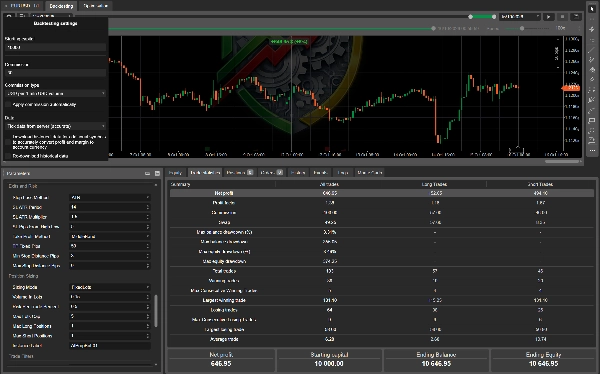
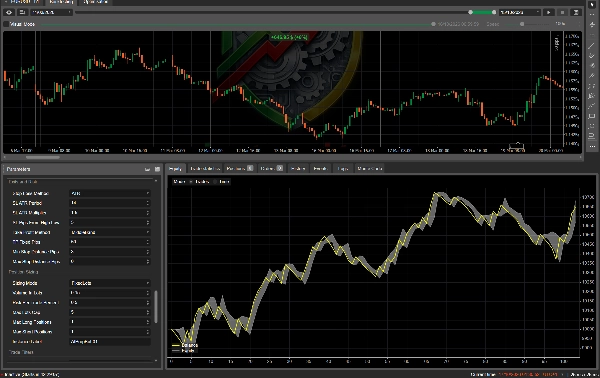
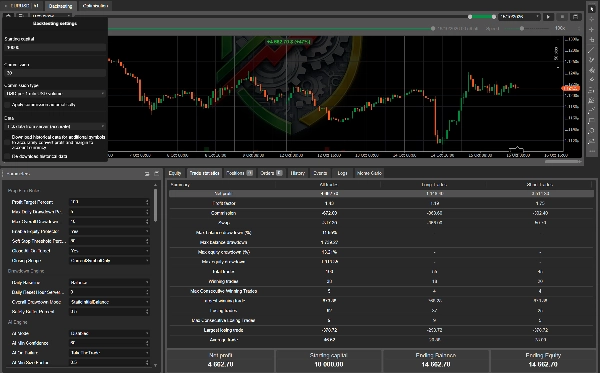
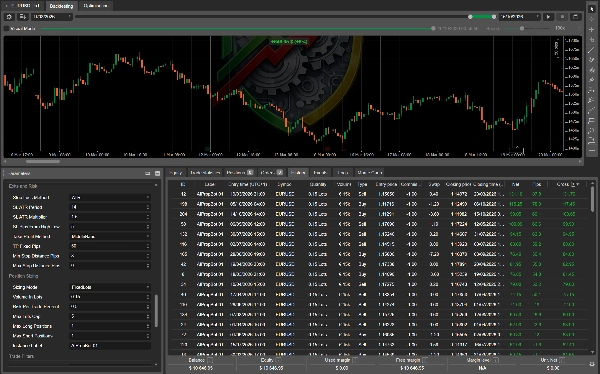

Description
What it does
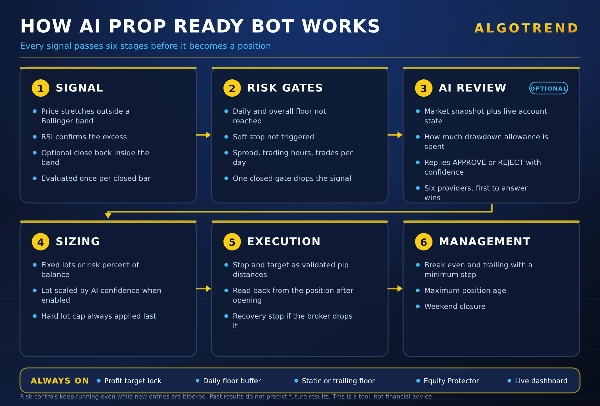
AI Prop Ready Bot trades a classic mean reversion setup, a Bollinger Bands stretch confirmed by RSI, and wraps it in the risk machinery an evaluation account actually needs. The strategy is the simple part. The value is in everything built around it.
The AI layer, and why it is different
Most AI trading tools ask a model whether a chart looks good. This one also tells the model where your account stands: how much of the daily allowance has been consumed, how much of the overall allowance, how far the profit target is, how many trades have already been taken today. The model is instructed to become progressively stricter as that allowance shrinks.
The result is a filter that behaves the way a risk officer would. Early in an evaluation, with the full allowance intact, it lets reasonable setups through. Late in a bad day, it starts saying no.
Four modes, so you decide how much you delegate:
- Disabled. No AI at all. The bot runs on the technical strategy and the risk engine. No API key, no account anywhere, nothing to configure. This is the default.
- Advisory Log Only. The AI is consulted and its verdict is written to the log, but nothing changes. Use this first to see how the model reasons on your symbol before trusting it.
- Filter Only. Signals the AI rejects are discarded.
- Filter And Sizing. Rejected signals are discarded, and approved ones are sized in proportion to the AI confidence, between your minimum size factor and full size.
Six providers are supported, tried in order until one answers: Groq, DeepSeek, OpenRouter, OpenAI, Gemini and Claude. Groq, DeepSeek and OpenRouter all offer free or very low cost tiers, so the AI layer does not have to add a monthly bill. Cost control is built in: a minimum delay between calls, a daily call budget, a response token cap and a request timeout.
If a provider is unreachable, you decide what happens. The default is to let the technical signal through, so an API outage never freezes the bot.
Prop firm risk engine
- Profit target with automatic lock and optional closure of open positions.
- Daily drawdown floor from balance or equity, with a configurable reset hour so it matches your firm's server day.
- Overall drawdown in three modes: static from initial balance, trailing from peak balance, trailing from peak equity.
- Safety buffer that places every floor slightly inside the official limit, so the bot stops before the firm does.
- Soft stop that blocks new entries once a configurable share of the daily allowance is gone, while open trades keep being managed.
- Equity Protector for hard closure on breach, scoped to the current symbol or the whole account.
- Trading days counter for firms that require a minimum number of active days.
Execution and safety
- Stop loss and take profit are sent as validated pip distances and verified on the position after opening.
- If a broker silently drops a stop loss, the bot detects it on the next tick and attaches a recovery stop based on ATR.
- Minimum and maximum stop distance filters, so oversized stops skip the trade instead of distorting the risk.
- Optional maximum position age, which closes trades left open beyond a set number of hours.
Strategy and filters
- Bollinger stretch faded with RSI confirmation. Take profit on the middle band or on fixed pips.
- Optional close back inside band confirmation for a more conservative entry.
- Stop loss from ATR or from the previous candle high and low.
- Fixed lots or risk percent per trade, with a hard lot cap.
- Separate caps on long and short positions, max trades per day, max spread, trading hours window, weekend closure.
Dashboard
On chart panel with live status, AI mode and last verdict, AI calls used against the daily budget, equity and balance, open positions, progress toward the target, percentage of daily and overall allowance consumed, floors in account currency, trades today and next reset time. The panel turns orange on soft stop and red on target or breach.
Compatibility
cTrader Desktop and cTrader Web. Any symbol, any timeframe. The AI layer is optional and the bot is fully functional without it.
Before you run it
Test on demo and in backtest with your firm's exact limits before running on an evaluation or funded account. Past results do not predict future results. This product is a tool, not financial advice.
Prop Firm Rules
Profit Target Percent (default 8.0). The profit target of your challenge, as a percentage of the starting balance. When balance reaches it, the bot locks and stops opening trades.
Max Daily Drawdown Percent (default 5.0). Your firm's daily loss limit as a percentage. The bot computes a floor from it and acts before that floor is touched.
Max Overall Drawdown Percent (default 10.0). Your firm's total loss limit as a percentage.
Enable Equity Protector (default true). When true, hitting a drawdown floor closes positions immediately. When false, the bot only stops opening new trades and leaves open positions alone.
Soft Stop Threshold Percent (default 80.0). Share of the daily allowance that, once consumed, blocks new entries for the rest of the day. At 80 the bot stops trading after losing 80 percent of what it is allowed to lose today.
Close All On Target (default true). Whether reaching the profit target also closes open positions, instead of only stopping new ones.
Closing Scope (default CurrentSymbolOnly). Whether emergency closures touch only this symbol or every position on the account, including manual trades and other bots. Use AllPositions only if this bot is the sole authority on the account.
Drawdown Engine
Daily Baseline (default Balance). Whether the daily floor is measured from the balance or the equity at the start of the trading day. Match this to how your firm measures it.
Daily Reset Hour Server Time (default 0). The hour, in server time, when your firm's trading day starts. The daily baseline and counters reset at this hour.
Overall Drawdown Mode (default StaticInitialBalance). StaticInitialBalance measures from the starting balance. TrailingPeakBalance and TrailingPeakEquity measure from the highest balance or equity reached, which is what firms with a trailing drawdown use.
Safety Buffer Percent (default 0.5). Pulls every floor inside the official limit by this amount. With a 5 percent daily limit and a 0.5 buffer, the bot acts at 4.5 percent. Set to 0 to use the exact limit.
AI Engine
AI Mode (default Disabled). Disabled runs without AI. AdvisoryLogOnly consults the AI and logs the verdict without acting on it. FilterOnly discards rejected signals. FilterAndSizing also scales the lot by AI confidence.
AI Min Confidence (default 60). The confidence score, from 0 to 100, below which an approval is treated as a rejection.
AI On Failure (default TakeTheTrade). What happens when no provider answers. TakeTheTrade lets the technical signal through. SkipTheTrade discards it.
AI Min Size Factor (default 0.5). In FilterAndSizing mode, the lot multiplier applied at minimum confidence. Confidence between the minimum and 100 scales the lot between this factor and full size.
AI Min Seconds Between Calls (default 30). Minimum delay between two AI calls. Signals arriving sooner are handled without AI.
AI Max Calls Per Day (default 40). Daily call budget. Once spent, signals are handled without AI until the next reset.
AI Enabled In Backtest (default false). Whether the AI layer runs during backtests. Leaving it off keeps backtests fast and free.
AI Max Response Tokens (default 160). Cap on the model's reply length. The bot only needs a short verdict, so a low value keeps cost down.
AI Timeout Seconds (default 12). How long to wait for a provider before giving up. The call is blocking, so do not set this high.
AI Extra Instruction (default empty). Free text appended to the prompt. Use it to add your own rule, for example avoiding trades during a news window or on a specific session.
AI Providers
Each provider has three parameters with the same meaning. Providers are tried in this order and the first one that answers is used: Groq, DeepSeek, OpenRouter, OpenAI, Gemini, Claude.
Provider Enabled (default false). Whether to include this provider in the chain.
Provider Api Key (default empty). Your API key for that provider. A provider with no key is skipped even if enabled.
Provider Model The model identifier. Defaults are llama-3.3-70b-versatile for Groq, deepseek-chat for DeepSeek, a free Llama model for OpenRouter, gpt-4o-mini for OpenAI, gemini-2.0-flash for Gemini and a Haiku model for Claude. Free model names on OpenRouter change often, so check the current list before relying on one.
Strategy Bollinger Bands
BB Period (default 20). Number of bars in the Bollinger calculation.
BB Standard Deviations (default 2.0). Band width in standard deviations. Higher means fewer and more extreme signals.
BB Source The price series the bands and the RSI are computed on.
Require Close Back Inside Band (default false). When true, a signal needs a close outside the band followed by a close back inside it. Fewer trades, better timing.
Strategy RSI
RSI Period (default 14). Number of bars in the RSI calculation.
RSI Overbought Level (default 70). RSI above this is required to confirm a sell signal.
RSI Oversold Level (default 30). RSI below this is required to confirm a buy signal.
Exits and Risk
Stop Loss Method (default ATR). ATR places the stop at a multiple of current volatility. CandleHighLow places it beyond the previous candle extreme.
SL ATR Period (default 14). Number of bars in the ATR calculation.
SL ATR Multiplier (default 1.5). How many ATR the stop sits away from entry.
SL Pips From High Low (default 5). Extra pips beyond the previous candle extreme, used only with the CandleHighLow method.
Take Profit Method (default MiddleBand). MiddleBand targets the Bollinger middle band, which is the natural mean reversion target. FixedPips uses a constant distance.
TP Fixed Pips (default 50). The take profit distance for the FixedPips method, also used as a fallback when the middle band sits on the wrong side of the entry.
Min Stop Distance Pips (default 3.0). Floor on the stop and target distance, to satisfy brokers that reject orders placed too close to price.
Max Stop Distance Pips (default 0.0, meaning no limit). Signals requiring a wider stop than this are skipped. Useful to avoid trades during volatility spikes.
Position Sizing
Sizing Mode (default FixedLots). FixedLots always trades the same size. RiskPercent computes the size so that the stop loss costs a fixed percentage of the balance.
Volume In Lots (default 0.5). The lot size used in FixedLots mode.
Risk Per Trade Percent (default 0.5). The percentage of balance risked per trade in RiskPercent mode.
Max Lots Cap (default 5.0). Hard ceiling on position size, applied in both modes and after any AI scaling.
Max Long Positions (default 1). Maximum simultaneous buy positions from this instance.
Max Short Positions (default 1). Maximum simultaneous sell positions from this instance.
Instance Label (default AIPropBot 01). The tag written on every position this instance opens. Give each instance a different label when running several on the same account.
Trade Filters
Max Trades Per Day (default 0, meaning unlimited). Caps how many positions can be opened in one trading day.
Max Spread Pips (default 0.0, meaning no filter). Signals are skipped while the spread is above this.
Trading Start Hour and Trading End Hour (both default 0). The trading window in server time. Setting both to the same value disables the filter. The window may cross midnight.
Close All Before Weekend (default false). Closes positions and stops trading on Friday from the hour below.
Friday Close Hour (default 20). The server hour on Friday at which the weekend closure triggers.
Max Position Age Hours (default 0, meaning no limit). Closes any position still open after this many hours, so nothing is left to drift over a weekend or a holiday.
Advanced Exit
Enable Trailing Stop (default false). Turns on the trailing stop.
Trailing Activation Pips (default 20). Profit in pips required before the trailing stop starts following price.
Trailing Distance Pips (default 10). How far behind price the trailing stop sits.
Trailing Step Pips (default 5.0). Minimum improvement before the stop is moved again. Low values cause a modify request on nearly every tick, so keep this at a few pips.
Enable Break Even (default false). Turns on the move to break even.
Break Even Activation Pips (default 15). Profit in pips required before the stop moves to entry.
Break Even Plus Pips (default 1). How far beyond entry the break even stop is placed, so the trade closes slightly positive rather than flat.
Dashboard
Show Dashboard (default true). Shows the status panel on the chart.
Dashboard Color (default Gold). Panel color by name. It turns orange on soft stop and red on target or breach regardless of this setting.
Enable Hourly Log (default true). Writes an hourly status line, and an AI usage line when the AI layer is active, to the log.
7. QUICK START
- Attach the bot to a chart and enter your firm's three numbers: Profit Target Percent, Max Daily Drawdown Percent and Max Overall Drawdown Percent.
- Set Daily Reset Hour Server Time to your firm's daily reset, and Overall Drawdown Mode to static or trailing, whichever your firm uses.
- Leave AI Mode on Disabled and run a backtest. Confirm the floors in the startup log match your firm's rules.
- When you want the AI layer, create a free key at one of the supported providers, paste it into that provider's Api Key field, enable it, and set AI Mode to AdvisoryLogOnly. Watch the log for a few days.
- Only then move to FilterOnly, and later to FilterAndSizing if you want confidence based sizing.