

ReplayPro
デスクトッププラグイン
バージョン 3.6、Oct 2026
Windows、Mac
4.5
レビュー: 2
登録日 09/03/2026
2
販売
283
無料インストール
説明
ReplayPro : 過去を取引し、未来を制する。
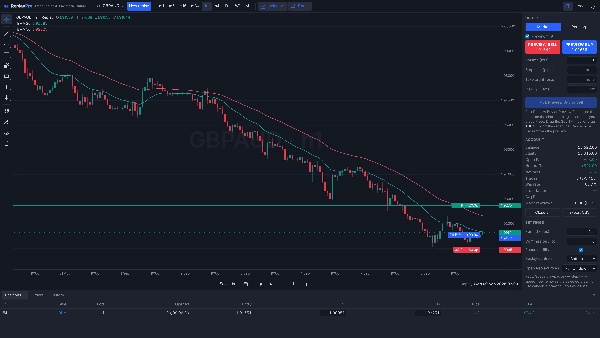
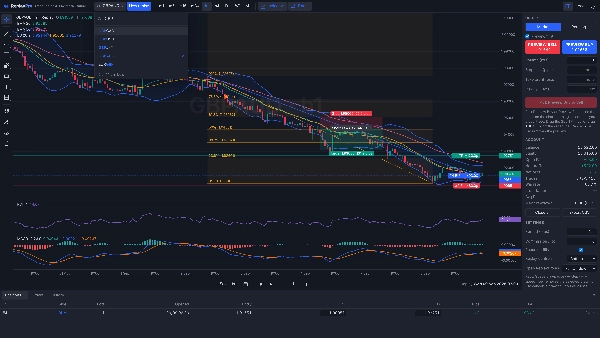
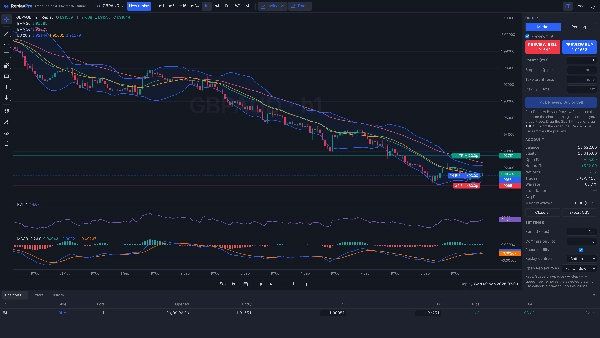
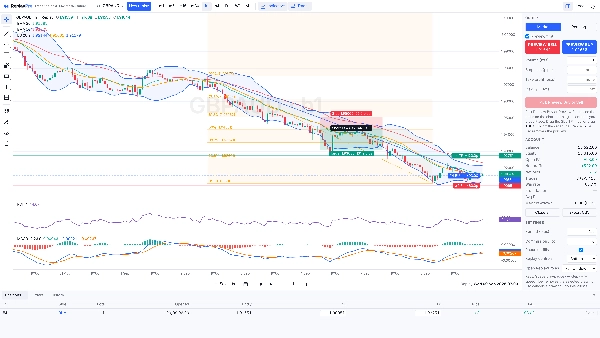
過去を振り返らずに実際の市場履歴で練習しましょう。 ReplayProはcTrader内であなたのブローカーのチャートをローソク足ごとに再生します。未来のバーはステップまたは再生するまで隠されているため、すべての決定はライブで行うのと同じ方法で、画面には過去のみが表示されます。一度に多くの過去の日に設定をテストし、エントリーとエグジットをリハーサルし、ライブ市場を待つよりもはるかに速く画面時間を積み重ねましょう。
インストールと起動
- cTraderストアからReplayProをインストールします。Algo → Pluginsの下に表示されます。
- 設定 → プラグインでReplayProがオンになっていることを確認してください(またはAlgo → Pluginsで起動してください)。特別なアクセス権なしで動作するため、許可のプロンプトは表示されず、cTraderを開くたびに再起動します。
- チャートツールバーにReplayボタン(⏪)が表示されます。クリックするたびに新しいReplayタブが開くので、複数のリプレイを同時に実行できます。そのタブを閉じるとそのリプレイが終了します。
1分で始める最初のリプレイ
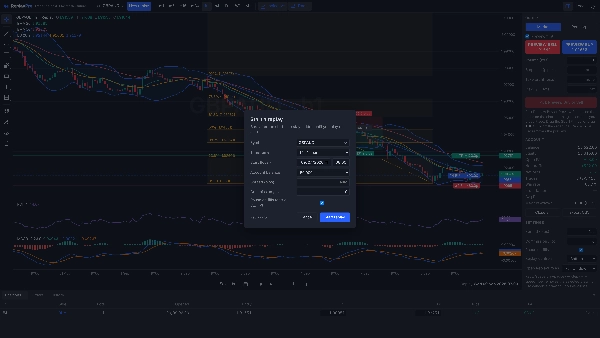
- 任意のチャートを開き、Replayボタンをクリックします。リプレイ開始ダイアログが開きます。
- チャートのシンボルがすでに選択されています。クリックするとブローカーのすべてのシンボルを検索できます。タイムフレームと開始日時を選択してください。
- 「リプレイ開始」をクリックします。シンボルの最初のリプレイは進行バーとキャンセルボタン付きで履歴を読み込みます。以降のリプレイは即座に開始します。
- 再生またはスペースキーでリプレイし、右矢印キーでローソク足を1本ずつ進めます。+と−で速度を変更できます。
- トレードの練習をするには、プレビューバイまたはプレビューセルをクリックし、チャート上でストップロスとテイクプロフィットをドラッグして「配置」を押します。注文はブローカーに送信されません。
なぜトレーダーはReplayProを選ぶのか
- あなたのブローカーの価格をcTrader内で。 別のアプリや追加のデータ購読は不要です。リプレイはブローカー自身の履歴を使用し、日足、週足、月足のローソク足もブローカーのシリーズから来ているため、ライブのcTraderチャートと一致します。
- いつでも戻れる。 Select barで任意のローソク足をクリックしてそこから再開したり、任意の日付に前後ジャンプできます。履歴は最初の読み込み後にコンピュータにキャッシュされるため、cTraderを再起動しても即座に再開できます。
- 本物のマルチタイムフレーム読み取り。 リプレイ中にm1、m5、m15、m30、h1、h4、D1、W1、月足を切り替えられます。チャートは同じ瞬間に留まり、現在のローソク足は当時のまま部分的に形成された状態で表示され、スクロール位置も保持されます。
- どんな速度でも信頼できる約定。 1分足ごとにエントリー、ストップ、ターゲットをチェックします。100倍速でも同様です。同じ1分内にストップとターゲットの両方が達成された場合はストップが優先されます。ギャップは始値で埋まり、ロングはビッドで決済、ショートはアスクで決済されます。
- 練習用に作られたトレードチケット。 注文前にチャート上でストップロスとテイクプロフィットをドラッグし、リスクパーセンテージでポジションサイズを設定し、注文が約定またはストップやターゲットに達したときに自動的に再生を一時停止します。
- あなたの数字を知る。 勝率、利益率、平均R、純ピップス、純利益、最大ドローダウンがトレードごとに更新されます。トレード履歴をCSVにエクスポートしてジャーナルに活用できます。
- 複数のリプレイを同時に。 ツールバーのボタンをクリックするたびに別のリプレイウィンドウが開きます。例えば異なる日付のEURUSDとゴールドなど。ウィンドウはダウンロードした履歴を共有します。
- アカウントにリスクなし。 ReplayProはブローカーに注文を送信せず、特別な権限なしで動作します。リプレイウィンドウ内のすべてのトレードはシミュレーションです。
リプレイ操作
- 再生、一時停止、ローソク足を1本ずつ進める。速度は0.1xから100xまで、再生中に調整可能。
- 日付ジャンプ、Select bar、チャートの下部または上部のリプレイバー。
- 最近のシンボルを含む検索可能なシンボルリスト。リプレイ中に同じ日時でシンボルを切り替え可能。
- キーボード:スペースで再生・一時停止、右矢印でステップ、+と−で速度調整。
チャートと分析
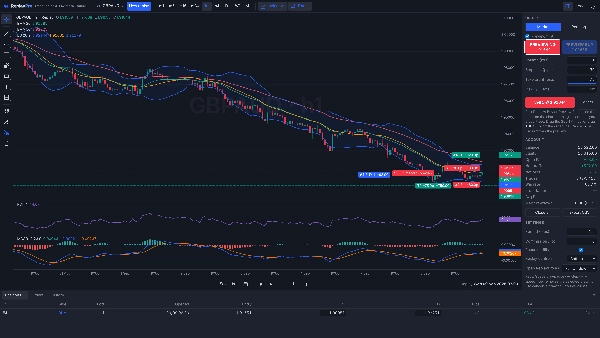
- 33の組み込みインジケーター:SMA、EMA、WMA、Hull MA、Supertrend、Parabolic SAR、一目均衡表、アリゲーター、フラクタル、ジグザグ、ボリンジャーバンド、ケルトナーチャネル、ドンチャンチャネル、ピボットポイント、VWAP、RSI、MACD、ストキャスティクス、CCI、ウィリアムズ%R、モメンタム、ADX、アローン、オーサムオシレーター、価格ROC、TRIX、ATR、標準偏差、ボリューム、OBV、MFI、チャイキンマネーフロー、A/D。これらはすでに表示されたローソク足のみから計算されます。オシレーターは独立したサイズ変更可能なパネルで開き、1セットのインジケーターがすべてのシンボルに適用されます。
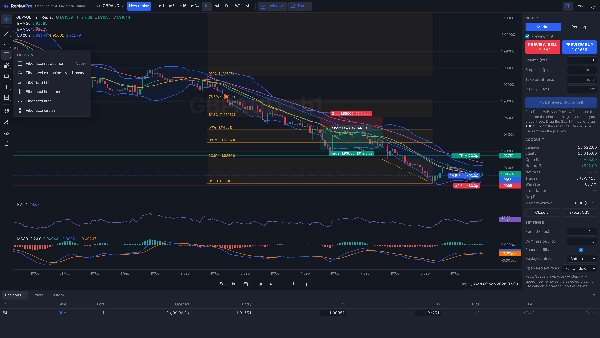
- 水平線と矩形でゾーンを表示。シンボルごとに保存され、タイムフレームを超えて保持されます。
- ズーム、パン、クロスヘア、ライト・ダークテーマ、ローカル時間またはUTC。ワンクリックでトレードラインを非表示にしてチャートをすっきりさせることができます。
設定
- リプレイ開始ダイアログ:シンボル、タイムフレーム、開始日時、口座残高、スプレッド(自動の場合は空白)、ロットあたりの手数料、約定時の一時停止。
- 注文パネル:成行または指値・逆指値注文(入力価格から選択)、ロット数、ストップロスとテイクプロフィット(ピップス単位)、リスク%サイズ設定(残高とストップロスからロット数を計算)。
- 設定パネル:スプレッド、ロットあたり手数料、約定時の一時停止はリプレイ中に変更可能。リプレイ操作はチャートの下部または上部に表示。サポート用に診断情報をコピー可能。
- ツールバー:シンボルリスト、新しいリプレイ、タイムフレーム、描画ツール、インジケーター、チャート上のトレード表示切替、注文パネル表示切替、ローカル時間またはUTC、ライトまたはダークテーマ。
- 設定、インジケーター、描画は保存され、次回ReplayProを開いたときに復元されます。
対象
- 数ヶ月または数年分の履歴を午後のうちに手動戦略でバックテストする。
- ロンドンやニューヨークのオープンなどのセッションを複数の日で練習する。
- プロップファームチャレンジの準備:支払う前にトレードごとのリスクとドローダウン制限を練習する。
- 過去を振り返らずにパターン認識をトレーニングする。
- ライブでトレードした日のリプレイをして、より良いトレード管理を練習する。
仕組み
ReplayProはブローカーから1分足(M1)の履歴を読み込み、そこからm5からh4までのローソク足を構築するため、タイムフレームの切り替えが即座に行えます。シンボルの最初のリプレイは開始日の90日前までのM1をダウンロードし、進行バーとキャンセルボタンを表示します。結果は月ごとにコンピュータにキャッシュされ、以降のセッションは新しいバーのみを取得します。
知っておくと良いこと
- カスタムやサードパーティ製のcTraderインジケーターはリプレイチャートに追加できません。33の組み込みインジケーターのみ利用可能です。
- 約定は固定スプレッドの1分足でシミュレーションされます:市場が開いている間のライブスプレッド、そのシンボルで最後に使用されたスプレッド、またはあなた自身の値です。ティック単位のシミュレーションではありません。
- どれだけ過去に遡ってリプレイできるかは、ブローカーが提供するM1履歴の量によります。数年前の開始日は初回読み込みに数分かかることがあります。
- 口座通貨での利益は今日のピップ価値を使用するため、古い日付のクロス通貨ペアでは概算です。ピップスとRは正確です。
- Windows版cTraderでテスト済みです。
免責事項: ReplayProはトレーニングおよび分析ツールです。リプレイで得られた結果はシミュレーションであり、実際の取引結果ではありません。取引にはリスクが伴います。過去のパフォーマンスは将来の結果を保証するものではありません。
概要
AIによる概要
ReplayPro is a plugin for the cTrader platform that enables traders to replay their broker’s price charts candle by candle. It simulates real market conditions by revealing historical price data incrementally, without showing future bars, allowing users to practice trading decisions as if live. Users can select any symbol, timeframe (from 1 minute to monthly), and start date to begin replaying market history.
Key features include multi-timeframe switching during replay, simulated trade execution with realistic fills based on one-minute bars, and a practice trade ticket that supports drag-and-drop stop loss and take profit placement. ReplayPro provides detailed trade statistics such as win rate, profit factor, average R, net pips, net profit, and maximum drawdown, with exportable trade history for journaling.
The plugin caches downloaded history locally for fast restarts and supports multiple simultaneous replay windows. It includes 33 built-in technical indicators and charting tools like horizontal lines and rectangles, with options for zoom, pan, and theme customization. ReplayPro operates entirely offline within cTrader, using the broker’s own historical data without sending live orders, ensuring zero risk to the user’s account.
Designed for backtesting manual strategies, practicing trading sessions, training pattern recognition, and preparing for prop-firm challenges, ReplayPro facilitates efficient skill development using authentic market data.
Key features include multi-timeframe switching during replay, simulated trade execution with realistic fills based on one-minute bars, and a practice trade ticket that supports drag-and-drop stop loss and take profit placement. ReplayPro provides detailed trade statistics such as win rate, profit factor, average R, net pips, net profit, and maximum drawdown, with exportable trade history for journaling.
The plugin caches downloaded history locally for fast restarts and supports multiple simultaneous replay windows. It includes 33 built-in technical indicators and charting tools like horizontal lines and rectangles, with options for zoom, pan, and theme customization. ReplayPro operates entirely offline within cTrader, using the broker’s own historical data without sending live orders, ensuring zero risk to the user’s account.
Designed for backtesting manual strategies, practicing trading sessions, training pattern recognition, and preparing for prop-firm challenges, ReplayPro facilitates efficient skill development using authentic market data.
プラグインのプロフィール
プラグインのカテゴリー
チャートUX
データアクセス
市場データ
ワークスペース
ファイル
ディスカッション
カスタマーレビュー
4.5
レビュー: 2
5 | 50 % | |
4 | 50 % | |
3 | 0 % | |
2 | 0 % | |
1 | 0 % |
カスタマーレビュー
October 25, 2026
practice can run from 0.1x to 100x with future candles hidden, orders available and 33 built in indicators, making this a substantial replay workspace whose M1 fixed spread fills remain simulated and whose chart does not accept external indicators.
October 23, 2026
Hidden future candles, practice orders, adjustable speed and 33 built in indicators make a useful discretionary training workspace. Fixed spread M1 fills and the inability to add external indicators define the simulation's limits rather than making it equivalent to live tick execution.
よくあるご質問
Chart UI Tools
cTrader Storeで入手可能な取引ボット、インジケーター、プラグインなどの商品は、第三者の開発者が提供するものであり、情報と技術の取得のみを目的としてご利用いただけます。cTrader Storeはブローカーではなく、投資助言や個人的な推奨を行うことも、将来のパフォーマンスを保証することもありません。














![「Custom Timeframes [Iridio Capital]」ロゴ](https://cdn.ctrader.com/image/webp/4d75a920-23c7-4fea-a7b5-594a9d067f2e_63286)





価格
登録日 09/03/2026
2
販売
283
無料インストール