present
新規登録で初回購入時に$50オフ
Trading product for RiskFit Trader - Risk Sizing デスクトッププラグイン Position Sizer Risk Calculator, image 2
Trading product for RiskFit Trader - Risk Sizing デスクトッププラグイン Position Sizer Risk Calculator, image 3
Trading product for RiskFit Trader - Risk Sizing デスクトッププラグイン Position Sizer Risk Calculator, image 4
登録日 16/09/2026

説明

RiskFit Trader - Risk Sizingは、リスクベースのポジションサイズで手動取引の計画と実行を行うためのcTraderデスクトッププラグインです。このパネルは、エントリー、ストップロス、オプションのテイクプロフィット、計算されたボリュームおよび注文タイプを一つのワークフローにまとめます。


取引の計画とサイズ設定


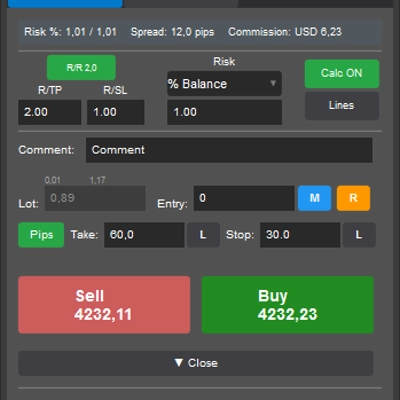
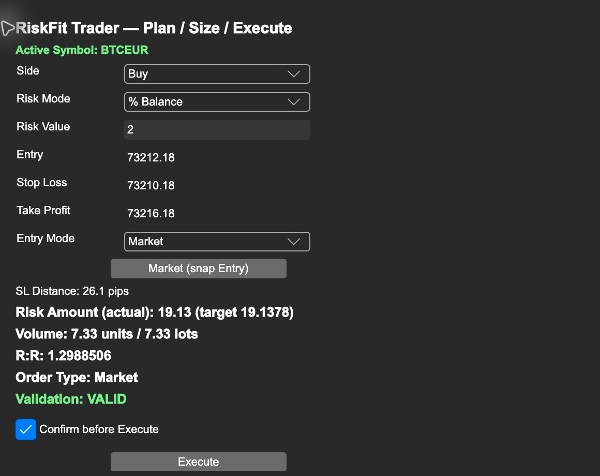
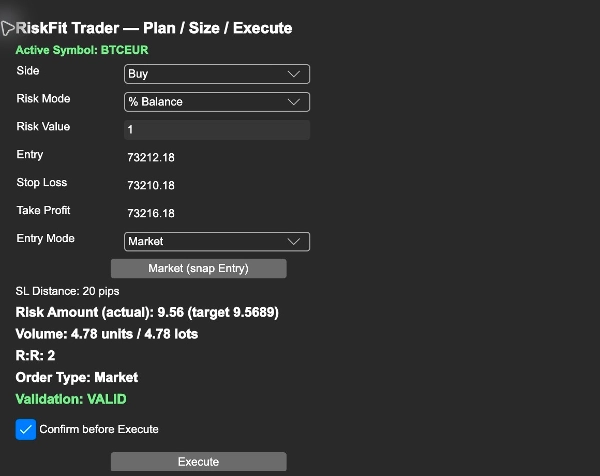
買いまたは売りを選択し、リスクを口座残高のパーセンテージ、エクイティのパーセンテージ、または口座通貨の固定金額として入力します。エントリーとストップロスを設定し、必要に応じてテイクプロフィットを追加します。パネルにはストップ距離、単位およびロットで計算されたボリューム、推定ストップロスリスク、テイクプロフィットが設定されている場合のリスクリワード比率が表示されます。


エントリー、ストップロス、テイクプロフィットはアクティブチャート上のラインでも表示されます。ラインを動かすと計画入力が更新されます。チャートを切り替えた後は表示されているシンボルと値を確認してください。


注文ワークフローの選択


マーケットモードは選択したサイドの現在の市場価格を使用します。プランドモードはエントリー価格を使って注文をBuy Limit、Sell Limit、Buy Stop、Sell Stopとして分類します。進める前に表示されている注文タイプを確認してください。


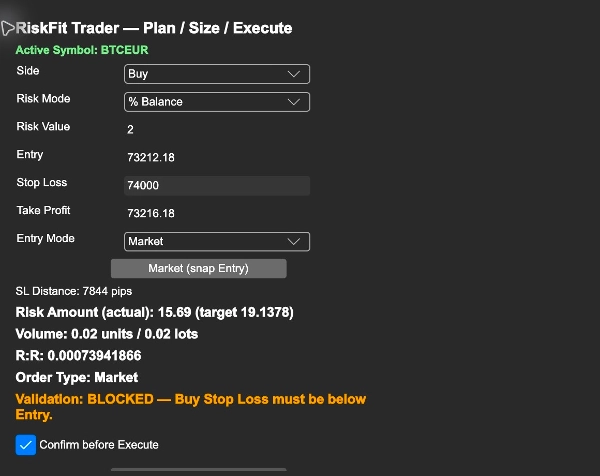
プラグインはボリュームをシンボルがサポートするステップに切り捨てます。無効な入力やシンボルの最小値以下のサイズはブロックします。計算されたサイズがシンボルの最大値を超える場合はボリュームを上限に設定し、結果として推定されるリスクを表示します。


始めるには


1. 購入したRiskFit Trader - Risk Sizingを、購入に使用したのと同じcTrader IDでcTraderデスクトップにインストールします。設定>プラグインを開き、RiskFit Trader - Risk Sizingを有効にします。

2. 取引したいシンボルのネイティブcTraderチャートを開きます。レイアウトコントロールを使ってTradeWatchを表示し、そのRiskFit Traderタブを選択します。パネルのタイトルはRiskFit Trader — Plan / Size / Executeです。

3. アクティブシンボルを確認し、サイド、リスクモード、リスク値を選択し、エントリー、ストップロス、オプションのテイクプロフィットを設定します。

4. エントリーモードでマーケットまたはプランドを選択します。マーケット(スナップエントリー)を使うとエントリーを現在の市場価格に戻せます。

5. ボリューム、リスク額、リスクリワード、注文タイプ、検証を確認します。実行前に確認が有効な場合、最初のクリックで取引内容の確認を求められ、Confirm Executeをクリックすると注文が送信されます。確認はデフォルトで有効です。


取引には該当するcTraderの取引許可が必要です。各送信後にプラグインが表示する結果を確認してください。リスクの推定は選択されたストップ距離とシンボル設定に基づいています。実行価格、スリッページ、手数料、ブローカーの条件が実際の損失に影響を与える可能性があります。RiskFit Traderは取引シグナルを提供せず、取引の利益を保証しません。


スクリーンショットの読み方


スクリーンショットはデモアカウントでのフルデスクトッププラグインを示しています:リスクパーセンテージと計算されたサイズ、エントリー、ストップロス、テイクプロフィットと注文タイプ、実行前にブロックされた無効なBuy Stop Loss。これらはコントロールと検証を示しており、取引結果ではありません。計画入力を変更しただけでは注文は行われません。


制限事項


これはデスクトッププラグインであり、cBotや自動戦略ではありません。アクティブなネイティブcTraderチャートとブローカーがサポートするシンボル仕様が必要です。市場価格や推定値は計画を見直す間に変動することがあります。注文を確定する直前に口座、シンボル、注文方向、価格、計算されたサイズを必ず確認してください。操作を学ぶためにデモアカウントで開始してください。別途ストアの試用版は提供されていません。


概要

AIによる概要
RiskFit Trader - Risk Sizing is a desktop plugin for the cTrader platform designed to assist traders in planning and executing manual trades with risk-based position sizing. The plugin integrates Entry, Stop Loss, optional Take Profit, calculated trade volume, and order type into a single workflow. Users select Buy or Sell, specify risk as a percentage of account balance, equity, or a fixed amount, then set Entry and Stop Loss prices, with an optional Take Profit. The interface displays stop distance, calculated volume in units and lots, estimated stop-loss risk, and risk-to-reward ratio when Take Profit is set.

Entry, Stop Loss, and Take Profit levels are visually represented as lines on the active chart, which can be adjusted interactively. The plugin supports Market mode, using current market prices, and Planned mode, which classifies orders as Buy Limit, Sell Limit, Buy Stop, or Sell Stop based on the Entry price. It enforces symbol-specific volume steps and limits, blocking invalid inputs and capping volume at the symbol maximum while showing the resulting estimated risk.

RiskFit Trader requires an active native cTrader chart and relevant trading permissions. It provides trade planning and sizing tools but does not generate trading signals or guarantees trading outcomes. The plugin includes confirmation prompts before order execution to review trade details.

ディスカッション

カスタマーレビュー

4.6
レビュー: 5
5
60 %
4
40 %
3
0 %
2
0 %
1
0 %
カスタマーレビュー
October 27, 2026
Updating estimated risk after a volume cap is applied makes the execution preview particularly clear. Lots, units and the planned Limit or Stop type stay visible together rather than showing an unchanged risk figure for a smaller order.
October 25, 2026
Cash amounts, balance percentages and equity percentages feed the same clear entry and stop based calculation, with both units and lots shown before sending for a particularly transparent sizing workflow.
October 23, 2026
Showing whether a planned entry is Limit or Stop gives the chart line a clear execution meaning. Estimated risk is visible and recalculated after volume caps. A useful preview that keeps the order type and the actual proposed size together.
October 18, 2026
Recalculating estimated risk after volume caps is a really good execution detail, keeping cash, balance or equity sizing consistent with the shown lots, units and Limit or Stop entry type before the ticket is sent.
October 16, 2026
RiskFit Trader provides a clear trade-planning workflow with dynamic position sizing, visible risk calculations and R information. In testing, a valid Buy setup passed validation, while incorrectly positioned SL/TP levels were blocked for both Buy and Sell. Error messages were specific and easy to understand. The main drawback is the narrow, small-text interface within TradeWatch. Score: 4.5/5.

よくあるご質問

Position Sizer
Risk Calculator
インジケーター
BOS
MSS
+4
インジケーター
BOS
インジケーター
EMA
Volume
インジケーター
Channel
Key Levels
+1
デスクトッププラグイン
Trade Journal
Trade Statistics
デスクトッププラグイン
Chart UI Tools
cBot
Drawdown Guard
Daily Loss Limit
インジケーター
Volume
Key Levels
デスクトッププラグイン
Prop
Forex
+5
デスクトッププラグイン
Trade Journal
AI Integration
+1
デスクトッププラグイン
Trade Journal
Market Scanner
+2
デスクトッププラグイン
Risk/Reward
Trade Journal
+2
デスクトッププラグイン
Risk/Reward
Chart UI Tools
+3
デスクトッププラグイン
Prop
Forex
+4
デスクトッププラグイン
TP Manager
Trade Journal
+5
デスクトッププラグイン
デスクトッププラグイン
External Data
デスクトッププラグイン
Fixed Risk %
Risk/Reward
+5
デスクトッププラグイン
SL Manager
Break Even
+5
デスクトッププラグイン
Market Scanner
デスクトッププラグイン
ATR
Prop
+5
デスクトッププラグイン
AI
ATR
+27
デスクトッププラグイン
ECN-friendly
Chart UI Tools
デスクトッププラグイン
Prop
Forex
+3
デスクトッププラグイン
Risk/Reward
Trade Journal
+5
デスクトッププラグイン
Forex
Crypto
+3

価格