
Description
Pressure Scanner 🔍📊
1. What Pressure Scanner does
Pressure Scanner is a volatility-and-direction tool that:
- detects when the market is under volatility pressure / compression ✅
- shows when that pressure is released into expansion 💥
- measures the direction and strength of the resulting price drive through a scanner value plotted as a histogram.
It combines:
- a Bollinger-style price band,
- a Keltner-style volatility channel,
- and a linear-regression-based scanner line,
to display both pressure states (on / released / neutral) and the directional impulse (up or down).
2. How it works (logic)
- Source
The indicator uses the closing price as the main input. - Outer volatility band (BB-style)
- Basis = SMA(close,
BB Length) - Deviation =
KC MultFactor× standard deviation of close - Upper band = basis + deviation
- Lower band = basis − deviation
- Basis = SMA(close,
- Inner volatility channel (KC-style)
- Center = SMA(close,
KC Length) - Range = either True Range or High−Low (set by
Use TrueRange) - Range average = SMA(range,
KC Length) - Upper channel = center + rangeAvg ×
KC MultFactor - Lower channel = center − rangeAvg ×
KC MultFactor
- Center = SMA(close,
- Pressure states
By comparing the outer band and the inner channel: - Pressure ON – black dots at zero
- Lower band > lower channel and upper band < upper channel
- The band is fully inside the channel → volatility is compressed, high pressure.
- Pressure RELEASED – gray dots at zero
- Lower band < lower channel and upper band > upper channel
- The band is fully outside the channel → volatility is expanding after pressure.
- Neutral pressure – blue dots at zero
- Any other configuration.
- Scanner value (
val)
The histogram shows a scanner value computed via linear regression: - Over the last
KC Lengthbars, the indicator finds: - highest high,
- lowest low,
- SMA of close.
- It builds a dynamic midline:
- rangeMid = (highest + lowest) / 2
- combinedMid = average(rangeMid, SMA(close))
- Then it defines:
scannerInput=close−combinedMid\text{scannerInput} = \text{close} - \text{combinedMid}scannerInput=close−combinedMid - A linear regression over
KC Lengthbars is run on thisscannerInput, and the final value at the last bar is the scanner valueval.
- Over the last
Interpretation:
val > 0→ price is pressing above the midline → bullish pressureval < 0→ price is pressing below the midline → bearish pressure- changes in
valbar-to-bar → increase or decrease in that directional pressure.
3. How to read the colors
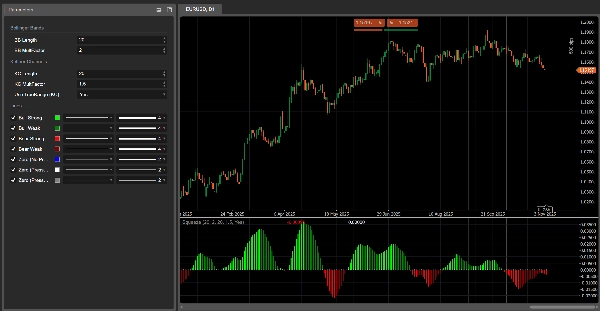
Histogram – directional pressure (scanner value)
Each bar of the histogram corresponds to val and is colored as:
- Lime –
val > 0and rising (val > previous val)
→ strong bullish pressure, scanner value strengthening upward. - Green –
val > 0but falling (val ≤ previous val)
→ still bullish, but pressure is fading. - Red –
val < 0and dropping further (val < previous val)
→ strong bearish pressure, downward drive intensifying. - Maroon –
val < 0but rising (val ≥ previous val)
→ still bearish, but pressure is losing strength.
So:
- Above 0 → bullish pressure regime
- Below 0 → bearish pressure regime
- Color change on the same side of 0 = pressure accelerating vs slowing.
Zero line – pressure states
Dots plotted at zero show the pressure state:
- Blue – neutral pressure (normal volatility)
- Black – Pressure ON (compression active)
- Gray – Pressure RELEASED (expansion after compression)
4. Parameter reference (English)
BB Length
Period for the SMA and standard deviation used in the outer volatility band.
- Shorter → more reactive band, more frequent pressure changes.
- Longer → smoother band, fewer but more “macro” signals.
BB MultFactor
Multiplier for the deviation of the outer band (kept as a user parameter for flexibility).
In this port, the deviation behaviour is tied to KC MultFactor as in the original formula, but you can adapt it if you want a different band style.
KC Length
Period for:
- the center line of the volatility channel,
- the range smoothing,
- the high/low window and the scanner regression.
Defines how far back Pressure Scanner looks to estimate volatility structure and directional pressure.
KC MultFactor
Controls the width of the volatility channel and the outer band.
- Larger value → wider channel, fewer Pressure ON states.
- Smaller value → tighter channel, more frequent pressure signals.
Use TrueRange (KC)
- true → channel range uses True Range (captures gaps and sharp moves).
- false → range is simply High − Low.
Summary
Key features include:
- Visualization of pressure states via colored dots at zero: black for compression (pressure on), gray for expansion (pressure released), and blue for neutral.
- A histogram representing directional pressure through a scanner value calculated by linear regression over recent bars. Positive values indicate bullish pressure, negative values indicate bearish pressure, with color-coded bars showing strength and acceleration of pressure (lime and green for bullish, red and maroon for bearish).
- Adjustable parameters such as BB Length and KC Length control the sensitivity and lookback period for volatility and directional pressure estimation.
- Option to use True Range or High-Low for volatility range calculation.
The indicator combines Bollinger Bands, Keltner Channels, and linear regression to provide a comprehensive view of market volatility structure and directional momentum, aiding in the identification of breakout and trend continuation opportunities.
Customer reviews
5 | 33 % | |
4 | 67 % | |
3 | 0 % | |
2 | 0 % | |
1 | 0 % |