Description
Trend Line Alerts
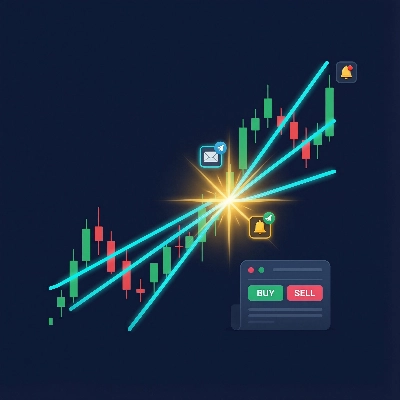
An indicator that monitors hand-drawn trend lines on price charts and fires multi-channel alerts — and optionally places trades — when price crosses a trend line.
What It Does
You draw trend lines on your chart. The indicator watches them. When price crosses a line, it:
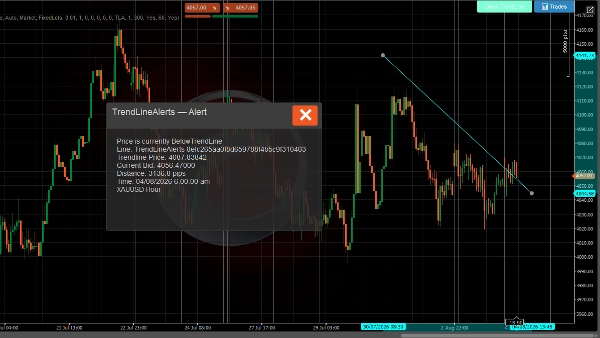
- Shows a popup on the chart with the crossover details
- Plays a sound notification
- Sends an email (optional)
- Sends a Telegram message via bot (optional)
- Places a trade (optional — market, limit, stop, or stop-limit order)
Alert System
- Trend line crossover detection — fires on every tick when price crosses above or below a tracked trend line
- Rich messages — includes trend line price, current bid, distance in pips, instrument, and time-frame
- Rate limiting — configurable cool down per trend line prevents duplicate alerts
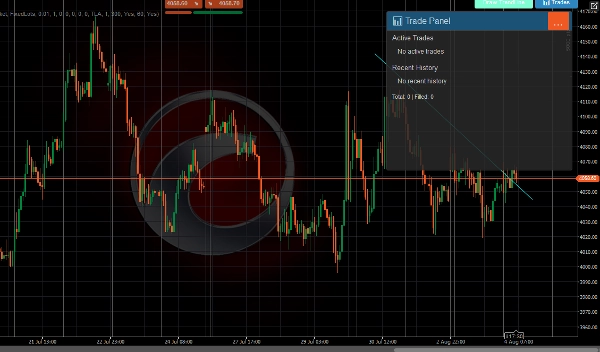
- Alert history — last 500 alerts stored and viewable in the Trade Panel
- Multi-channel delivery — popup, sound, email, and Telegram simultaneously
Trading System
When trading is enabled, a crossover event can also place a trade:
- All C-Trader order types — market, buy/sell limit, buy/sell stop, buy/sell stop-limit
- Auto direction — price crosses below → sell, crosses above → buy (or set manually per line)
- Stop loss and take profit — specified in pips, converted to price levels automatically
- Two volume modes — fixed lots or risk-based (% of account balance)
- Per-trend line overrides — each trend line can have its own trade settings (direction, volume, SL / TP, order type)
- Trade management — max trades per line, cool down between trades, automatic pending order cancellation when a trend line is deleted
- Trade life cycle monitoring — tracks fills, SL/TP hits, rejections, and cancellations with notifications for each event
UI
A toolbar appears on the chart (position configurable) with:
- Draw Trend Line — places a new interactive trend line on the chart
- 📊 Trades — opens a panel showing active trades, recent history, and stats
Notifications
Channel Description
Popup In-chart dialog with color-coded header (green = TP hit, red = SL/reject, blue = order placed)
Sound cTrader announcement sound
Email Sent via cTrader's built-in email system
Telegram Sent via Telegram Bot API to configured channels
All channels receive the same rich message format including instrument, time-frame, current price, trend line details, and trade information when applicable.
USAGE
Drawing Trend Lines
Using the toolbar button
- Click Draw Trend Line on the toolbar
- A horizontal cyan trend line appears on the chart
- Drag the endpoints to position it at your desired price level
- The indicator automatically begins monitoring it for crossovers
Drawing manually
- Draw any trend line using cTrader's drawing tools
- Name it with the prefix
TrendLineAlertsfollowed by a space (e.g.,TrendLineAlerts support1) - The indicator picks it up and starts tracking
Configuring Alerts
Button Placement
- Button Placements group → choose which corner the toolbar appears in (TopLeft, TopRight, BottomLeft, BottomRight)
Telegram Notifications
- Set Use Telegram Notifications to
true - Enter your Telegram Bot Key (from @BotFather)
- Enter the Channel Name or Chat Id (leave blank to auto-discover from bot interactions)
Email Notifications
- Set Use Email Notifications to
true(default) - Enter your Email Address
- Emails are sent via cTrader's built-in notification system
Alert Cooldown
- Alert Cooldown (seconds) — minimum time between duplicate alerts for the same trendline (default: 60s)
- Enable Alert History — stores the last 500 alerts (default: true)
Configuring Trading
Enable Trading
- Set Enable Trading to
true(default: false) - Configure the global defaults below
Order Type
- Default Order Type — which order type to place on crossover:
Market— executes immediately at current priceLimit— places a pending limit order at the trendline price ± offsetStop— places a pending stop order at the trendline price ± offsetStopLimit— places a pending stop-limit order
Direction
- Default Direction:
Auto— price crosses below trendline → Sell, crosses above → BuyBuy— always buy on crossoverSell— always sell on crossover
Volume
- Volume Mode:
FixedLots— uses the Volume (lots) value directly (e.g., 0.01)RiskPercent— calculates lot size from account balance, risk %, and stop loss distance
- Volume (lots) — fixed lot size when using FixedLots mode
- Risk Percent — percentage of account balance to risk per trade (e.g., 1.0 = 1%)
Stop Loss / Take Profit
- Stop Loss (pips) — distance from entry in pips (0 = no SL)
- Take Profit (pips) — distance from entry in pips (0 = no TP)
Pending Order Settings
Only relevant for Limit, Stop, and StopLimit order types:
- Limit Price Offset (pips) — distance from trendline price for limit orders
- Stop Price Offset (pips) — distance from trendline price for stop orders
- Expiration (minutes) — when the pending order expires (0 = Good-Til-Cancelled)
Trade Management
- Order Label — prefix for position labels (default:
TLA) - Max Trades Per Line — maximum concurrent trades per trendline (default: 1)
- Cooldown (seconds) — minimum time between trades on the same trendline (default: 300)
Trade Result Notifications
- Notify Trade Results — send alerts when trades are filled, SL/TP hit, or rejected (default: true)
Per-Trendline Overrides
By default, all trendlines use the global trade settings above.
Viewing Trades
Click the 📊 Trades button on the toolbar to open the Trade Panel:
- Active Trades — shows all open positions and pending orders linked to trendlines
- Recent History — last 5 closed/cancelled/rejected trades with status icons:
- 🛑 Stop Loss hit
- 🎯 Take Profit hit
- ❌ Rejected
- ⚠️ Cancelled
- Stats — total trades and fill count
Trend Line Lifecycle
Event What Happens
Line drawn/updated Indicator calculates price state, resets alert to Pending
Price crosses line Alert fires (popup + sound + email + Telegram), trade placed if enabled
Line deleted Tracking data cleared, any pending orders for that line are cancelled
Popup Color Guide
Color Meaning
Dark grey Price crossover alert
Blue Order placed
Green (teal) Trade filled
Green Take profit hit
Red Stop loss hit or trade rejected
Yellow Order cancelled
Trading involves risk. Past performance does not guarantee future results.
Summary
Key features include:
- Real-time detection of price crossing above or below tracked trend lines on every tick.
- Rich alert messages containing trend line price, current bid, distance in pips, instrument, and timeframe.
- Configurable alert cooldowns to prevent duplicate notifications.
- Storage and display of the last 500 alerts in a Trade Panel.
- Multi-channel alert delivery: popup, sound, email, and Telegram simultaneously.
When trading is enabled, the indicator supports all cTrader order types (market, limit, stop, stop-limit) with automatic direction setting based on price crossing (buy above, sell below) or manual configuration per trend line. It includes stop loss and take profit settings, two volume modes (fixed lots or risk-based), and per-trend line trade overrides. Trade management features include limits on concurrent trades per line, cooldowns between trades, and automatic cancellation of pending orders when a trend line is deleted. Trade lifecycle events such as fills, SL/TP hits, rejections, and cancellations generate notifications.
The user interface provides a configurable toolbar for drawing trend lines and accessing a Trade Panel that displays active trades, recent history, and statistics. Alerts use color-coded popups to indicate event types (e.g., order placed, trade filled, stop loss hit).



!["[Stellar Strategies] MARSI Signal Plotter" logo](https://cdn.ctrader.com/image/webp/7b2b8da6-8f8e-4646-8d4a-4710c516c01e_25567)