
Description
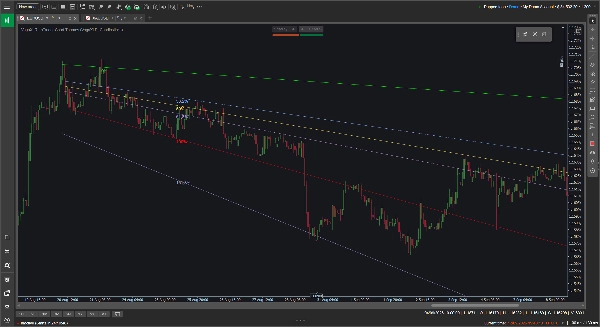
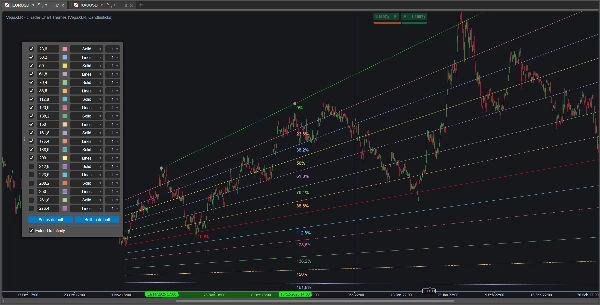
Les outils Fibonacci standard sont verrouillés sur des plans horizontaux, ce qui n'est pas toujours utile lorsque vous suivez une tendance clairement ascendante ou descendante. L'outil Fibonacci personnalisé VegaXLR résout ce problème en vous permettant de tracer des retracements Fibonacci dynamiques et inclinés qui s'adaptent à la pente réelle de l'action des prix.
Il est conçu pour vous offrir plus de flexibilité lors du tracé des canaux de tendance, de la projection des objectifs de prix ou de la recherche de supports et résistances diagonaux.
🔥 Fonctionnalités clés
- Niveaux inclinés dynamiques : Les niveaux intermédiaires se calculent automatiquement et s'inclinent pour correspondre à vos lignes de tendance de base 0 % et 100 %. Si vous déplacez ou ajustez une ligne de base, les niveaux internes se mettent à jour instantanément.
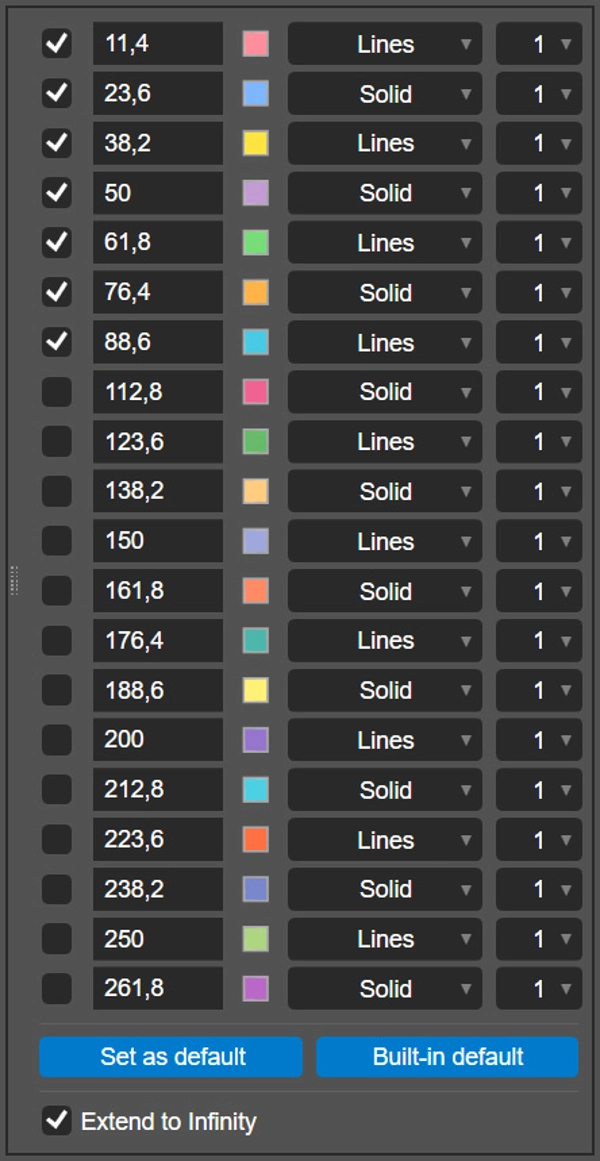
- 20 niveaux configurables : Vous pouvez activer et configurer jusqu'à 20 niveaux Fibonacci individuels par tracé.
- Personnalisation par niveau : Pour chaque ligne, vous pouvez définir le ratio exact, choisir une couleur personnalisée, sélectionner le style de ligne (comme Solide ou Lignes) et régler l'épaisseur de 1 à 8 pixels.
- Extension à l'infini : Un simple bouton bascule vous permet de projeter vos lignes de base et tous les niveaux actifs directement vers la droite du graphique.
- Sauvegardez vos paramètres : Cliquez sur le bouton « Définir par défaut » pour enregistrer localement vos ratios, couleurs et styles personnalisés. Le plugin mémorise vos préférences et les applique automatiquement aux tracés futurs.
- Multi-plateforme : L'outil est entièrement pris en charge et optimisé pour les clients de bureau cTrader sous Windows et macOS.
🖱️ Contrôles intuitifs sur le graphique
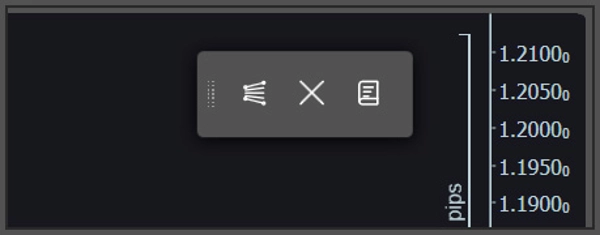
Le plugin repose sur une barre d'outils flottante légère sur le graphique plutôt que sur des menus d'indicateurs complexes.
- Tracé rapide & Effacement : Utilisez la barre d'outils pour déposer un nouvel outil Fibonacci sur le graphique ou effacer en toute sécurité tous les tracés actuels. Si vous souhaitez des lignes horizontales ou verticales traditionnelles, maintenez simplement la touche Shift en dessinant.
- Paramètres contextuels : Pour personnaliser un tracé spécifique, cliquez directement sur sa ligne de base 0 % ou 100 %. Le panneau de configuration apparaîtra directement sur votre graphique pour des ajustements faciles.
⚙️ Paramètres de l'indicateur
Vous pouvez ajuster quelques préférences de ligne de base dans les paramètres de l'indicateur cTrader avant de commencer à tracer :
- Changer la position par défaut à l'écran de la barre d'outils flottante (par exemple, en haut à droite, en bas au centre).
- Changer la position par défaut du panneau contextuel pour la configuration.
- Activer ou désactiver toutes les étiquettes de pourcentage Fibonacci.
Résumé
Key features include an option to extend all active levels infinitely across the chart, saving custom settings as defaults for future use, and compatibility with both Windows and macOS cTrader desktop clients. The plugin uses an intuitive floating on-chart toolbar for quick drawing and clearing of Fibonacci tools, with a pop-up configuration panel accessible by clicking on baseline lines. Users can also toggle traditional horizontal or vertical lines by holding the Shift key while drawing.
Additional adjustable parameters include the default screen position of the toolbar, the pop-up panel location, and the display of Fibonacci percentage labels. VegaXLR is designed to enhance trend channel mapping, price target projection, and identification of diagonal support and resistance on cTrader charts.















![Logo de "Custom Timeframes [Iridio Capital]"](https://cdn.ctrader.com/image/webp/4d75a920-23c7-4fea-a7b5-594a9d067f2e_63286)