Beschreibung
Multi-Chart Sync Pro hilft Ihnen, viele Charts gleichzeitig einfach zu verwalten. Sie müssen nicht bei jedem einzelnen Chart manuell scrollen, zoomen oder Zeitrahmen ändern.
Warum dieses Tool verwenden?
- Synchronisiertes Scrollen: Scrollen Sie in einem Chart, und alle anderen Charts bewegen sich zur gleichen Zeit.
- Synchronisiertes Zoomen: Zoomen Sie in einem Chart hinein oder heraus, und alle anderen Charts zoomen entsprechend mit.
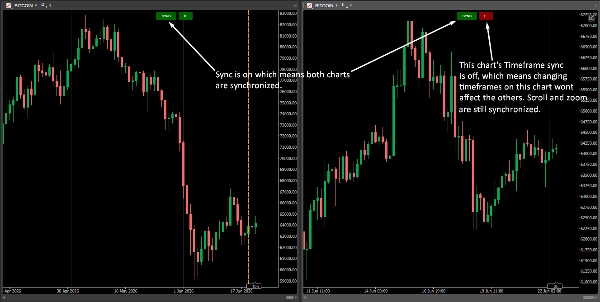
- Zeitrahmen-Synchronisation umschalten: Schalten Sie die Zeitrahmen-Synchronisation mit einem Klick EIN oder AUS. Sie können einen Chart auf eine 5-Minuten-Ansicht ändern, während Ihre anderen Charts auf einer 1-Stunden-Ansicht bleiben.
- Einfache Einrichtung: Klicken Sie einfach auf einen beliebigen Chart, um ihn zum Hauptführer zu machen. Keine komplizierte Einrichtung erforderlich.
So verwenden Sie es:
1. Laden Sie Multi-Chart Sync Pro herunter.
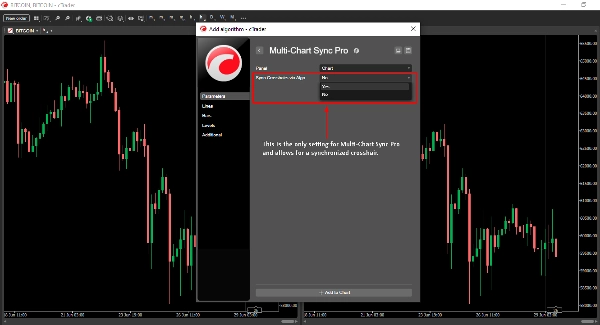
2. Fügen Sie den Indikator zu JEDEM geöffneten Chart auf Ihrem Bildschirm hinzu.
3. "Sync"-Button: Klicken Sie, um alle Synchronisationsfunktionen EIN (Grün) oder AUS (Rot) zu schalten.
4. "TF"-Button: Klicken Sie, um die Zeitrahmen-Synchronisation unabhängig EIN oder AUS zu schalten.