


Opis
Pozwól, że przedstawię Ci => The Position Manager
- Wszechstronne Zarządzanie Transakcjami zarówno dla Traderów jak i Deweloperów
Dla Traderów => Chroń zyski, Ogranicz straty i Wymuszaj dyscyplinę dzięki konfigurowalnym ustawieniom.
The Position Manager posiada 4 moduły, które uzasadniają jego nazwę:
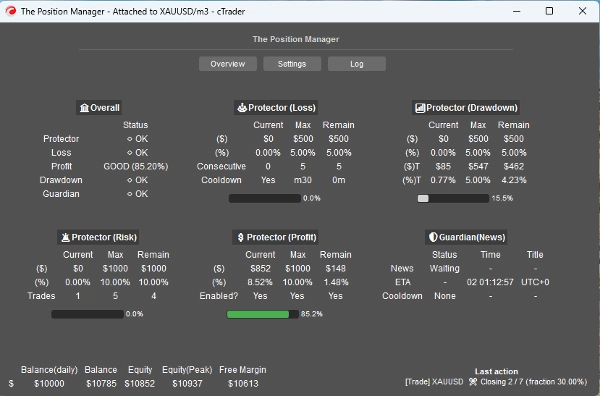
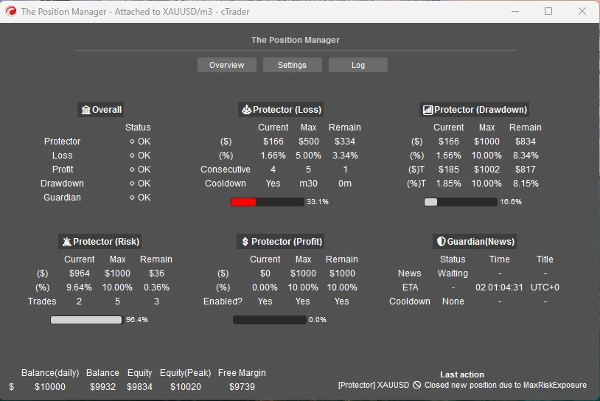
- Portfolio Protector
- Guardian Trading
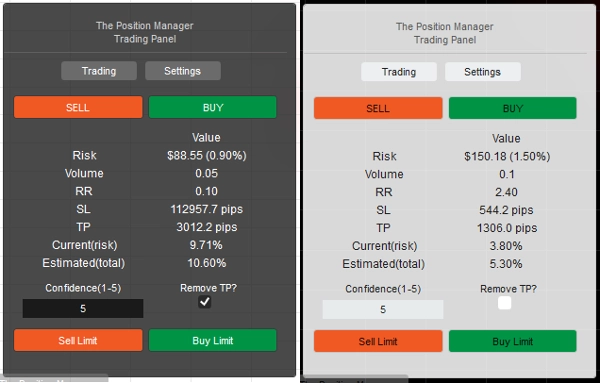
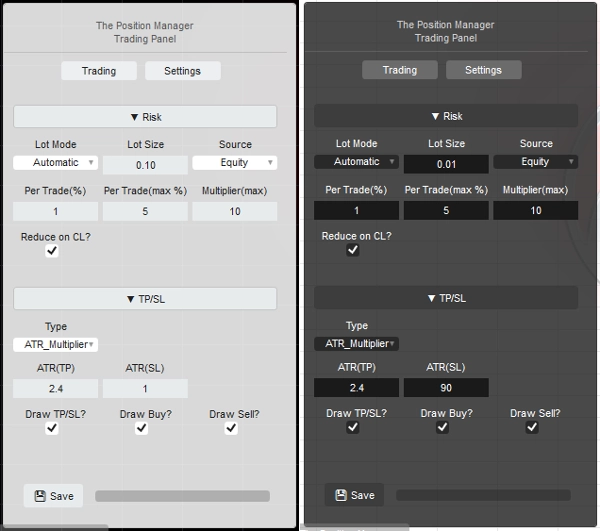
- Risk Manager (do handlu manualnego/półautomatycznego)
- Trade Manager (trailing TP, częściowe TP/SL)
Każdy z nich posiada podmoduły dla lepszego zarządzania.
Przypadki użycia:
- Traderzy szukający ochrony portfela + inteligentnego skalowania podczas handlu na Desktop, Mobile i Web.
-
- Jeśli handlujesz wyłącznie na Desktopie, użyj Tryb Headless => WYŁ.
- Jeśli handlujesz również przez Mobile/Web, użyj Tryb Headless => WŁ.
- Prop-Traderzy z ustalonymi limitami ryzyka.
- Deweloperzy którzy chcą zamienić sygnały handlowe w rzeczywiste wejścia.
Jak używać:
- Przy pierwszym użyciu zdecydowanie zalecam:
- Utworzyć tylko jedną instancję "The Position Manager" z:
- Tryb Headless => WYŁĄCZONY (tryb UI)
- Tryb Instancji => Oba (Manager + Panel Handlowy)
- Następnie poznawać jego zachowanie, najlepiej w testach historycznych(tryb wizualny) przed uruchomieniem na żywo.
Pamiętaj => "The Position Manager" sam nie otwiera pozycji:
- Zarządza istniejącymi!
- jednocześnie zapewnia zarządzanie na poziomie konta.
Dla małych kont możesz zwiększyć procenty.
Dla dużych kont możesz zmniejszyć procenty.
W każdym przypadku zawsze dostosuj ustawienia do wielkości swojego konta.
Gdy już zapoznasz się z parametrami/zachowaniem, możesz uruchomić go na cTrader Cloud aby zarządzać pozycjami na Mobile/Web, istnieją tylko dwie proste zasady do przestrzegania:
- Tryb Headless => WŁĄCZONY
- Również, powinna być dodana tylko jedna instancja "The Position Manager" :
-
- W przeciwnym razie mogą się one „kłócić” ze sobą, ponieważ większość operacji dotyczy symboli globalnie.
- Ta sama zasada obowiązuje podczas uruchamiania lokalnego.
Pozwól, że wyjaśnię parametry i oczekiwane zachowanie dla każdego z nich:
Chociaż niektóre są intuicyjne, jest wiele parametrów...
Proszę przeczytaj każdy z nich ze spokojem.
==== Zarządzanie Pozycjami ====
- Tryb Headless? => Dostępne funkcje w tym trybie to:
-
- Portfolio Protector
-
- Wszystkie funkcje są dostępne.
- Guardian Trading
-
- Filtr wiadomości jest wyłączony jeśli Tryb Headless => WŁĄCZONY.
- Trailing Profit
-
- Dla dowolnego symbolu, pozycje nie powinny mieć Take Profit.
- Częściowe zamknięcia
-
- Dla dowolnego symbolu, pozycje muszą mieć Take Profit lub Stop Loss
=> Headless WYŁĄCZONY (tryb UI)
- Tryb Instancji:
-
- Manager => Powinna być dodana tylko jedna instancja.
- Trading => Czysty panel handlowy (moduł Risk Manager), możesz dodać wiele instancji.
- Oba => Powinna być dodana tylko jedna instancja:
-
- Manager będzie wyświetlany jako okno.
- Trading będzie wyświetlany na wykresie.
- Typ/Pozycja Panelu: Oczywiste
- Przechowywanie według:
-
- Użyj Brookera do zapisywania/ładowania tych samych ustawień przy każdym restarcie.
- Użyj Broker_Symbol jeśli chcesz używać konfiguracji dla każdego symbolu jako rodzaju „profilu ryzyka”.
=> Headless WYŁĄCZONY/WŁĄCZONY - Lokalnie
- Zezwolić na tryb wiadomości?
-
- Oczywiste
- Podczas używania [Trading, Both] Trybu Instancji, zmień „TP/SL => Typ” na „Pipsy” w ustawieniach panelu, aby TP/SL mogły być ustawiane przez wiadomości.
- Zezwolić na handel przez wiadomości?
-
- Zezwól na otwieranie pozycji przez wiadomości.
- Jeśli Tryb Headless WŁĄCZONY, konfiguracja Risk Managera nie jest możliwa.
- Jeśli Tryb Headless WYŁĄCZONY, podczas używania [Trading, Both] Trybu Instancji, możesz konfigurować moduł Risk Manager według własnego uznania.
=> Headless WŁĄCZONY / Ogólne konto
- Minimalny Breakeven(%):
-
- Dla każdej pozycji, gdy logika Breakeven zostanie wykonana przez moduły Trailing/Partial Profit, zamiast przesuwać SL dokładnie do ceny wejścia (co prowadzi do ujemnego PnL).
- SL zostanie przesunięty o x% w kierunku ceny wejścia.
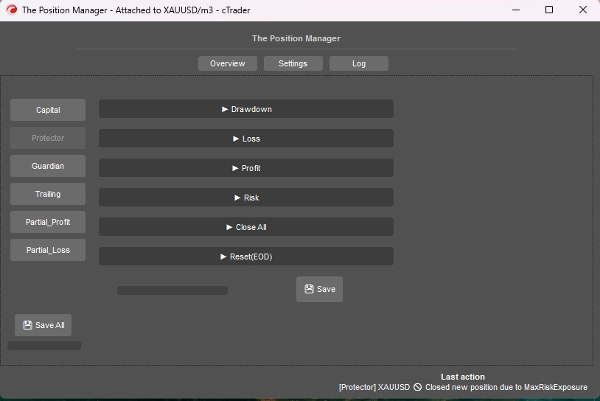
=> Headless WŁĄCZONY / Protector Drawdown
- Tryb Drawdown:
-
- Dzienny => oparty na saldzie dnia
- Trailing => oparty na szczytowym kapitale
- Typ Drawdown:
-
- Procentowy => % salda dnia, idealny dla dynamicznego wzrostu.
- Stały => stała kwota, idealna dla ścisłych zasad
- Maksymalny Drawdown => % lub stały (oczywiste)
=> Headless WŁĄCZONY / Protector Loss
- Źródło strat: => Obecnie oparte tylko na „Saldo dnia”.
-
- Jeśli kapitał spadnie poniżej salda dnia, zostanie to wyzwolone/policzone.
- Typ strat:
-
- Procentowy => % salda dnia, idealny dla dynamicznego wzrostu.
- Stały => stała kwota, idealna dla ścisłych zasad
- Maksymalna dzienna strata² => % lub stała (oczywiste)
- Kolejne straty(CL):
-
- Włącz zamykanie pozycji, gdy nastąpią kolejne straty.
- Liczba kolejnych strat:
-
- Oczywiste
- Czas oczekiwania na reset(CL):
-
- Czas oczekiwania na zresetowanie licznika i pozwolenie na otwarcie nowych pozycji.
=> Headless WŁĄCZONY / Protector Profit
- Włączyć limit zysku? => Oczywiste
-
- Po osiągnięciu maksymalnego zysku nowe pozycje zostaną zamknięte.
- Źródło zysku: => Zawsze oparte na saldzie dnia
- Typ zysku:
-
- Procentowy => % salda dnia, idealny dla dynamicznego wzrostu.
- Stały => stała kwota, idealna dla ścisłych zasad
- Maksymalny zysk² => % lub stały (oczywiste)
=> Headless WŁĄCZONY / Protector Risk
- Całkowita ekspozycja(%):
-
- Uwzględnia również pozycje znajdujące się na breakeven.
- Całkowita liczba otwartych transakcji:
-
- Nowe pozycje zostaną zamknięte, jeśli Całkowita liczba jest równa Całkowitej liczbie otwartych transakcji
=> Headless WŁĄCZONY / Protector CloseAll
- Zamknąć na koniec dnia? => Zamknij wszystkie pozycje na koniec dnia (EOD)
- Zamknąć na koniec tygodnia? => Zamknij wszystkie pozycje na koniec tygodnia (EOW - piątek), używa godzin EOD jako odniesienia.
=> Headless WŁĄCZONY / Protector Reset(EOD)
- Godzina „resetu” śledzenia szczytowego kapitału oraz wykonania logiki CloseAll, jeśli dotyczy.
- Reset (Godzina) => 0h - 23h
- Reset (Minuta) => 0m – 59m
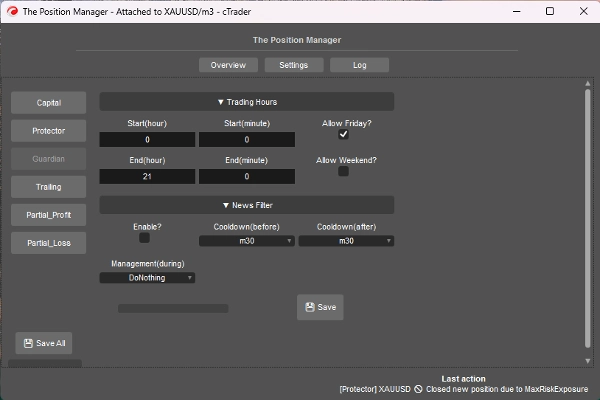
=> Headless WŁĄCZONY / Guardian
- Pozycje otwarte poza Godzinami Handlu lub Dozwolonym dniem zostaną automatycznie zamknięte.
-
- Start/Koniec (Godzina) => 0h – 23h
- Start/Koniec (Minuta) => 0m – 59m
- Zezwolić na piątek? => Oczywiste
- Zezwolić na weekend? (krypto) => Oczywiste
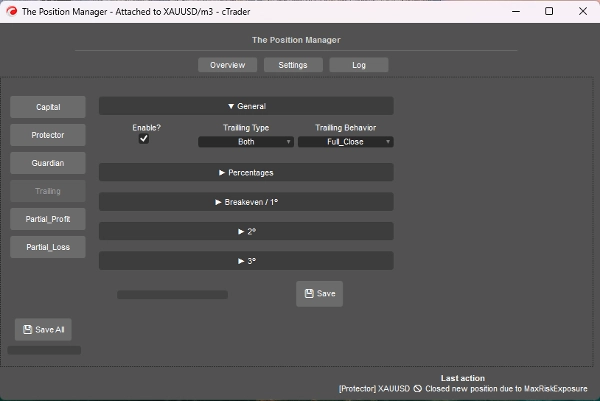
=> Headless WŁĄCZONY / Trailing Profit
- To jest oparte na kapitale Take Profit
- Włączyć?
-
- Dla pozycji bez TP, idealne dla pozycji podążających za trendem.
- => Typ:
-
- Procentowy => Czysty % kapitału
- Drawdown => Oparty na koncepcji Trailing DD (Szczytowy kapitał), myśl w kategoriach cofnięć/retrakcje ceny.
- Oba => Zachowanie Partial_Close jest domyślnie włączone:
-
- Typ procentowy dla częściowych zamknięć.
- Typ drawdown dla pełnego wyjścia.
- Zachowanie:
-
- Full_Close:
-
- Po osiągnięciu docelowego % kapitału, zamknij wszystkie pozycje bez TP.
- Również, gdy połowa docelowego % kapitału zostanie osiągnięta, SL jest przesuwany do breakeven.
- Partial_Close:
-
- Włącz częściowe zamknięcia.
- Pamiętaj => Jeśli rozmiar pozycji (lot) jest zbyt mały na częściowe zamknięcie, pozycja zostanie zamknięta w całości.
- Minimalny zysk(%):
-
- Minimalny zysk do aktywacji logiki trailing.
- => Pełne zamknięcie przy(%):
-
- Dla zachowania „Full_Close” tylko.
- => [Oba] Zamknij Drawdown(%):
-
- Dla „typu Oba” tylko.
- => [% tylko] Smart SL?"
-
- Dla „Procentowego” typu tylko.
- Jest dość podobny do typu Drawdown, ale bardziej reaktywny dzięki Trailing SL
- Partial 1(%) / Partial 2(%)
-
- Docelowy % kapitału do wykonania częściowych zamknięć (Procentowy lub Oba)
- Zawsze sprawdzaj, czy typ Trailing to Procentowy czy Drawdown
- Partial 1(% kolejność) / Partial 2(% kolejność)
-
- Oczywiste
- => Zamknij 3(%):
-
- Docelowy % kapitału do pełnego zamknięcia pozycji bez TP.
- Dla typów Procentowy lub Drawdown tylko
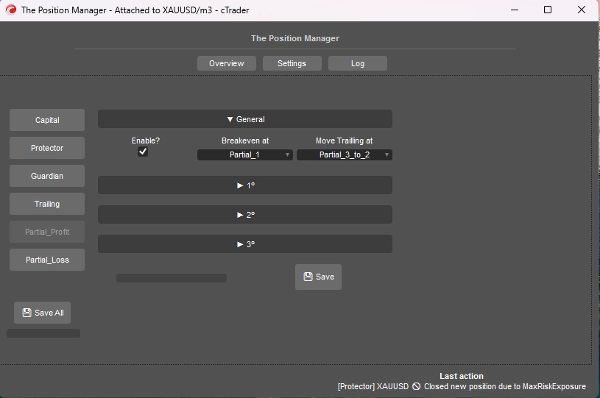
=> Headless WŁĄCZONY / Partial Profit
- Włączyć?
-
- Dla pozycji z TP, idealne dla day-tradingu lub skalpowania.
- Cena wejścia będzie 0%
- Take Profit będzie 100%
- Ceny częściowe będą obliczane na tej podstawie.
- Breakeven przy:
-
- Oczywiste, przesuwaj SL do BE, gdy wybrany Partial zostanie wyzwolony.
- => Przesuń Trailing przy:
-
- Oczywiste, przesuwaj SL do poprzedniej ceny Partial, gdy wybrany Partial zostanie wyzwolony.
- Pamiętaj => Upewnij się, że Partial 2 lub 3 jest aktywowany.
- Partial 1(%) /
Partial 2(%) /
Partial 3(%) -
- Procenty pomiędzy EntryPrice a TakeProfit.
- => Włączyć 2º?
=> Włączyć 3º? -
- Oczywiste
- Partial 1(% kolejność) /
Partial 2(% kolejność) /
Partial 3(% kolejność) -
- Oczywiste
=> Headless WŁĄCZONY / Partial Loss
- Włączyć?
-
- Dla pozycji z SL, idealne do ograniczania strat przegrywających transakcji które mogą wrócić do kierunku.
- Cena wejścia będzie 0%
- Stop loss będzie 100%
- Ceny częściowe będą obliczane na tej podstawie.
- Partial 1(%) /
Partial 2(%) /
Partial 3(%) -
- Procenty pomiędzy EntryPrice a StopLoss.
- => Włączyć 2º?
=> Włączyć 3º? -
- Oczywiste
- Partial 1(% kolejność) /
Partial 2(% kolejność) /
Partial 3(% kolejność) -
- Oczywiste
====================================================
Dla Deweloperów => Plug-and-Play dla dowolnej strategii poprzez wiadomości/subskrypcje cTrader Algo.
- Dla pół- lub w pełni zautomatyzowanych systemów:
- Półautomatyczne: Zlecenia nadal otwierane przez nas samych, ale:
-
- SL i TP są ustawiane przez wiadomości/subskrypcje.
- W pełni automatyczne: Sygnały zleceń są wysyłane przez wiadomości/subskrypcje do „The Position Manager”
-
- Konfiguracja „Risk Manager” może nie być dostępna w tym podejściu.
To dość proste, wystarczy wysłać sygnał używając następującej klasy:
public class TradeSignal
{
public string Symbol { get; set; }
public TradeType Direction { get; set; }
public double StopLossPips { get; set; }
public double? TakeProfitPips { get; set; } // null = bez TP
public string StrategyId { get; set; }
public double? EntryPrice { get; set; } // null = rynek, w przeciwnym razie zlecenie limit.
public DateTime Timestamp { get; set; }
public int Confidence { get; set; } // 1–5
}
Następnie:
Messages.Send("ThePositionManager", signal);
Krótki przykład:
TradeSignal signal = new()
{
Symbol = Symbol.Name,
Direction = TradeType.Buy,
StopLossPips = 1500,
TakeProfitPips = 3000,
StrategyId = "MyStrategy",
Confidence = 5
};
Messages.Send("ThePositionManager", signal);
Podsumowanie
Key features include four main modules: Portfolio Protector, Guardian Trading, Risk Manager (for manual or semi-automated trading), and Trade Manager (supporting trailing take profit and partial take profit/stop loss). The tool supports intelligent scaling and portfolio protection across Desktop, Mobile, and Web platforms, with a Headless mode option for managing positions remotely via cTrader Cloud.
For traders, it offers configurable risk controls such as daily and trailing drawdown limits, profit caps, exposure limits, and automated position closing based on trading hours or drawdown thresholds. Trailing profit and partial profit/loss management allow dynamic adjustment of stop loss and take profit levels to optimize trade exits.
Developers can integrate The Position Manager with automated strategies by sending trade signals via messages, enabling semi or fully automated order management with customizable stop loss and take profit settings.
The tool supports saving settings by broker or symbol, and includes detailed parameters for break-even management, risk exposure, and partial close orders, making it adaptable to various account sizes and trading styles.
Opinie klientów
5 | 0 % | |
4 | 67 % | |
3 | 33 % | |
2 | 0 % | |
1 | 0 % |
Dyskusja
Częste pytania
















Cena