![Trading product for [Hamster-Coder] Moving Average MTF Indicator Prop Forex, image 1](https://cdn.ctrader.com/image/webp/b11b98b1-194d-4b8e-b00e-d611826ad159_31226)
![Trading product for [Hamster-Coder] Moving Average MTF Indicator Prop Forex, image 2](https://cdn.ctrader.com/image/webp/44311b7b-300d-4721-b22f-d0c798163e6b_31227)
![Trading product for [Hamster-Coder] Moving Average MTF Indicator Prop Forex, image 3](https://cdn.ctrader.com/image/webp/83137ff3-0a9c-465a-b159-7685b3adf576_31228)

Description
📌 Current Version
!!! This is [Hamster-Coder] Moving Average MTF - check "Available Versions" section for full information about MOD differences.
Ensure the displayed version on the chart matches this value:
Version: 1.2.0
Version Date: 2025-08-03 18:00:00
🔧 Available Versions
🔹 MTF Version (Multi-Timeframe) - [Hamster-Coder] Moving Average MTF
The MTF version is the most powerful variant of indicator.
It includes full multi-timeframe support, allowing users to select any custom timeframe for moving average calculation, independent of the chart's timeframe.
Ideal for identifying higher-timeframe structures.
🔹 Standard Version - [Hamster-Coder] Moving Average
The standard version contains of features of **[Hamster-Coder] Pivot Points MTF ** except multi time frame support selection.
📖 Description
The [Hamster-Coder] Pivot Points is a flexible pivot point indicator of the Hamster-Coder™ Algo Series is a versatile analytical tool that calculates a dynamic level based on a customizable smoothing algorithm. It is designed as an enhancement to classic moving averages, providing flexible parameters to better align with a trader’s individual strategy.
🧠 Hamster-Coder™ Algo Series
This indicator is part of a powerful toolkit implementing Timeframe Decoupling — a proprietary concept allowing you to assign separate timeframes to each key parameter.
The result: true multi-timeframe analysis on a single chart — a game-changing capability for modern traders.
To explore more indicators from this series, search for “Hamster-Coder” in the platform.
🚀 Key Features
- Timeframe Decoupling (series feature)
Assign independent timeframes to components like the basis (e.g., moving average) and deviation source for precision control. - Multi-Timeframe Price Inputs
Choose fromOpen,Close,High,Low,HL2,HLC3,HLCC4, orOHLC4— from any available timeframe. - Real-Time Adjustments
Change parameters after the indicator is applied — something not possible with default source properties in the platform. - Adjustable Sensitivity
Fine-tune the pivot detection usingLength(Periods), controlling how many bars are averaging. - Seamless Integration
Designed to work perfectly with both manual trading and automated strategies.
🛠️ How to Use
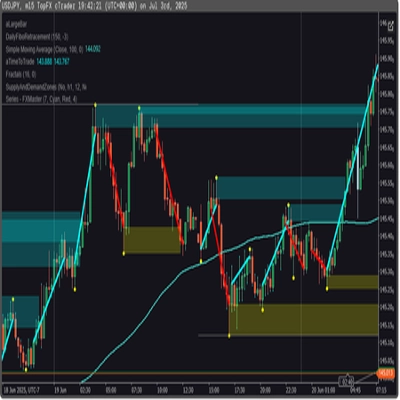
To see 30m timeframe Simple Moving Average length 50 on m1 chart:
1. Apply to 'm1' chart
2. Select 'm30' price timeframe
3. Select 'Close' price source
4. Select '1' price offset (for HTF > Chart time frame is recommended to use values more than 0, because it recalculates every tick on active time frame)
5. Select 'Simple' moving average type 6. Select '50' moving average length
✅ Version Check
Set 'Show Version' = Yes to display the current version in the bottom-right corner of the chart.
- Make sure this version matches the "Current Version" listed at the top of this description.
- If there's a mismatch — contact support or reach out to the developer directly.
🙋♂️ P.S.
Happy trading! And feel free to leave comments with suggestions, feature requests, or inquiries about custom development.
Summary
Key functionalities include:
- Selection of multiple price inputs (Open, Close, High, Low, HL2, HLC3, HLCC4, OHLC4) from any timeframe.
- Real-time parameter adjustments after application.
- Adjustable sensitivity through customizable length (periods) for averaging.
- Compatibility with both manual and automated trading strategies.
The indicator comes in two versions: the MTF version with full multi-timeframe support and a standard version without custom timeframe selection. It supports a wide range of markets including Forex, Indices, Commodities, Crypto, and Stocks. Users can display the current version on the chart for verification and ensure alignment with the latest release.
This tool is intended for traders seeking enhanced moving average analysis with flexible timeframe and price source configurations.
Customer reviews
5 | 50 % | |
4 | 50 % | |
3 | 0 % | |
2 | 0 % | |
1 | 0 % |
!["[Hamster-Coder] Moving Average" logo](https://cdn.ctrader.com/image/webp/1bd952ad-57d2-4db2-9b49-b01be0b048b8_30113)
!["[Hamster-Coder] Pivot Points MTF" logo](https://cdn.ctrader.com/image/webp/4c143e5a-309c-40e3-a578-f04d1e133ffa_31159)
!["[Hamster-Coder] Pivot Points (Demo)" logo](https://cdn.ctrader.com/image/webp/87b54299-8c73-4942-9207-4bc6db824811_31153)
!["[Hamster-Coder] Bollinger Bands" logo](https://cdn.ctrader.com/image/webp/21d8e5d6-fb11-4bac-b9ee-cd05c2b76804_30327)
!["[Hamster-Coder] Price" logo](https://cdn.ctrader.com/image/webp/893fb641-d5b3-44d8-91fb-6a2dc6f3d309_30647)
!["[Hamster-Coder] Pivot Points" logo](https://cdn.ctrader.com/image/webp/cdac5a8c-e5cf-40b7-9507-25d4cdfb1e29_31156)