
Description
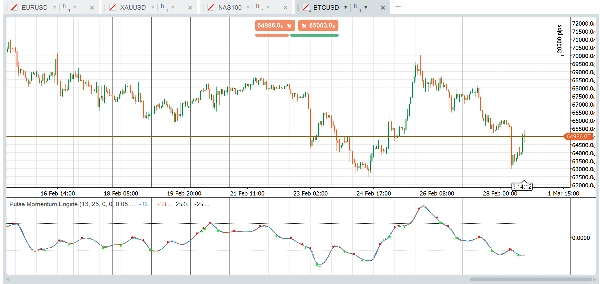
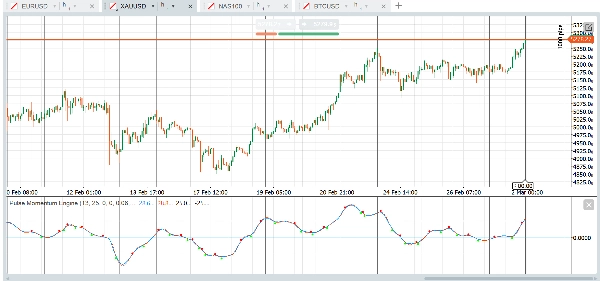
The Pulse Momentum Engine (PME) is an advanced adaptive momentum oscillator with built-in lag correction and a 5-condition confluence filter. It speeds up in trends, slows down in noise, and only shows you the signals worth taking. Works on Forex, indices, gold, crypto, and more — right out of the box.
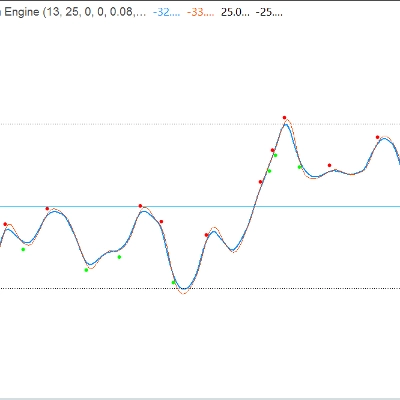
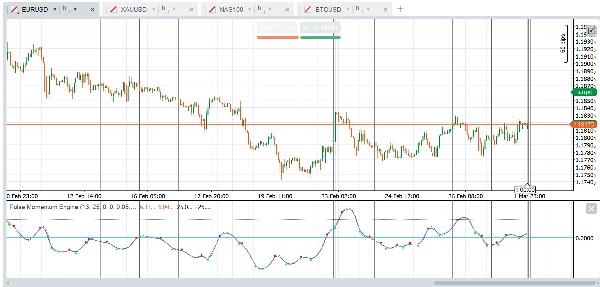
The indicator displays as a sub-window oscillator with a main Pulse Line, an optional Signal Line, fixed Overbought/Oversold levels, and optional crossover arrows filtered by a multi-condition confluence system.
Parameter Groups:
- Momentum Core: Controls the base momentum calculation. Default Output Range is 0 centered. When using Output Range = 1 (Shifted), adjust the OB/OS levels accordingly (e.g., OB = 70, OS = 30)
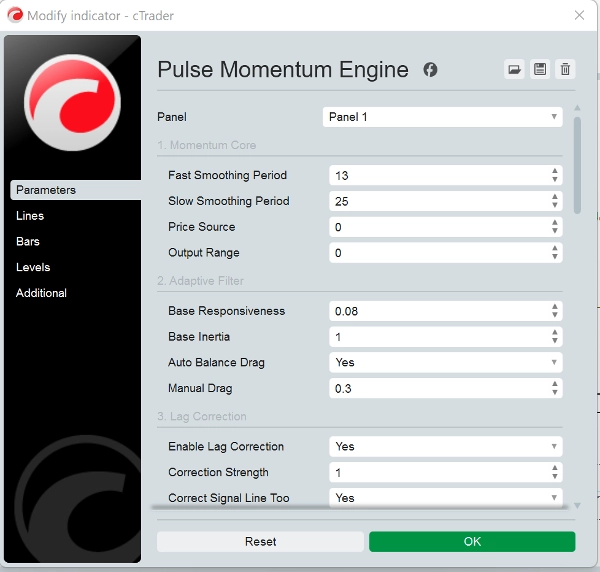
- Adaptive Filter: Controls how the filter tracks the momentum signal. Base Responsiveness (0.08) determines how quickly the filter responds to momentum changes. Higher = faster but noisier. Base Inertia (1.0) determines resistance to sudden changes. Higher = smoother output but more lag. Auto Balance Drag (True) automatically computes optimal drag to prevent ringing/oscillation. Recommended to leave enabled. Manual Drag (0.3) is manual drag coefficient when Auto Balance is disabled. Higher = more damping.
- Lag Correction: Reduces the inherent delay of the adaptive filter using two-pass error feedback.
- Dynamic Tracking: Makes the filter adapt its behavior based on market conditions.
- Adaptation Engine: Controls the overall adaptation mechanism.
- Signal Line: A slower reference line used for crossover-based signals.
- Cross Arrows: Visual markers at main/signal line crossover points. Note: Non-Repainting: When "Require Confirmed Bar" is True (default), crossover signals only appear after the bar closes and will never disappear. Set to False only if you need real-time alerts and understand the signal may change before bar close.
- Confluence Filter: Requires multiple conditions to agree before showing a crossover arrow. Significantly reduces false signals.
- Fixed Levels: Simple, constant overbought and oversold reference lines. Conservative (fewer signals): OB = 40, OS = -40 (centered) or OB = 70, OS = 30 (shifted). Aggressive (more signals): OB = 15, OS = -15 (centered) or OB = 60, OS = 40 (shifted).
- Performance: Max Bars to Calculate is set to 0. 0 = calculate all available history. Set to 5000-10000 on very long charts to reduce CPU load.
Basic Usage
- Trend Direction: When the Pulse Line (blue) is above zero and rising, momentum is bullish. Below zero and falling indicates bearish momentum.
- Crossover Signals: A bullish signal occurs when the Pulse Line crosses above the Signal Line (green arrow). A bearish signal occurs when it crosses below (red arrow).
- Overbought/Oversold Zones:
- Pulse Line above the OB level → market may be overextended to the upside. Look for bearish crossovers as potential reversal signals.
- Pulse Line below the OS level → market may be oversold. Look for bullish crossovers as potential reversal signals.
- Crossovers that occur in the neutral zone (between OB and OS) are typically trend-following signals.
Confluence Filter Strategy
The default configuration requires 3 out of 5 conditions to confirm a crossover. This significantly reduces false signals. You can:
- Increase Min Conditions to 4-5 for fewer but higher-quality signals
- Decrease Min Conditions to 1-2 for more signals with lower individual quality
- Disable individual filters to customize which confirmations matter to your strategy
Recommended Assets & Markets
Major Forex Pairs- EUR/USD, GBP/USD, USD/JPY, AUD/USD (High liquidity produces clean momentum swings. The adaptive filter handles varying session volatility effectively)
Forex Crosses - EUR/GBP, GBP/JPY, AUD/NZD (Often exhibit stronger trending behavior, which the confluence filter exploits well)
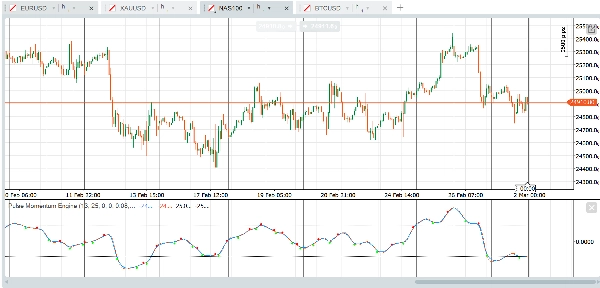
Stock Indices - US30, NAS100, SPX500, GER40 (Persistent trend phases align well with the adaptive filter. Lag correction captures breakouts early)
Gold (XAU/USD) - Long momentum swings and clear trend phases match the filter design closely.
Crude Oil - WTI, Brent (Strong momentum persistence)
Large-Cap Stocks - AAPL, MSFT, AMZN, TSLA (Institutional participation produces clean momentum signatures)
Major Crypto - BTC/USD, ETH/USD (Strong trending tendencies. Increase Responsiveness to 0.10 - 0.15 for crypto's faster cycles).
Less Suitable for Illiquid instruments (Random spikes amplified as false signals) and Tight range-bound pairs (Indicator provides little actionable information).
With respect to timeframe, the default setting is made to work with one hour time-based chart out of the box but other timeframes and chart types like renko, range, ticks work well too. The Platform and the Indicator are yours to experiment with to find suitable settings for your strategy. Here are examples of quick presets you can try:
Quick-Start Presets
Forex Majors — Ready Out of the Box
The default settings are optimized for major forex pairs on the H1 timeframe. No changes needed. Simply apply the indicator and set your Overbought level to 25 and Oversold level to -25.
Gold & Oil — Slightly More Responsive
For gold (XAU/USD) and crude oil, increase the Base Responsiveness to 0.10 to better capture their characteristic momentum swings. Widen the OB/OS levels slightly to 30 and -30 to account for their wider oscillation range. All other settings can remain at their defaults.
Stock Indices — Faster and Tighter
Indices like US30, NAS100, and SPX500 benefit from shorter smoothing periods. Set the Fast Period to 11 and the Slow Period to 21 for quicker reaction to intraday momentum shifts. Increase Base Responsiveness to 0.10 and reduce the Signal Period to 6 for tighter crossover timing. Keep OB at 25 and OS at -25. Min Confluence at 3 works well for most index trading.
Cryptocurrency — Built for Speed
Crypto markets move fast and trend hard. Shorten the Fast Period to 10 and Slow Period to 21. Push Base Responsiveness up to 0.12 and reduce Base Inertia to 0.8 so the filter reacts quickly to volatile swings. Use a Signal Period of 5 for faster crossover detection. Raise the Max Responsiveness ceiling to 0.5 to give the adaptation engine more room. Lower Min Confluence to 2 since crypto trends tend to be more directional and less noisy once established. Set OB to 30 and OS to -30.
Bonds & Slow Instruments — Patient and Selective
Treasuries, bunds, and other slow-moving instruments require longer lookback periods and more patience. Increase the Fast Period to 18 and Slow Period to 34. Reduce Base Responsiveness to 0.05 and raise Base Inertia to 1.5 to prevent the filter from reacting to minor fluctuations. Extend the Signal Period to 10 and the Adaptation Lookback to 15. Raise Min Confluence to 4 to ensure only the strongest setups trigger signals. Use tighter OB/OS levels of 20 and -20 since these instruments oscillate in a narrower range.
Important Notes
- Non-Repainting: With "Require Confirmed Bar" enabled (default), all crossover arrow signals are based on closed bars and will never change or disappear retroactively.
- The Pulse Line and Signal Line values on the current (unclosed) bar will update in real-time — this is standard behavior for any indicator. Only the arrow signals are controlled by the confirmed bar setting.
- Fixed OB/OS levels are simple reference lines. Unlike dynamic levels, they do not adapt to changing market conditions. Adjust them based on the asset and timeframe you are trading.
- When switching Output Range from Centered to Shifted, remember to update OB/OS levels accordingly (see Level Guidelines table above).
- Performance: On very long charts (50,000+ bars), consider setting "Max Bars to Calculate" to 5000-10000.
Disclaimer
This indicator is a technical analysis tool and does not constitute financial advice. Past performance is not indicative of future results. Always use proper risk management and combine with other forms of analysis before making trading decisions.
Summary
Key functionalities include:
- Adaptive filtering that adjusts responsiveness and inertia based on market conditions.
- Lag correction via two-pass error feedback to improve signal timeliness.
- A confluence filter requiring multiple conditions to confirm crossover signals, enhancing signal quality.
- Fixed overbought and oversold reference levels to identify potential reversal zones.
- Customizable parameters for momentum calculation, filter behavior, lag correction, and signal generation.
PME is optimized for one-hour charts but supports other timeframes and chart types. It provides presets tailored for different markets such as Forex majors, gold, oil, stock indices, cryptocurrencies, and bonds, allowing users to adjust responsiveness and signal sensitivity accordingly. The indicator is non-repainting when used with confirmed bar settings and is intended as a technical analysis tool to assist in trend detection and trade timing.
Customer reviews
5 | 25 % | |
4 | 75 % | |
3 | 0 % | |
2 | 0 % | |
1 | 0 % |







!["[Hamster-Coder] Bollinger Bands" logo](https://cdn.ctrader.com/image/webp/21d8e5d6-fb11-4bac-b9ee-cd05c2b76804_30327)