


Description
Let me introduce you to => The Position Manager
- The all-in-one Trade Management for both Traders and Developers
For Traders => Protect profits, Limit losses and Enforce discipline by configurable inputs.
The Position Manager has 4 modules that justify its name:
- Portfolio Protector
- Guardian Trading
- Risk Manager (for manual/semi-automated trading)
- Trade Manager (trailing TP, partials TP/SL)
Each one with sub-modules for better management.
Use cases:
- Traders looking for portfolio protection + intelligent scaling when trading at Desktop, Mobile and Web.
- If you trade entirely via Desktop, use Headless mode=> OFF
- If you also trade via Mobile/Web, use Headless mode=> ON
- Prop-Traders with fixed risk limits.
- Developers who wants turn trading signals into real entries.
How to use:
- For the first use, I strongly recommend to:
- Create just one instance of "The Position Manager" with:
- Headless Mode => OFF (UI mode)
- Instance Mode => Both (Manager + Trading Panel)
- Then learning about its behaviour, preferably in backtesting(visual mode) before going live.
Keep in mind => "The Position Manager" does not open positions by itself:
- It manages the existing ones!
- while provides account-level management.
For small accounts, you may increase the percentages.
For large accounts, you may decrease the percentages.
In any case, always adapt the inputs to your account size.
Once you’re familiar with the parameters/behavior, you may run it on cTrader Cloud in order to manage positions in Mobile/Web, there are just two simple rules to be follow:
- Headless mode=> ON
- Also, only one instance of "The Position Manager" should be added:
- Otherwise, they may “fight” each other, since the most operations are symbols-wide.
- The same rule applies when running locally.
Let me explain the parameters and expected behavior for each one:
Even though some are intuitive, there's a lot of parameters...
Please read each one with patience.
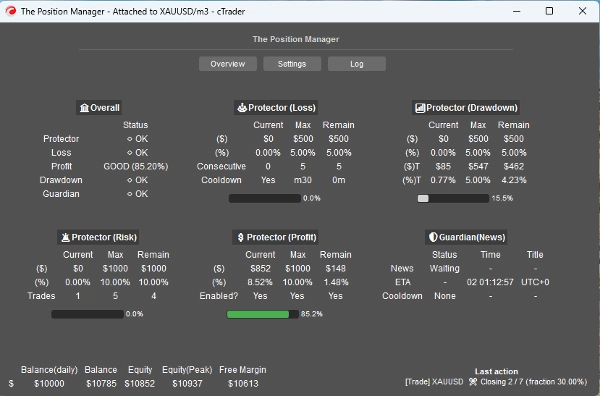
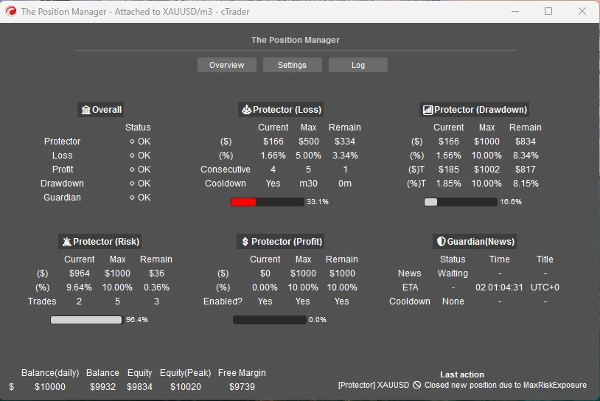
==== The Position Management ====
- Headless Mode? => The available features in this mode are:
- Portfolio Protector
- All features are available.
- Guardian Trading
- News filter is disabled if Headless Mode => ON.
- Trailing Profit
- For any symbol, the positions should not have Take Profit.
- Partial Closes
- For any symbol, the positions must have Take Profit or Stop Loss
=> Headless OFF (UI mode)
- Instance Mode:
- Manager => Just one instance should be added.
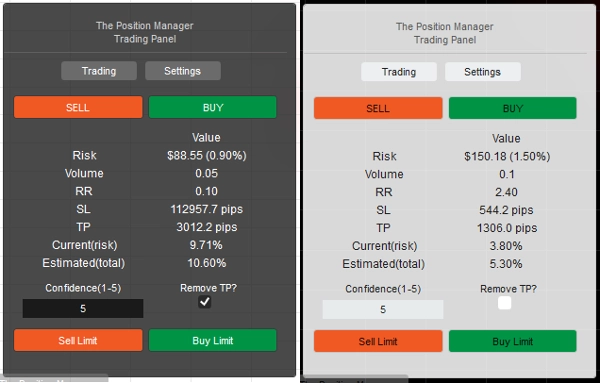
- Trading => Pure trading panel (Risk Manager module), you can add multiples instances.
- Both => Just one instance should be added:
- Manager will be displayed as Window.
- Trading will be displayed on Chart.
- Panel Type/Position: Self-Explanatory
- Storage By:
- Use Broker to save/load the same settings every restart.
- Use Broker_Symbol if you want to use each symbol config as kind of a “risk profile”.
=> Headless OFF/ON - Locally
- Allow Message Mode?
- Self-Explanatory
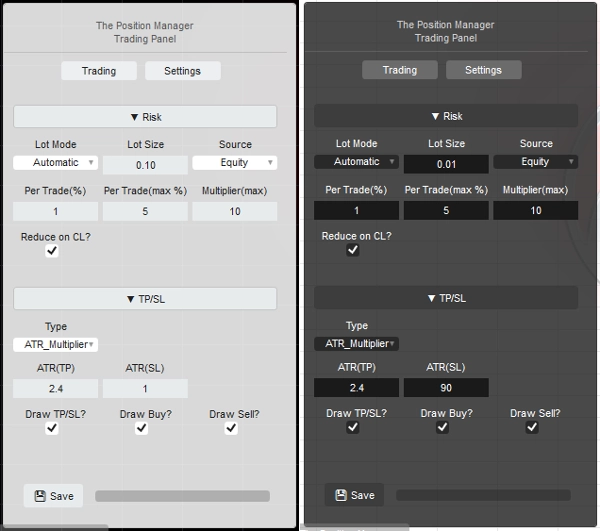
- When using [Trading, Both] Instance Mode, change the “TP/SL => Type” to “Pips” in the panel settings so the TP/SL can be set by the message.
- Allow Message Trading?
- Allow opening positions by the messages.
- If Headless ON, Risk Manager configuration is not possible.
- If Headless OFF, when using [Trading, Both] Instance Mode, you can configure the Risk Manager Module as you wish.
=> Headless ON / Account General
- Minimal Breakeven(%):
- For each position, when the Breakeven logic be executed by Trailing/Partial Profit modules, instead of moving the SL right to the Entry Price (which leads to negative PnL).
- The SL will be moved x% forward to the Entry Price.
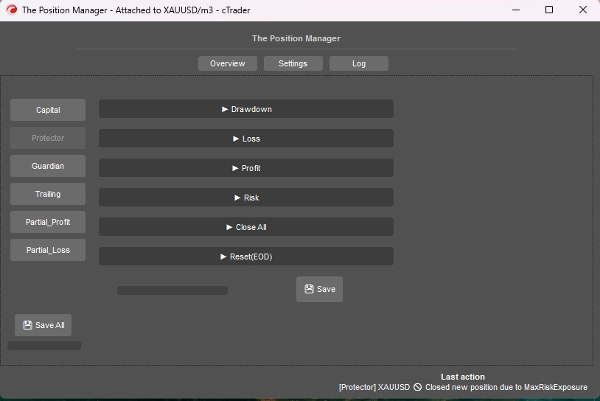
=> Headless ON / Protector Drawdown
- Drawdown Mode:
- Daily => Based on Balance of Day
- Trailing => Based on Peak Equity
- Drawdown Type:
- Percentage => % of Balance of Day, ideal for dynamic growth.
- Fixed => Fixed amount, ideal for strict rules
- Max Drawdown => % or fixed (self-explanatory)
=> Headless ON / Protector Loss
- Loss Source: => Currently, based on “Balance of Day” only.
- If the Equity goes below the Balance of Day, then it will be triggered/counted.
- Loss Type:
- Percentage => % of Balance of Day, ideal for dynamic growth.
- Fixed => Fixed amount, ideal for strict rules
- Max Daily Loss² => % or fixed (self-explanatory)
- Consecutive Loss(CL):
- Enable closing positions when consecutive losses happens.
- Consecutive Count:
- Self-Explanatory
- Cooldown to Reset(CL):
- Cooldown to reset count and allow new positions to be open.
=> Headless ON / Protector Profit
- Enable Profit Cap? => Self-Explanatory
- Once the Max Profit be reached, new positions will be closed.
- Profit Source: => Always based on Balance of Day
- Profit Type:
- Percentage => % of Balance of Day, ideal for dynamic growth.
- Fixed => Fixed amount, ideal for strict rules
- Max Profit² => % or fixed (self-explanatory)
=> Headless ON / Protector Risk
- Total Exposure(%):
- It also takes in consideration positions that are in Breakeven.
- Total Opened Trades:
- New positions will be closed if the Total Count is equal to Total Opened Trades
=> Headless ON / Protector CloseAll
- Close at End of Day? => Close all position at EOD
- Close at End of Week? => Close all position at EOW(Friday), uses EOD hours as reference.
=> Headless ON / Protector Reset(EOD)
- Hour to “reset” the equity peak tracking, as well as, executed CloseAll logic, if applicable.
- Reset (Hour) => 0h - 23h
- Reset (Minute) => 0m – 59m
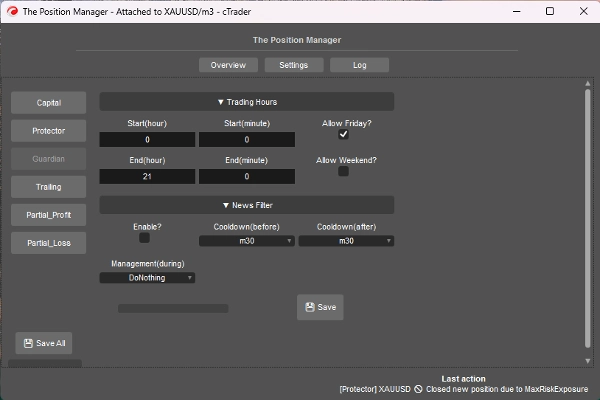
=> Headless ON / Guardian
- Positions opened outside the Trading Hours or Allowed Day will be automatically closed.
- Start/End (Hour) => 0h – 23h
- Start/End (Minute) => 0m – 59m
- Allow Friday? => Self-Explanatory
- Allow Weekend? (crypto) => Self-Explanatory
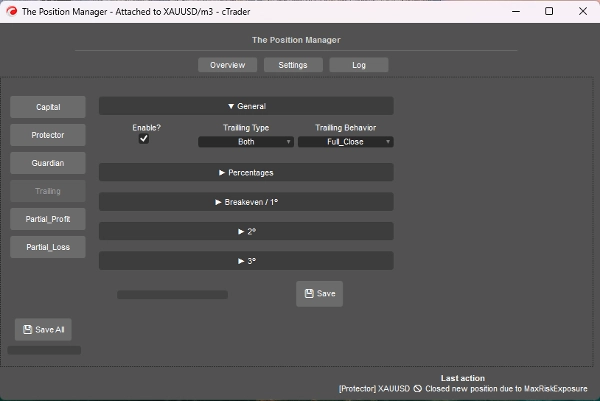
=> Headless ON / Trailing Profit
- It’s a Equity-Based Take Profit
- Enable?
- For positions without TP, ideal for trend-following positions.
- => Type:
- Percentage => Pure equity %
- Drawdown => Based on Trailing DD concept (Peak Equity), think in terms of pullbacks/retraction of price.
- Both => Partial_Close Behavior is enabled by default:
- Percentage type for Partials.
- Drawdown type for Full Exit.
- Behavior:
- Full_Close:
- Once the target % equity is reached, close all positions without TP.
- Also, when half of the target % equity is reached, the SL is moved to Breakeven.
- Partial_Close:
- Enable partials closes.
- Keep in mind => If the position size (lot size) is too small for partial close, the position will be closed entirely.
- Minimal Profit(%):
- The minimal profit to activate the trailing logic.
- => Full Close at(%):
- For “Full_Close” Behavior only.
- => [Both] Close Drawdown(%):
- For “Both” Type only.
- => [% only] Smart SL?"
- For “Percentage” Type only.
- It’s quite similar to Drawdown type, but more reactive using Trailling SL
- Partial 1(%) / Partial 2(%)
- Target % equity to execute the partials (Percentage or Both)
- Always verify if the Trailling Type is Percentage or Drawdown
- Partial 1(% order) / Partial 2(% order)
- Self-Explanatory
- => Close 3(%):
- Target % equity to full close the positions without TP.
- For Percentage or Drawdown Types only
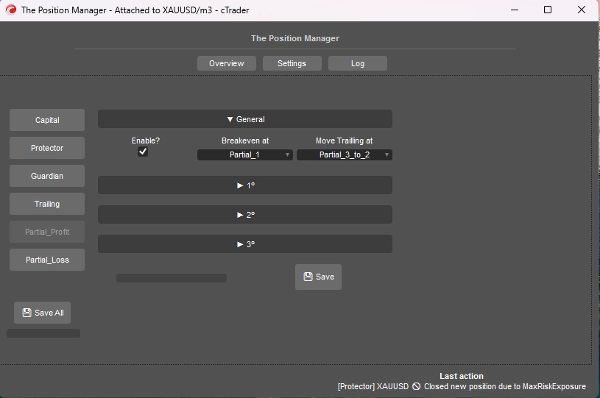
=> Headless ON / Partial Profit
- Enable?
- For positions with TP, ideal for day-trading or scalping positions.
- The Entry Price will be the 0%
- The Take Profit will be the 100%
- The Partial Prices will be calculated based in this approach.
- Breakeven at:
- Self-Explanatory, move SL to BE when the selected Partial is triggered.
- => Move Trailling at:
- Self-Explanatory, move SL to previous Partial Price when the selected Partial is triggered.
- Keep in mind => Make sure that the Partial 2º or 3º is activated.
- Partial 1(%) /
Partial 2(%) /
Partial 3(%) - Percentages between EntryPrice and TakeProfit.
- => Enable 2º?
=> Enable 3º? - Self-Explanatory
- Partial 1(% order) /
Partial 2(% order) /
Partial 3(% order) - Self-Explanatory
=> Headless ON / Partial Loss
- Enable?
- For positions with SL, ideal to limit losses of losing trades that may return to the directional.
- The Entry Price will be the 0%
- The Stop loss will be the 100%
- The Partial Prices will be calculated based in this approach.
- Partial 1(%) /
Partial 2(%) /
Partial 3(%) - Percentages between EntryPrice and StopLoss.
- => Enable 2º?
=> Enable 3º? - Self-Explanatory
- Partial 1(% order) /
Partial 2(% order) /
Partial 3(% order) - Self-Explanatory
====================================================
For Developers => Plug-and-Play for any strategy via Messages/subscriptions of cTrader Algo.
- For Semi or Fully automated systems:
- Semi: Orders are still open by ourselves, but:
- SL and TP are set by Messages/subscriptions.
- Fully: Order signals are send via Messages/subscriptions to “The Position Manager”
- “Risk Manager” configuration may not be available in this approach.
It's quite straightforward, you just need to send the signal using the following class:
public class TradeSignal
{
public string Symbol { get; set; }
public TradeType Direction { get; set; }
public double StopLossPips { get; set; }
public double? TakeProfitPips { get; set; } // null = without TP
public string StrategyId { get; set; }
public double? EntryPrice { get; set; } // null = market, otherwise limit order.
public DateTime Timestamp { get; set; }
public int Confidence { get; set; } // 1–5
}
Then:
Messages.Send("ThePositionManager", signal);
Short example:
TradeSignal signal = new()
{
Symbol = Symbol.Name,
Direction = TradeType.Buy,
StopLossPips = 1500,
TakeProfitPips = 3000,
StrategyId = "MyStrategy",
Confidence = 5
};
Messages.Send("ThePositionManager", signal);
Summary
Key features include four main modules: Portfolio Protector, Guardian Trading, Risk Manager (for manual or semi-automated trading), and Trade Manager (supporting trailing take profit and partial take profit/stop loss). The tool supports intelligent scaling and portfolio protection across Desktop, Mobile, and Web platforms, with a Headless mode option for managing positions remotely via cTrader Cloud.
For traders, it offers configurable risk controls such as daily and trailing drawdown limits, profit caps, exposure limits, and automated position closing based on trading hours or drawdown thresholds. Trailing profit and partial profit/loss management allow dynamic adjustment of stop loss and take profit levels to optimize trade exits.
Developers can integrate The Position Manager with automated strategies by sending trade signals via messages, enabling semi or fully automated order management with customizable stop loss and take profit settings.
The tool supports saving settings by broker or symbol, and includes detailed parameters for break-even management, risk exposure, and partial close orders, making it adaptable to various account sizes and trading styles.
Discussion
Customer reviews
5 | 0 % | |
4 | 67 % | |
3 | 33 % | |
2 | 0 % | |
1 | 0 % |
FAQ















Price