
Описание
✅ UATKit предоставляется бесплатно в качестве доброй воли для сообщества cTrader, созданного профессиональным трейдером, который понимает повседневные трудности анализа графиков и исполнения сделок.
⚠️Пожалуйста, периодически проверяйте страницу продукта на наличие обновлений, так как cTrader не уведомляет пользователей о выпуске новых версий индикаторов.
⭐️ Я также буду рад получить ваши комментарии и отзывы в Отзывах клиентов и Обсуждениях.
1. Что это за продукт
Комплексный набор инструментов для улучшения рабочего процесса, предназначенный для более плавного, ясного и эффективного построения графиков в cTrader.
Universal Assistant Toolkit (UATKit) — многофункциональный помощник для работы с графиками в cTrader.
Он объединяет несколько практичных инструментов — каждый из которых решает конкретную задачу рабочего процесса — в один универсальный, легкий индикатор.
Каждая функция в UATKit полностью настраивается и работает независимо, предоставляя трейдерам полный контроль для настройки поведения, визуальных элементов и горячих клавиш, включая только необходимые инструменты для чистого и отзывчивого опыта построения графиков.
UATKit предоставляется бесплатно в качестве доброй воли для сообщества cTrader, созданного профессиональным трейдером, который понимает повседневные трудности анализа графиков и исполнения сделок.
2. Для кого этот набор инструментов
UATKit создан для трейдеров, которые:
- Проводят значительное время за анализом графиков
- Предпочитают чистые, информативные и настраиваемые макеты графиков
- Хотят более быстрый доступ к часто используемым действиям через горячие клавиши
- Нуждаются в визуальной ясности во время быстро меняющихся рынков
- Ценят инструменты, которые улучшают рабочий процесс без добавления шума
Независимо от того, занимаетесь ли вы скальпингом, свинг-трейдингом или просто хотите более организованную среду для построения графиков, UATKit адаптируется к вашему стилю.
3. Обзор групп функций
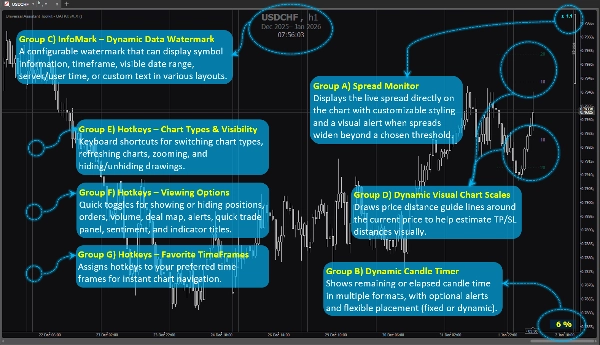
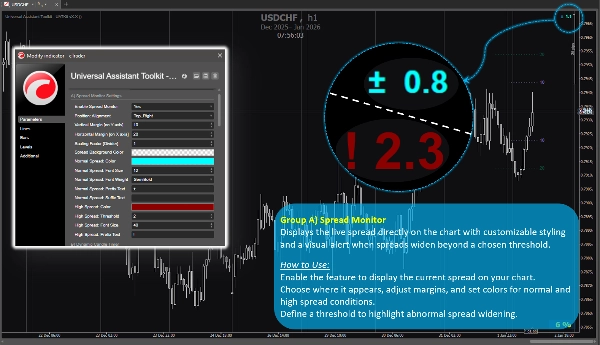
Группа функций A) 🔸 Монитор спреда
Отображает текущий спред прямо на графике с настраиваемым стилем и визуальным предупреждением, когда спред расширяется за выбранный порог.
Как использовать:
Включите функцию для отображения текущего спреда на вашем графике.
Выберите место отображения, настройте отступы и установите цвета для нормальных и высоких значений спреда.
Определите порог для выделения аномального расширения спреда.
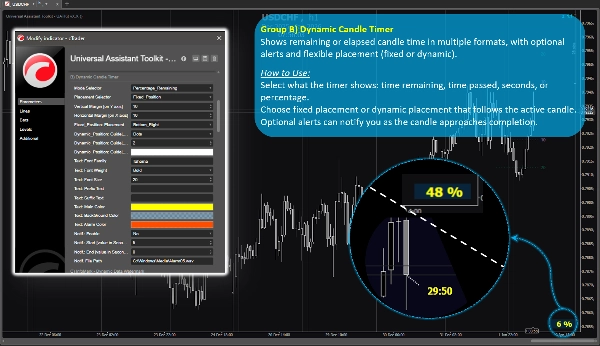
Группа функций B) 🔸 Динамический таймер свечи
Показывает оставшееся или прошедшее время свечи в различных форматах, с опциональными оповещениями и гибким размещением (фиксированное или динамическое).
Как использовать:
Выберите, что показывает таймер: оставшееся время, прошедшее время, секунды или процент.
Выберите фиксированное размещение или динамическое, следующее за активной свечой.
Опциональные оповещения могут уведомлять вас по мере приближения свечи к завершению.
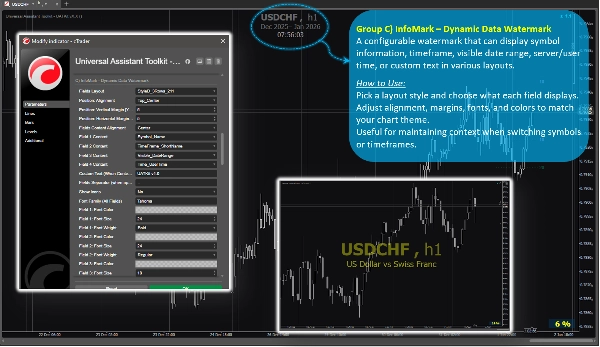
Группа функций C) 🔸 InfoMark – динамический водяной знак данных
Настраиваемый водяной знак, который может отображать информацию о символе, таймфрейме, видимом диапазоне дат, времени сервера/пользователя или пользовательский текст в различных макетах.
Как использовать:
Выберите стиль макета и определите, что отображает каждое поле.
Настройте выравнивание, отступы, шрифты и цвета в соответствии с темой вашего графика.
Полезно для сохранения контекста при переключении символов или таймфреймов.
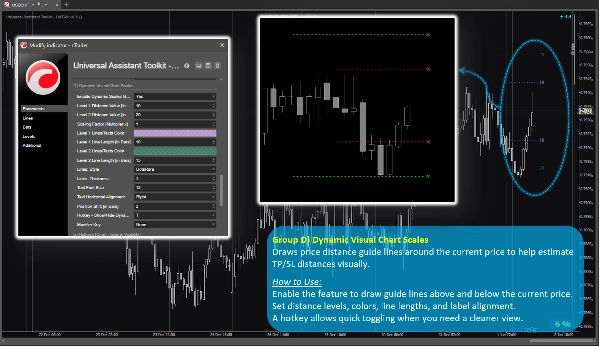
Группа функций D) 🔸 Динамические визуальные шкалы графика
Рисует направляющие линии расстояния цены вокруг текущей цены, чтобы помочь визуально оценить расстояния TP/SL.
Как использовать:
Включите функцию для рисования направляющих линий выше и ниже текущей цены.
Установите уровни расстояния, цвета, длину линий и выравнивание меток.
Горячая клавиша позволяет быстро переключать отображение для более чистого вида.
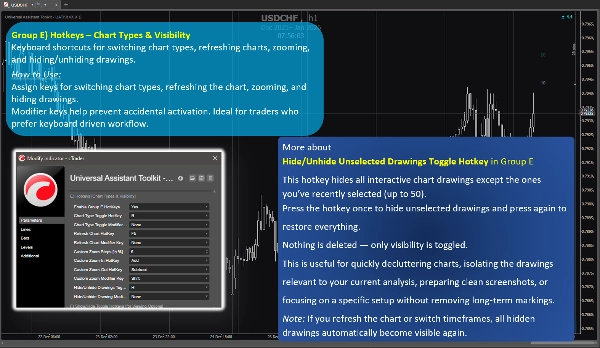
Группа функций E) 🔸 Горячие клавиши – типы графиков и видимость
Клавиатурные сокращения для переключения типов графиков, обновления графиков, масштабирования и скрытия/показа рисунков.
Как использовать:
Назначьте клавиши для переключения типов графиков, обновления графика, масштабирования и скрытия рисунков.
Модификаторы помогают предотвратить случайное срабатывание. Идеально для трейдеров, предпочитающих работу с клавиатурой.
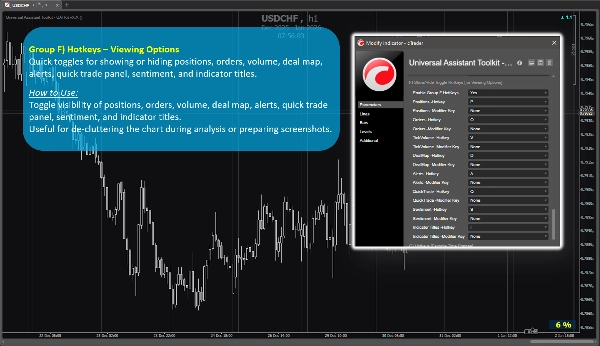
Группа функций F) 🔸 Горячие клавиши – параметры отображения
Быстрое переключение отображения или скрытия позиций, ордеров, объема, карты сделок, оповещений, панели быстрого трейда, сентимента и названий индикаторов.
Как использовать:
Переключайте видимость позиций, ордеров, объема, карты сделок, оповещений, панели быстрого трейда, сентимента и названий индикаторов.
Полезно для очистки графика во время анализа или подготовки скриншотов.
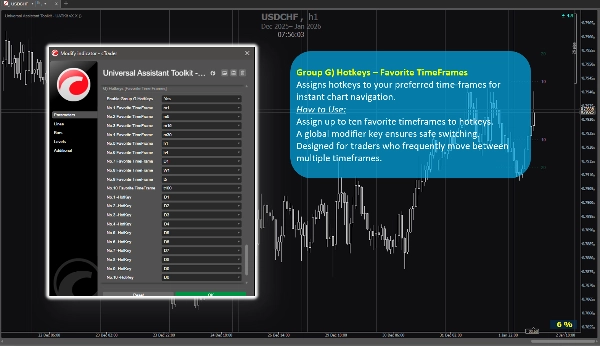
Группа функций G) 🔸 Горячие клавиши – избранные таймфреймы
Назначает горячие клавиши для ваших предпочтительных таймфреймов для мгновенной навигации по графику.
Как использовать:
Назначьте до десяти любимых таймфреймов на горячие клавиши.
Глобальная клавиша-модификатор обеспечивает безопасное переключение.
Разработано для трейдеров, которые часто переключаются между несколькими таймфреймами.
4. Дополнительные заметки для пользователей
- Все функции являются опциональными и могут быть включены или отключены индивидуально.
- Набор инструментов оптимизирован для производительности и разработан так, чтобы не мешать другим индикаторам.
- Большинство параметров имеют встроенные подсказки. Просто наведите курсор на любую настройку, чтобы увидеть дополнительное руководство и заметки по использованию.
- Не используются внешние источники данных; вся информация поступает с графика и платформы.
- Этот набор инструментов предоставляется бесплатно для поддержки сообщества cTrader и улучшения повседневных рабочих процессов построения графиков.
- Настройки по умолчанию разумны, поэтому пользователи, которым не нужны специальные конфигурации, могут полагаться на предустановленные параметры без дополнительного времени на настройку.
- ⭐️ Отзывы и предложения приветствуются для улучшения будущих версий (используйте раздел обсуждений на этой странице).
- ⚠️Пожалуйста, периодически проверяйте страницу продукта на наличие обновлений, так как cTrader не уведомляет пользователей о выпуске новых версий индикаторов.
Сводка
Key features include:
- **Spread Monitor:** Displays live spread on the chart with customizable visuals and alerts for spread widening.
- **Dynamic Candle Timer:** Shows remaining or elapsed candle time in various formats, with optional alerts and flexible positioning.
- **InfoMark Watermark:** Configurable watermark displaying symbol info, timeframe, date range, server/user time, or custom text.
- **Dynamic Visual Chart Scales:** Price-distance guide lines around current price to estimate take-profit/stop-loss distances visually.
- **Hotkeys for Chart Types & Visibility:** Keyboard shortcuts for switching chart types, refreshing, zooming, and toggling drawing visibility.
- **Hotkeys for Viewing Options:** Quick toggles for positions, orders, volume, deal map, alerts, quick trade panel, sentiment, and indicator titles.
- **Hotkeys for Favorite TimeFrames:** Assign up to ten favorite timeframes to hotkeys for instant navigation.
All features are optional and configurable, optimized for performance without interfering with other indicators. UATKit supports various markets including Forex, indices, commodities, crypto, and stocks. It is intended for traders who seek a clean, customizable, and efficient charting environment with enhanced workflow controls.
Отзывы покупателей
5 | 100 % | |
4 | 0 % | |
3 | 0 % | |
2 | 0 % | |
1 | 0 % |