
SSL Channel
Gösterge
3 satın almalar
Sürüm 1.2, Jan 2026
Windows, Mac
4.5
Değerlendirmeler: 4

Başlangıç 04/04/2025
8
Satışlar
2.16K
Ücretsiz yüklemeler
Açıklama
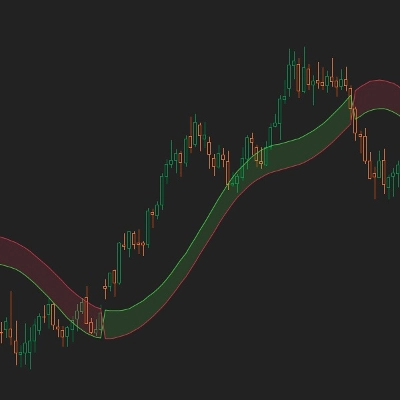
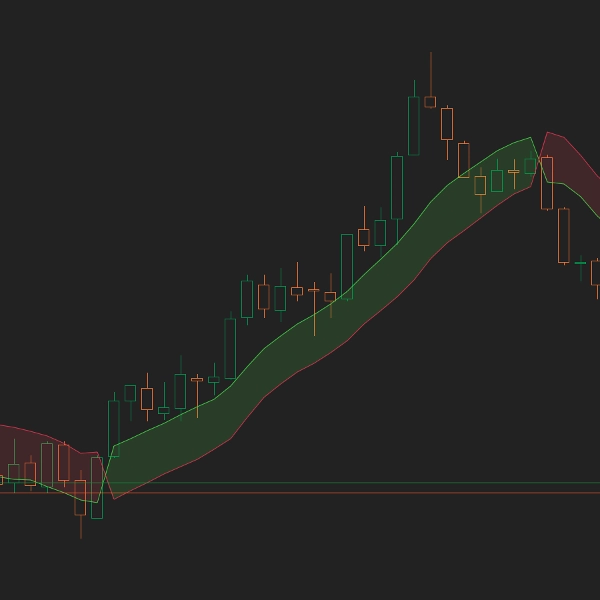
Piyasa yönü hakkında kafanız mı karıştı? SSL Kanalı, trendin net bir görsel temsilini oluşturmak için çift hareketli ortalamalar kullanır - yeşil bulut al anlamına gelir, kırmızı bulut sat anlamına gelir. Saf, basit, etkili.
Ana Özellikler
- Çift MA Trend Tespiti: Trend yönünü belirlemek için yüksekler ve düşükler üzerinde ayrı hareketli ortalamalar kullanır, tek MA sistemlerinin belirsizliğini ortadan kaldırır
- Görsel Bulut Onayı: Yarı saydam bulut, Boğa ve Ayı çizgileri arasındaki alanı doldurarak mevcut trend durumunun anında görsel onayını sağlar
- Akıllı Renk Mantığı: Kapanış yüksek MA'nın üzerindeyse, Boğalar yeşile döner ve en üste çıkar. Kapanış düşük MA'nın altındaysa, Ayılar kırmızıya döner ve en üst pozisyonu alır
- İsteğe Bağlı Uyarılar: Boğa ve Ayı çizgileri kesiştiğinde potansiyel bir trend değişimini işaret eden açılır bildirimler ve ses uyarılarını etkinleştirin
- Çoklu MA Türleri: Ticaret tarzınıza uygun olarak Basit, Üssel, Düzleştirilmiş veya Ağırlıklı hareketli ortalamalar arasından seçim yapın
Nasıl Çalışır
SSL Kanalı iki hareketli ortalama hesaplar: biri yüksekler üzerinde, diğeri düşükler üzerinde. Gösterge daha sonra mevcut kapanış fiyatını bu seviyelerle karşılaştırır:
- Boğa Trendi: Kapanış > Yüksek MA olduğunda, Boğalar çizgisi (yeşil) en üste çıkar ve Ayılar çizgisi (kırmızı) en alta iner
- Ayı Trendi: Kapanış < Düşük MA olduğunda, Ayılar çizgisi (kırmızı) en üste çıkar ve Boğalar çizgisi (yeşil) en alta iner
Bu çizgiler arasındaki bulut, trendi görsel olarak güçlendirir - en üstte renkli çizginin yönünde işlem yaparak en yüksek olasılıklı kurulumları yakalayın.
Parametreler
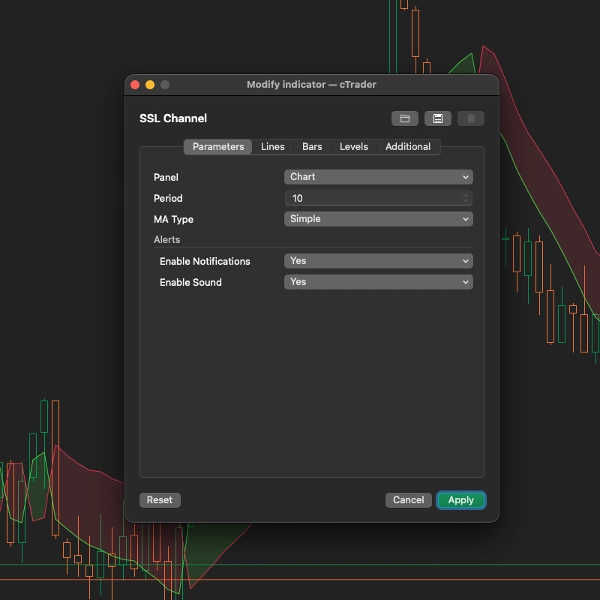
- Periyot (Varsayılan: 10): Hareketli ortalama hesaplaması için bar sayısı. Daha düşük = daha duyarlı, Daha yüksek = daha yumuşak sinyaller
- MA Türü (Varsayılan: Basit): Hareketli ortalama hesaplama yöntemini seçin - Basit, Üssel, Düzleştirilmiş, Ağırlıklı veya diğer mevcut türler
- Bildirimleri Etkinleştir (Varsayılan: Yanlış): Çizgiler kesiştiğinde açılır uyarıları göster
- Sesi Etkinleştir (Varsayılan: Yanlış): Çizgiler kesiştiğinde ses çal
İdeal Kullanım
- Net, belirsiz olmayan sinyaller isteyen trend traderları
- Kırılma veya geri çekilme stratejileri kullanan traderlar
- Ekran izlemek yerine görsel, grafik tabanlı ticareti tercih edenler
- Mevcut sistemleri için basit bir trend filtresi isteyen herkes
Ticaret İpuçları
- Trend Filtresi: Boğalar (yeşil) üstteyken sadece uzun işlemler, Ayılar (kırmızı) üstteyken kısa işlemler yapın
- Geri Çekilme Girişleri: Fiyatın buluta geri çekilmesini bekleyin, sonra trend yönünde giriş yapın
- Kesişim Sinyalleri: Boğa ve Ayı çizgilerinin kesişimi trend değişimini işaret eder - bunu giriş veya çıkış sinyali olarak kullanın
- Zaman Dilimleri: M15'ten scalping için H4/D1'e kadar swing trading için çalışır
Profesyonel İpuçları
- Onay için hacimle birleştirin - yüksek hacimli kesişimler daha güvenilirdir
- Daha yüksek olasılıklı girişler için destek/direnç seviyeleri ile birlikte kullanın
- Periyot parametresi sembole göre optimize edilebilir - işlem yaptığınız her çift üzerinde farklı değerleri test edin
Özet
AI summary
The SSL Channel is a trend-following indicator designed for scalpers and day traders seeking clear, early signals of market direction changes. It uses two moving averages—one calculated on highs and another on lows—to define bullish and bearish trends. When the closing price is above the high moving average, the indicator displays a green "Bulls" line on top and a red "Bears" line below, signaling an uptrend. Conversely, when the close is below the low moving average, the red "Bears" line moves to the top and the green "Bulls" line to the bottom, indicating a downtrend. A semi-transparent cloud fills the space between these lines, providing an immediate visual confirmation of the current trend.
Traders can customize the moving average type (Simple, Exponential, Smoothed, Weighted) and the period length to suit their trading style. Optional popup and sound alerts notify users of line crossovers, marking potential trend shifts. The SSL Channel supports multiple markets including Forex, indices, and cryptocurrencies, and is suitable for use on timeframes from 15 minutes to daily charts. It can be used standalone or combined with other systems for confirmation, aiding in breakout, pullback, and trend-following strategies. The indicator is simple to apply—just add it to the chart, adjust settings, and trade accordingly.
Traders can customize the moving average type (Simple, Exponential, Smoothed, Weighted) and the period length to suit their trading style. Optional popup and sound alerts notify users of line crossovers, marking potential trend shifts. The SSL Channel supports multiple markets including Forex, indices, and cryptocurrencies, and is suitable for use on timeframes from 15 minutes to daily charts. It can be used standalone or combined with other systems for confirmation, aiding in breakout, pullback, and trend-following strategies. The indicator is simple to apply—just add it to the chart, adjust settings, and trade accordingly.
Gösterge profili
Müşteri değerlendirmeleri
4.5
Değerlendirmeler: 4
5 | 50 % | |
4 | 50 % | |
3 | 0 % | |
2 | 0 % | |
1 | 0 % |
Müşteri değerlendirmeleri
May 13, 2025
Not perfect, but the workflow felt cleaner. Two timeframes give more context.
May 9, 2025
May 8, 2025
Tartışma
SSS
BTCUSD
Forex
Breakout
Scalping
Indices
EURUSD
GBPUSD
NZDUSD
Crypto
XAUUSD
NAS100
USDJPY
cTrader Store üzerinden erişilebilen işlem botları, göstergeler ve eklentiler gibi ürünler, üçüncü taraf sağlayıcılar tarafından sağlanır ve yalnızca bilgilendirme ve teknik erişim amaçlarıyla sunulur. cTrader Store bir broker değildir ve yatırım tavsiyesi, kişisel öneriler vermez veya gelecekteki performansı garanti etmez.
Bu oluşturanın diğer ürünleri









Fiyat
Başlangıç 04/04/2025
8
Satışlar
2.16K
Ücretsiz yüklemeler