
![Trading product for [Stellar Strategies] QQE Chỉ báo Signal Indices, image 1](https://cdn.ctrader.com/image/webp/e702104a-874c-4b39-97dd-fb34518d1015_27712)
[Stellar Strategies] QQE
Chỉ báo
313 lượt tải
Phiên bản 1.0, Mar 2025
Windows, Mac
5.0
Đánh giá: 1
![Trading product for [Stellar Strategies] QQE Chỉ báo Signal Indices, image 2](https://cdn.ctrader.com/image/webp/76b980a3-76bf-4305-a55c-72c65f217667_27713)
![Trading product for [Stellar Strategies] QQE Chỉ báo Signal Indices, image 3](https://cdn.ctrader.com/image/webp/a8dedc4d-2393-4b97-b251-c5273f061551_27714)
![Trading product for [Stellar Strategies] QQE Chỉ báo Signal Indices, image 4](https://cdn.ctrader.com/image/webp/33002ac3-dd6b-41b0-9a74-e19f836dc126_27715)
![Trading product for [Stellar Strategies] QQE Chỉ báo Signal Indices, image 5](https://cdn.ctrader.com/image/webp/2c4dce8e-c324-473b-983c-c75286fa4d8e_27716)
![Trading product for [Stellar Strategies] QQE Chỉ báo Signal Indices, image 6](https://cdn.ctrader.com/image/webp/d6366ad6-6070-4de9-ac26-44e98acd02c2_27717)

20.46M
Khối lượng đã giao dịch
8.02K
Pip đạt được
27
Lượt bán
4.84K
Cài đặt miễn phí
Mô tả
Chỉ báo Đánh giá Định lượng Định tính (QQE) là một công cụ phân tích kỹ thuật được thiết kế để xác định các thay đổi xu hướng tiềm năng và tín hiệu giao dịch. Phiên bản cAlgo của chỉ báo QQE này bao gồm các tính năng sau:
- Tính toán dựa trên RSI kép: Nó sử dụng hai phép tính Chỉ số Sức mạnh Tương đối (RSI) với các chu kỳ và hệ số làm mượt có thể điều chỉnh.
- Dải Bollinger: Dải Bollinger được áp dụng cho các giá trị RSI đã được làm mượt để xác định các mức quá mua và quá bán.
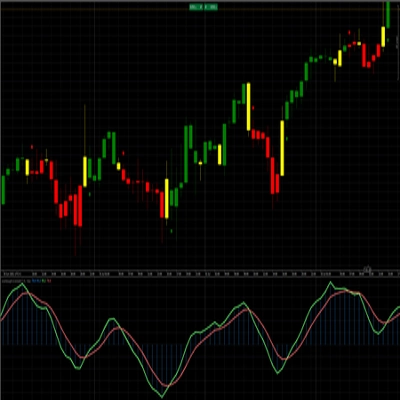
- Đầu ra Biểu đồ cột và Đường: Chỉ báo cung cấp cả biểu đồ cột và đầu ra đường, cho phép nhà giao dịch hình dung động lượng thị trường và các khả năng đảo chiều xu hướng.
- Biểu đồ cột mã màu: Biểu đồ cột được mã màu, hiển thị các giá trị dương (chỉ động lượng tăng) bằng màu xanh và các giá trị âm (chỉ động lượng giảm) bằng màu đỏ.
- Đường số không: Một đường chấm trắng được vẽ tại mức số không để dễ tham chiếu.
- Tham số có thể điều chỉnh: Chỉ báo cung cấp nhiều tham số có thể điều chỉnh, cho phép nhà giao dịch tùy chỉnh theo phong cách giao dịch và điều kiện thị trường của họ.
Cách sử dụng chỉ báo QQE:
- Gắn chỉ báo vào biểu đồ của bạn:
-
- Trong cAlgo, mở biểu đồ của công cụ bạn muốn phân tích.
- Kéo và thả chỉ báo "QQE" từ bảng "Indicators" vào biểu đồ của bạn.
- Cấu hình các tham số của chỉ báo:
-
- Sau khi gắn chỉ báo, một cửa sổ "Parameters" sẽ xuất hiện.
- Điều chỉnh các tham số sau theo nhu cầu:
-
- Chu kỳ RSI: Chu kỳ được sử dụng cho phép tính RSI đầu tiên.
- Làm mượt RSI: Hệ số làm mượt áp dụng cho RSI đầu tiên.
- Hệ số QQE: Hệ số dùng để tính Dải Bollinger.
- Độ dài Bollinger: Độ dài của Dải Bollinger.
- Bội số Bollinger: Bội số dùng cho Dải Bollinger.
- Chu kỳ RSI2: Chu kỳ được sử dụng cho phép tính RSI thứ hai.
- Làm mượt RSI2: Hệ số làm mượt áp dụng cho RSI thứ hai.
- Hệ số QQE2: Hệ số dùng để tính bộ dải thứ hai.
- Ngưỡng: Giá trị Ngưỡng giúp xác định độ mạnh của tín hiệu.
- Diễn giải chỉ báo:
-
- Biểu đồ cột:
-
- Các thanh màu xanh biểu thị động lượng tăng.
- Các thanh màu đỏ biểu thị động lượng giảm.
- Chiều cao của các thanh thể hiện độ mạnh của động lượng.
- Đường QQE: Đường màu đen biểu thị giá trị của
RSI2-50, và cung cấp biểu diễn làm mượt của động lượng. - Đường số không: Đường chấm trắng biểu thị mức số không.
- Dải Bollinger:
-
- Khi đường RSI1 cắt lên trên Dải Bollinger trên, có thể chỉ ra điều kiện quá mua và khả năng đảo chiều.
- Khi đường RSI1 cắt xuống dưới Dải Bollinger dưới, có thể chỉ ra điều kiện quá bán và khả năng đảo chiều.
- Tín hiệu giao dịch:
-
- Tín hiệu mua: Tìm các thanh màu xanh trong biểu đồ cột trên đường số không, biểu thị động lượng tăng.
- Tín hiệu bán: Tìm các thanh màu đỏ trong biểu đồ cột dưới đường số không, biểu thị động lượng giảm.
- Sử dụng các điểm cắt giữa Dải Bollinger và đường RSI để xác nhận tín hiệu.
- Kết hợp với các chỉ báo khác:
-
- Để có tín hiệu đáng tin cậy hơn, kết hợp chỉ báo QQE với các công cụ phân tích kỹ thuật khác, như đường xu hướng, mức hỗ trợ và kháng cự, và các chỉ báo khác.
- Luyện tập và kiểm tra lại:
-
- Trước khi sử dụng chỉ báo QQE trong giao dịch thực, hãy luyện tập trên tài khoản demo và kiểm tra lại trên dữ liệu lịch sử.
Lưu ý quan trọng:
- Chỉ báo QQE không phải là hệ thống hoàn hảo và không nên sử dụng một mình.
- Luôn sử dụng các kỹ thuật quản lý rủi ro phù hợp khi giao dịch.
- Điều kiện thị trường có thể thay đổi nhanh chóng, vì vậy hãy chuẩn bị để điều chỉnh chiến lược giao dịch của bạn.
Bằng cách tuân theo các hướng dẫn này, bạn có thể sử dụng hiệu quả chỉ báo QQE để xác định các cơ hội giao dịch tiềm năng và đưa ra các quyết định giao dịch thông minh.
Tóm tắt
AI summary
The [Stellar Strategies] QQE indicator is a technical analysis tool implemented for cAlgo to identify potential trend changes and trading signals. It uses a dual Relative Strength Index (RSI) calculation with adjustable periods and smoothing factors. Bollinger Bands are applied to the smoothed RSI values to define overbought and oversold levels. The indicator displays both a color-coded histogram and a line output: blue histogram bars indicate bullish momentum, red bars indicate bearish momentum, and a dotted white zero line aids visual reference. The black QQE line represents a smoothed RSI2-50 value, reflecting momentum trends. Users can customize parameters including RSI periods and smoothing, QQE factors, Bollinger Bands length and multiplier, and a threshold to tailor the indicator to specific trading styles and market conditions. Trading signals are generated by observing histogram colors and positions relative to zero, with Bollinger Band and RSI crossovers used for confirmation. The indicator is designed for use alongside other technical tools such as trend lines and support/resistance levels. It is recommended to practice and backtest the QQE indicator before live trading and to apply proper risk management. Market conditions may change rapidly, so adaptability is advised when using this tool.
Hồ sơ chỉ báo
Đánh giá của khách hàng
5.0
Đánh giá: 1
5 | 100 % | |
4 | 0 % | |
3 | 0 % | |
2 | 0 % | |
1 | 0 % |
Đánh giá của khách hàng
August 18, 2025
Reliable RSI-based oscillator, smooth signals, customizable. Cons: No alerts, no MTF mode, lacks strategy templates.
Thảo luận
Câu hỏi thường gặp
Signal
Indices
RSI
Bollinger
Các sản phẩm có sẵn trên cTrader Store, bao gồm bot giao dịch, chỉ báo và plugin, được cung cấp bởi các nhà phát triển bên thứ ba và chỉ nhằm mục đích cung cấp thông tin và tiếp cận kỹ thuật. cTrader Store không phải là nhà môi giới và không cung cấp lời khuyên đầu tư, khuyến nghị cá nhân hay bất kỳ đảm bảo nào về hiệu suất trong tương lai.
![Logo "[Stellar Strategies] Market Structure Breakout"](https://cdn.ctrader.com/image/webp/bceec265-3247-4b11-915f-6295a29c106d_28465)
![Logo "[Stellar Strategies] Market Session Ultimate"](https://cdn.ctrader.com/image/webp/61ffd537-0125-4246-9e72-42eca1791d64_28232)
![Logo "[Stellar Strategies] BOS Trend 1.0"](https://cdn.ctrader.com/image/webp/6cdec0f1-0e97-4a82-a8a4-2b67aed54d38_25695)
![Logo "[Stellar Strategies] Inside Bar with Signals"](https://cdn.ctrader.com/image/webp/1d9e8bfa-3b2c-4440-bb37-5856902008a7_30683)
![Logo "[Stellar Strategies] Wave Trend Pro"](https://cdn.ctrader.com/image/webp/5f226fbb-245a-41cd-9cdd-b018257d5e6d_28617)
![Logo "[Stellar Strategies] Smart ADX"](https://cdn.ctrader.com/image/webp/af13b084-b6f6-41db-b7bc-c7e688b57b05_36929)
![Logo "[StellarStrategies] Scheduled Trade Executor"](https://cdn.ctrader.com/image/webp/daefc6af-7eca-453e-878d-1b981be2c401_25646)
![Logo "[Stellar Strategies] VBO"](https://cdn.ctrader.com/image/webp/f034c012-94d4-445a-a01b-febd1cdedaef_36944)
![Logo "[Stellar Strategies] Linear Regression Candles 1.1"](https://cdn.ctrader.com/image/webp/8b9cff9f-2431-46d2-b0ec-c7f55f4a4a6d_27918)
![Logo "[Stellar Strategies] Candlestick Patterns Dashboard"](https://cdn.ctrader.com/image/webp/ae8691a5-4884-4553-9bcc-64e16ac82a30_38344)
![Logo "[Stellar Strategies] SP500 Gap Closure cBot 1.0"](https://cdn.ctrader.com/image/webp/92c23fdc-4ad1-4e61-bdb5-c77f6ec8c539_27686)
![Logo "[Stellar Strategies] Visual Trend Momentum"](https://cdn.ctrader.com/image/webp/48aee0a5-f10e-4bc8-9671-78e156fcc5df_27548)










Giá
20.46M
Khối lượng đã giao dịch
8.02K
Pip đạt được
27
Lượt bán
4.84K
Cài đặt miễn phí