
![Trading product for [Stellar Strategies] BOS Trend 1.0 指标, image 1](https://cdn.ctrader.com/image/webp/6cdec0f1-0e97-4a82-a8a4-2b67aed54d38_25695)
[Stellar Strategies] BOS Trend 1.0
指标
493 下载
版本 1.0, Nov 2024
Windows 版、Mac 版
5.0
评价:1
![Trading product for [Stellar Strategies] BOS Trend 1.0 指标, image 2](https://cdn.ctrader.com/image/webp/2738d263-76dc-4e6f-a818-7e66349e6883_25696)
![Trading product for [Stellar Strategies] BOS Trend 1.0 指标, image 3](https://cdn.ctrader.com/image/webp/5338cc95-bf3e-4db4-b575-3e935cff8e90_25697)
![Trading product for [Stellar Strategies] BOS Trend 1.0 指标, image 4](https://cdn.ctrader.com/image/webp/59502053-3cfb-4232-b1da-c27ad8852e60_25698)
![Trading product for [Stellar Strategies] BOS Trend 1.0 指标, image 5](https://cdn.ctrader.com/image/webp/e32ea74f-662d-4c30-8571-3b8062b6be90_25699)
![Trading product for [Stellar Strategies] BOS Trend 1.0 指标, image 6](https://cdn.ctrader.com/image/webp/fe0c3dd9-19fe-4833-bd0e-640ccec47e31_25700)
![Trading product for [Stellar Strategies] BOS Trend 1.0 指标, image 7](https://cdn.ctrader.com/image/webp/0fa38032-d41c-4684-a0ec-c9512db0d567_25701)
![Trading product for [Stellar Strategies] BOS Trend 1.0 指标, image 8](https://cdn.ctrader.com/image/webp/10e865d7-9813-4932-ac9b-3b76516518c9_25702)

20.46M
交易量
8.02K
盈利点数
27
销售
4.91K
免费安装
说明
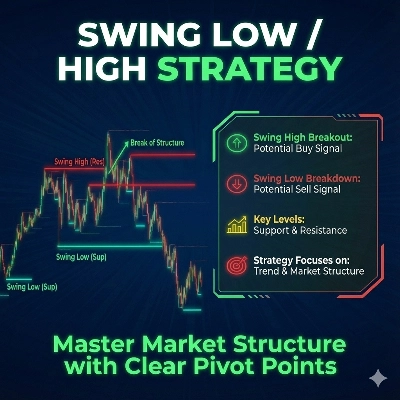
[Stellar Strategies] BOS 趋势 是一个为 cAlgo 设计的高级多时间框架结构突破(BOS)指标。它通过检测多个时间框架内的上升趋势和下降趋势的结构突破,为交易者提供市场趋势的关键见解。
功能:
- 多时间框架分析: 分析不同时间框架(1分钟到每日)的价格变动。
- 可定制时间框架: 启用或禁用特定时间框架以定制您的分析。
- 实时提醒: 在检测到结构突破时,在图表上显示消息。
- 用户友好界面: 可自定义文本颜色,以便在不同图表背景上更好地显示。
参数:
- 回溯周期(默认:20): 检测结构突破时回溯的柱数。
- 时间框架参数:
-
使用1分钟时间框架使用5分钟时间框架使用15分钟时间框架使用30分钟时间框架使用1小时时间框架使用4小时时间框架使用每日时间框架
- 文本颜色(默认:“黄色”): 设置结构突破消息的颜色。
如何使用该指标:
- 添加指标:
-
- 打开您的 cAlgo 平台。
- 导航到指标部分并将 [Stellar Strategies] BOS 趋势 添加到您的图表中。
- 设置参数:
-
- 回溯周期: 根据您的交易策略调整回溯周期(默认是20根柱)。
- 启用/禁用时间框架: 通过勾选或取消勾选相应选项选择您想分析的时间框架。
- 文本颜色: 选择与您的图表背景形成良好对比的文本颜色,以便清晰可见。
- 读取结构突破信号:
-
- 上升趋势结构突破: 绿色线条表示上升趋势的结构突破。
- 下降趋势结构突破: 红色线条表示下降趋势的结构突破。
- 结构突破消息: 图表上会显示诸如“当前时间框架:检测到上升趋势结构突破”的消息,以及您启用的其他时间框架的消息。
- 解读数据:
-
- 利用结构突破信号识别潜在的趋势反转或延续。
- 关注多时间框架分析,以获得更强的趋势确认。
- 自定义显示:
-
- 您可以调整结构突破消息的文本颜色和位置,以提高可读性。
示例:
以下是如何使用 [Stellar Strategies] BOS 趋势 指标的逐步示例:
- 添加指标:
-
- 在您的 cAlgo 平台中打开一个图表。
- 转到
指标并选择 [Stellar Strategies] BOS 趋势。
- 设置参数:
-
- 将
回溯周期设置为20。 - 启用
使用1分钟时间框架、使用5分钟时间框架以及其他所需时间框架。 - 将
文本颜色设置为“黄色”,以提高可见性。
- 将
- 监控图表:
-
- 观察图表上的绿色(上升趋势)和红色(下降趋势)结构突破线。
- 查找显示不同时间框架结构突破检测的消息。
- 采取行动:
-
- 利用结构突破信号,根据趋势反转或延续做出明智的交易决策。
通过遵循这些步骤,您可以有效利用 [Stellar Strategies] BOS 趋势 指标,结合多时间框架结构突破分析,提升您的交易策略。
如果您需要进一步的帮助或更多信息,请随时告诉我!📈📉
摘要
AI 摘要
The [Stellar Strategies] BOS Trend is a multi-timeframe Break of Structure (BOS) indicator designed for the cAlgo platform. It identifies key market trend shifts by detecting uptrend and downtrend BOS signals across multiple timeframes ranging from 1 minute to daily charts. Users can customize which timeframes to analyze and adjust the lookback period for BOS detection, with a default of 20 bars. The indicator provides real-time alerts directly on the chart, displaying messages such as "Current TF: Uptrend BOS detected" to inform traders of structural breaks. Visual cues include green lines for uptrend BOS and red lines for downtrend BOS. The interface allows customization of text color to enhance visibility against different chart backgrounds. Traders can use the BOS signals to identify potential trend reversals or continuations, leveraging multi-timeframe analysis for stronger confirmation. The indicator supports flexible configuration to fit various trading strategies and preferences.
指标配置
讨论
客户评价
5.0
评价:1
5 | 100 % | |
4 | 0 % | |
3 | 0 % | |
2 | 0 % | |
1 | 0 % |
客户评价
August 18, 2025
Pros: Automatically detects and marks Break Of Structure points indicating trend shifts. Clean visual arrows and straightforward setup. Cons: No alerts, tooltips, or template saving. May produce noise without volume or market context filters.
常见问答
cTrader Store 提供的所有产品,包括交易机器人、指标和插件,均由第三方开发者提供,仅供信息参考和技术访问之用。cTrader Store 并非经纪商,不提供投资建议、个人推荐或任何未来业绩保证。
该作者的其他作品
!["[Stellar Strategies] Market Structure Breakout" 标识](https://cdn.ctrader.com/image/webp/bceec265-3247-4b11-915f-6295a29c106d_28465)
!["[Stellar Strategies] Market Session Ultimate" 标识](https://cdn.ctrader.com/image/webp/61ffd537-0125-4246-9e72-42eca1791d64_28232)
!["[Stellar Strategies] Wave Trend Pro" 标识](https://cdn.ctrader.com/image/webp/5f226fbb-245a-41cd-9cdd-b018257d5e6d_28617)
!["[Stellar Strategies] Inside Bar with Signals" 标识](https://cdn.ctrader.com/image/webp/1d9e8bfa-3b2c-4440-bb37-5856902008a7_30683)
!["[StellarStrategies] Scheduled Trade Executor" 标识](https://cdn.ctrader.com/image/webp/daefc6af-7eca-453e-878d-1b981be2c401_25646)
!["[Stellar Strategies] Smart ADX" 标识](https://cdn.ctrader.com/image/webp/af13b084-b6f6-41db-b7bc-c7e688b57b05_36929)
!["[Stellar Strategies] Linear Regression Candles 1.1" 标识](https://cdn.ctrader.com/image/webp/8b9cff9f-2431-46d2-b0ec-c7f55f4a4a6d_27918)
!["[Stellar Strategies] VBO" 标识](https://cdn.ctrader.com/image/webp/f034c012-94d4-445a-a01b-febd1cdedaef_36944)
!["[Stellar Strategies] SP500 Gap Closure cBot 1.0" 标识](https://cdn.ctrader.com/image/webp/92c23fdc-4ad1-4e61-bdb5-c77f6ec8c539_27686)
!["[Stellar Strategies] Candlestick Patterns Dashboard" 标识](https://cdn.ctrader.com/image/webp/ae8691a5-4884-4553-9bcc-64e16ac82a30_38344)
!["[Stellar Strategies] QQE" 标识](https://cdn.ctrader.com/image/webp/e702104a-874c-4b39-97dd-fb34518d1015_27712)
!["[Stellar Strategies] Visual Trend Momentum" 标识](https://cdn.ctrader.com/image/webp/48aee0a5-f10e-4bc8-9671-78e156fcc5df_27548)









!["[Hamster-Coder] Bollinger Bands" 标识](https://cdn.ctrader.com/image/webp/21d8e5d6-fb11-4bac-b9ee-cd05c2b76804_30327)

价格
20.46M
交易量
8.02K
盈利点数
27
销售
4.91K
免费安装