
![Trading product for [Stellar Strategies] QQE Indicator Signal Indices, image 1](https://cdn.ctrader.com/image/webp/e702104a-874c-4b39-97dd-fb34518d1015_27712)
[Stellar Strategies] QQE
Indicator
318 downloads
Version 1.0, Mar 2025
Windows, Mac
5.0
Reviews: 1
![Trading product for [Stellar Strategies] QQE Indicator Signal Indices, image 2](https://cdn.ctrader.com/image/webp/76b980a3-76bf-4305-a55c-72c65f217667_27713)
![Trading product for [Stellar Strategies] QQE Indicator Signal Indices, image 3](https://cdn.ctrader.com/image/webp/a8dedc4d-2393-4b97-b251-c5273f061551_27714)
![Trading product for [Stellar Strategies] QQE Indicator Signal Indices, image 4](https://cdn.ctrader.com/image/webp/33002ac3-dd6b-41b0-9a74-e19f836dc126_27715)
![Trading product for [Stellar Strategies] QQE Indicator Signal Indices, image 5](https://cdn.ctrader.com/image/webp/2c4dce8e-c324-473b-983c-c75286fa4d8e_27716)
![Trading product for [Stellar Strategies] QQE Indicator Signal Indices, image 6](https://cdn.ctrader.com/image/webp/d6366ad6-6070-4de9-ac26-44e98acd02c2_27717)

20.46M
Traded volume
8.02K
Pips won
27
Sales
4.89K
Free installs
Description
The Quantitative Qualitative Estimation (QQE) indicator is a technical analysis tool designed to identify potential trend changes and trading signals. This cAlgo implementation of the QQE indicator incorporates the following features:
- Dual RSI-based Calculation: It utilizes two Relative Strength Index (RSI) calculations with adjustable periods and smoothing factors.
- Bollinger Bands: Bollinger Bands are applied to the smoothed RSI values to define overbought and oversold levels.
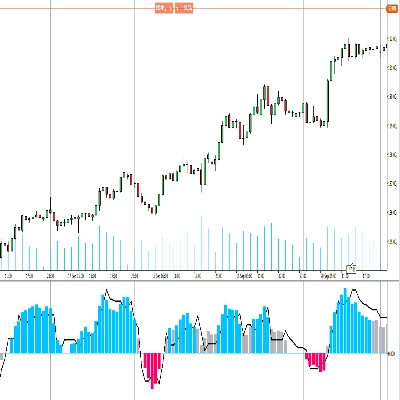
- Histogram and Line Outputs: The indicator provides both a histogram and a line output, enabling traders to visualize the market's momentum and potential trend reversals.
- Color-Coded Histogram: The histogram is color-coded, displaying positive values (indicating bullish momentum) in blue and negative values (indicating bearish momentum) in red.
- Zero Line: A dotted white line is plotted at zero for easy reference.
- Adjustable Parameters: The indicator offers various adjustable parameters, allowing traders to customize it to their trading style and market conditions.
How to Use the QQE Indicator:
- Attach the Indicator to Your Chart:
- In cAlgo, open the chart of the instrument you want to analyze.
- Drag and drop the "QQE" indicator from the "Indicators" panel onto your chart.
- Configure the Indicator Parameters:
- After attaching the indicator, a "Parameters" window will appear.
- Adjust the following parameters as needed:
- RSI Period: The period used for the first RSI calculation.
- RSI Smoothing: The smoothing factor applied to the first RSI.
- QQE Factor: The factor used to calculate the Bollinger Bands.
- Bollinger Length: The length of the Bollinger Bands.
- Bollinger Multiplier: The multiplier used for the Bollinger Bands.
- RSI2 Period: The period used for the second RSI calculation.
- RSI2 Smoothing: The smoothing factor applied to the second RSI.
- QQE2 Factor: The factor used to calculate the second set of bands.
- Threshold: The Threshold value that helps to determine the strength of the signal.
- Interpret the Indicator:
- Histogram:
- Blue bars indicate bullish momentum.
- Red bars indicate bearish momentum.
- The height of the bars represents the strength of the momentum.
- QQE Line: The black line represents the value of
RSI2-50, and provides a smoothed representation of the momentum. - Zero Line: The white dotted line represents the zero level.
- Bollinger Bands:
- When the RSI1 line crosses above the upper Bollinger Band, it may indicate an overbought condition and a potential reversal.
- When the RSI1 line crosses below the lower Bollinger Band, it may indicate an oversold condition and a potential reversal.
- Trading Signals:
- Buy Signal: Look for blue bars in the histogram above the zero line, indicating bullish momentum.
- Sell Signal: Look for red bars in the histogram below the zero line, indicating bearish momentum.
- Use the Bollinger Bands and RSI line crossovers to confirm signals.
- Combine with Other Indicators:
- For more reliable signals, combine the QQE indicator with other technical analysis tools, such as trend lines, support and resistance levels, and other indicators.
- Practice and Backtesting:
- Before using the QQE indicator in live trading, practice using it in a demo account and backtest it on historical data.
Important Notes:
- The QQE indicator is not a foolproof system and should not be used in isolation.
- Always use proper risk management techniques when trading.
- Market conditions can change rapidly, so be prepared to adapt your trading strategy.
By following these guidelines, you can effectively use the QQE indicator to identify potential trading opportunities and make informed trading decisions.
Summary
AI summary
The [Stellar Strategies] QQE indicator is a technical analysis tool implemented for cAlgo to identify potential trend changes and trading signals. It uses a dual Relative Strength Index (RSI) calculation with adjustable periods and smoothing factors. Bollinger Bands are applied to the smoothed RSI values to define overbought and oversold levels. The indicator displays both a color-coded histogram and a line output: blue histogram bars indicate bullish momentum, red bars indicate bearish momentum, and a dotted white zero line aids visual reference. The black QQE line represents a smoothed RSI2-50 value, reflecting momentum trends. Users can customize parameters including RSI periods and smoothing, QQE factors, Bollinger Bands length and multiplier, and a threshold to tailor the indicator to specific trading styles and market conditions. Trading signals are generated by observing histogram colors and positions relative to zero, with Bollinger Band and RSI crossovers used for confirmation. The indicator is designed for use alongside other technical tools such as trend lines and support/resistance levels. It is recommended to practice and backtest the QQE indicator before live trading and to apply proper risk management. Market conditions may change rapidly, so adaptability is advised when using this tool.
Indicator profile
Customer reviews
5.0
Reviews: 1
5 | 100 % | |
4 | 0 % | |
3 | 0 % | |
2 | 0 % | |
1 | 0 % |
Customer reviews
August 18, 2025
Reliable RSI-based oscillator, smooth signals, customizable. Cons: No alerts, no MTF mode, lacks strategy templates.
Discussion
FAQ
Signal
Indices
RSI
Bollinger
Products available through cTrader Store, including trading bots, indicators and plugins, are provided by third-party developers and made available for informational and technical access purposes only. cTrader Store is not a broker and does not provide investment advice, personal recommendations or any guarantee of future performance.
More from this author
!["[Stellar Strategies] Market Structure Breakout" logo](https://cdn.ctrader.com/image/webp/bceec265-3247-4b11-915f-6295a29c106d_28465)
!["[Stellar Strategies] Market Session Ultimate" logo](https://cdn.ctrader.com/image/webp/61ffd537-0125-4246-9e72-42eca1791d64_28232)
!["[Stellar Strategies] Wave Trend Pro" logo](https://cdn.ctrader.com/image/webp/5f226fbb-245a-41cd-9cdd-b018257d5e6d_28617)
!["[Stellar Strategies] Inside Bar with Signals" logo](https://cdn.ctrader.com/image/webp/1d9e8bfa-3b2c-4440-bb37-5856902008a7_30683)
!["[Stellar Strategies] BOS Trend 1.0" logo](https://cdn.ctrader.com/image/webp/6cdec0f1-0e97-4a82-a8a4-2b67aed54d38_25695)
!["[Stellar Strategies] Smart ADX" logo](https://cdn.ctrader.com/image/webp/af13b084-b6f6-41db-b7bc-c7e688b57b05_36929)
!["[StellarStrategies] Scheduled Trade Executor" logo](https://cdn.ctrader.com/image/webp/daefc6af-7eca-453e-878d-1b981be2c401_25646)
!["[Stellar Strategies] VBO" logo](https://cdn.ctrader.com/image/webp/f034c012-94d4-445a-a01b-febd1cdedaef_36944)
!["[Stellar Strategies] Linear Regression Candles 1.1" logo](https://cdn.ctrader.com/image/webp/8b9cff9f-2431-46d2-b0ec-c7f55f4a4a6d_27918)
!["[Stellar Strategies] Candlestick Patterns Dashboard" logo](https://cdn.ctrader.com/image/webp/ae8691a5-4884-4553-9bcc-64e16ac82a30_38344)
!["[Stellar Strategies] SP500 Gap Closure cBot 1.0" logo](https://cdn.ctrader.com/image/webp/92c23fdc-4ad1-4e61-bdb5-c77f6ec8c539_27686)
!["[Stellar Strategies] Visual Trend Momentum" logo](https://cdn.ctrader.com/image/webp/48aee0a5-f10e-4bc8-9671-78e156fcc5df_27548)









Price
20.46M
Traded volume
8.02K
Pips won
27
Sales
4.89K
Free installs