
VegaXLR - Custom Fibonacci Tool
إضافة سطح المكتب
الإصدار 1.0، Sep 2026
Windows, Mac

255
المبيعات
1.5K
التثبيتات المجانية
الوصف
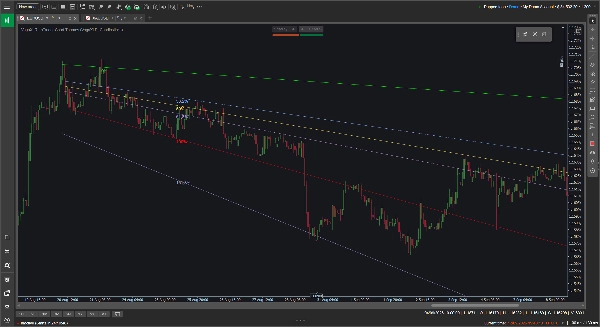
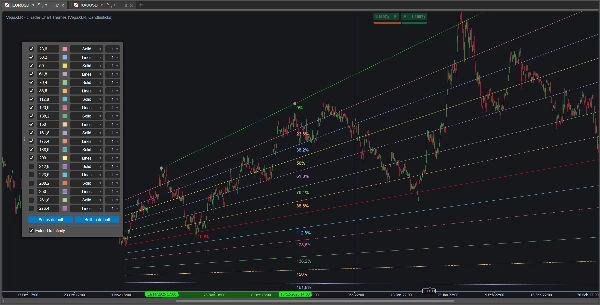
أدوات فيبوناتشي القياسية مقيدة بالمستويات الأفقية، وهذا ليس مفيدًا دائمًا عندما تتبع اتجاهًا صاعدًا أو هابطًا واضحًا. أداة فيبوناتشي المخصصة VegaXLR تصلح هذا من خلال السماح لك برسم ارتدادات فيبوناتشي ديناميكية ومائلة تتكيف مع الميل الفعلي لحركة السعر.
تم تصميمها لمنحك مزيدًا من المرونة عند رسم قنوات الاتجاه، توقع أهداف السعر، أو البحث عن دعم ومقاومة مائلة.
🔥 الميزات الرئيسية
- المستويات المائلة الديناميكية: تحسب المستويات الوسيطة تلقائيًا وتميل لتتطابق مع خطوط الاتجاه الأساسية 0% و100%. إذا قمت بسحب أو تعديل خط أساسي، يتم تحديث المستويات الداخلية فورًا.
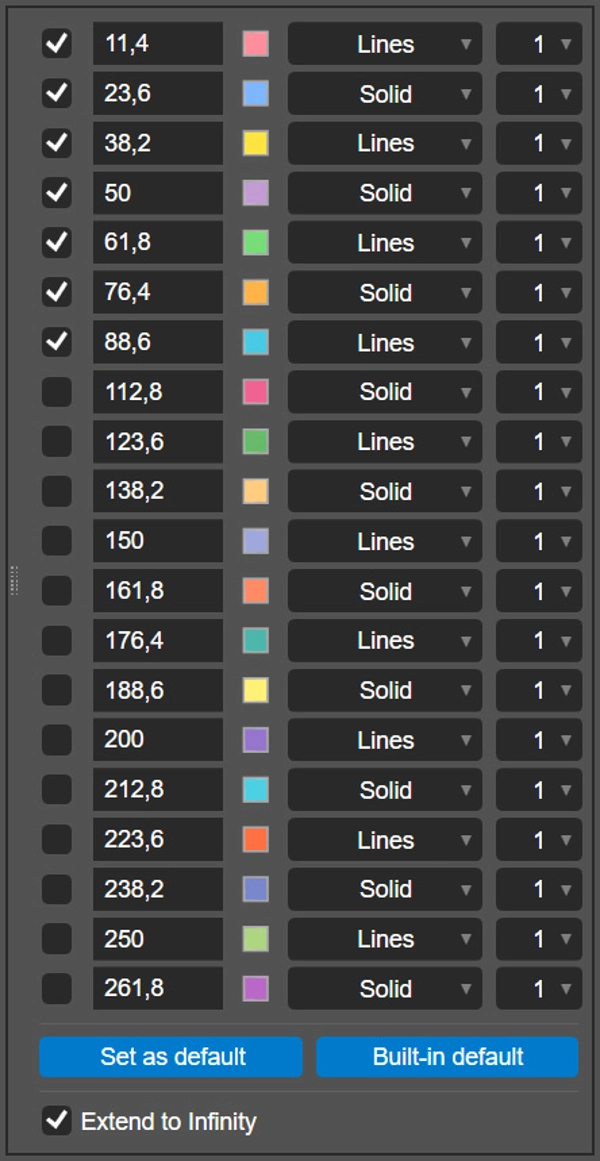
- 20 مستوى قابل للتكوين: يمكنك تفعيل وتكوين ما يصل إلى 20 مستوى فيبوناتشي فردي لكل رسم.
- تخصيص لكل مستوى: لكل خط، يمكنك تعيين النسبة الدقيقة، اختيار لون مخصص، اختيار نمط الخط (مثل صلب أو خطوط)، وتعيين السماكة من 1 إلى 8 بكسل.
- التمديد إلى ما لا نهاية: مفتاح تبديل واحد يتيح لك إسقاط خطوطك الأساسية وجميع المستويات النشطة عبر الجانب الأيمن من المخطط.
- حفظ إعداداتك: انقر على زر "تعيين كافتراضي" لحفظ النسب، الألوان، والأنماط المخصصة محليًا. يتذكر البرنامج المساعد تفضيلاتك ويطبقها على الرسومات المستقبلية تلقائيًا.
- عبر الأنظمة الأساسية: الأداة مدعومة بالكامل ومحسنة لكل من عملاء سطح المكتب cTrader على ويندوز وماك.
🖱️ عناصر تحكم بديهية على المخطط
يعتمد البرنامج المساعد على شريط أدوات عائم وخفيف الوزن على المخطط بدلاً من قوائم المؤشرات العميقة.
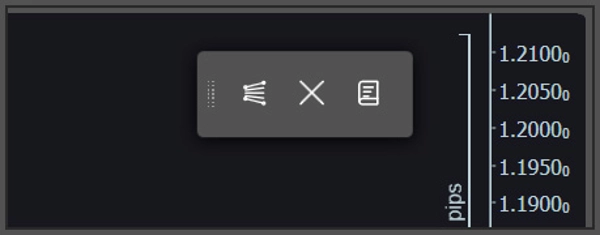
- رسم ومسح سريع: استخدم شريط الأدوات لوضع أداة فيبوناتشي جديدة على المخطط أو لمسح كل الرسومات الحالية بأمان. إذا أردت خطوطًا أفقية أو عمودية تقليدية، فقط اضغط مفتاح Shift أثناء الرسم.
- إعدادات منبثقة: لتخصيص رسم معين، انقر مباشرة على خط الأساس 0% أو 100%. ستظهر لوحة التكوين مباشرة على مخططك لتعديلات سهلة.
⚙️ معلمات المؤشر
يمكنك تعديل بعض تفضيلات خطوط الأساس في معلمات مؤشر cTrader قبل البدء بالرسم:
- تغيير الموقع الافتراضي لشريط الأدوات العائم على الشاشة (مثل: أعلى اليمين، أسفل الوسط).
- تغيير الموقع الافتراضي للنافذة المنبثقة الخاصة بلوحة التكوين.
- تبديل جميع تسميات نسب فيبوناتشي تشغيلًا أو إيقافًا.
الملخص
AI summary
VegaXLR - Custom Fibonacci Tool is a plugin for cTrader that enables drawing dynamic, angled Fibonacci retracements aligned with the slope of price trends, rather than fixed horizontal levels. This tool supports up to 20 individually configurable Fibonacci levels per drawing, allowing users to customize each level’s ratio, color, line style, and thickness. The retracement lines automatically adjust their angle when the baseline trendlines (0% and 100%) are moved, maintaining alignment with the price action slope.
Key features include an option to extend all active levels infinitely across the chart, saving custom settings as defaults for future use, and compatibility with both Windows and macOS cTrader desktop clients. The plugin uses an intuitive floating on-chart toolbar for quick drawing and clearing of Fibonacci tools, with a pop-up configuration panel accessible by clicking on baseline lines. Users can also toggle traditional horizontal or vertical lines by holding the Shift key while drawing.
Additional adjustable parameters include the default screen position of the toolbar, the pop-up panel location, and the display of Fibonacci percentage labels. VegaXLR is designed to enhance trend channel mapping, price target projection, and identification of diagonal support and resistance on cTrader charts.
Key features include an option to extend all active levels infinitely across the chart, saving custom settings as defaults for future use, and compatibility with both Windows and macOS cTrader desktop clients. The plugin uses an intuitive floating on-chart toolbar for quick drawing and clearing of Fibonacci tools, with a pop-up configuration panel accessible by clicking on baseline lines. Users can also toggle traditional horizontal or vertical lines by holding the Shift key while drawing.
Additional adjustable parameters include the default screen position of the toolbar, the pop-up panel location, and the display of Fibonacci percentage labels. VegaXLR is designed to enhance trend channel mapping, price target projection, and identification of diagonal support and resistance on cTrader charts.
ملف تعريف الإضافة
تقييمات العملاء
0.0
التقييمات: 0
تقييمات العملاء
لا توجد تقييمات لهذا المنتج حتى الآن. هل جرَّبته بالفعل؟ كن أول من يخبر الآخرين!
مناقشة
الأسئلة الشائعة
Chart UI Tools
يتم توفير المنتجات المتاحة من خلال cTrader Store، بما في ذلك روبوتات التداول والمؤشرات والإضافات، من قبل مطوري الطرف الثالث وإتاحتها لأغراض الوصول المعلوماتي والفني فقط. cTrader Store ليس وسيطًا ولا يقدم نصائح استثمارية أو توصيات شخصية أو أي ضمان للأداء المستقبلي.















![شعار "Custom Timeframes [Iridio Capital]"](https://cdn.ctrader.com/image/webp/4d75a920-23c7-4fea-a7b5-594a9d067f2e_63286)



السعر
255
المبيعات
1.5K
التثبيتات المجانية