
Deskripsi
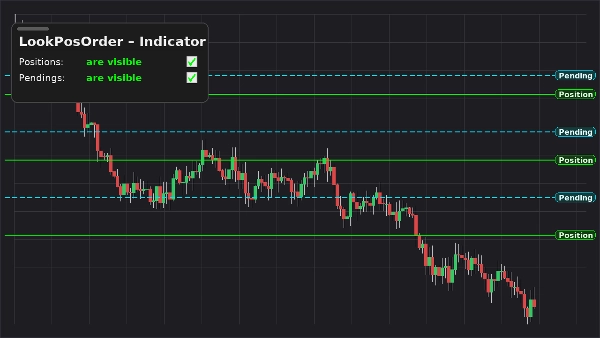
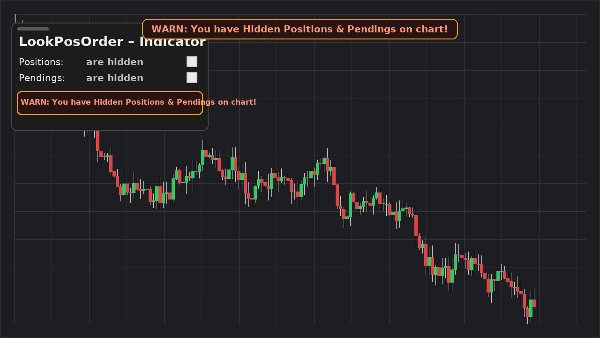
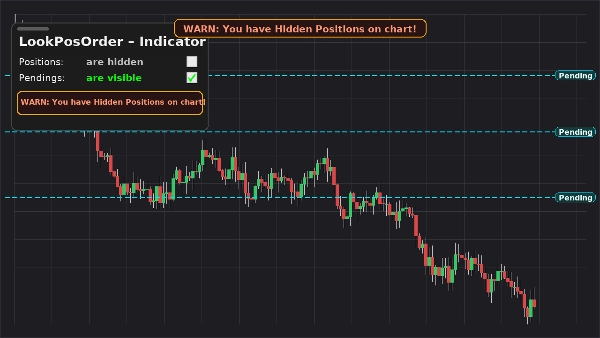
LookPosOrder (Indikator) menjaga Anda tetap aman dan cepat: ia menambahkan panel mengambang yang dapat digeser pada grafik Anda untuk menampilkan atau menyembunyikan Posisi dan Order Tertunda—dan menampilkan banner peringatan tetap di tengah atas kapan pun ada item tersembunyi untuk simbol saat ini.
Apa yang dilakukannya
- Panel di grafik dengan dua toggle:
-
- Posisi: terlihat / tersembunyi
- Tertunda: terlihat / tersembunyi
- Peringatan tetap di grafik (tidak bergerak saat Anda menggeser/memperbesar) jika ada item tersembunyi.
- Peringatan inline yang sama di dalam panel.
- Kesadaran per simbol: hanya memberi peringatan saat simbol aktif benar-benar memiliki item tersembunyi.
- Mengingat preferensi Anda per simbol.
Mengapa trader menyukainya
- Menghindari kesalahan: jangan lupa Anda telah menyembunyikan order/posisi.
- Toggle instan: tidak perlu lagi masuk ke menu grafik.
- Tampilan bersih: dapat digeser, ringkas, dan responsif.
Fitur Utama
- Panel kontrol yang dapat digeser di grafik
- Toggle satu klik untuk Posisi dan Order Tertunda
- Banner peringatan tetap saat ada item tersembunyi
- Peringatan inline di dalam panel
- Kesadaran per simbol
- Bekerja bersama Pengaturan Tampilan asli (sinkron otomatis jika Anda mengubahnya di tempat lain)
Persyaratan
- cTrader 5.4.9 atau lebih baru disarankan
- Platform desktop
Instalasi
- Unduh file indikator.
- Buka cTrader → Automate → Indicators → Import.
- Tambahkan LookPosOrder – Indicator ke grafik Anda (overlay).
- Seret panel ke tempat yang Anda suka; gunakan dua kotak centang untuk mengelola visibilitas.
Cara Menggunakan
- Toggle Posisi dan Tertunda dari panel mengambang.
- Jika sesuatu tersembunyi dan ada untuk simbol saat ini, peringatan muncul:
-
- “PERINGATAN: Anda memiliki Posisi Tersembunyi di grafik!”
- “PERINGATAN: Anda memiliki Order Tertunda Tersembunyi di grafik!”
- “PERINGATAN: Anda memiliki Posisi & Order Tertunda Tersembunyi di grafik!”
- Banner peringatan tetap di tengah atas. Gunakan parameter indikator “Y offset Warning Text” untuk menggesernya ke bawah jika perlu.
FAQ
T: Apakah ini mengubah order/posisi saya?
J: Tidak. Ini hanya mengubah visibilitas grafik (Pengaturan Tampilan asli).
T: Apakah ini akan memberi peringatan untuk simbol lain?
J: Tidak. Peringatan hanya muncul saat simbol saat ini memiliki item tersembunyi.
T: Bagaimana jika saya mengubah visibilitas dari menu grafik?
J: Indikator menyinkronkan panel dan peringatan secara otomatis.
T: Dampak kinerja?
J: Minimal—overlay ringan dan pemeriksaan per simbol.
Dukungan & Pengembalian Dana
- Garansi uang kembali 14 hari jika tidak berfungsi seperti yang dijelaskan untuk Anda.
Ringkasan
Ulasan pelanggan
5 | 33 % | |
4 | 67 % | |
3 | 0 % | |
2 | 0 % | |
1 | 0 % |