Deskripsi
Jika pasar terus bergerak ke arah baru ini, pada suatu titik keuntungan dari perdagangan arah berlawanan akan melampaui kerugian dari perdagangan awal, pada saat itulah Anda dapat menutup kedua perdagangan tersebut.
Jika pasar kembali ke arah sebelumnya, perdagangan yang berlawanan dengan ukuran lot yang lebih besar akan mengakumulasi kerugian lebih cepat daripada perdagangan awal yang sedang mendapatkan keuntungan. Dalam situasi ini, kami membuka perdagangan lain ke arah awal di mana perdagangan awal dan perdagangan ketiga bersama-sama akan lebih besar dari perdagangan kedua.
Strategi lindung nilai bolak-balik ini dapat dilanjutkan sampai aksi harga menembus ke salah satu arah.
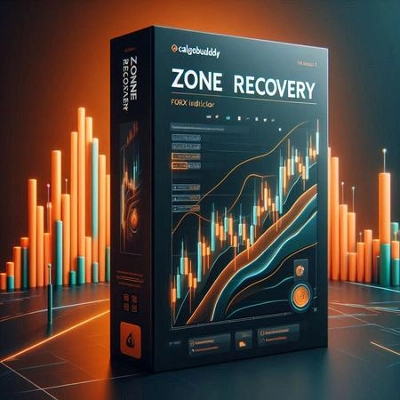
Cara menggunakan Indikator Zone Recovery
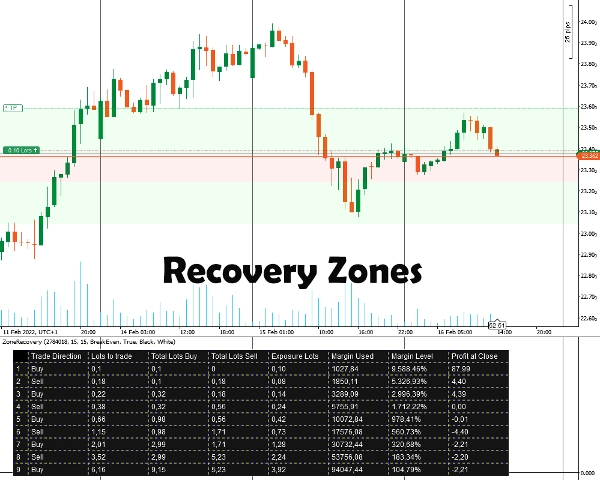
Pertama, Anda harus memasukkan ID Posisi yang ingin Anda lindungi. Posisi harus memiliki target keuntungan. Setelah itu, Anda memilih ukuran Zone Recovery dengan memasukkan jumlah pip yang Anda yakini harus mulai dilindungi. Indikator akan menampilkan zona serta tabel agar strategi dapat bekerja.
Anda harus secara manual menempatkan order, stop loss, dan target take profit untuk semua posisi berikutnya.
Informasi Penting
Pertama dan terutama, akun trading Anda harus berupa akun tipe lindung nilai.
- Pada dasarnya, ini adalah strategi martingale yang memiliki risikonya sendiri. Jika perdagangan awal dibuka di pasar yang bergerak sideways, ini dapat dengan cepat menguras margin Anda. Anda membutuhkan instrumen yang volatil/trending untuk hasil yang lebih baik.
- Instrumen trading dengan komisi rendah/spread kecil akan bekerja lebih baik.
- Jika perdagangan awal dilakukan dengan ukuran lot minimum, perhitungan berikutnya akan sedikit salah, karena perhitungan komisi yang salah dan pembulatan ukuran lot naik/turun untuk perdagangan di masa depan.
- Jika Anda memperdagangkan instrumen yang berbeda dari mata uang akun Anda, perhitungan margin akan sedikit meleset karena nilai tukar yang terus berubah. (Misalnya, akun dalam EUR, posisi terbuka dalam GBP/USD)
- Swap tidak diperhitungkan.
Opsi Indikator
Indikator menawarkan opsi berikut:
- ID Posisi - ID posisi terbuka yang ingin Anda hitung tabel lindung nilainya. Bisa dimasukkan tanpa “PID” awal (hanya angkanya).
- Zone Recovery Pips - Jumlah pip yang akan dipertimbangkan zone recovery untuk perhitungannya. Pada akhir zone recovery, perdagangan arah berlawanan dengan perdagangan awal harus dibuka.
- Mode Perhitungan
Dua mode tersedia: BreakEven dan Profit
BreakEven: Perhitungan akan mencoba memberikan ukuran lot agar kerugian nol atau minimal saat semua perdagangan ditutup. Pengurasan margin lebih lambat.
Profit: Perhitungan akan mencoba memberikan ukuran lot agar mencapai target keuntungan dari perdagangan terbuka awal. Pengurasan margin lebih cepat. - Gambar Area Zone Recovery - Pilih ya jika Anda ingin area Zone Recovery digambar di Grafik.
- Warna Tabel / Warna Font - Opsi pewarnaan untuk tabel lindung nilai.
Ringkasan
Users input the Position ID of the trade to hedge and set a Zone Recovery size in pips, which defines when to start hedging. The indicator displays recovery zones and a strategy table, but users must manually place orders, stop losses, and take profit targets. It requires a hedging account type and is based on a martingale approach, best suited for volatile or trending markets with low commissions and spreads.
Key options include selecting the Position ID, setting Zone Recovery pips, choosing between BreakEven or Profit calculation modes (balancing margin use and profit targets), enabling zone area drawings on the chart, and customizing table colors. The tool supports markets including Forex (e.g., EURUSD) and commodities (e.g., XAUUSD).
Ulasan pelanggan
5 | 100 % | |
4 | 0 % | |
3 | 0 % | |
2 | 0 % | |
1 | 0 % |


![Logo "[Hamster-Coder] Bollinger Bands"](https://cdn.ctrader.com/image/webp/21d8e5d6-fb11-4bac-b9ee-cd05c2b76804_30327)