คำอธิบาย
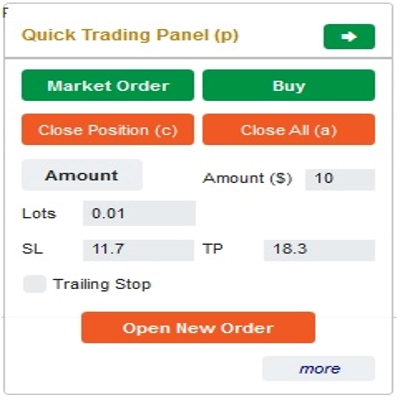
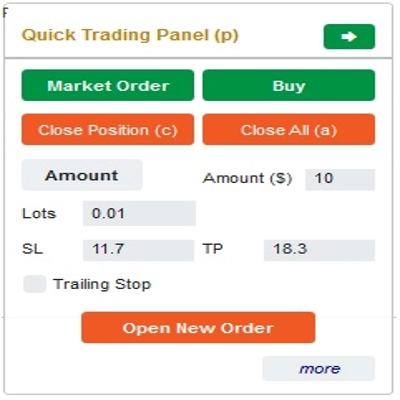
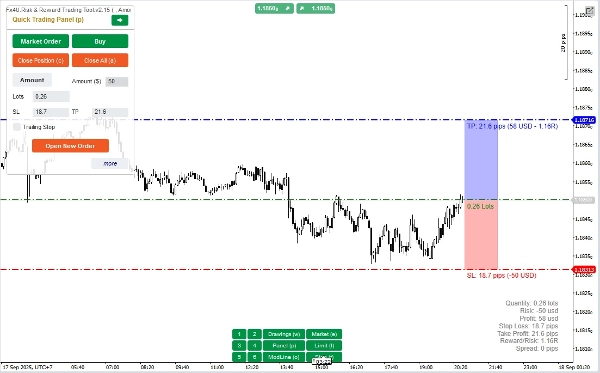
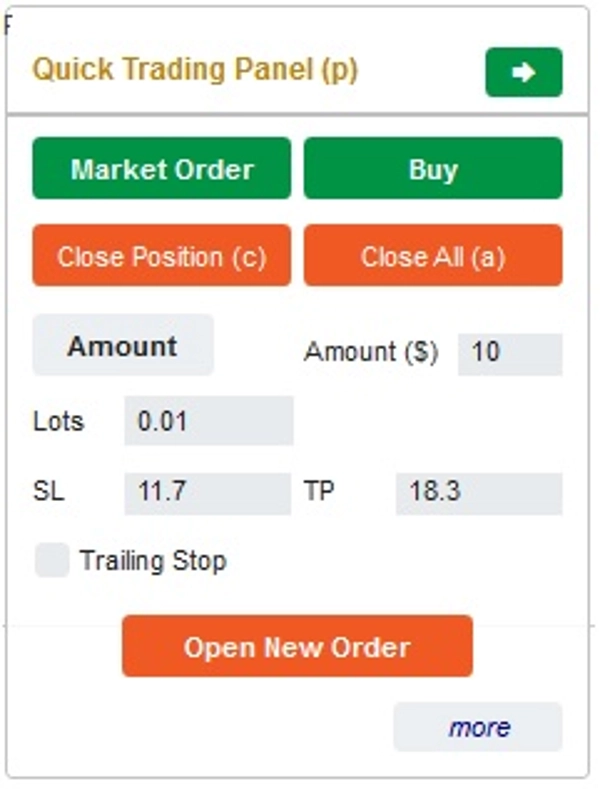
นี่คือเครื่องมือที่จะช่วยให้เทรดเดอร์เปิด/ปิดคำสั่ง/แก้ไขคำสั่งได้อย่างรวดเร็วเพียงคลิกเดียว เครื่องมือนี้ได้คำนวณจำนวนล็อตตามจำนวนความเสี่ยงสำหรับแต่ละคำสั่งและ StopLoss ที่คุณเลือกไว้แล้ว สามารถทำงานได้ทั้งในโหมดเรียลไทม์สำหรับการเทรดสดและในโหมดทดสอบย้อนหลังเพื่อทดสอบกลยุทธ์ของคุณ
หมายเหตุสำคัญ:
- "ปุ่มสีน้ำเงิน" คือปุ่มเปลี่ยนสถานะ (Market Order => Limit Order => Stop Order => Market Order; Buy => Sell => Buy)
- "ปุ่มสีแดง" คือปุ่ม "การดำเนินการ" => เพื่อเปิดคำสั่ง - ใช้ปุ่ม "Open New Order"; เพื่อปิดสถานะ - ใช้ปุ่ม "Close Position" หรือ "Close All"; เพื่อยกเลิก Pending Order - ใช้ปุ่ม "Cancel Order" หรือ "Close All"
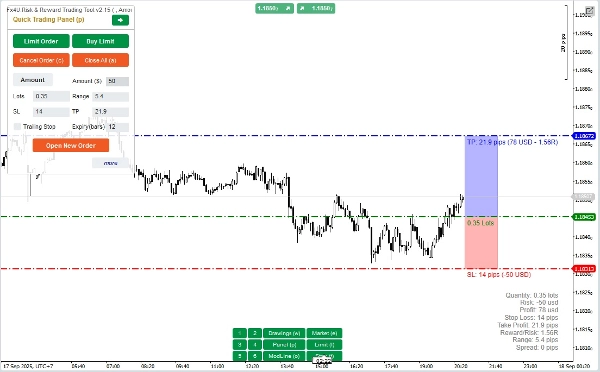
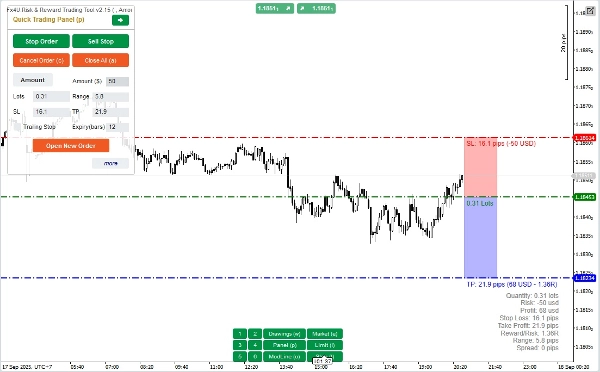
ใน “Quick Trading Panel”:
เพื่อเปลี่ยนระหว่างคำสั่ง BUY และ SELL คุณสามารถลากเส้น StopLoss บนกราฟขึ้นหรือลงจากเส้น Entry
– คุณสามารถเปิดและปิดทั้งคำสั่งตลาดและคำสั่ง Limit หรือ Stop
– คุณสามารถปรับจำนวนคำสั่งเป็น %Balance หรือจำนวนคำสั่งคงที่สำหรับแต่ละคำสั่ง ตามจำนวนนี้และ StopLoss ที่คุณเลือก บอทจะคำนวณจำนวนล็อตที่จะเปิดคำสั่งโดยอัตโนมัติ
– คุณสามารถแก้ไข StopLoss, TakeProfit หรือราคา Entry (สำหรับคำสั่งรอดำเนินการ) โดยการเปลี่ยนตัวเลข SL, TP หรือ Range ใน “Quick Trading Panel” หรือโดยการลากเส้นแนวนอนบนกราฟ
– SL, TP และ Range (สำหรับคำสั่งรอดำเนินการ) คำนวณเป็น Pips ขณะที่ Expiry(นาที) คำนวณเป็นนาที (ถ้าคุณไม่ใช้ Expiry ให้ปล่อยเป็น 0 หรือเว้นว่างไว้)
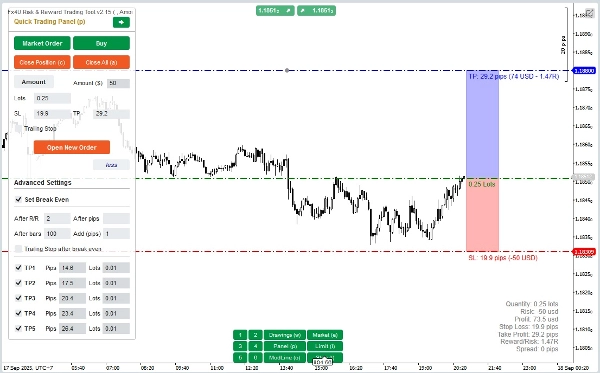
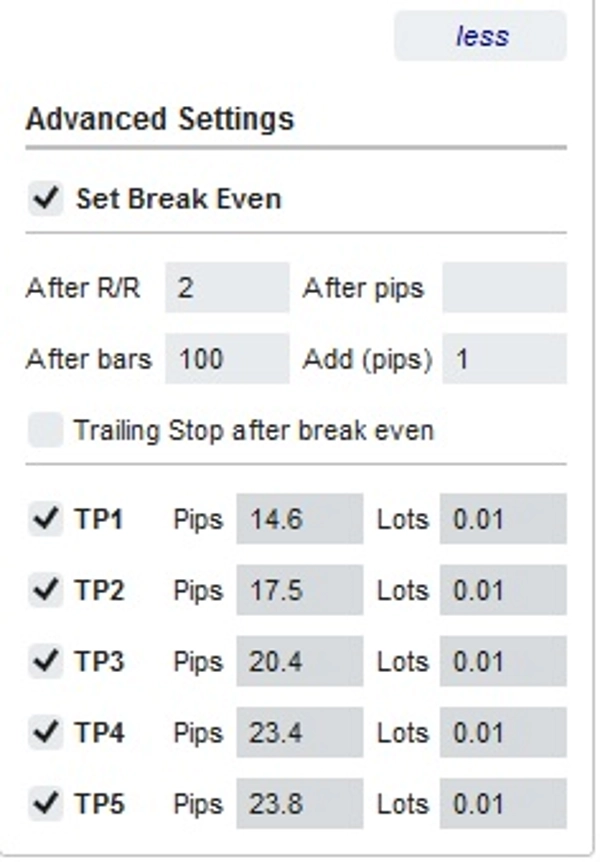
– นอกจากนี้ยังมีส่วนการตั้งค่าขั้นสูงที่อนุญาตให้คุณ (หมายเหตุ: การตั้งค่าขั้นสูงใช้ได้เฉพาะเมื่ออินดิเคเตอร์เปิดใช้งาน):
+ ตั้งค่า "Break Even" เมื่อราคาขยับจำนวน Pips ที่กำหนด ("After Pips") หรือเมื่อราคาขยับเป็นบวก "R/R" เท่าของ Stoploss ("After R/R") หรือหลังจากคำสั่งเปิด "n" แท่งเทียน ("After Bars")
+ อนุญาตให้คุณ "Advanced Take Profit" ด้วย 5 ระดับให้เลือก
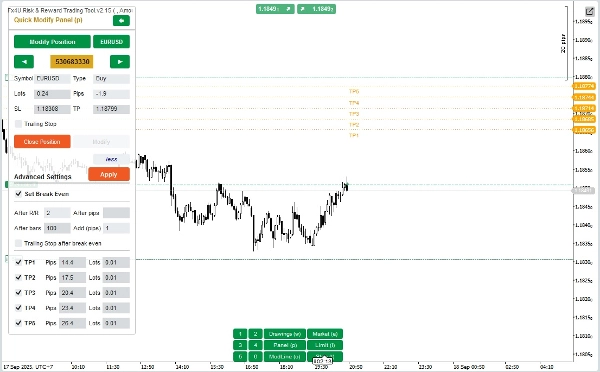
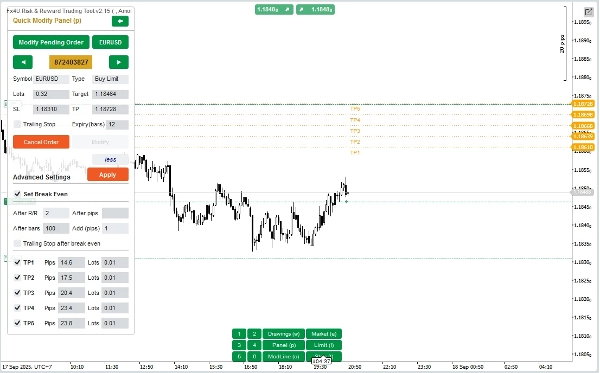
ใน “Quick Modifying Panel”:
– ในแผงนี้คุณสามารถปิดคำสั่งหรือแก้ไขพารามิเตอร์คำสั่ง เช่น StopLoss (ในราคา), TakeProfit (ในราคา), TrailingStop หรือ Range (ใน Pips) และ Expiry (ในนาที)
(โปรดทราบว่า StopLoss และ TakeProfit ในแผงนี้คือราคาที่คุณตั้งใจจะย้ายไป)
– ในแผงนี้คุณยังสามารถเปลี่ยน StopLoss, TakeProfit หรือ Range(ใน Pips) โดยตัวเลขในแผงหรือโดยการลากเส้นแนวนอนบนกราฟไปยังตำแหน่งที่ต้องการ
– คุณสามารถสลับไปมาระหว่างคำสั่งเพื่อแสดงพารามิเตอร์ของคำสั่งเหล่านั้นบนแผง
หมายเหตุ: ตัวเลขในกรอบสีเหลืองคือหมายเลข ID ของคำสั่งที่ถูกเลือกเพื่อแก้ไข
– นอกจากนี้ยังมีส่วนการตั้งค่าขั้นสูงที่อนุญาตให้คุณ (หมายเหตุ: การตั้งค่าขั้นสูงใช้ได้เฉพาะเมื่ออินดิเคเตอร์เปิดใช้งาน):
+ แก้ไขการตั้งค่า "Break Even" เมื่อราคาขยับจำนวน Pips ที่กำหนด ("After Pips") หรือเมื่อราคาขยับเป็นบวก "R/R" เท่าของ Stoploss ("After R/R") หรือหลังจากคำสั่งเปิด "n" แท่งเทียน ("After Bars")
+ แก้ไข "Advanced Take Profit" ด้วย 5 ระดับให้เลือก
ขอให้คุณเทรดประสบความสำเร็จ!
สรุป
Key features include:
- A Quick Trading Panel allowing drag-and-drop adjustment of StopLoss lines to switch between buy and sell orders.
- Order amount settings adjustable by percentage of balance or fixed amount.
- Editable StopLoss, TakeProfit, and Entry Price parameters via panel inputs or chart line dragging.
- Support for order expiry times measured in minutes.
- Advanced settings for automatic Break Even adjustments triggered by price movement in pips, risk/reward ratio, or elapsed bars.
- Multi-level Advanced Take Profit options with up to five levels.
- A Quick Modifying Panel to close orders or edit StopLoss, TakeProfit, TrailingStop, Range, and Expiry parameters, with visual order selection by ID.
The tool operates in both real-time live trading and backtesting modes. It supports major Forex symbols including EURUSD, GBPUSD, USDJPY, and XAUUSD (gold). The interface uses color-coded buttons for order status changes and execution commands to streamline trading operations.
การสนทนา
รีวิวจากลูกค้า
5 | 50 % | |
4 | 50 % | |
3 | 0 % | |
2 | 0 % | |
1 | 0 % |
!["[Fx4U] GBPUSD - Price Action" โลโก้](https://cdn.ctrader.com/image/webp/d80b34fc-da3c-4f01-a321-456450665649_26190)
!["[Fx4U] CADJPY - Price Action" โลโก้](https://cdn.ctrader.com/image/webp/1ba81247-b6b7-4f3c-a297-fa3eb1d57fe1_26195)

!["[Fx4U] AUDCHF - Price Action" โลโก้](https://cdn.ctrader.com/image/webp/0a22e9aa-c83b-42cd-b0b8-c1a2da593207_26148)

!["[Fx4U] EURAUD - Price Action" โลโก้](https://cdn.ctrader.com/image/webp/baf8dde4-1ef3-4beb-8ae2-0fed8320f65d_26177)